
Overview of SparkoCam
Table of Contents
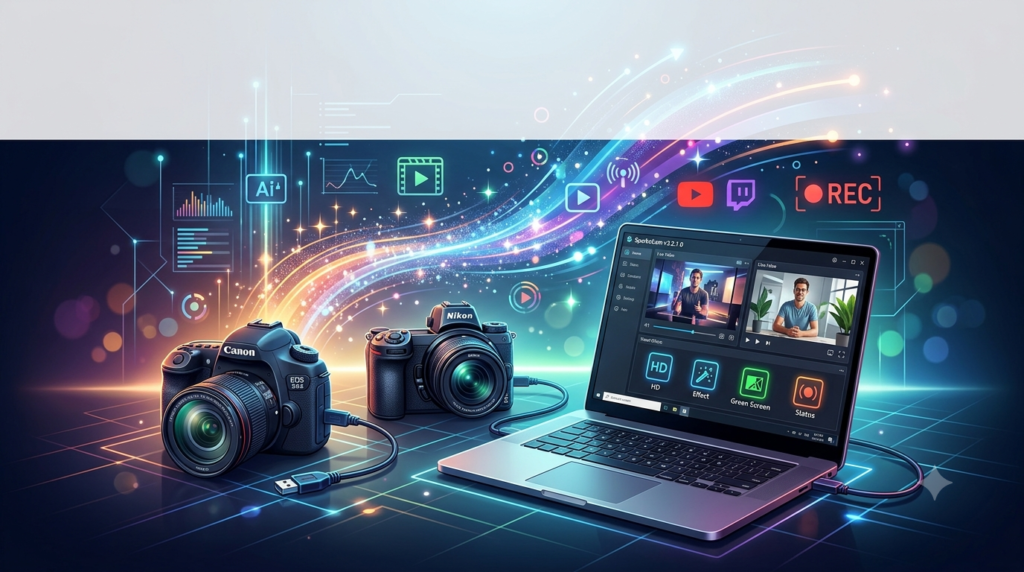
SparkoCam is an all-in-one virtual webcam and video effects software for Windows that transforms how you approach video chats, live streaming, and recordings. At its core, SparkoCam webcam software enables you to use your Canon or Nikon DSLR camera as a high-quality webcam for applications like Skype, Zoom, Microsoft Teams, and OBS Studio . This webcam enhancement software bridges the gap between professional camera hardware and everyday video communication tools .
The software was developed by Sparkosoft and serves as a complete solution for anyone looking to upgrade their webcam functionality beyond what standard USB cameras provide . By connecting your DSLR camera via USB, SparkoCam webcam software creates a virtual webcam device that any video application can detect and use .
SparkoCam software distinguishes itself through its ability to apply real-time visual effects to your video feed. You can add face accessories, replace backgrounds using green screen technology, create custom overlays, and even use your desktop as a video source. The software supports an extensive list of Canon and Nikon camera models, making it a versatile tool for professionals and casual users alike .
The software operates on a freemium model, offering a free version with watermarked output and time-limited usage, while the full version unlocks unlimited access and removes all restrictions . SparkoCam has accumulated over 8,000 downloads and maintains active user engagement, with regular updates adding new features and compatibility improvements .
Key Features
DSLR Camera Integration
The hallmark feature of SparkoCam is its ability to turn a compatible Canon or Nikon camera into a fully functional webcam. This functionality allows users to leverage their camera’s superior optics, larger sensors, and professional image quality for video conferencing and streaming .
The software provides full control over camera parameters directly from the computer interface:
-
Exposure settings: Aperture (Av), shutter speed (Tv), ISO sensitivity, and white balance can all be adjusted via the software interface
-
Focus control: Move focus points and perform autofocus operations directly from your computer
-
Camera compatibility: SparkoCam supports hundreds of Canon camera models including Rebel series (T1i through T8i), EOS series (5D, 6D, 7D, 1D), and mirrorless models (EOS R, RP, R5, R6, R7, R8, R10, R50), as well as Nikon models including D, Z, and 1 series cameras
When you connect your camera via USB cable and select the appropriate checkbox in the Device tab, SparkoCam automatically detects and configures the camera for use as a webcam .
Webcam Splitting and Virtual Camera
SparkoCam allows you to split a single physical webcam source and use it across multiple applications simultaneously . This feature addresses a common limitation where only one application can access a webcam at a time.
The software creates a virtual webcam device that other applications detect as a standard video source. Whether you’re using Skype for a business call or OBS Studio for streaming, SparkoCam’s virtual webcam ensures consistent, enhanced video output across all platforms .
Desktop Streaming
Beyond camera input, SparkoCam enables desktop streaming for presentations, tutorials, and application demonstrations. The software transmits everything happening on your desktop in real-time to any compatible application . Users can choose from several streaming options:
-
Entire desktop: Capture full-screen content across single or multi-monitor setups
-
Application window: Stream a specific window, selected with a picker tool
-
Part of desktop: Define a custom capture area
-
Follow cursor: Stream the area around your mouse cursor, ideal for detailed demonstrations
These desktop capture features can be combined with webcam overlays, effects, and picture-in-picture layers for professional presentations .
Face Tracking and Accessories
SparkoCam includes advanced face tracking capabilities that automatically detect and overlay various face accessories onto your video feed . The face detection system performs live tracking, meaning accessories such as glasses, hats, masks, or hair styles move in real-time as you move your head .
Customization options for face accessories include:
-
Adjusting individual item positions for a perfect fit
-
Creating new accessories by importing PNG images
-
Defining proper positioning for newly created items on the face
This feature is particularly useful for content creators looking to add entertainment value to their streams or for users who want to maintain visual interest during video calls.
Effects and Filters Gallery
SparkoCam offers an extensive library of real-time effects to enhance your video output . The Effects tab organizes these options into logical categories:
-
Objects: Add static or animated objects (GIF/PNG) over your video; adjust position and size for each item
-
Foreground Image: Add borders or overlays over the entire video; transparency can be adjusted
-
Scenes: Place your live video inside “scene” images, such as a TV frame or billboard
-
Distortions: Apply various transformation effects to your video in real-time
-
Color Effects: Convert your video to black-and-white, sepia, or negative mode
Chroma Key / Green Screen
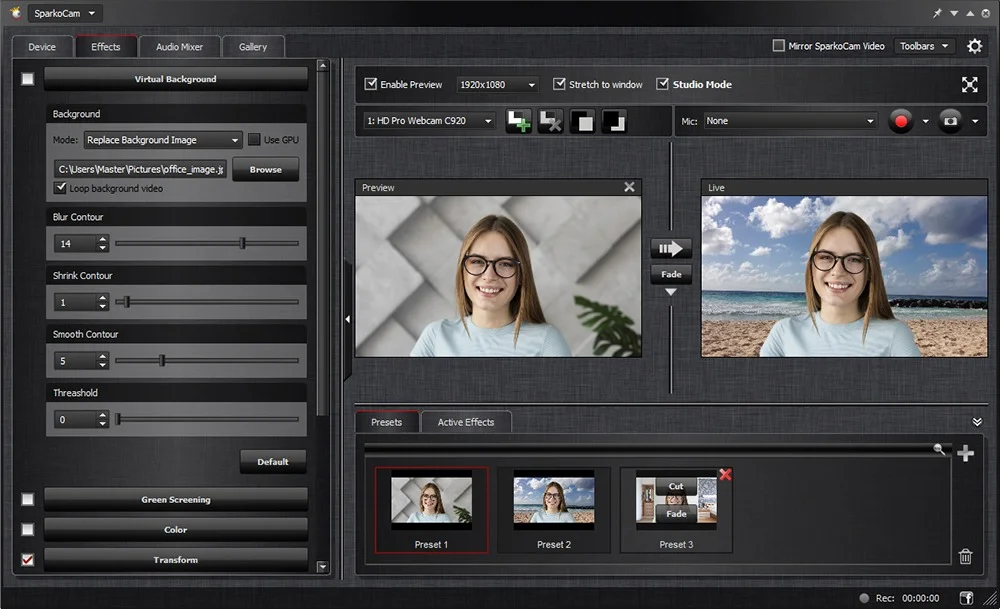
The green screen (chroma key) capability allows users to replace their background with a custom image or video. By filming in front of a green background, SparkoCam software enables professional-looking virtual backgrounds without dedicated hardware. This feature is particularly valuable for remote workers, educators, and content creators who want to present a clean, branded background during calls or streams .
3D Anaglyph Effects
SparkoCam supports stereoscopic 3D effects for users with anaglyph (red-cyan) glasses. When enabled, this effect can be applied to any video source including DSLR cameras, webcams, video files, or pictures. The 3D effect creates an immersive viewing experience, though it does require special glasses to perceive the depth effect correctly .
Recording Capabilities
The software allows users to record camera video with accompanying audio. Recorded content is saved to a library and can be reused as a video source for future streams or chats. This makes SparkoCam useful for content creation workflows beyond live streaming, enabling pre-recorded video production with professional effects .
What’s New in SparkoCam v3.2.1.0
The latest version of SparkoCam brings significant improvements over previous releases, focusing on stability, performance, and expanded camera compatibility .
Enhanced Camera Support
Version 3.2.1.0 expands support for newer Canon and Nikon camera models, including:
-
Canon EOS R System: Full support for R1, R3, R5 Mark II, R6 Mark II, R7, R8, R10, R50, and R100
-
Canon PowerShot: Support for PowerShot G7X Mark III, G5X Mark II, ZOOM, and V10
-
Nikon Z Series: Comprehensive support for Z5, Z6 II, Z7 II, Z8, Z9, and Z50
This update ensures users with the latest camera equipment can leverage SparkoCam’s full functionality without compatibility concerns .
Performance Optimizations
The new version includes optimized video processing for smoother performance and reduced latency. Users with older hardware can expect better performance from SparkoCam’s real-time effects and face tracking features .
DirectX 11 Support
SparkoCam v3.2.1.0 now requires DirectX 11.0 or above, enabling more efficient graphics processing for visual effects and improved hardware acceleration .
Updated System Compatibility
The software now officially supports Windows 11 alongside existing Windows 7, 8, and 10 compatibility .
System Requirements
Before installing SparkoCam webcam software, ensure your system meets the following minimum and recommended specifications:
| Component | Minimum Requirements | Recommended Requirements |
|---|---|---|
| Operating System | Windows 7, 8, 10 | Windows 10 or 11 |
| Processor | Intel Pentium 2.5 GHz or equivalent AMD | Intel Core i5 or higher |
| RAM | 4 GB | 8 GB or more |
| Hard Drive Space | 182.6 MB free HDD space | 500 MB or more for effects library |
| Display | 1280 x 768 resolution | 1920 x 1080 or higher |
| DirectX | DirectX 9.0c | DirectX 11.0 or above |
| USB | USB 2.0 port for camera connection | USB 3.0 for higher bandwidth cameras |
Additional Notes: While minimum requirements support basic webcam functionality, users planning to use a DSLR as a webcam with effects enabled should consider the recommended specifications for optimal performance . The software has a relatively small footprint at approximately 2.9MB to 38.7MB, depending on the version and included resources .
Installation Guide
Step 1: Download the Installation Package
Visit the official SparkoSoft website and download the latest SparkoCam installation file (SparkoCamInstaller.exe). Ensure you are downloading from a legitimate source to avoid potentially harmful modified versions .
Step 2: Close Competing Applications
Before running the installer, close all applications that might use the webcam. This includes video chat software like Skype, Zoom, and Teams, as well as broadcasting software like OBS Studio. Closing these applications ensures the SparkoCam Virtual Webcam driver installs properly .
To completely close applications like Skype, right-click their icon in the system tray and select “Quit” or “Exit” rather than simply closing the main window .
Step 3: Run the Installer
Execute the downloaded SparkoCamInstaller.exe file and follow all installation steps carefully. The installation process will create necessary drivers and register the SparkoCam Virtual Webcam with your Windows system .
Step 4: Connect Your Camera
If using a DSLR camera as a webcam:
-
Connect your compatible Canon or Nikon camera to your computer via USB cable
-
Turn the camera on
-
Allow Windows to recognize the new device
If your camera software (such as Canon EOS Utility) starts automatically, close it as SparkoCam does not require it to function .
Step 5: Launch SparkoCam
After installation, launch SparkoCam. The software should detect your connected camera automatically. If multiple cameras are connected, select the appropriate device from the list .
Step 6: Configure Your Target Application
Configure the application you intend to use (e.g., Skype, Zoom, OBS Studio) to use SparkoCam Virtual Webcam as its video source instead of your default webcam .
How to Use SparkoCam
Setting Up Your Camera as a Webcam
SparkoCam simplifies the process of using a DSLR camera as a webcam :
-
Launch SparkoCam and navigate to the Device tab
-
Select your camera type: Check the box next to “Canon Camera” or “Nikon Camera” depending on your camera
-
Choose your camera from the dropdown list if multiple cameras are connected
-
Adjust camera settings:
-
Aperture (Av)
-
Shutter speed (Tv)
-
ISO sensitivity
-
White balance
-
Focus point
-
Autofocus control
-
The software automatically populates the camera list with connected compatible cameras. When you disconnect a camera, it disappears from the list, and when you connect a new one, it appears automatically .
Switching Video Sources
SparkoCam supports multiple video sources, accessible from the Device tab:
-
Canon Camera: Use a Canon DSLR as your webcam
-
Nikon Camera: Use a Nikon DSLR as your webcam
-
Webcam: Use your existing USB webcam
-
Video: Play a media file (WMV, AVI, MP4, MKV, FLV, MOV, MPG) as your webcam feed
-
Picture: Display a static image as your webcam feed
-
Blank Image: Show a solid color (hides your real feed)
-
Desktop: Stream your desktop as a webcam feed
Each mode retains its last used parameters, allowing quick switching between sources .
Applying Effects
To enhance your video with real-time effects:
-
Open the Effects tab
-
Select effects from available categories:
-
Face Accessories: Add glasses, hats, masks, or custom imported accessories
-
Objects: Add animated or static objects over your video
-
Foreground Image: Apply borders or overlays
-
Scenes: Place video inside a scene image
-
Distortions: Transform video with visual effects
-
Green Screening: Replace background with a custom image
-
Color Effects: Apply color filters
-
Anaglyph 3D: Enable stereoscopic 3D effect
-
Recording Video
To record your video source:
-
Select your desired video source and configure effects
-
Click the Record button in the SparkoCam interface
-
The recording will be added to your Video library
-
Recorded videos can be used as a video source for future streams
Using Picture-in-Picture
SparkoCam v3.2.1.0 supports picture-in-picture layers, allowing you to show multiple video sources simultaneously:
-
Select your primary video source
-
Use the layer feature to add secondary video sources
-
Position and resize each layer as needed
Best Use Cases
Remote Work and Video Conferencing
SparkoCam transforms a DSLR camera into a high-quality webcam for professional video meetings. The enhanced image quality, combined with virtual backgrounds and green screen capability, helps create a polished appearance for remote workers, executives, and remote teams. The ability to use a DSLR camera as a webcam with SparkoCam ensures you stand out in video calls with superior image quality that built-in laptop cameras cannot match .
Live Streaming
Content creators on platforms like Twitch and YouTube benefit from SparkoCam’s effects, overlays, and real-time video enhancements. The software supports OBS Studio and XSplit integration, making it easy to incorporate professional-grade effects into existing streaming setups . Streamers can engage audiences with face accessories, animated objects, and custom scenes.
Online Education
Educators and course creators can enhance their video lessons with SparkoCam by using green screen backgrounds, adding explanatory overlays, and integrating desktop demonstrations. The software’s ability to stream desktop content as a video source makes it ideal for software tutorials and presentation delivery .
Content Creation
Video producers can use SparkoCam’s recording features and effects library to create compelling content. The software’s ability to apply effects in real-time eliminates post-production work, allowing creators to produce polished videos directly from their camera feed. User reviews note the extensive feature set as a key strength, though some find the interface clunky on high-resolution displays .
Video Game Streaming
Gamers can incorporate face tracking, accessories, and green screen backgrounds into their streams, creating more engaging content for their audience. The webcam splitting feature allows simultaneous use of the webcam across different streaming platforms .
Advantages and Limitations
Advantages
Professional Webcam Upgrade: Transforms a Canon or Nikon DSLR camera into a webcam, offering superior image quality compared to standard webcams. The software supports hundreds of camera models, ensuring broad compatibility for most users .
Extensive Effects Library: Over 200 effects, face accessories, and custom object creation capabilities provide creative freedom for content creators . Users can import their own PNG and GIF images to create custom effects .
Multiple Source Support: Works with DSLR cameras, webcams, video files, pictures, and desktop capture, giving users maximum flexibility. The ability to switch between sources quickly makes it suitable for varied use cases .
Virtual Webcam for Multi-Application Use: Allows the same webcam feed to be used across multiple applications simultaneously, a significant advantage for users who need to run multiple video applications .
Real-time Face Tracking: The automatic face tracking for accessories works effectively, positioning items correctly on the face and adjusting as the user moves .
Desktop Sharing: The ability to stream desktop content as a webcam feed simplifies presentations, tutorials, and demonstrations without needing additional software .
Limitations
Windows-Only Platform: SparkoCam is currently available only for Windows operating systems (7-11). Mac users cannot use this software without virtualization or boot camp, limiting its accessibility for cross-platform users .
No Audio Over USB: Canon and Nikon cameras cannot transmit audio through USB connections. Users must use an external microphone for voice capture . This limitation requires additional hardware for voice functionality.
Free Version Limitations: The free version includes a visible watermark on output video and imposes time limits on camera usage . This restriction may be a significant limitation for users evaluating the software for professional use.
Interface Design: User reviews note the interface appears outdated on modern high-resolution displays . Some users report the interface is “clunky and ugly” on modern monitors, though functionality remains largely unaffected.
Price Point: The full version costs approximately $59.95 one-time payment, positioning it at a premium compared to some alternatives . The pricing may deter budget-conscious users seeking more affordable webcam enhancement software.
Learning Curve: For users new to video effects and virtual camera software, the feature-rich interface may require some time to master. While the basic functionality is straightforward, maximizing the effects library and custom features takes practice.
Alternatives to SparkoCam
| Alternative | Key Features | Platform | Price |
|---|---|---|---|
| iGlasses | 50+ effects, face tracking, 3D distortions, digital pan/zoom | Mac | $19.95 one-time |
| FineCam | AI virtual camera, background removal, smartphone as webcam, video enhancement | Windows, Mac | $6.90/month |
| Snap Camera | Apply Snapchat Lenses to webcam feed, virtual webcam output | Windows, Mac | Free |
| YouCam | 200+ AR effects, real-time skin enhancements, makeup features, virtual backgrounds | Windows | $34.99 |
| SplitCam | Multi-streaming, virtual camera, background removal, supports multiple video sources | Windows | Free |
| AlterCam | Desktop streaming, multiple sources, dynamic overlays, background blur | Windows | $39.95 one-time |
| EpocCam | Smartphone as webcam, gesture controls, AR effects, background blur | Windows, Mac | $7.99 |
| Ecamm Live | Multi-camera support, HDMI capture, scene switching, professional broadcasting | Mac | $20/month |
Free open-source alternatives worth considering include:
-
digiCamControl: DSLR camera remote control and capture
-
qDslrDashboard: Cross-platform DSLR control (Windows, Mac, Linux, iOS, Android)
-
Webcamoid: Multi-platform webcam suite with 60+ effects, virtual webcam support
Feature Comparison Overview
SparkoCam stands out among alternatives for its specific DSLR support and the depth of its camera control features. While free alternatives like SplitCam and Snap Camera offer adequate webcam enhancement, they lack the professional camera control capabilities that SparkoCam provides.
For DSLR users, SparkoCam’s ability to adjust ISO, aperture, shutter speed, and white balance directly from the computer interface offers significant advantages over competitors. The extensive camera compatibility list (over 100 Canon and Nikon models) makes SparkoCam a more reliable choice for users with newer camera models.
Frequently Asked Questions
What is SparkoCam and how does it work?
SparkoCam is a virtual webcam and video effects software for Windows that allows you to use your Canon or Nikon DSLR camera as a high-quality webcam. It works by connecting your camera to your computer via USB and creating a virtual webcam device that other applications detect as a standard video source . The software also adds live effects, face tracking, and green screen capability to your video feed.
Is SparkoCam free to use?
SparkoCam offers both free and paid versions. The free version includes watermarked video output and time-limited camera usage. To remove the watermark and access unrestricted features, you need to purchase the full version, which costs approximately $59.95 as a one-time payment . Some sources mention a lower price point of around $19 for unlimited licensing, but this may reflect older pricing or different licensing tiers .
What cameras are compatible with SparkoCam?
SparkoCam supports a wide range of Canon and Nikon cameras. Compatible Canon models include Rebel/T series (T1i through T8i), EOS series (5D, 6D, 7D, 1D), and mirrorless models (EOS R, RP, R5, R6, R7, R8, R10, R50). Nikon compatibility includes D series, Z series (Z5, Z6, Z7, Z8, Z9), and 1 series cameras. The full list is available on the SparkoSoft website .
Can SparkoCam run on Mac?
No, SparkoCam is currently only available for Windows operating systems. Users on Mac systems would need to use virtualization software or Boot Camp to run Windows and then install SparkoCam. This limitation is a significant consideration for users in cross-platform environments .
How do I use my DSLR as a webcam with SparkoCam?
To use your DSLR camera as a webcam with SparkoCam: 1) Connect your camera to your computer via USB cable and turn it on, 2) Launch SparkoCam and go to the Device tab, 3) Select the checkbox for “Canon Camera” or “Nikon Camera,” 4) Choose your camera from the dropdown list, and 5) Configure your target application (Skype, Zoom, OBS Studio) to use SparkoCam Virtual Webcam as its video source .
Why can’t SparkoCam capture audio from my DSLR camera?
Canon and Nikon cameras do not provide functionality for transmitting audio via USB connection. The USB connection only carries video data, not audio. To add audio to your video feed, you need to use an external microphone connected to your computer’s audio input .
Can I use SparkoCam for live streaming on Twitch and YouTube?
Yes, SparkoCam integrates with popular streaming software like OBS Studio and XSplit . You can use SparkoCam as a video source, apply real-time effects, and stream to platforms such as Twitch, YouTube Live, and Facebook Live. The software’s desktop streaming capabilities are also valuable for sharing screen content during live streams .
What are the best alternatives to SparkoCam?
Popular alternatives include FineCam ($6.90/month), YouCam ($34.99 one-time), AlterCam ($39.95 one-time), and free options like SplitCam (free) and Snap Camera (free) . For Mac users, Ecamm Live ($20/month) and iGlasses ($19.95 one-time) offer similar functionality. Each alternative has different strengths in terms of platform support, features, and pricing.
How much does SparkoCam cost?
SparkoCam’s full version pricing appears to vary depending on the source, with reported prices ranging from approximately $19.95 to $59.95 for a one-time license. The SparkoSoft website offers the current pricing structure directly. The free version provides limited functionality with a watermark .
Does SparkoCam work with all Canon and Nikon cameras?
While SparkoCam supports a very wide range of Canon and Nikon DSLR and mirrorless camera models, not every model is compatible. The software’s official support list on the SparkoSoft website details over 100 compatible models. It’s recommended to check this list before attempting to use a particular camera model with the software .
Final Thoughts
SparkoCam v3.2.1.0 delivers powerful functionality for Windows users looking to elevate their video quality far beyond what a standard webcam provides. The software’s ability to transform a Canon or Nikon DSLR camera into a professional webcam with real-time effects, green screen capability, and face tracking positions it as a valuable tool for remote workers, content creators, educators, and streamers.
The software’s strengths lie in its extensive camera compatibility, flexible video source options, and deep effects library. For users who already own a compatible DSLR camera, SparkoCam offers a cost-effective alternative to purchasing a dedicated high-end webcam. The professional-grade camera controls accessible from the software interface provide a level of customization that few other webcam enhancement tools can match.
However, SparkoCam’s Windows-only compatibility limits its accessibility for Mac users, and the external microphone requirement for audio may necessitate additional hardware investment. The user interface has drawn criticism for appearing outdated on modern displays, and the learning curve for mastering all features may be steep for casual users.
When evaluating SparkoCam against alternatives, consider your specific use case. If you require professional DSLR control and effects with broad camera compatibility, SparkoCam is a strong contender despite its limitations. For users who prioritize a modern interface, Mac compatibility, or a lower price point, alternatives like FineCam, Ecamm Live, or free options like SplitCam may be worth exploring.
Ultimately, SparkoCam’s continued development with regular updates including enhanced camera support suggests a commitment to maintaining relevance in the competitive webcam software market. Whether you’re hosting professional video conferences, streaming to an audience, or creating educational content, SparkoCam offers a comprehensive solution for those willing to invest in a premium webcam enhancement experience.
Consider starting with the free version to evaluate whether SparkoCam meets your needs before committing to the full license. The software’s robust feature set and continuous updates make it a worthwhile consideration for anyone serious about their video presence.
Our Paid Service
“We do not sell or provide any software. We only offer professional support services. If any software on your system is not working properly, or you are facing installation errors, crashes, or any other technical issue — just contact us. We will help you fix the problem quickly and remotely via AnyDesk. No software will be provided from our side — only expert troubleshooting and support.”