
Overview of the Software
Table of Contents
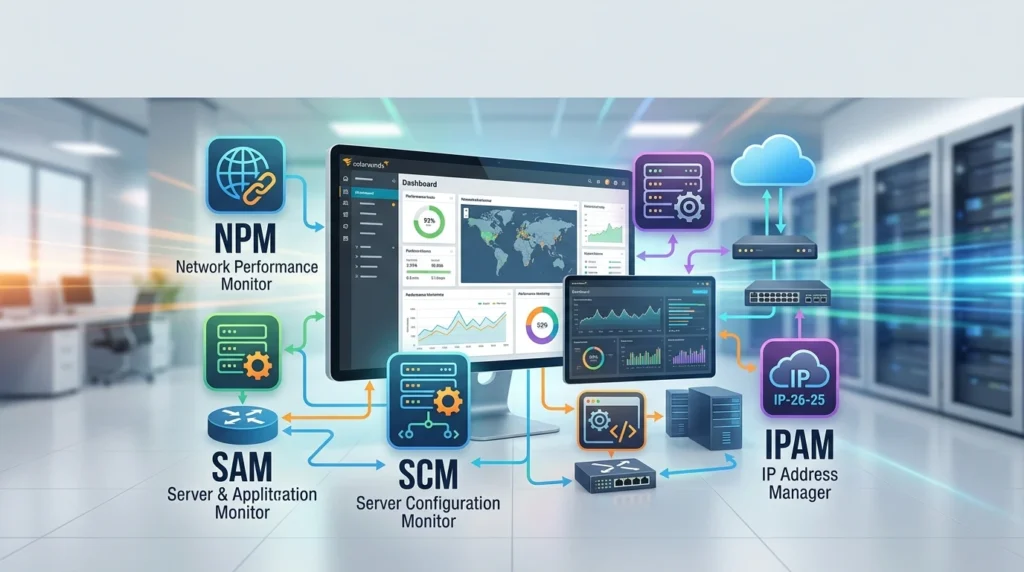
SolarWinds NPM (Network Performance Monitor), SAM (Server & Application Monitor), SCM (Server Configuration Monitor), and IPAM (IP Address Manager) are modular products that share a common architecture—the SolarWinds Platform. This shared framework means that regardless of which modules you license, all features and platform modules are installed, providing a consistent user experience and seamless integration across the entire suite.
The SolarWinds Platform serves as the foundation, delivering core capabilities such as a centralized web console, alerting engine, reporting framework, and discovery mechanisms. Each module extends this foundation with specialized functionality. NPM delivers fault, performance, and availability monitoring for network infrastructure. SAM provides application and server monitoring with over 250 application templates. SCM tracks configuration changes across servers, applications, and databases. IPAM integrates DHCP, DNS, and IP address management with automated subnet discovery and IP scanning.
Key Features
Network Performance Monitor (NPM)
SolarWinds NPM provides real-time network monitoring with a focus on fault, performance, and availability management. The NetPath™ feature delivers hop-by-hop visualization of network paths, enabling administrators to identify performance degradation even across public internet segments and third-party vendor nodes. PerfStack™ enables cross-stack data correlation by allowing users to drag and drop network performance metrics onto a common timeline for immediate visual root-cause analysis.
Key capabilities include:
-
Intelligent topology mapping with dependency-aware alerts that respond to correlated events and network device relationships
-
Automated capacity forecasting that calculates resource exhaustion dates using customizable thresholds based on peak and average usage patterns
-
Dynamic statistical baselines for performance metrics, enabling anomaly detection without manual threshold configuration
-
Customizable real-time dashboards with interactive charts and drag-and-discover performance metrics
Server & Application Monitor (SAM)
SAM extends monitoring to the application layer, providing visibility into server health, application performance, and database availability across on-premises, cloud, and hybrid environments. The platform supports over 250 application types, including application servers, authentication servers, and database servers, through a library of more than 1,200 monitoring templates.
Notable features include:
-
Automated application discovery and dependency mapping that identifies application relationships without manual configuration
-
End-to-end visibility across public, private, and hybrid cloud environments
-
Custom application monitoring with support for API polling and reusable templates
-
Intelligent alerting with threshold-based and dependency-aware alert correlation
Server Configuration Monitor (SCM)
SCM addresses configuration drift and compliance by detecting changes to server, application, and database configurations. When a server experiences performance degradation or an outage, SCM provides the configuration change data necessary to determine whether a modification was the root cause.
Core capabilities include:
-
Near real-time detection of configuration deviations from established baselines
-
Audit trails showing who made configuration changes and when
-
Automated comparison between current and baseline configurations
-
Alerting and reporting on unauthorized or unexpected configuration modifications
IP Address Manager (IPAM)
IPAM integrates DHCP, DNS, and IP address management into a unified interface, providing automated subnet discovery and IP scanning to maintain accurate visibility into IP address utilization. The system alerts administrators to IP conflicts, depleted subnets and scopes, and mismatched DNS entries.
Key features include:
-
Integrated DHCP and DNS management with support for Microsoft and Cisco DHCP, as well as Kea DHCP servers with real-time scope and lease management
-
Automated IP address scanning to discover and track address space usage
-
Historical IP address tracking through the IP Tracer feature
-
Role-based access control for granular permission management
What’s New in the Latest Version
NPM 2026.2.3 Release Highlights
The 2026.2.3 release includes critical security updates addressing several CVEs, including a high-severity unauthenticated remote code execution vulnerability (CVE-2026-28324) with a severity score of 9.8. SolarWinds strongly recommends upgrading all environments to apply the latest performance and security fixes.
Significant changes to Web Performance Monitor (WPM) components include the migration of passive WPM Players to active mode and the automatic assignment of randomly generated passwords during upgrade for remote players.
Platform Enhancements (2026.4 Roadmap)
The 2026.4 release introduces SLA Mute mode for maintenance windows, allowing monitoring and data collection to continue during planned maintenance while optionally muting alerts and excluding the period from availability and SLA calculations. This differs from unmanaging or disabling an object, which stops monitoring entirely.
Additional enhancements include:
-
Redesigned network discovery with a modernized workflow using the same interaction patterns as the SolarWinds Platform Web Console
-
Extended SD-WAN monitoring for Cisco Catalyst SD-WAN vEdge (Viptela) circuits and tunnels, plus new support for Versa Networks devices
-
F5 VELOS and rSeries polling support with CPU and memory utilization, disk volumes, hardware health, and vendor details
-
Extended Ruckus switch monitoring covering stack topology, hardware sensors, and VLAN configuration
IPAM 2026.2 Enhancements
IPAM 2026.2 adds support for Azure Virtual Networks (VNets) and their associated subnets and IP addresses. This feature requires a SAM, VMAN, or SolarWinds Observability Self-Hosted Advanced license and enables unified visibility across on-premises and Azure cloud network address spaces.
The release also introduces an option to clear old, orphaned DHCP scopes and DNS zones, improving network hygiene by enabling administrators to remove outdated and unused configurations that no longer reflect the current network state.
System Requirements
SolarWinds Observability Self-Hosted and the SolarWinds Platform have tiered system requirements based on the number of monitored elements, such as nodes, interfaces, or component monitors.
Hardware Requirements
| Deployment Size | CPU Cores | RAM | Storage |
|---|---|---|---|
| Small (up to 500 elements) | 4 | 16 GB | 100 GB SSD |
| Medium (501–2,000 elements) | 8 | 32 GB | 100 GB SSD |
| Large (2,000+ elements) | 8–12 | 32 GB | 100 GB SSD |
| XL (up to 1,000,000 elements) | 12 | 64 GB | 150 GB SSD |
For the database server, requirements range from 4 CPU cores and 16 GB RAM for small deployments to 32 CPU cores and 256–512 GB RAM for XL environments.
Operating System Compatibility
The SolarWinds Platform supports Windows Server 2025, Windows Server 2022, Windows Server 2019, and Windows Server 2016. All SolarWinds Platform components, including Additional Polling Engines and Additional Web Servers, must use the same time zone as the SolarWinds Platform server.
Additional Requirements
-
Network connectivity with low latency to the database server and monitored endpoints
-
CPU and memory requirements increase when using SolarWinds Platform Agent, WMI, or SNMPv3 with authentication, or when monitoring complex element types such as applications, firewalls, load balancers, or wireless controllers
-
SolarWinds strongly recommends installing the platform on a server that is neither public nor internet-facing
Installation Guide
Pre-Installation Planning
Before deploying SolarWinds NPM or any SolarWinds Platform product, administrators should review the deployment sizing guidelines to determine the appropriate hardware configuration for their environment. SolarWinds provides detailed planning checklists covering server port requirements, SQL Server prerequisites, and hardware sizing recommendations.
Installation Process
The SolarWinds Orion Installer provides a guided installation path for all SolarWinds Platform products. The installation workflow includes:
-
Download the installer from the SolarWinds Customer Portal or the official SolarWinds website
-
Right-click the installer and select “Run as Administrator” to ensure proper permissions
-
Select products to install — the current version of NPM is selected by default, but additional products can be installed or evaluated by selecting them from the Additional Products section
-
Follow the installation wizard — the Orion Installer checks for product updates and presents step-by-step installation guidance
Post-Installation Configuration
After installation, administrators should run the Configuration Wizard to complete the initial setup. The Getting Started Guide provides deployment and configuration information to quickly establish monitoring operations.
For agent-based monitoring, the Add Node wizard enables deployment of the SolarWinds Platform Agent to target devices. Administrators enter the polling hostname or IP address and follow the guided installation process.
Upgrade Considerations
When upgrading from more than one version back, SolarWinds recommends reviewing the release notes aggregator to understand all changes across the versions being skipped. This ensures awareness of any deprecated features, breaking changes, or migration requirements.
How to Use the Software
Initial Network Discovery
The redesigned network discovery workflow in the 2026.4 release uses interaction patterns consistent with the modernized SolarWinds Platform Web Console, reducing the number of steps required to bring devices under monitoring. Administrators can switch between the legacy and new discovery wizards at any time. In large environments, discovery uses the main polling engine by default instead of the polling engine with the lowest engine ID.
Adding Devices for Monitoring
To add a single node, administrators log in to the Orion Web Console, navigate to Settings > Manage Nodes, and click Add a Node. The polling method is selected, and the device is configured for monitoring. By default, devices monitored by NPM are polled for data every nine minutes, and it may take some time before all nodes have data available for review.
Using the Discovery Central Page
The Discovery Central page provides a single, modern entry point for discovering and managing monitored environments. Users get an overview of what is currently monitored and can discover additional resources from a centralized location. The page is available from the Settings menu and the top-right corner of the top menu bar for administrators.
What’s New Page
After upgrading, administrators see a What’s New page on first login that highlights new features and important changes. This interactive page allows administrators to click directly into new feature pages. Later, the page remains available as a tab on the Discovery Central page.
Best Use Cases
Enterprise Network Monitoring
SolarWinds NPM is positioned for global enterprises requiring exhaustive, multi-vendor visibility. The NetPath feature provides hop-by-hop visualization of network paths even across the public internet, making it valuable for organizations with complex WAN topologies and multi-cloud connectivity.
Hybrid Cloud Infrastructure Management
Organizations operating hybrid environments benefit from SAM’s end-to-end visibility across public, private, and hybrid cloud environments. The platform monitors server health, application performance, and database availability across on-premises and cloud-based infrastructure.
Configuration Compliance and Change Management
SCM is designed for organizations that need to maintain configuration baselines and detect unauthorized changes. The tool is particularly valuable in regulated industries where configuration drift can lead to compliance violations or security vulnerabilities.
IP Address Space Management
IPAM serves organizations managing large or complex IP address spaces. The automated subnet discovery and IP scanning capabilities are essential for networks with significant address space utilization, particularly those with integrated DHCP and DNS infrastructure from Microsoft or Cisco.
SD-WAN and Multi-Vendor Environments
The expanded SD-WAN monitoring capabilities in recent releases make the suite suitable for organizations deploying Cisco Catalyst SD-WAN or Versa Networks devices. The platform provides monitoring for circuit and tunnel details, along with quality metrics such as latency, jitter, packet loss, and vQoE scores.
Advantages and Limitations
Advantages
Integrated Platform Architecture: The shared SolarWinds Platform framework means that all modules install together, providing seamless integration and a consistent user experience. Organizations can start with NPM and add SAM, SCM, or IPAM without rearchitecting their monitoring infrastructure.
Comprehensive Monitoring Coverage: From network interfaces and paths to application performance, configuration changes, and IP address management, the suite covers multiple monitoring domains within a single platform.
Mature Alerting and Reporting: The alert engine supports dependency-aware intelligent alerts, multi-condition checks, and correlated events, reducing alert noise while ensuring critical issues receive appropriate attention.
Scalability: The platform scales from small deployments monitoring up to 500 elements to XL environments supporting up to 1,000,000 elements with additional polling engines and web servers.
Limitations
Windows-Centric Architecture: SolarWinds Observability Self-Hosted is designed for Windows Server environments. Organizations with Linux-centric infrastructure may find the platform less aligned with their operational preferences.
Resource Requirements: The platform requires substantial hardware resources, particularly for large deployments. The SQL Server database requires significant CPU, memory, and storage allocation, which may be a barrier for smaller organizations.
Licensing Changes: SolarWinds has transitioned to subscription-only, node-based licensing, which represents a significant change for organizations accustomed to perpetual licensing models. This shift has prompted some teams to evaluate alternatives.
Alternatives to the Software
Paessler PRTG
PRTG offers sensor-based pricing with both self-hosted (Windows) and hosted deployment options. It provides a freeware version supporting up to 100 sensors and a 30-day unlimited trial. PRTG is well-suited for SMB and mid-size networks seeking published, predictable pricing.
LogicMonitor
LogicMonitor is a SaaS platform with collectors that target hybrid enterprises and managed service providers. Its per-hybrid-unit pricing model provides flexibility for organizations with dynamic infrastructure footprints. LogicMonitor offers a 15-day trial.
ManageEngine OpManager
OpManager provides on-premises network monitoring with both perpetual and subscription licensing options. Starting prices are accessible for smaller deployments, with a free edition supporting three devices. OpManager is a strong choice for teams that want to retain an on-premises, perpetual licensing option.
Zabbix
Zabbix is a fully open-source, self-hosted monitoring platform with no license fees. Paid support is available by quote, and Zabbix Cloud starts at $50 per month. Zabbix is best suited for Linux-skilled teams operating at any scale who prefer open-source solutions.
Checkmk
Checkmk offers self-hosted and cloud deployment options with a free Community edition. Pro and Ultimate editions are available at monthly subscription rates. Checkmk is designed for large host counts on a budget, with pricing significantly lower than enterprise alternatives.
Datadog Network Device Monitoring
Datadog provides network device monitoring as part of its broader observability suite. Pricing is per device per month, making it attractive for teams already using Datadog for application performance monitoring and log management. The platform offers a trial period.
Frequently Asked Questions
What is SolarWinds NPM used for?
SolarWinds NPM is used for real-time network monitoring, fault detection, performance analysis, and availability management. It helps network administrators identify potential device faults, availability issues, and performance problems before they impact users.
Can I install multiple SolarWinds modules on the same server?
Yes. SolarWinds Platform products share a common architecture, and all features and platform modules are installed regardless of active licensing. Organizations can install NPM, SAM, SCM, and IPAM on the same SolarWinds Platform server, subject to hardware capacity and licensing.
What operating systems are supported by SolarWinds Observability Self-Hosted?
The platform supports Windows Server 2025, Windows Server 2022, Windows Server 2019, and Windows Server 2016. All platform components must use the same time zone as the SolarWinds Platform server.
How does SolarWinds SAM monitor applications?
SAM monitors applications through a library of over 1,200 templates covering more than 250 application types. The platform includes automated application discovery and dependency mapping, custom application monitoring with API polling, and intelligent alerting with dependency-aware correlation.
What is the SLA Mute feature in the 2026.4 release?
SLA Mute mode for maintenance windows allows monitoring and data collection to continue during planned maintenance while optionally muting alerts and excluding the period from availability and SLA calculations. This differs from unmanaging or disabling an object, which stops monitoring entirely.
Does IPAM support cloud-based IP address management?
Yes. Starting with IPAM 2026.2, the platform supports Azure Virtual Networks (VNets) and their associated subnets and IP addresses of monitored VMs. This functionality requires a SAM, VMAN, or SolarWinds Observability Self-Hosted Advanced license.
What are the hardware requirements for a small SolarWinds deployment?
For small deployments monitoring up to 500 elements, SolarWinds recommends a server with 4 CPU cores, 16 GB RAM, and 100 GB SSD storage. The database server for small deployments has similar requirements: 4 CPU cores, 16 GB RAM, and 100 GB SSD storage.
Can I evaluate SolarWinds software before purchasing?
Yes. SolarWinds offers a 30-day trial of NPM as a fully featured version of the product. After the evaluation period, the evaluation license can be converted to a production license by obtaining and applying a license key.
Final Thoughts
SolarWinds NPM, SAM, SCM, and IPAM 2026.2.3 represent a mature and comprehensive infrastructure monitoring suite. The integrated platform architecture provides significant advantages for organizations seeking a unified approach to network, server, application, configuration, and IP address management. The recent additions of SD-WAN monitoring, Azure VNet support, and SLA Mute mode demonstrate continued development and responsiveness to evolving enterprise requirements.
Organizations evaluating SolarWinds should carefully assess their hardware capacity, licensing preferences, and long-term operational requirements. While the platform delivers extensive capabilities and strong scalability, the Windows-centric architecture and subscription-based licensing model may influence deployment decisions. For enterprises already invested in the SolarWinds ecosystem or those requiring deep multi-vendor network visibility, the suite remains a compelling option in the network performance monitoring software landscape.
Our Paid Service
“We do not sell or provide any software. We only offer professional support services. If any software on your system is not working properly, or you are facing installation errors, crashes, or any other technical issue — just contact us. We will help you fix the problem quickly and remotely via AnyDesk. No software will be provided from our side — only expert troubleshooting and support.”