
Overview of Skelion Pro 5.5.5
Table of Contents
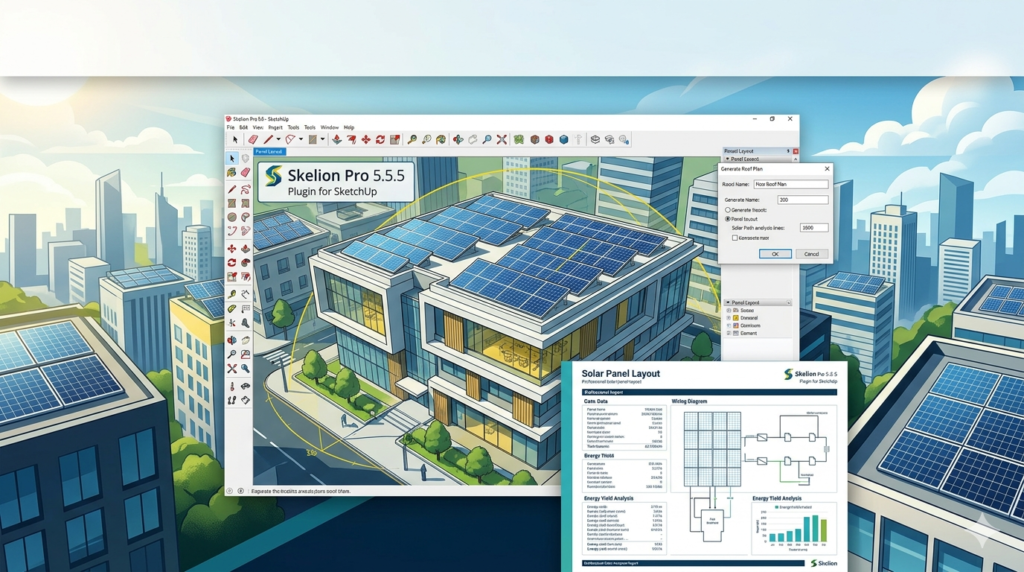
Skelion Pro is a specialized solar photovoltaic (PV) design extension developed for Trimble SketchUp. Version 5.5.5 serves as a robust tool for engineers and architects involved in renewable energy projects. This plugin facilitates the automated placement of solar panels on 3D models, converting standard SketchUp geometry into fully parametric solar fields.
Unlike generic 3D modeling, Skelion Pro leverages geographical data and solar irradiation algorithms. The software utilizes the SketchUp Ruby API to generate accurate shading analysis and energy yield calculations. It is a commercially licensed tool intended for professional solar system design and photovoltaic performance simulation.
Key Features of Skelion Pro
The core functionality of this plugin revolves around reducing manual modeling time through automation. Here are the primary features available in version 5.5.5:
-
Automated Panel Placement: Users can select a roof face or terrain surface, and the software will automatically populate it with solar panels based on predefined spacing and offset rules.
-
Geolocation Integration: The tool imports real-world latitude and longitude data, along with historical weather patterns, to calculate solar incidence angles.
-
Shading Analysis Engine: The plugin simulates shadows cast by chimneys, trees, or adjacent buildings across different times of the year.
-
3D Solar String Management: It organizes panels into electrical strings visually within the 3D workspace.
-
Export to PVSyst & SAM: The software exports 3D shading scenes to industry-standard simulation software like PVSyst and System Advisor Model (SAM).
-
Topography Adaptation: Panels can conform to uneven terrain, allowing for ground-mount solar farm designs.
What’s New in Version 5.5.5
Version 5.5.5 represents a maintenance update focused on stability and compatibility. While the core workflow remains consistent with previous iterations, this version introduces refinements for modern hardware.
Key updates include:
-
SketchUp 2024 Compatibility: Full support for the latest version of SketchUp, including the new graphics engine.
-
Improved Snapping Logic: Enhanced magnetic snapping for panel arrays reduces gaps between modules during manual adjustments.
-
Faster Rendering of Large Arrays: Optimization of the OpenGL rendering pipeline allows for smoother navigation of solar farms exceeding 10,000 panels.
-
Bug Fixes: Resolution of an edge-case crash related to importing
.csvfiles containing terrain data with negative elevation values.
System Requirements
Before installing the plugin, verify that your workstation meets the necessary specifications to ensure stable performance.
| Component | Minimum Requirement | Recommended Requirement |
|---|---|---|
| Operating System | Windows 10 (64-bit) or macOS 11 (Big Sur) | Windows 11 or macOS 13 (Ventura) |
| Host Software | SketchUp 2019 | SketchUp 2023 – 2024 |
| CPU | 2.0 GHz+ (Dual-core) | 3.0 GHz+ (Quad-core Intel i7/i9 or M1/M2) |
| RAM | 8 GB | 16 GB – 32 GB |
| GPU | 1 GB VRAM (OpenGL 3.1) | 4 GB VRAM (Dedicated GPU) |
| Disk Space | 200 MB | 500 MB (for cache files) |
Installation Guide
Obtaining a legitimate license for Skelion Pro is essential for accessing updates and support. The software operates via a license key system and requires an active internet connection for activation.
-
Purchase or Trial: Visit the official SketchUp Extension Warehouse or the developer’s website to purchase a license or request a trial key.
-
Download: Download the
.rbzinstaller file associated with your account. -
Access Extension Manager: Open SketchUp, navigate to the
Windowmenu, and selectExtension Manager. -
Install Extension: Click the
Install Extensionbutton and locate the downloaded.rbzfile. -
Activate License: Once installed, a toolbar will appear. Click the
Licenseicon and enter your 16-digit product key. -
Restart: Restart SketchUp to load the solar library and default settings.
How to Use the Software for a Solar Design Workflow
To maximize the utility of Skelion Pro, users should follow a structured workflow from site selection to array layout.
Step 1: Modeling the Site
Import or draw the existing structures. Use the Location tool in SketchUp to set the correct geographic position and time zone.
Step 2: Terrain or Roof Selection
Select the face or group where the panels will be placed. The software requires a smooth surface; triangulated meshes must be smoothed using the Soften Edges function.
Step 3: Configuring Panels
Use the PV Panel Manager to select the specific make and model of the solar module. You can set custom dimensions, tilt angles, and spacing distances.
Step 4: Running the Shadow Analysis
Activate the Solar Analysis tool. The software will calculate the Annual Irradiation map, displaying hot spots (red) for high energy and cold spots (blue) for shaded areas.
Step 5: Generating the Array
Click Place PV Panels. The plugin will automatically tile the panels across the selected area, avoiding obstacles identified in the shadow analysis.
Best Use Cases for Skelion Pro
This plugin is specifically engineered for high-accuracy utility and commercial projects.
-
Utility-Scale Solar Farms: Designing ground-mounted arrays on complex topographies where manual placement is impossible.
-
Commercial Rooftop Audits: Calculating the payback period for warehouse roofs by determining the maximum megawatt capacity.
-
Architectural Integration: Designing Building-Integrated Photovoltaics (BIPV) where panels serve as the actual roofing material.
-
Educational Simulation: Teaching engineering students about the relationship between axial tilt and seasonal energy variance.
Advantages and Limitations
Advantages
-
Speed: Reduces design time by up to 80% compared to manual array drawing.
-
Parametric Editing: Changing panel spacing automatically reforms the entire array.
-
Industry Standard: Accepted by major engineering firms for preliminary shading reports.
Limitations
-
SketchUp Dependency: Cannot function as a standalone tool; requires a full SketchUp license.
-
Learning Curve: The shadow analysis engine requires a basic understanding of solar geometry and radians.
-
Export Limits: The free version restricts exports to low-resolution JPG; Pro unlocks HD and 3D PDF.
-
Price Point: The perpetual license is an investment best suited for dedicated solar engineering firms rather than general architects.
Alternatives to the Software
If Skelion Pro does not fit your specific budget or technical requirements, consider these alternatives for solar design.
| Software | Platform | Primary Focus | Licensing Model |
|---|---|---|---|
| PVCase | AutoCAD / BricsCAD | Automated utility-scale design | Subscription |
| Helios 3D | Standalone | High-resolution shading | Perpetual |
| SketchUp Sefaira | Cloud-based | Early-stage energy analysis | Annual Subscription |
| PVSol | Standalone | Detailed financial simulation | Perpetual |
Frequently Asked Questions
1. Is Skelion Pro 5.5.5 compatible with SketchUp Free (Web version)?
No. The plugin requires the Ruby C++ API, which is only available in SketchUp Pro desktop versions (2019–2024). It does not function in the browser-based SketchUp Free.
2. Can I import my own solar panel specifications?
Yes. The software includes a panel editor that allows users to input custom dimensions, wattage, efficiency rates, and temperature coefficients (Pmax).
3. Does the software handle structural loads?
Skelion Pro focuses on layout and shading. It does not perform wind uplift or structural dead-load calculations; users should export the geometry to a structural engineering tool like RISA-3D.
4. Can I use Skelion Pro for solar thermal collectors?
While primarily designed for photovoltaic panels, the placement logic can be adapted for solar thermal arrays by disabling the electrical stringing features and using custom geometry.
5. Why is my shading analysis showing no red zones?
This usually indicates a missing geographical location. Ensure the SketchUp model has a valid Location set under Window > Model Info > Geo-location. Without coordinates, the sun vector defaults to noon at the equator.
Final Thoughts
Skelion Pro 5.5.5 remains a benchmark for renewable energy design within the SketchUp ecosystem. By bridging the gap between architectural modeling and engineering simulation, it allows professionals to produce bankable shading reports and accurate panel layouts.
For firms currently using manual placement methods, the speed optimization provided by version 5.5.5—particularly the improved snapping logic—represents a tangible return on investment. While the software requires a significant upfront license fee and a powerful workstation, the reduction in engineering hours often justifies the cost for high-volume solar developers.
Our Paid Service
“We do not sell or provide any software. We only offer professional support services. If any software on your system is not working properly, or you are facing installation errors, crashes, or any other technical issue — just contact us. We will help you fix the problem quickly and remotely via AnyDesk. No software will be provided from our side — only expert troubleshooting and support.”