

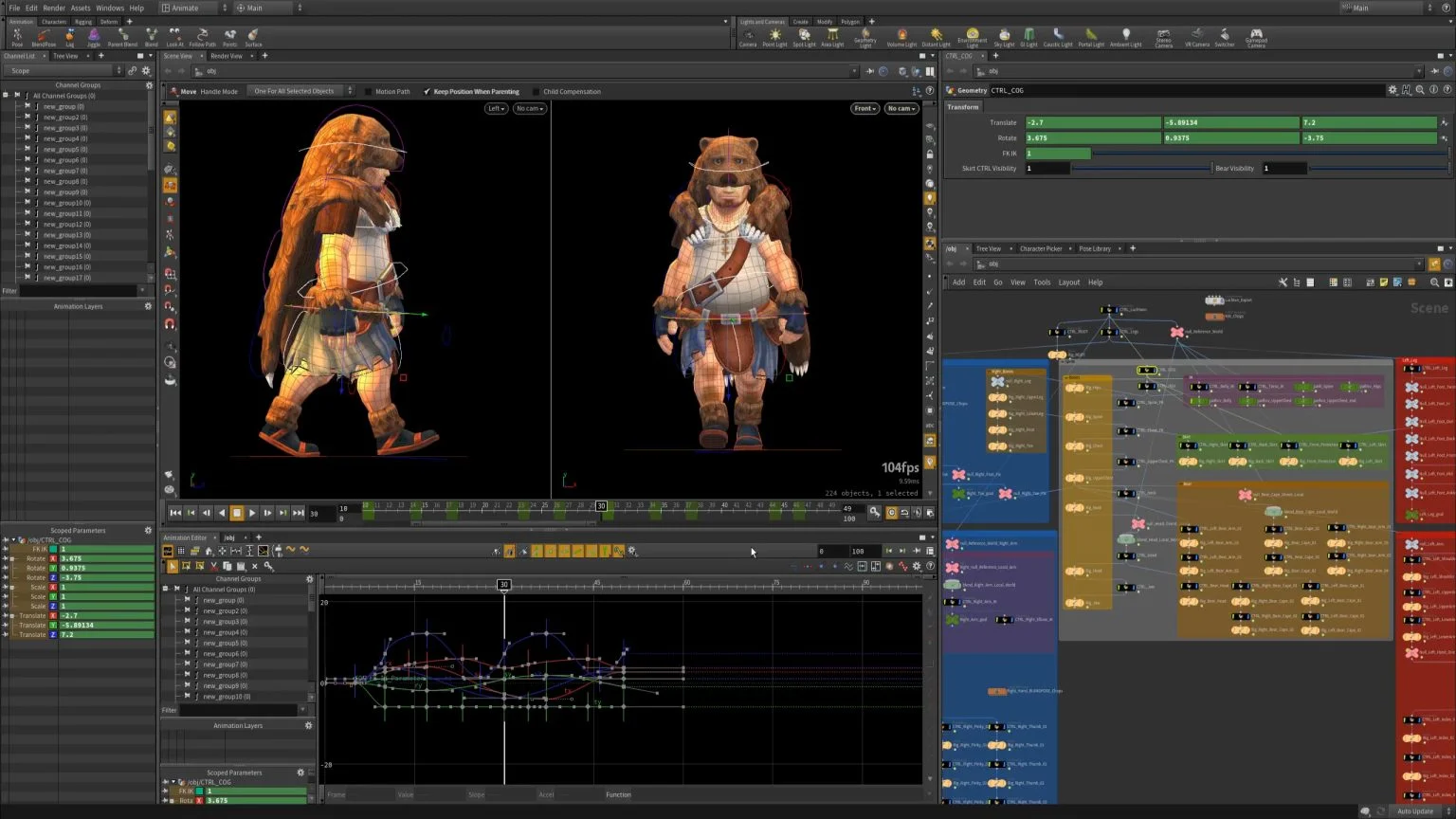
Overview of Houdini 20.5.278
Table of Contents
SideFX Houdini is a powerful, node-based 3D software suite widely recognized as the industry standard for procedural visual effects, 3D animation, and dynamic simulation . The software employs a unique procedural architecture where every action stores as a node, enabling non-destructive editing and complex parameterization .
Houdini’s node-based workflow empowers artists to create incredibly complex and detailed digital worlds, characters, and effects with unparalleled control and flexibility . Unlike traditional 3D applications that apply modifications destructively, Houdini maintains a complete history of operations, allowing users to revisit and adjust any parameter at any stage of production .
The 20.5.278 production build offers enhanced stability and performance improvements over previous versions, making it the preferred choice for professional studios worldwide . Leading visual effects studios across the globe rely on Houdini to create award-winning effects for film, television, advertising, and video games .
Houdini is available in several editions, including Houdini FX for commercial studios, Houdini Indie for independent creators, and a free Apprentice version for learning and non-commercial use . The software is developed by SideFX, a company that has been at the forefront of procedural 3D technology since its founding in 1987.
Key Features
Procedural Node-Based Workflow
Every action in Houdini is stored as a node, enabling non-destructive editing and complex parameterization. This procedural approach means artists can iterate quickly, make changes at any stage of production, and automate repetitive tasks .
Advanced Dynamics and Simulation
Houdini features high-performance solvers for fluids, pyro, cloth, rigid bodies, and granular materials. The software’s simulation capabilities are unmatched in the industry, allowing for realistic natural phenomena like water, fire, smoke, and debris . GPU acceleration dramatically increases the performance and speed of Vellum and Pyro FX simulations on supported graphics cards .
Procedural Modeling and Generation
Artists can create everything from architectural structures to organic environments using rules and algorithms. The procedural modeling tools enable the creation of complex, highly detailed assets that would be impractical to build manually .
Character Rigging and Animation
Comprehensive tools for building sophisticated character systems and animating them convincingly. Houdini provides a robust set of rigging and animation features suitable for film, television, and game development .
Volumetric and Lighting Tools
Work with volumes, fog, clouds, and advanced lighting using the Karma renderer or Mantra. The Karma XPU renderer currently supports CPU and NVIDIA OptiX devices, providing fast, high-quality rendering .
Solaris and USD Integration
Leverage Pixar’s Universal Scene Description for streamlined pipeline collaboration. This integration makes Houdini an essential tool for modern VFX pipelines .
VEX and Python Scripting
Customize tools, automate workflows, and extend functionality with embedded scripting. Advanced users can create custom tools and automate complex processes .
Game Development Integration
Export assets and tools directly to game engines like Unity and Unreal Engine. Houdini’s procedural tools are particularly valuable for game developers creating dynamic and interactive environments .
What’s New in Houdini 20.5.278
Houdini 20.5.278 represents a production build that introduces several important updates and fixes . This version includes improvements to viewport rendering and grooming tools, addressing issues identified in earlier builds.
Viewport Enhancements
The 20.5.278 build addresses viewport rendering issues, particularly related to Vulkan renderer compatibility. Users experiencing issues with guide selection in groom workflows may benefit from switching to the OpenGL renderer in Preferences > 3D Viewports > Renderer . Later builds, such as 20.5.370, include additional fixes for viewport-related issues .
Groom Tool Improvements
Selecting groom guides in the viewport has been optimized in this production build. While some users reported initial issues with guide selection, subsequent builds (20.5.328 and later) have addressed these concerns .
Third-Party Compatibility
Houdini 20.5.278 supports major third-party plugins and tools. For example, Axiom 3.2, 3.1, and 3.0 have been compiled specifically for this Houdini production build, ensuring compatibility for users relying on these simulation tools .
System Requirements
Houdini 20.5.278 demands robust hardware to deliver optimal performance. SideFX provides detailed system requirements for this production build .
Operating System (64-bit Only)
-
Windows: Windows 11 or Windows 10. Windows 8.1 and below are not supported. Windows Server (any version) is not supported .
-
macOS: Requires 64-bit Intel-based or Apple Silicon Mac with macOS 11 and higher .
-
Linux: Ubuntu 20.04+ LTS, Debian 10.0+, RHEL 7+, Fedora 32+, CentOS 7+, Mint 19.3+, Pop! 20.04 LTS, Rocky 8+, Alma 8+ .
Memory
-
Minimum: 16 GB required
-
Recommended: 32 GB or higher
-
Strongly Recommended for Fluid Simulations: 64 GB
Processor
-
Intel or AMD x64 CPU with SSE 4.2 required. Houdini 20.5 will not run on a system with an instruction set lower than SSE 4.2 .
Disk Space
-
5.0 GB required for installation
Graphics Card
-
A GL4.0 compliant graphics card is required. GL3.3 cards will have missing features and lower GL versions will not run Houdini 20.5 at all .
-
VRAM: 12 GB or more is required. Less than this can result in display errors such as blank windows. High DPI displays (4K, 5K) or multiple monitors require a minimum of 12 GB .
-
Graphics card must support OpenCL version 1.2 .
-
The OptiX Denoiser requires a Kepler or later NVIDIA GPU (K, P, M, V prefixes) .
Recommended Drivers
-
NVIDIA RTX & GeForce GPUs: 555.x Production/Studio Driver or higher .
-
AMD: 24.Q2 or higher .
-
Intel: 30.0.100.9955 or higher .
Monitor
-
Minimum resolution: 1920 x 1080 or higher recommended .
-
Color depth of 32-bit (“true color”) required .
-
12 GB VRAM or higher required for dual displays or single displays greater than 1920×1200 .
Additional Requirements
-
Sound card and speakers/headset required for audio
-
Network support required for offline simulation, batch processing, and rendering
-
Internet browser required for connection to www.sidefx.com (Online licensing and Houdini Forum)
Installation Guide
This installation guide provides step-by-step instructions for properly installing Houdini 20.5.278 on your system. Before beginning, ensure your workstation meets the system requirements outlined above.
Installation Tips
For users experiencing license issues after installation, checking the License Administrator (under File > License Tools Services) can help troubleshoot Sesinetd service issues . Additional resources are available through SideFX support and the Houdini community forums.
Pre-Installation Checklist
Before installing Houdini, complete these preparation steps:
-
Verify System Requirements: Confirm your workstation meets all minimum and recommended specifications for Houdini 20.5.278 .
-
Create a SideFX Account: Register or login to your SideFX web account at www.sidefx.com to download the software .
-
Ensure Internet Connection: Required for license validation and SideFX server communication .
-
Administrator Privileges: All platforms require administrator privileges to install .
Obtaining the Installer
Houdini 20.5.278 can be obtained through SideFX’s official download portal .
Installing Using the Houdini Launcher
The Houdini Launcher is the recommended installation method :
-
Download and install the Houdini Launcher from the SideFX website.
-
Launch the Houdini Launcher application.
-
Log in to your SideFX web account.
-
Click the Install button and select “Production Build” .
-
Choose the License Server option during installation if this is your first Houdini installation .
-
Follow the on-screen prompts to complete installation.
Installing Using the Legacy Installer
For users who prefer the traditional installer method :
-
Download the installation package from the SideFX website.
-
Run the installer executable.
-
Follow the installation prompts.
-
Complete the installation process.
License Activation
After installation, Houdini requires license activation:
-
Launch Houdini to display the license pop-up window .
-
Select “I have paid for a license and want to use SideFX as my License Server” .
-
Navigate to Licenses > License Administrator from the Houdini Launcher .
-
In the License Administrator, go to File > Change License Server .
-
Add www.sidefx.com (SideFX Login Server) in the bottom section .
-
Remove local host from the top section .
-
Click Accept to complete the licensing process .
How to Use Houdini 20.5.278
Getting Started
For those new to Houdini, the software offers a comprehensive learning path through official tutorials and community resources . Courses on platforms like Coursera provide structured learning experiences covering Boolean operations, procedural modeling tools, and workflows optimization using Houdini FX .
Interface Overview
The Houdini interface is organized around several key components:
-
Network Editor: The primary workspace for building node-based procedural networks
-
Viewport: Interactive 3D visualization of your scene
-
Parameter Editor: Controls for adjusting node properties
-
Geometry Spreadsheet: Data view for geometry attributes
Creating a Basic Project
-
Launch Houdini and create a new project file .
-
Begin exploring the interface, starting with the network editor and viewport .
-
Follow official tutorials or community learning resources to build your first project .
-
Gradually advance to more complex workflows involving dynamics, lighting, and rendering .
Advanced Workflows
Houdini supports sophisticated techniques that set it apart from other 3D software:
-
Procedural Asset Creation: Build reusable digital assets with custom parameters
-
Dynamic Simulation: Simulate realistic physics for destruction, fluids, and cloth
-
USD Pipeline Integration: Work with Solaris for look development and lighting
-
GPU Acceleration: Leverage supported graphics cards for faster Vellum and Pyro simulations
Best Use Cases
Visual Effects for Film and Television
Houdini is the software of choice for visual effects artists working on feature films and episodic content . The software’s simulation capabilities enable the creation of realistic natural phenomena, destruction sequences, and complex particle systems that are the hallmark of modern blockbuster cinema .
Game Development
Game developers use Houdini to create dynamic and interactive environments. The procedural workflow is particularly valuable for generating terrain, vegetation, and complex assets that adapt to gameplay requirements . Houdini’s game development integration allows for seamless export to engines like Unity and Unreal Engine .
Motion Graphics
Motion graphics designers build complex animated sequences using Houdini’s node-based workflow. The software’s ability to create procedural animations and dynamic effects makes it a powerful tool for advertising and title sequences .
Architectural Visualization
Architecture professionals utilize Houdini for generating detailed and realistic renders. The procedural modeling capabilities enable the creation of complex building structures and environments .
Advantages and Limitations
Advantages
-
Unmatched Procedural Workflow: Houdini’s node-based system provides unparalleled control and flexibility .
-
Industry-Leading Simulation: Pyro, fluid, and destruction solvers are considered best-in-class .
-
Non-Destructive Editing: All actions are stored as nodes, enabling easy iteration and modification .
-
Strong Pipeline Integration: Works well with USD-based workflows and major game engines .
-
Stability and Performance: Top ratings in stability, performance, and developer confidence across animation, advertising, games, and VFX .
-
GPU Acceleration: Dramatically improves simulation and rendering performance on supported hardware .
Limitations
-
Learning Curve: Houdini is widely considered the hardest 3D software to learn among major applications .
-
High Hardware Requirements: Demands powerful hardware, particularly for RAM and VRAM .
-
User Interface: “Improve the user interface” is the most common complaint across all 3D software, including Houdini .
-
Cost: Commercial licensing can be expensive for individuals and small studios .
Alternatives to Houdini
While Houdini excels in procedural workflows and simulations, several alternatives serve different needs in the 3D creation space :
Blender
-
License: Free, open-source
-
Platforms: Windows, macOS, Linux
-
Specialization: All-in-one modeling, sculpting, animation, rendering
-
Considerations: Best for beginners and budget-conscious creators. Larger community than commercial tools .
Autodesk Maya
-
License: Paid subscription
-
Platforms: Windows, macOS, Linux (RHEL/CentOS)
-
Specialization: Animation, VFX, rigging
-
Considerations: Industry standard for animation and character work .
Autodesk 3ds Max
-
License: Paid subscription
-
Platforms: Windows only
-
Specialization: Modeling, architecture visualization
-
Considerations: Currently holds the largest market share in animation (56.49%) .
Cinema 4D
-
License: Paid subscription/perpetual
-
Platforms: Windows, macOS
-
Specialization: Motion graphics, VFX
-
Considerations: Easiest to learn among paid commercial tools .
Frequently Asked Questions
What is Houdini 20.5.278 used for?
Houdini 20.5.278 is a professional 3D software suite used for procedural modeling, visual effects, animation, and dynamic simulation in film, television, advertising, and video game production . It’s particularly valued for its node-based workflow and advanced simulation capabilities .
What are the system requirements for Houdini 20.5.278?
Houdini 20.5.278 requires a 64-bit operating system (Windows 10/11, macOS 11+, or Linux), 16 GB RAM minimum (32+ GB recommended), an OpenGL 4.0 compliant graphics card with 12+ GB VRAM, and an Intel or AMD x64 CPU with SSE 4.2 support .
Is Houdini difficult to learn?
Yes, Houdini is widely considered the hardest 3D software to learn among major applications . However, the free Apprentice version and extensive learning resources make it accessible to dedicated learners . Many studios provide training for new hires, and the 2024 State of CG survey found that nearly half of all Houdini users started less than two years ago .
Can Houdini be used for game development?
Yes, Houdini is extensively used in game development for creating dynamic environments, terrain, and procedural assets . It integrates well with major game engines like Unity and Unreal Engine . The software’s procedural workflow is particularly valuable for generating content that adapts to gameplay requirements.
What’s the difference between Houdini FX, CORE, and Indie?
Houdini FX provides comprehensive tools for simulating fluids, destruction, pyro, grains, cloth, and more for commercial studios . Houdini CORE is designed for modelers, lighters, riggers, animators, and game artists . Houdini Indie makes all Houdini FX tools available under an indie license for animators and game developers during the incubation stage of their business .
Is there a free version of Houdini?
Yes, SideFX offers a free Apprentice version for learning and non-commercial use . The Apprentice version is fully featured but includes watermarks and some limitations on file exports . There is also a full-featured Education version for students and schools .
Final Thoughts
SideFX Houdini 20.5.278 represents a powerful evolution in procedural 3D software, offering unmatched capabilities for visual effects, simulation, and procedural content creation. The software’s node-based workflow provides unparalleled control and flexibility, making it the tool of choice for artists and studios creating award-winning effects for film, television, and games .
Despite its steep learning curve, Houdini’s growing popularity is evident in industry surveys, with nearly half of users starting in the last two years . The software’s top ratings for stability, performance, and developer confidence underscore its position as a professional-grade tool that delivers results .
For artists and studios willing to invest in learning Houdini, the return is substantial: the ability to create complex, high-quality 3D content with a level of control and efficiency that no other software can match . With the availability of the free Apprentice version, there has never been a better time to explore what Houdini can do for your creative projects.
The 20.5.278 production build offers a stable foundation for professional work, with continued improvements in viewport performance, simulation efficiency, and third-party plugin compatibility . As SideFX continues to innovate, Houdini remains at the forefront of 3D technology, shaping the future of visual effects and digital content creation.
Our Paid Service
“We do not sell or provide any software. We only offer professional support services. If any software on your system is not working properly, or you are facing installation errors, crashes, or any other technical issue — just contact us. We will help you fix the problem quickly and remotely via AnyDesk. No software will be provided from our side — only expert troubleshooting and support.”