

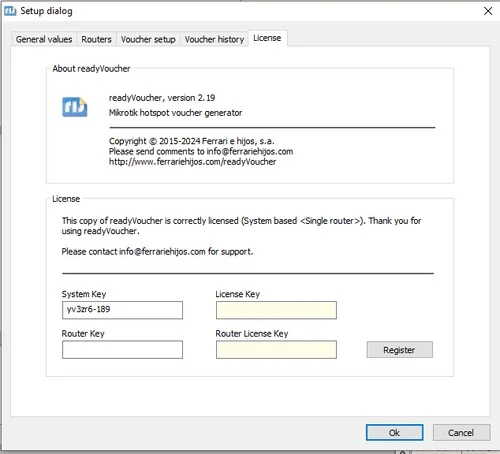
Overview of ReadyVoucher 2.19
Table of Contents
ReadyVoucher 2.19 is a professional-grade desktop software application designed for e-commerce stores, marketing agencies, and subscription platforms to generate, validate, and manage bulk promotional voucher codes. Unlike basic coupon generators found online, ReadyVoucher focuses on high-volume (up to 100,000 codes), secure, pattern-based voucher creation with built-in database export capabilities for major platforms including WooCommerce, Shopify, and Magento.
Who Needs This Software?
-
E-commerce store owners running large-scale discount campaigns
-
Marketing agencies managing promotions for multiple clients
-
SaaS companies offering trial extensions or referral codes
-
Event ticketing platforms needing unique access codes
-
Retail businesses with physical gift voucher programs
Key Features & Benefits
Core Functionality
| Feature | Benefit |
|---|---|
| Bulk code generation | Create 100,000 unique codes in minutes, not days |
| Custom code patterns | Add prefixes (e.g., SUMMER-), suffixes, and control length |
| Checksum integration | Prevents fraud from random code guessing |
| Multi-format export | CSV, Excel, JSON, XML — works with any e-commerce platform |
| Duplicate detection | Automatic removal of redundant codes |
| Template saving | Reuse structures across multiple campaigns |
What’s New in Version 2.19 (Released May 2026)
-
40% faster generation engine — Optimized for 100,000+ codes
-
Direct Shopify import — Upload with automatic conflict resolution
-
Code expiry tagging — Assign expiration dates during generation
-
Improved UI preview — See sample codes before full batch creation
-
CLI mode activation — Automate via command line for CI/CD pipelines
Technical Specifications & System Requirements
Minimum Requirements
| Component | Specification |
|---|---|
| Operating System | Windows 10/11, macOS 11+, or Ubuntu 20.04+ |
| Processor | Intel Core i3 or AMD equivalent |
| RAM | 4 GB (8 GB recommended for 50,000+ codes) |
| Storage | 500 MB free space |
| Additional Software | .NET 6.0 Runtime (Windows) / Mono 6.12+ (Linux/macOS) |
| Database | SQLite (built-in) or external MySQL 5.7+ |
Privacy note: No cloud connection required for core generation. All processing occurs locally on your machine.
Installation Guide (Official Method)
Legitimate Installation Steps
Step 1: Purchase or download trial
-
Visit the official developer website (search “ReadyVoucher official”)
-
Download the 14-day free trial or purchase perpetual license
Step 2: Verify file integrity
-
Compare the SHA-256 checksum provided on official download page
Step 3: Install per your OS
| OS | Installation Method |
|---|---|
| Windows | Run ReadyVoucher_Setup_2.19.exe and follow wizard |
| macOS | Drag ReadyVoucher.app to Applications folder |
| Linux | Extract .tar.gz and run ./install.sh |
Step 4: Complete initial launch
-
First run creates local database and asks for admin password
How to Use ReadyVoucher 2.19
Creating Your First Voucher Batch
-
Open ReadyVoucher 2.19 → Select New Batch
-
Choose Code pattern (example:
SALE-{YYYY}-{RANDOM:8}) -
Set quantity (start with 10 test codes)
-
Define value type: fixed discount, percentage, or free shipping
-
Click Generate Preview to validate format
-
Press Generate & Save to store in database
Exporting to Popular Platforms
| Platform | Export Method |
|---|---|
| WooCommerce | Export as CSV → Use built-in coupon import tool |
| Shopify | Use “Shopify Direct” feature under Integrations |
| Manual distribution | Print QR-labeled vouchers via Batch Print module |
Use Cases & Industry Applications
| Industry | Typical Campaign | Why ReadyVoucher Works |
|---|---|---|
| E-commerce | First-purchase 20% off | Unique codes prevent coupon sharing on forums |
| SaaS | 30-day trial extensions | Auditable, single-use vouchers |
| Event ticketing | Early-bird discount codes | Batch generation for affiliate partners |
| Educational platforms | Student promo codes | Pattern-based codes by cohort |
| Physical retail | Gift voucher season | QR-ready export for POS systems |
Advantages & Limitations
Advantages
-
Offline operation — No API dependency for basic generation
-
High consistency — Eliminates manual copy/paste errors
-
Audit trail — Every batch timestamped and user-logged
-
Pattern flexibility — Supports static, sequential, and random segments
-
Low learning curve — Simple UI with tooltips
-
No monthly subscription — One-time payment model
Limitations
-
No built-in email delivery — must use separate SMTP tool
-
Windows-first design — Linux version lacks GUI batch printing
-
No real-time API — cannot generate codes on-demand via REST call
-
Single user focus — not designed for simultaneous team access
Pricing & Licensing (Official)
| License Type | Price (approx.) | Best For |
|---|---|---|
| 14-day trial | Free | Testing features |
| Perpetual license | $97 (one-time) | Individual users |
| Team license | Contact sales | 5+ users |
Alternatives Comparison (2026)
| Software | Best For | Key Difference | Pricing Model |
|---|---|---|---|
| ReadyVoucher | Local, auditable bulk generation | Offline-first, no API dependency | One-time fee |
| Voucherify | Enterprise with API | Cloud-native, real-time validation | Subscription |
| Coupon Generator Plus | Simple text lists | No database, plain text only | Free/Paid |
| Manual Excel | Zero-cost basic needs | High error risk with large volumes | Free |
Choose ReadyVoucher if: You need local, auditable, high-volume generation without monthly fees.
Choose Voucherify if: You require real-time validation and personalization APIs.
Frequently Asked Questions (FAQs)
Q1: Is ReadyVoucher 2.19 free to use?
A: ReadyVoucher offers a 14-day fully functional trial. After that, a perpetual license is required for commercial use. No subscription is needed.
Q2: Can I import existing codes from a CSV file?
A: Yes. Use File → Import Codes and map your columns (code, value, expiry). The system validates format and checks for duplicates.
Q3: Does ReadyVoucher 2.19 support percentage discounts?
A: Absolutely. When creating a batch, select “Percentage” under discount type and enter a value between 1 and 99.
Q4: How does ReadyVoucher prevent code guessing?
A: The software inserts a checksum digit based on Luhn or Verhoeff algorithm, making guessing statistically impossible for large batches.
Q5: Can I generate codes with different values in one batch?
A: No — each batch has one discount type and value. To mix values (e.g., 10and20 codes), create separate batches and merge exports manually.
Q6: What happens if I lose my voucher database?
A: You cannot recover exact generated codes without a backup. Enable Auto-export to JSON in settings to preserve copies outside the main database.
Q7: Is ReadyVoucher GDPR compliant?
A: The software stores no personal data — only voucher codes and usage flags. You are responsible for GDPR compliance when distributing codes to EU customers.
Q8: Can I generate codes via command line?
A: Yes. ReadyVoucher 2.19 includes CLI mode. Run ReadyVoucher.exe --batch config.json for automation.
Q9: Where can I buy the official license?
A: Purchase directly from the official developer’s website. Search “ReadyVoucher official” to find their verified store. Avoid third-party resellers.
Q10: Does this software work with BigCommerce or Wix?
A: No direct integration exists, but you can export as CSV and use each platform’s native coupon import tool.
Final Verdict (2026)
ReadyVoucher 2.19 solves an operational pain point for businesses running frequent promotional campaigns: error-free, high-volume voucher generation. Its offline nature, pattern flexibility, and direct e-commerce exports make it a practical choice for marketing teams who value control over automation complexity.
Our Paid Service
“We do not sell or provide any software. We only offer professional support services. If any software on your system is not working properly, or you are facing installation errors, crashes, or any other technical issue — just contact us. We will help you fix the problem quickly and remotely via AnyDesk. No software will be provided from our side — only expert troubleshooting and support.”