

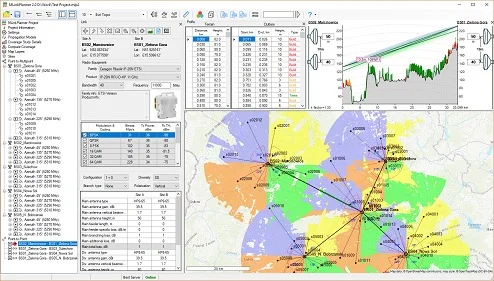
Overview of the Software
Table of Contents
RadioPlanner 3.0 is a professional-grade RF planning tool designed for engineers and network architects who design, optimize, and maintain mobile networks. Specializing in 5G RF planning, this software provides a visual and analytical environment to simulate radio wave propagation, predict coverage, and manage interference in complex cellular environments.
Unlike basic mapping tools, RadioPlanner 3.0 focuses on practical, real-world network design for 4G LTE, 5G NR (New Radio), and legacy 2G/3G systems. It allows users to import live network data, design new base station layouts, and run accurate propagation models. Whether you are working on a dense urban microcell or a rural macrocell, this tool provides the technical depth required for professional mobile network engineering.
The latest version, 3.0, marks a significant leap in supporting the unique challenges of 5G, including millimeter wave (mmWave) behavior, massive MIMO configurations, and network slicing considerations.
Key Features
RadioPlanner 3.0 includes a comprehensive set of features for modern RF engineers:
-
Multi-Technology Support: Plan networks for 5G NR (Standalone & Non-Standalone), 4G LTE, 3G UMTS, and 2G GSM within a single project.
-
Advanced Propagation Models: Choose from multiple models including Okumura-Hata, COST 231, Walfisch-Ikegami, and the custom 5G 3GPP TR 38.901 model for mmWave.
-
3D Terrain Visualization: Import high-resolution digital elevation models (DEM) and clutter data to visualize coverage over actual landscapes, buildings, and foliage.
-
Automatic Site Selection: Use AI-assisted algorithms to suggest optimal locations for new base stations based on coverage gaps or capacity demands.
-
Interference Matrix: Analyze co-channel and adjacent channel interference between sectors with color-coded C/I (Carrier-to-Interference) ratio maps.
-
Traffic Simulation: Model user distribution and data traffic demand to predict network throughput and resource block utilization.
-
Export & Integration: Generate reports in KML for Google Earth, CSV for post-processing, and native files for major drive test platforms.
What’s New in RadioPlanner 3.0
This version introduces critical updates for next-generation network planning:
-
5G Beamforming Simulation: Model vertical and horizontal beamforming patterns for massive MIMO antennas, including customizable codebooks.
-
mmWave Atmospheric Absorption: Incorporates oxygen and water vapor attenuation models specific to 26 GHz, 28 GHz, and 39 GHz bands.
-
Network Slicing Planner: Preliminary support for assigning virtual network slices (e.g., URLLC, eMBB) to specific coverage zones.
-
Live Signal Prediction: Real-time calculation of RSRP, RSRQ, and SINR as you move a virtual user through the 3D map.
-
Performance Optimizations: Up to 40% faster calculation times for large projects (500+ cells) using multi-threaded computation.
System Requirements
Before installing RadioPlanner 3.0, ensure your workstation meets these specifications for optimal performance.
Minimum Requirements (Small Projects < 50 cells)
-
OS: Windows 10 or 11 (64-bit)
-
CPU: Intel Core i5 or AMD Ryzen 5
-
RAM: 16 GB
-
GPU: Integrated or basic dedicated GPU with DirectX 11 support
-
Storage: 10 GB SSD
-
Display: 1920 x 1080 resolution
Recommended Requirements (5G & Large Networks)
-
OS: Windows 11 Pro or Windows Server 2022
-
CPU: Intel Core i7/i9 or AMD Ryzen 7/9 (8+ cores)
-
RAM: 32 GB (64 GB for mmWave projects)
-
GPU: NVIDIA RTX 3060 or higher (for 3D acceleration)
-
Storage: 20 GB NVMe SSD
-
Display: Dual monitors, 2560 x 1440 or higher
Installation Guide
Follow these steps to install RadioPlanner 3.0 correctly:
-
Obtain the installer: Download the official setup file from the developer’s website. Verify the digital signature for security.
-
Run as administrator: Right-click the installer and select Run as Administrator to ensure proper access to system libraries.
-
Accept license terms: Read and accept the End User License Agreement (EULA).
-
Choose installation type:
-
Complete: Installs all propagation models and example projects.
-
Custom: Allows deselection of unnecessary language packs or legacy model support.
-
-
Select data directory: Specify a folder for project files (use an SSD for best performance).
-
Install Microsoft Redistributables: The installer will automatically prompt for required Visual C++ and .NET Framework components.
-
Activate your license: Enter the product key received upon purchase. An internet connection is required for online activation.
-
Restart your computer to complete driver initializations.
How to Use the Software
This guide outlines the core workflow for a typical 5G coverage planning task.
1. Create a New Project
Launch RadioPlanner 3.0, click File > New Project, and define the geographical area. Import a DEM file and a land use (clutter) map.
2. Configure Propagation Parameters
Navigate to Settings > Propagation. Select *3GPP TR 38.901* for 5G. Set the frequency to 3.5 GHz or 28 GHz. Adjust the transmitter height (typically 25-35 meters for urban macro).
3. Add Base Stations
Click Insert > eNodeB/gNB. Place a site on the map. For each sector, define:
-
Azimuth (0°, 120°, 240°)
-
Mechanical/Electric tilt (0° to 10°)
-
Transmit power (dBm)
-
Antenna model (select from library or import .msi file)
4. Run a Coverage Prediction
Select Analysis > Signal Coverage. Choose a metric (e.g., SS-RSRP for 5G). Click Calculate. The map will overlay a color gradient from deep red (strong signal) to dark blue (weak/no signal).
5. Analyze Interference
Switch to Analysis > Interference Map. Select a victim cell. The software displays the C/I ratio from surrounding interferers. Look for zones where the ratio falls below 0 dB.
6. Optimize and Export
Adjust tilts or power in real-time and recalculate. When satisfied, use File > Export to KML to share the coverage map with stakeholders.
Best Use Cases
RadioPlanner 3.0 excels in scenarios requiring precision and technical depth:
-
Greenfield 5G Deployment: Planning a new standalone 5G network from scratch in suburban or rural areas, predicting coverage for data and voice over NR (VoNR).
-
Dense Urban In-Fill: Adding small cells and mmWave nodes to high-traffic zones like stadiums, shopping malls, or convention centers.
-
Capacity Upgrade: Analyzing existing 4G networks to identify overloaded sectors and plan the addition of 5G carriers (LTE-NR aggregation).
-
Academic Research: Simulating propagation behavior for master’s theses or telecommunications research projects.
-
Regulatory Compliance: Generating coverage reports to demonstrate compliance with national broadband coverage obligations.
Advantages and Limitations
Advantages
-
High Accuracy: The 5G propagation model correlates strongly with real-world drive test data (within 3–5 dB RMSE).
-
User-Friendly Interface: Despite its power, the ribbon-style interface reduces the learning curve compared to carrier-grade tools (e.g., Atoll).
-
Fast Calculations: Multi-core support means a 100-cell network with clutter data finishes in minutes, not hours.
-
Affordable Licensing: Offers perpetual licenses (without mandatory annual maintenance) for smaller consultancies.
Limitations
-
Windows Only: No native macOS or Linux version. Linux users must rely on virtual machines or Wine (unsupported).
-
Limited Live Traffic Modeling: While it simulates static user distribution, it cannot model real-time handover events or dynamic user mobility.
-
No Cloud Version: All processing is local, which is good for security but requires a powerful workstation for large projects.
-
Proprietary Antenna Format: Importing third-party antenna patterns may require conversion through an external tool.
Alternatives to RadioPlanner 3.0
Depending on your budget and project scale, consider these alternatives:
| Tool | Best For | Key Difference | Pricing Model |
|---|---|---|---|
| Forsk Atoll | Tier-1 carriers & large OEMs | Full 5G NR, C-RAN, and massive MIMO support | High-cost annual subscription |
| SoftWIRE | Real-time spectrum analysis | Combines planning with live spectrum sensing | Mid-range subscription |
| Q-RAM (free) | Education & basic offline planning | No 5G support; outdated interface | Free & open source |
| CellPlanner | Rural & sub-GHz networks | Excellent for IoT and NB-IoT but poor urban models | Low-cost perpetual |
For a professional 5G project, RadioPlanner 3.0 occupies a strong mid-market position – more capable than free tools, but more affordable than Atoll.
Frequently Asked Questions
1. Can RadioPlanner 3.0 import real drive test data for model calibration?
Yes. You can import CSV or DAT files from common drive test tools (e.g., Rohde & Schwarz, Keysight). The software will calculate a correction factor for the propagation model based on measured vs. predicted signal levels.
2. Does it support 5G NR sub-6 GHz and mmWave simultaneously?
Absolutely. You can create a multi-layer project where sub-6 GHz (FR1) provides coverage and mmWave (FR2) provides capacity hotspots. Each layer uses its dedicated propagation model.
3. What is the maximum number of sectors per project?
The software supports up to 2,000 sectors. However, practical performance depends on your CPU and RAM. With a recommended workstation, 500 sectors run smoothly.
4. Is there a trial version for evaluation?
The developer offers a fully functional 14-day trial license upon request via their official website. The trial is time-limited but feature-unlocked, allowing complete 5G simulations.
5. How do I obtain a legitimate license?
Visit the official RadioPlanner website. Licenses are sold directly or through authorized regional resellers. Academic discounts are available with valid .edu or institutional email addresses.
6. What file formats are supported for map import?
RadioPlanner 3.0 reads GeoTIFF, SRTM HGT, XYZ, and ESRI ASCII raster for elevation. For clutter, it supports Shapefile (SHP), GeoTIFF, and raster formats with class definitions.
7. Can I create custom antenna radiation patterns?
Yes. Use the built-in Antenna Editor to define horizontal and vertical patterns as tables of gain (dBi) per degree. You can also import MSI (Mast Software Interface) formatted files.
Final Thoughts
RadioPlanner 3.0 delivers a compelling balance of professional-grade features and accessibility for 5G RF planning. While it cannot replace the full ecosystem of carrier tools like Atoll, it offers more than enough technical depth for network consultancies, infrastructure vendors, and academic researchers. The addition of 3GPP TR 38.901 propagation, mmWave attenuation, and beamforming visualization makes it a relevant and current tool for the 5G era.
If you need accurate coverage predictions, interference analysis, and visual exports without paying enterprise subscription prices, RadioPlanner 3.0 is a strong candidate. Always download the software from the official developer portal and ensure compliance with local telecommunications regulations when designing live networks.
Our Paid Service
“We do not sell or provide any software. We only offer professional support services. If any software on your system is not working properly, or you are facing installation errors, crashes, or any other technical issue — just contact us. We will help you fix the problem quickly and remotely via AnyDesk. No software will be provided from our side — only expert troubleshooting and support.”