
Download the Pacestar LanFlow V7.51.2221 (Network Diagramming Software for IT Professionals) from this link…

Overview of Pacestar LanFlow
Table of Contents
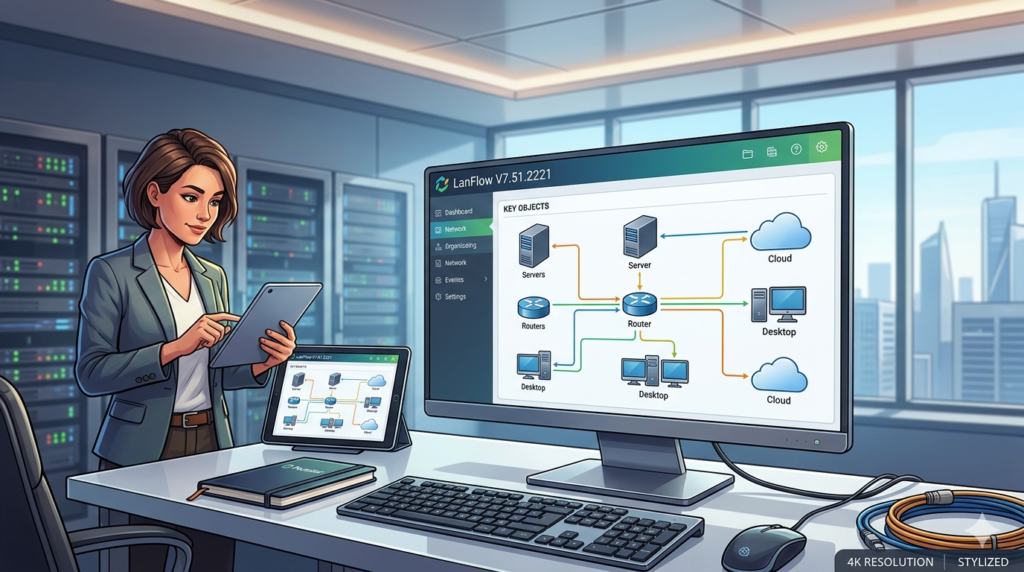
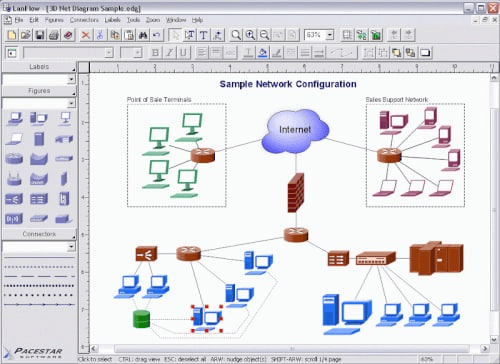
Pacestar LanFlow is a dedicated network diagram software that enables users to create professional local area network (LAN), wide area network (WAN), and cloud infrastructure diagrams. Unlike general-purpose drawing tools, LanFlow focuses exclusively on network visualization, offering pre-built device shapes, automatic connection routing, and hierarchical diagram structures.
Version 7.51.2221 continues this tradition by refining the user interface and adding support for modern network components such as software-defined networking (SDN) nodes, virtual switches, and advanced firewall symbols. The software runs natively on Windows and integrates with common documentation formats like Microsoft Visio through import/export compatibility.
Key Features
Pacestar LanFlow includes a range of features tailored for network documentation and design:
-
Pre-drawn network symbols: Over 1,000 device shapes including routers, switches, firewalls, servers, workstations, printers, and cloud icons
-
Auto-routing connections: Intelligent line routing that avoids overlapping and adjusts automatically when shapes are moved
-
Layer-2 and layer-3 diagrams: Support for physical cabling layouts and logical IP subnet representations
-
Hierarchical diagramming: Collapsible subnets and container objects for large enterprise networks
-
Multiple export formats: PNG, JPEG, BMP, EMF, PDF, and SVG for documentation and presentations
-
Print and page setup controls: Scale diagrams to fit paper sizes or create poster-sized prints
-
Template library: Pre-built templates for star, mesh, ring, bus, and hybrid topologies
-
Visio compatibility: Import Visio stencils (VSS) and export to Visio XML format
What’s New in Version 7.51.2221
The latest release, V7.51.2221, introduces several improvements over previous versions:
-
Updated device symbol library: Added symbols for next-generation firewalls, SD-WAN appliances, and hyperscale cloud providers (AWS, Azure, Google Cloud)
-
Enhanced zoom and pan performance: Smoother navigation for diagrams with more than 500 objects
-
Improved grid and alignment tools: Snap-to-grid enhancements and distance measurement guides
-
New connection styles: Dashed lines, colored routes, and label positioning options for trunk links and VLAN paths
-
Export to vector formats: High-resolution SVG and EMF output for embedding in technical documents
-
Bug fixes: Resolved connection routing errors when deleting intermediate shapes and improved undo/redo stability
System Requirements
To run Pacestar LanFlow V7.51.2221 efficiently, your system should meet the following specifications:
| Component | Minimum Requirement |
|---|---|
| Operating System | Windows 7, 8, 10, or 11 (32-bit or 64-bit) |
| Processor | 1 GHz or faster |
| RAM | 512 MB (1 GB recommended) |
| Hard Disk Space | 50 MB for installation |
| Display Resolution | 1024 x 768 or higher |
| Additional Software | .NET Framework 4.0 or later (included if needed) |
The software runs on Windows Server editions as well, making it suitable for remote desktop environments and lab virtual machines.
Installation Guide
Installing Pacestar LanFlow is straightforward. Follow these steps:
-
Download the installer from the official Pacestar website or a verified software distributor.
-
Run the executable (LanFlowSetup.exe) as an administrator.
-
Accept the license agreement after reading the terms.
-
Choose installation directory (default:
C:\Program Files\Pacestar\LanFlow). -
Select components – All features are recommended for full functionality.
-
Complete installation – The setup wizard will create shortcuts on the desktop and Start menu.
-
Activate your license – Enter the license key provided upon purchase. A free trial mode is available with saving disabled.
How to Use the Software
Creating Your First Network Diagram
-
Launch LanFlow and select “New Diagram” from the welcome screen.
-
Choose a template (e.g., Star Topology, Basic Office LAN) or start blank.
-
Drag and drop symbols from the left-hand stencil library onto the canvas.
-
Connect devices by clicking the connection tool, then clicking on two symbols.
-
Label components by double-clicking a shape and entering device names or IP addresses.
-
Add subnets using the container shape to group devices logically.
-
Save your work as a native
.lanfile or export to an image format.
Advanced Techniques
-
Auto-layout: Use Diagram > Auto-Route to reorganize connections cleanly.
-
Custom stencils: Create and save custom device groups for reuse across projects.
-
Layer management: Hide or lock layers for complex multi-level diagrams.
-
Batch export: Export all pages of a multi-page diagram to separate image files.
Best Use Cases
Pacestar LanFlow excels in specific professional scenarios:
| Use Case | Description |
|---|---|
| Network documentation | Create accurate as-built diagrams for audits and compliance (ISO, SOC2, NIST) |
| Pre-sales proposals | Design proposed network architectures for client presentations |
| Troubleshooting references | Map out device dependencies and cable paths for faster incident response |
| IT training materials | Build clear topology diagrams for junior engineers and students |
| Change management | Visualize planned network upgrades before implementation |
| Inventory mapping | Link diagrams to spreadsheets for switch ports, VLANs, and IP assignments |
Advantages and Limitations
Advantages
-
Purpose-built for networking – faster than general tools like Visio or Draw.io
-
Low learning curve – IT teams can become productive within an hour
-
Affordable licensing – Perpetual license model without subscription fees
-
Lightweight – Runs on older hardware and remote sessions
-
Professional output – Vector exports suitable for documentation and printing
Limitations
-
Windows only – No native macOS or Linux versions
-
No real-time collaboration – Lacks cloud-based multi-user editing
-
Limited automation – No API or scripting for diagram generation from live network data
-
Basic styling – Fewer gradient and 3D effects compared to high-end design tools
-
Manual updates – Device symbols must be updated manually; no auto-sync with vendor catalogs
Alternatives to Pacestar LanFlow
If you are evaluating network diagramming tools, consider these alternatives:
| Software | Platform | Key Strength | Pricing Model |
|---|---|---|---|
| Microsoft Visio | Windows, Web | Enterprise integration | Subscription (Microsoft 365) |
| Draw.io (diagrams.net) | Web, Desktop | Free, cloud-friendly | Free / Open source |
| Lucidchart | Web, Mobile | Real-time collaboration | Subscription |
| Dia | Windows, Linux | Open source, lightweight | Free |
| ConceptDraw DIAGRAM | Windows, Mac | Advanced formatting | Perpetual license |
| NetTerrain | Web, Windows | Auto-discovery + diagrams | Subscription (enterprise) |
Choose LanFlow if you need a fast, Windows-native tool without ongoing fees. Choose Lucidchart or Draw.io for team collaboration. Choose Visio for deep Office 365 integration.
Frequently Asked Questions
Is Pacestar LanFlow free to use?
No, LanFlow is commercial software. A free trial is available with full functionality except saving and exporting. Paid licenses are perpetual.
Can LanFlow import existing Visio diagrams?
Yes, LanFlow can import Visio stencil files (.VSS) and some Visio drawing formats. However, complex Visio diagrams with custom macros or embedded objects may not render perfectly.
Does LanFlow support IPv6 and VLAN tagging in diagrams?
Yes, you can label connections and devices with IPv6 addresses and VLAN IDs. The software does not auto-calculate subnets, but manual labeling is fully supported.
Can I use LanFlow on a Mac?
Not natively. However, LanFlow runs under Windows emulation software like Parallels Desktop, VMware Fusion, or CrossOver. Performance may vary.
What file formats can I export from LanFlow?
You can export to PNG, JPEG, BMP, EMF, PDF, and SVG. PDF and SVG are recommended for documentation and vector editing.
Does LanFlow integrate with network discovery tools like SNMP?
No, LanFlow is a manual diagramming tool. It does not discover devices or generate diagrams automatically from live network scans.
How often does Pacestar release updates?
Minor updates (e.g., V7.51.x) are released quarterly for bug fixes and symbol library additions. Major version upgrades (e.g., V7 to V8) are released every 12–18 months.
Is technical support included with the license?
Yes, registered users receive email-based technical support. Phone support is not available, but response times are typically within one business day.
Final Thoughts
Pacestar LanFlow V7.51.2221 remains a reliable, focused tool for network professionals who need to produce clean, accurate diagrams without the overhead of subscription-based or overly complex software. Its strength lies in simplicity: drag, drop, connect, and annotate. While it lacks cloud collaboration and auto-discovery features, its low cost, lightweight design, and Windows-native performance make it an excellent choice for internal IT documentation, consulting proposals, and training materials.
If your team works primarily on Windows and values perpetual licensing over recurring fees, LanFlow deserves a place in your technical toolkit. For collaborative or cross-platform environments, consider supplementing it with cloud-based alternatives. Regardless, version 7.51.2221 delivers a stable, incrementally improved experience that respects the original purpose of network diagramming: clarity over complexity.
Premium Software Support Service
If you need professional help with software installation, setup, or technical configuration, our team is available to assist you.
Contact & Support
For quick assistance and latest updates, connect with us using the links below:
🔹 Direct Telegram Support
https://t.me/PlayoutKing
🔹 Official Telegram Updates Group
https://t.me/yourgroup
Service Policy
- Remote testing available through AnyDesk before confirmation.
• Verify the setup and performance before completing the order.
• Support available for single or multiple systems.
• Step-by-step guidance to ensure smooth installation and working environment.
Our goal is to provide reliable technical assistance so your software runs smoothly without interruptions.