


Overview of MV Playout 40 Channel Ver.2.0
Table of Contents
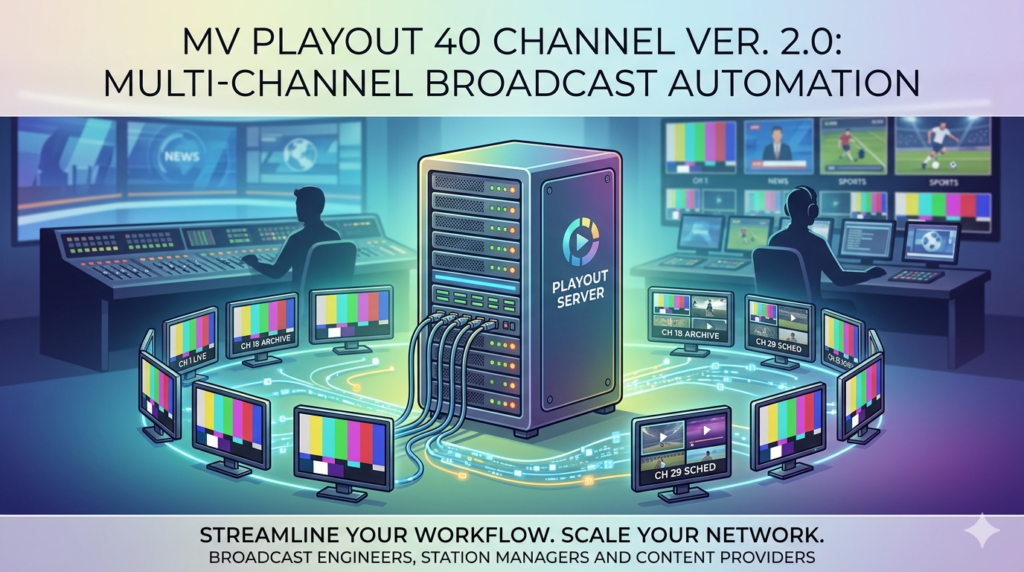
MV Playout 40 Channel Ver.2.0 (often referred to as Master Control Playout Software) acts as the central nervous system for broadcast operations. Unlike basic media players, this software allows broadcasters to manage up to 40 discrete channels simultaneously from a single interface. It is built for cable TV networks, corporate broadcasters, and IPTV providers who require reliable, automated content delivery without continuous manual oversight.
The software bridges the gap between scheduled programming and live events, ensuring that transitions between pre-recorded ads, shows, and live feeds occur seamlessly.
Key Features of Version 2.0
The Ver.2.0 release introduces significant stability and feature upgrades over previous iterations. Below are the core functional areas:
Multi-Channel Automation Engine
-
Simultaneous Playout: Manage up to 40 independent channels.
-
Intelligent Scheduling: Drag-and-drop playlist creation with conflict detection.
-
Failover Protection: Automatic switching to backup media if a primary file is corrupted.
Real-Time Graphics & Logo Insertion
-
Dynamic Overlays: Insert station logos (PNG with alpha channel), clocks, and weather widgets.
-
Text Tickers: Scroll news or emergency alerts across the bottom of the screen without interrupting the main video.
-
GPU Acceleration: Uses graphics card processing to reduce CPU load during rendering.
Extensive File Format Compatibility
MV Playout 40 Channel supports professional broadcast formats including:
-
Containers: MP4, MOV, AVI, MXF, MKV.
-
Codecs: H.264, H.265 (HEVC), ProRes, DNxHD.
-
Audio: AAC, MP3, PCM (16-bit and 24-bit).
Live Input Switching
The software accepts live feeds via SDI, NDI, or IP streaming (RTMP/ SRT). This allows operators to cut away from scheduled files to a live studio camera or remote reporter instantly.
What’s New in MV Playout 40 Channel Ver.2.0
The transition from Version 1.x to Ver.2.0 focuses on operational intelligence:
-
Web-Based Remote Control: Operators can now manage playlists and start emergency triggers via a local network web browser (no remote desktop software required).
-
Advanced ASRun Logging: Automatic creation of “As-Run” logs for advertising compliance and audit trails.
-
Improved H.265 Efficiency: Reduced storage and bandwidth requirements for 1080p and 4K channels.
-
Audio Mapping: Individual gain control and channel remapping for stereo, 5.1, or dual-mono audio tracks.
System Requirements (Recommended)
To run 40 channels efficiently, your hardware must meet these specifications:
| Component | Minimum Requirement | Recommended (40 Channels) |
|---|---|---|
| OS | Windows 10 Pro (64-bit) | Windows Server 2019 / Windows 11 Pro |
| CPU | Intel Core i7 (8th Gen) | Dual Intel Xeon or AMD Ryzen Threadripper |
| RAM | 16 GB | 32 GB – 64 GB |
| Storage | 1 TB HDD | 4 TB NVMe SSD (RAID 10 for media storage) |
| GPU | NVIDIA GTX 1050 Ti | NVIDIA RTX 3060 or higher (for graphics rendering) |
| Network | Gigabit Ethernet | 10GbE for multi-channel streaming output |
Installation Guide
Step-by-Step Setup
-
Disable Antivirus Temporarily: Some broadcast tools require low-level hardware access. Add the installation folder to your antivirus exceptions list.
-
Run as Administrator: Right-click the installer
MVPlayout_40ch_v2.0.exeand select Run as Administrator. -
Select Components: Choose “Full Installation” (includes sample clips and codec packs).
-
License Activation: Enter your 25-character license key. Do not use unauthorized keygens or patches.
-
Audio Device Setup: Configure your ASIO or WDM audio driver for proper sync.
How to Use the Software for 40-Channel Broadcasting
Once installed, follow this workflow to get 40 channels on air.
Configuring Channel Outputs
Navigate to Settings > Channel Mapper. Assign each of the 40 channels a specific output:
-
Output 1-20: RTMP streams to CDN.
-
Output 21-35: Local DeckLink SDI cards.
-
Output 36-40: NDI streams for internal monitoring.
Building a Playlist
-
Click New Playlist.
-
Drag media files from the “Library” panel to the timeline.
-
Right-click a clip > Set In/Out points to trim ads.
-
Apply Transition effects (Crossfade, Slide) between clips.
Automation Rules
To run 24/7 without human input:
-
Go to Rules Engine.
-
Create a rule: If playlist ends, Loop from beginning.
-
Create a rule: *If time = 18:00, insert “Evening News.mxf”.*
Best Use Cases for MV Playout 40 Channel
This software is not for casual video editing; it is for professional broadcast environments.
-
Cable TV Headends: Distributing 40 different local ad inserts to different neighborhoods.
-
Hotel TV Systems: Running welcome channels, information loops, and pay-per-view promotion on separate channels.
-
Religious Organizations: Streaming 10 different languages of the same service plus 30 music channels.
-
Community Access TV: Automating public meetings and local sports replays overnight.
Advantages and Limitations
Advantages (Pros)
-
Cost per channel: Extremely low compared to hardware-based playout servers.
-
Scalability: Start with 1 channel, scale to 40 on the same PC.
-
Support for legacy codecs: Still plays older MPEG-2 files without transcoding.
Limitations (Cons)
-
Windows dependency: Cannot run natively on Linux or macOS (requires virtual machine).
-
Learning curve: Setting up 40 channels with distinct audio routings requires a network engineer.
-
No built-in transcoder: You must convert unsupported files externally before importing.
Alternatives to MV Playout 40 Channel Ver.2.0
If this solution does not fit your workflow, consider these legitimate competitors:
| Software | Max Channels | Best For | Pricing Model |
|---|---|---|---|
| OBS Studio | 1 (with plugins) | Low-budget live streaming | Free (Open Source) |
| vMix Pro | 8 | Live event production | $700 (One-time) |
| PlayBox Neo | Unlimited | Enterprise broadcasters | Custom quote |
| Tv (TVPlay) | 16 | Eastern European broadcasters | Subscription |
Frequently Asked Questions (FAQ)
Q1: Can MV Playout 40 Channel Ver.2.0 output 4K resolution?
Yes, it supports 4K (3840×2160) output for up to 10 channels simultaneously, provided your GPU has enough VRAM (8GB+).
Q2: Does this software require a hardware dongle?
Version 2.0 offers both USB hardware dongle activation and cloud-based floating license activation. Check with your vendor.
Q3: How do I legally obtain MV Playout 40 Channel Ver.2.0?
You must purchase a license from the official developer website or an authorized reseller like BroadcastStore or B&H Photo Video.
Q4: Is there a demo version to test 40 channels?
Yes, a 30-day trial is available that allows 40 channels with a watermark overlay.
Q5: What happens if a video file is missing during playback?
The software logs an error and automatically skips to the next playable file. You can configure it to play a “Technical Difficulties” slate instead.
Q6: Can I integrate this with an EPG (Electronic Program Guide)?
Yes. Ver.2.0 exports XMLTV files which can be uploaded to IPTV middleware (like Ministra or Xtream UI).
Final Thoughts
MV Playout 40 Channel Ver.2.0 represents a mature solution for broadcasters who need to move beyond consumer-grade video players. While it requires a significant initial investment in hardware and a legitimate software license, the return on investment comes from 24/7 reliability and the ability to hyper-target content across 40 distinct channels.
For media companies looking to automate their playout chain without paying enterprise prices (six figures), this software strikes an excellent balance between professional features and operational cost.
Our Paid Service
Looking for full-version software without limitations? You’re in the right place. Instead of wasting time on unreliable or outdated sources, unlock a powerful bundle of 10k+ premium tools covering marketing, SEO, broadcasting, automation, and business productivity — all in one place at an affordable price. This collection is specially curated for freelancers, agencies, and business owners who want fast, real results with professional tools.
Direct contact: Telegram ID :
Join Us For Update Telegram Group :
Join Us For Updated WhatsApp group:
You Can test through AnyDesk before Buying,
And When You Are Satisfied, Then Buy It.
Unlimited PCs/Users.
Join today and upgrade your workflow with premium tools.