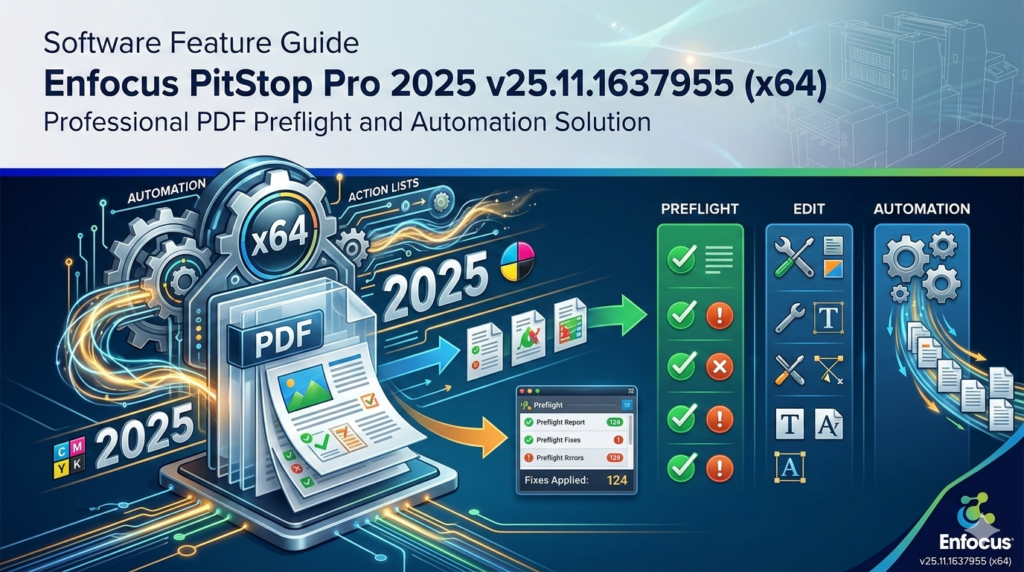


Download Enfocus PitStop Pro 2025 (v25.11.1637955 x64) – a professional PDF preflight and automation solution.
Start your free 30-day trial of PitStop Pro today.

Overview of the Software
Table of Contents
In the high-stakes world of professional printing, a single undetected error in a PDF can lead to costly reprints, wasted materials, and missed deadlines. Enfocus PitStop Pro 2025 (version 25.11.1637955, x64) is the industry-standard PDF preflight and editing plugin that transforms Adobe Acrobat Pro from a simple document viewer into a powerful, production-grade quality control center. Developed by Enfocus, a recognized leader in PDF automation, this tool is indispensable for prepress operators, graphic designers, and print professionals working in commercial printing, packaging, and large-scale digital workflows.
Unlike basic PDF viewers, Enfocus PitStop Pro acts as a comprehensive inspection and repair system. It allows you to not only detect complex errors—such as missing fonts, RGB images, or incorrect color spaces—but also to fix them directly at the object level. This capability eliminates the costly and time-consuming back-and-forth with graphic designers, empowering your team to take control of file quality and ensure every job is press-ready.
Key Features
Enfocus PitStop Pro 2025 is packed with advanced tools designed to streamline prepress workflows. Its power lies in its ability to move from simple error detection to automated, large-scale correction.
Advanced Preflight Capabilities
Preflight is the automated process of inspecting a PDF against a set of predefined rules. Enfocus PitStop Pro elevates this with industry-standard profiles based on PDF/X, PDF/A, and Ghent PDF Workgroup (GWG) specifications. It scans every element within the file—text, images, vector graphics, fonts, and color profiles—flagging any deviations from your chosen output standard, such as incorrect bleed, overprint conflicts, or resolution issues.
Object-Level Editing
This is where PitStop Pro distinguishes itself from standard Acrobat tools. You can directly select and modify individual elements within a PDF. Need to change the color of a specific vector line? Adjust the font size in a single text block? Move a dieline for packaging? Object-level editing allows you to make these precise corrections without needing access to the original source files, such as those from Adobe InDesign or Illustrator.
Automation with Action Lists
Action Lists are sequences of automated commands that function like macros for PDF correction. You can record a series of fixes and apply them to hundreds of files in seconds. For example, an Action List can:
-
Convert all RGB images to CMYK.
-
Scale page content to add a standard bleed.
-
Set a specific resolution for all images below a threshold.
-
Flatten transparency for compatibility with older RIPs.
This rule-based automation is the cornerstone of efficiency in high-volume print environments.
Global Changes
The Global Changes feature allows you to apply a modification consistently across an entire document or multiple documents. If a client’s logo color needs a slight hue adjustment, you can make that change universally with a few clicks, ensuring brand consistency without manual, page-by-page editing.
Detailed Preflight Reports
Communication is key in prepress. PitStop generates comprehensive, shareable preflight reports that outline every issue detected within a file. These logs can be shared with clients to justify corrections or archived for internal quality assurance, which is especially critical in regulated sectors like pharmaceutical packaging.
What’s New in the Latest Version (v25.11.1637955)
The 2025 release of Enfocus PitStop Pro focuses on enhancing performance, expanding automation capabilities, and supporting the latest industry standards.
-
Enhanced Performance for Complex Files: The x64 architecture in version 25.11.1637955 is fully optimized for modern hardware, offering significantly faster preflighting and processing of large-format packaging files and image-rich catalogs.
-
Updated PDF Standards Support: This version includes the latest ISO PDF standards for print, ensuring your output is always compliant with evolving industry requirements.
-
Improved User Interface: Workflow efficiency is boosted with a refined interface that streamlines access to frequently used Action Lists and Global Changes, reducing the number of clicks needed to perform common tasks.
System Requirements
As a plugin for Adobe Acrobat, Enfocus PitStop Pro’s requirements are tied to Adobe’s ecosystem. For optimal performance with version 25.11.1637955 (x64), your system should meet these criteria:
Supported Operating Systems:
-
Windows: 64-bit versions of Windows 11 or Windows 10.
-
macOS: Latest versions of macOS (macOS Ventura, Sonoma, and Sequoia typically supported; check Enfocus documentation for specific build compatibility).
Software Compatibility:
-
Adobe Acrobat: A compatible 64-bit version of Adobe Acrobat Pro DC (Continuous or Classic track) is required.
Recommended Hardware:
-
RAM: 8GB minimum; 16GB or more is strongly recommended for processing complex, high-resolution files.
-
Processor: Modern multi-core processor (Intel Core i5/i7 or AMD equivalent).
-
Storage: Fast SSD storage for quick file access and temporary file processing during batch operations.
Installation Guide
Installing PitStop Pro 2025 is a straightforward process, but it requires that Adobe Acrobat Pro be installed first.
-
Prerequisite: Ensure you have a licensed and updated version of 64-bit Adobe Acrobat Pro DC installed on your system and close it completely.
-
Download: Download the official Enfocus PitStop Pro 2025 v25.11.1637955 (x64) installer from a legitimate software provider or the official Enfocus website.
-
Run Installer: Right-click the downloaded installer file and select “Run as Administrator” to ensure proper integration with your system.
-
Follow Prompts: Follow the on-screen instructions. The installer will automatically detect your installation of Adobe Acrobat.
-
Activation: Once the installation is complete, open Adobe Acrobat Pro. You will find a new “Enfocus” or “PitStop” menu in the main toolbar. You must enter your license serial number to activate the plugin.
How to Use the Software
Harnessing the power of PitStop Pro involves moving from manual inspection to automated correction. Here’s a basic workflow:
-
Open a PDF in Acrobat Pro: Launch Adobe Acrobat and open the file you need to process.
-
Run a Preflight Check: Navigate to the Enfocus PitStop Pro toolbar and select “Preflight.” Choose a preflight profile that matches your output requirements (e.g., “PDF/X-4 for Commercial Printing”).
-
Review the Report: After the scan, review the detailed preflight report. This will list all errors, warnings, and ignored items, such as images with low resolution or text using RGB black.
-
Apply Automated Fixes: For common issues, run a pre-configured Action List. Go to “Action Lists,” select one (e.g., “Convert RGB to CMYK”), and apply it to the document. The software will instantly make the corrections.
-
Perform Manual Edits: For unique problems, use the “Edit PDF” tools within the PitStop menu to select and modify specific objects directly on the page.
Best Use Cases
PitStop Pro is a versatile tool that solves critical problems across various print sectors.
-
Commercial Printing: Preflighting client files for flyers, brochures, and business cards. Automatically correct common errors like RGB images, hairline rules, and missing bleeds before platesetting.
-
Packaging Production: Managing complex dielines, verifying spot colors (e.g., Pantone), and ensuring that varnish and embossing layers are correctly defined and separated.
-
Large-format Digital Printing: Checking image resolution for banners and posters, and converting files to the correct color space for large-format inkjet devices.
-
Publishing: Ensuring book and magazine files comply with strict PDF/X standards for print-on-demand or offset reproduction.
Advantages and Limitations
Advantages |
Limitations |
|---|---|
| Deep Integration: Seamlessly integrates into Adobe Acrobat, leveraging a familiar interface. | Requires Acrobat: It is not a standalone application; a licensed copy of Adobe Acrobat Pro is mandatory. |
| Unmatched Automation: Action Lists and Global Changes save countless hours by automating repetitive tasks. | Learning Curve: Mastering the full potential of Action Lists and advanced preflight profiles requires training and practice. |
| Object-Level Precision: Allows for surgical edits to PDFs without needing original design files. | Cost: It is a premium professional tool, representing a significant investment for smaller shops or individual designers. |
| Industry Standard: Its reports and capabilities are universally recognized and trusted in the print industry. |
Alternatives to the Software
While PitStop Pro is the market leader, several alternatives exist for PDF quality control.
-
Callas pdfToolbox: A direct and powerful competitor that can be used as a plugin for Acrobat, a server-based automation tool, or a standalone application. It offers comparable preflight and automation capabilities.
-
Adobe Acrobat Pro DC (Built-in Preflight): Acrobat includes a basic preflight module. While useful for simple checks, it lacks the deep object-level editing, extensive automation (Action Lists), and global change features of PitStop Pro.
-
Markzware FlightCheck: A standalone preflight application that checks not only PDFs but also native files from design applications like InDesign and Illustrator, catching errors at the source.
Frequently Asked Questions
1. Is PitStop Pro a standalone program or a plugin?
PitStop Pro is a plugin that integrates directly into Adobe Acrobat Pro. You must have Acrobat Pro installed to use it.
2. Can I edit text and images in a PDF without the source file?
Yes. PitStop Pro’s object-level editing tools allow you to modify text, adjust images, and manipulate vector elements directly within the PDF.
3. What is an Action List and why is it important?
An Action List is a set of automated commands that you can run on one or hundreds of PDFs at once. It’s important because it automates repetitive correction tasks, ensuring consistency and dramatically speeding up your workflow.
4. Will PitStop Pro work with my version of Adobe Acrobat?
PitStop Pro is designed for specific versions of Acrobat. Always check the official Enfocus documentation or the product specifications for version 25.11.1637955 to confirm compatibility with your specific release of Acrobat Pro DC (e.g., 2023 or 2024 versions).
5. Does it support PDF/X standards?
Yes, PitStop Pro is the industry standard for enforcing PDF/X compliance. It includes a comprehensive library of preflight profiles for all major PDF/X formats (PDF/X-1a, PDF/X-3, PDF/X-4, etc.).
6. What kind of preflight reports does it generate?
It generates detailed, interactive reports that list every error, warning, and ignored item found in the PDF. These reports can be saved, printed, or shared with clients as proof of quality control.
7. Can I use PitStop Pro on a network or server for automated workflows?
For server-based automation, Enfocus offers PitStop Server. PitStop Pro is the desktop version designed for interactive use. However, both integrate seamlessly with automation platforms like Enfocus Switch.
Final Thoughts
Enfocus PitStop Pro 2025 v25.11.1637955 (x64) remains the gold standard for PDF quality control in the professional print industry. It transcends the function of a simple plugin, acting as a critical command center that ensures file integrity from creation to press. By combining deep preflight analysis, precise object-level editing, and powerful automation through Action Lists, it empowers prepress professionals to eliminate errors, reduce waste, and meet the most demanding deadlines with confidence.
For any business where printing precision is paramount, the investment in PitStop Pro translates directly into operational efficiency, cost savings, and the ability to consistently deliver flawless results.
Premium Software Support Service
If you need professional help with software installation, setup, or technical configuration, our team is available to assist you.
Contact & Support
For quick assistance and latest updates, connect with us instantly:
If Telegram app doesn’t open, it will automatically open in your browser.
Service Policy
- Remote testing available through AnyDeskbefore confirmation.
• Verify the setup and performance before completing the order.
• Support available for single or multiple systems.
• Step-by-step guidance to ensure smooth installation and working environment.
Our goal is to provide reliable technical assistance so your software runs smoothly without interruptions.