

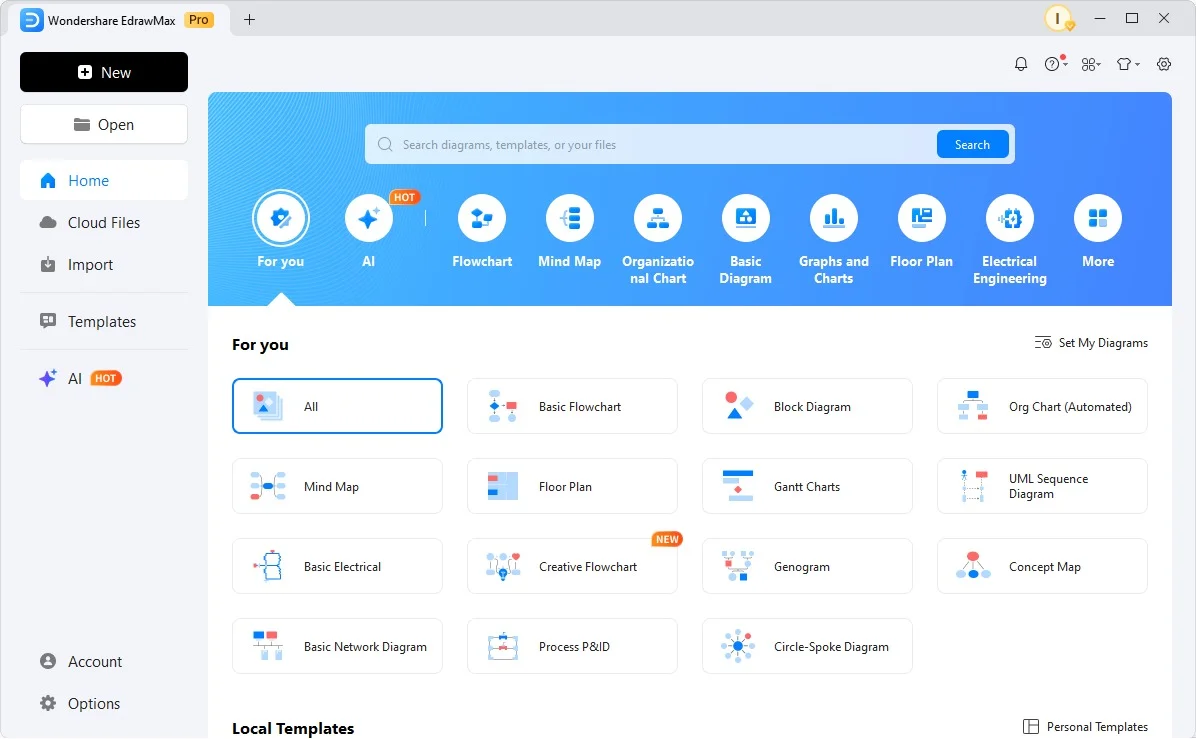
Overview of EdrawMax 15.2.1.1532
Table of Contents
EdrawMax 15.2.1.1532 is a full-featured diagramming and vector design application developed by Wondershare. This version represents a significant update to the software, focusing on enhanced stability, improved template rendering, and faster file export processing. As a leading alternative to Visio, EdrawMax enables professionals, educators, and students to create over 280 types of diagrams, including flowcharts, network diagrams, floor plans, and infographics.
The latest iteration—version 15.2.1.1532—specifically addresses user-reported bugs related to symbol alignment on high-resolution displays and optimizes the import of SVG files. This article provides a complete walkthrough of its features, installation process, use cases, and legitimate alternatives.
Key Features
EdrawMax 15.2.1.1532 is packed with tools that serve both novice designers and experienced engineers. Below are its core capabilities:
-
Extensive Template Library: Access over 1,500 pre-designed templates and 26,000 vector symbols.
-
Multi-Format Export: Export diagrams to Visio (VSDX), PDF, Word, Excel, PowerPoint, SVG, and image formats.
-
Cross-Platform Synchronization: Available on Windows, macOS, Linux, Web, and mobile devices (iOS/Android).
-
AI-Powered Smart Alignment: Automatic snapping, spacing, and layout suggestions.
-
Real-Time Collaboration: Team members can co-edit diagrams via cloud storage.
-
One-Click Data Visualization: Import Excel data to generate Gantt charts, P&IDs, and UML diagrams automatically.
-
Custom Stencil Creator: Build and save personalized symbol libraries.
What’s New in Version 15.2.1.1532
This maintenance release focuses on performance and user experience:
-
Improved SVG Handling: Fixed layer distortion when editing imported SVGs.
-
Enhanced 4K Display Support: Corrected icon scaling and text rendering on ultra-HD monitors.
-
Faster Cloud Sync: Reduced latency for auto-save operations on Wondershare Cloud.
-
Stability Fixes: Resolved random crashes when working with large floor plans (over 15 MB).
-
Batch Export Upgrade: Now allows simultaneous export of multiple pages to PDF.
System Requirements
To install EdrawMax 15.2.1.1532 legally and run it efficiently, ensure your hardware meets the following minimum specifications:
| Component | Windows | macOS |
|---|---|---|
| OS | Windows 10 / 11 (64-bit) | macOS 11 (Big Sur) or later |
| CPU | 1 GHz or faster | Intel or Apple Silicon |
| RAM | 4 GB (8 GB recommended) | 4 GB |
| Storage | 2 GB available space | 2 GB available space |
| Display | 1280 x 768 resolution | 1280 x 768 resolution |
| Network | Required for activation & cloud features | Required for activation & cloud features |
Installation Guide
Follow these steps to download and install the official version of EdrawMax:
-
Visit the Official Website: Go to the Wondershare EdrawMax download page.
-
Select Your OS: Choose the Windows, macOS, or Linux installer.
-
Run the Installer: Execute the downloaded
.exe(Windows) or.dmg(macOS) file. -
Accept Permissions: Grant administrator access if prompted.
-
Choose Setup Type: Select “Typical Installation” for standard components or “Custom” to change the install path.
-
Launch the Application: After installation, open EdrawMax and register with an email or social account.
-
Activate License: Enter a purchased license key or start the free trial.
How to Use the Software
Creating a professional diagram in EdrawMax requires just a few steps:
Creating a New Diagram
-
Open the software and click “New” on the left sidebar.
-
Select a category (e.g., Flowchart, Mind Map, Floor Plan).
-
Double-click a template or choose a blank canvas.
Adding and Connecting Symbols
-
Drag symbols from the left library onto the canvas.
-
Use the auto-connect tool to draw lines between shapes.
-
Right-click to format fill color, line weight, or shadow.
Exporting Your Work
-
Click File > Export > [Format] .
-
Select PDF for printing, SVG for web use, or Visio for Microsoft compatibility.
-
Adjust DPI (300 dpi for publication) before saving.
Best Use Cases
EdrawMax serves multiple professional domains:
-
Business Analysts: Create BPMN, SWOT analysis, and value stream maps.
-
IT & Network Engineers: Design AWS architecture, network topologies, and UML diagrams.
-
Project Managers: Build Gantt charts, timelines, and WBS structures.
-
Educators: Develop lesson plans, lab diagrams, and interactive quizzes.
-
Home Users: Draw room layouts, electrical plans, or family trees.
Advantages and Limitations
Advantages
-
All-in-One Solution: Replaces multiple tools (Visio, Lucidchart, SmartDraw).
-
Offline Mode: Full functionality without an internet connection.
-
Visio Import/Export: Seamless work with Microsoft Visio files.
-
Regular Updates: Version 15.2.1.1532 proves active maintenance.
Limitations
-
Learning Curve: Advanced features (custom data fields) require tutorials.
-
Subscription Model: No perpetual license for the latest version.
-
Resource Usage: Large diagrams (500+ shapes) consume significant RAM.
Alternatives to EdrawMax 15.2.1.1532
If you are evaluating other legitimate diagramming tools, consider these options:
| Software | Best For | Platform | Pricing Model |
|---|---|---|---|
| Microsoft Visio | Enterprise process mapping | Windows | Subscription (Microsoft 365) |
| Lucidchart | Real-time team collaboration | Web-based | Monthly/Yearly |
| Draw.io (diagrams.net) | Free, open-source diagrams | Web, Desktop | Free (MIT license) |
| ConceptDraw DIAGRAM | Project management integration | Windows, macOS | Perpetual license |
| Miro | Whiteboarding & agile workflows | Web-based | Freemium |
Frequently Asked Questions (FAQ)
Q1: Is EdrawMax 15.2.1.1532 free to use?
Yes, Wondershare offers a free trial with full editing features. However, exported files will include a watermark. A paid license removes the watermark and unlocks cloud collaboration.
Q2: Can I open Microsoft Visio files in EdrawMax?
Absolutely. EdrawMax supports importing VSD, VSDX, and VDX formats. You can also edit Visio stencils directly within the software.
Q3: Does version 15.2.1.1532 work on Mac M1/M2 chips?
Yes. This version runs natively on Apple Silicon (M1, M2, M3) via a dedicated macOS ARM64 build, ensuring better performance than emulated versions.
Q4: How do I update from an older EdrawMax version?
Open the application, go to Help > Check for Updates. The software will automatically download and install the latest build (15.2.1.1532) without losing your local templates.
Q5: What file formats can I export to?
You can export to 15+ formats, including PDF, SVG, HTML, PNG, JPEG, Word, Excel, PowerPoint, and Visio.
Q6: Is my data safe when using EdrawMax Cloud?
Yes. EdrawMax uses AES-256 encryption for stored diagrams and TLS 1.3 for data in transit. Wondershare complies with GDPR and CCPA regulations.
Q7: Can I use EdrawMax offline?
Yes. Once installed and activated, the desktop application works entirely offline. Only cloud sync, template downloads, and real-time collaboration require an internet connection.
Q8: Does this software include AI features?
Yes. EdrawMax 15.2.1.1532 includes an AI diagram generator that can create flowcharts from text prompts, though this feature requires an active internet connection and a paid subscription.
Final Thoughts
EdrawMax 15.2.1.1532 stands as a mature, legally compliant, and feature-rich alternative to complex diagramming tools. Its latest patch improves stability and high-DPI rendering, making it a reliable choice for both Windows and macOS users.
For professionals seeking a single application to handle everything from network maps to floor plans, EdrawMax offers the best balance of power and usability. Always download the software directly from the official Wondershare website to ensure security and full functionality. Avoid any third-party sites offering “cracked” versions—these not only violate copyright law but also risk exposing your system to malware.
Our Paid Service
“We do not sell or provide any software. We only offer professional support services. If any software on your system is not working properly, or you are facing installation errors, crashes, or any other technical issue — just contact us. We will help you fix the problem quickly and remotely via AnyDesk. No software will be provided from our side — only expert troubleshooting and support.”