

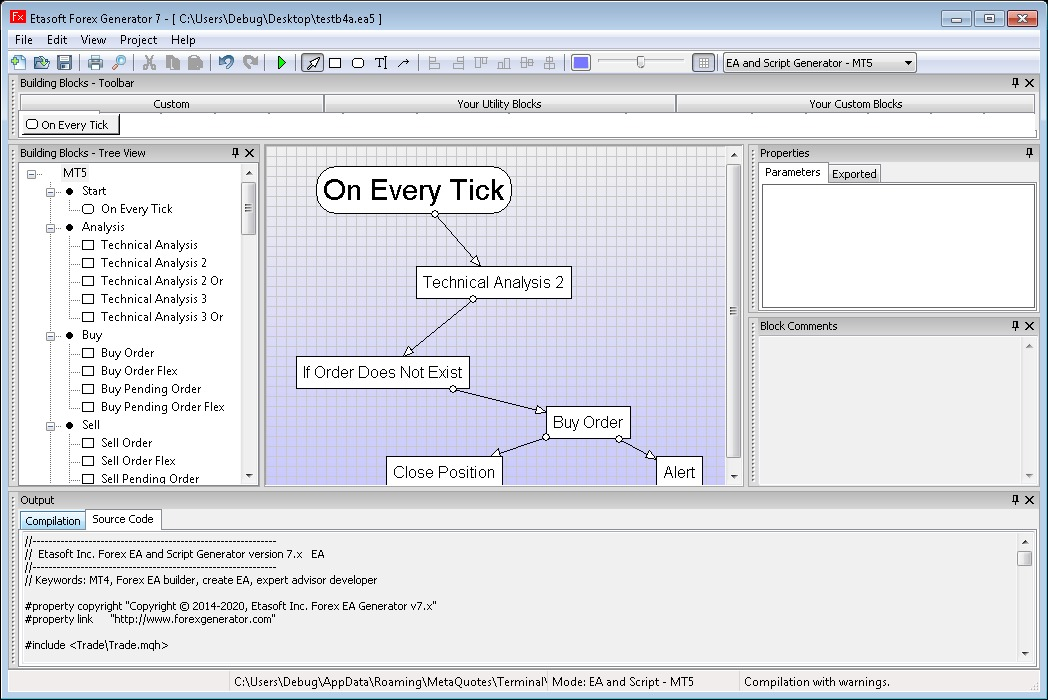
Download the EA Forex Generator V7.5.1 (Build Custom Forex Robots for MetaTrader) from this link…

Overview of the Software
Table of Contents
EA Forex Generator V7.5.1 is a powerful desktop application designed for retail Forex traders who want to create automated trading strategies without writing a single line of code. Instead of purchasing expensive, pre-built Expert Advisors (EAs) that may not fit your specific trading style, this software allows you to generate custom EAs for the MetaTrader 4 (MT4) platform using a simple, rule-based visual interface.
The software acts as a code generator, translating your trading logic (indicators, entry/exit rules, money management) into the native MQL4 language. This version, V7.5.1, is particularly noted for its stability, expanded indicator library, and improved backtesting accuracy compared to earlier releases.
Key Features
EA Forex Generator V7.5.1 provides a comprehensive toolkit for strategy development. Below are its core capabilities:
-
Visual Strategy Builder: Use drag-and-drop logic blocks to define entry conditions (e.g., “When RSI crosses below 30 AND Moving Average slope turns positive”).
-
Extensive Indicator Library: Includes over 50 built-in indicators (MACD, Stochastic, Bollinger Bands, Alligator, Fractals) plus custom indicator support.
-
Advanced Money Management: Set fixed lots, percentage risk per trade, Martingale systems, or geometric progression.
-
Time Filters: Restrict trading to specific sessions (London, New York, Tokyo) or days of the week.
-
Multi-Currency Support: Generate one EA that trades up to 28 currency pairs simultaneously.
-
Trailing Stop & Breakeven: Automate exit strategies with adjustable trailing steps and breakeven triggers.
-
News Filter Integration: Schedule EA inactivity around high-impact economic news events.
-
Source Code Export: Outputs native MQL4 source code (
.mq4file), allowing advanced users to manually optimize the logic in MetaEditor.
What’s New in EA Forex Generator V7.5.1
Version 7.5.1 focuses on reliability and user feedback. Key updates include:
-
Enhanced Backtesting Engine: More accurate tick simulation for better strategy validation.
-
Fixed Order Management Bug: Resolved an issue where pending orders would occasionally fail to modify.
-
New Indicators Added: Included the Volume Weighted Average Price (VWAP) and Chandelier Exit.
-
UI Performance Boost: Strategy loading time reduced by approximately 35%.
-
Export Logging: Detailed logs now show exactly how the MQL4 code was structured, aiding in debugging.
System Requirements
Before installing EA Forex Generator V7.5.1, ensure your environment meets these specifications:
| Component | Minimum Requirement | Recommended |
|---|---|---|
| Operating System | Windows 7 (64-bit) | Windows 10/11 (64-bit) |
| Processor | 1.5 GHz dual-core | 2.5 GHz+ quad-core |
| RAM | 2 GB | 4 GB+ |
| Disk Space | 500 MB | 1 GB (for logs & exports) |
| Platform | MetaTrader 4 build 1350+ | MetaTrader 4 latest build |
| .NET Framework | Version 4.7.2 | Version 4.8 or higher |
Installation Guide
Follow these steps to install EA Forex Generator V7.5.1 correctly:
-
Download the official installer from the developer’s website (avoid third-party resellers).
-
Disable antivirus temporarily (some security tools flag code generators as false positives).
-
Run
EAForexGenerator_v7.5.1_Setup.exeas Administrator. -
Choose installation path (default:
C:\Program Files\EA Forex Generator\). -
Complete installation and restart your PC.
-
Launch the software and enter your license key (purchased separately).
-
Open MetaTrader 4 to confirm the integration path (the software will auto-detect your MT4 Data Folder).
How to Use the Software: A Practical Guide
Using EA Forex Generator V7.5.1 follows a logical 5-step workflow.
Step 1: Define Your Trading Rules
Open the Strategy Builder window. Use the condition blocks to create entry logic. For example:
-
Entry Long:
RSI(14) < 30ANDClose > SMA(20) -
Entry Short:
RSI(14) > 70ANDClose < SMA(20)
Step 2: Configure Risk Management
Navigate to the Money Management tab. Select a risk model:
-
Fixed Lot: 0.1 lots per trade.
-
AutoRisk: 2% risk per trade based on stop loss distance.
Step 3: Set Filters
-
Time Filter: Only trade between 08:00 and 17:00 GMT.
-
Max Spread: Reject trades if spread > 2.5 pips.
Step 4: Generate the EA
Click the Generate EA button. You will be prompted to:
-
Name your EA (e.g.,
My_RSI_Strategy). -
Select output folder (defaults to
MT4/MQL4/Experts/).
Step 5: Attach to MT4 Chart
-
In MetaTrader 4, open Navigator (Ctrl+N).
-
Find your new EA under Expert Advisors.
-
Drag it onto a chart and enable AutoTrading.
Best Use Cases
EA Forex Generator V7.5.1 is not a one-size-fits-all tool. It excels in specific scenarios:
| Use Case | Why It Works |
|---|---|
| Backtesting Ideas | Rapidly generate an EA from a theory, test in MT4 Strategy Tester, then refine. |
| Non-Coders | Traders who understand technical analysis but lack MQL4 knowledge. |
| Portfolio Diversification | Create multiple small EAs, each focused on one currency pair or one setup (e.g., breakout only). |
| Teaching/Coaching | Mentors can show students how logic translates into automated rules. |
| Prototyping | Professional developers use the generated MQL4 as a template for complex custom coding. |
Advantages and Limitations
Advantages (Strengths)
-
No coding required – accessible to beginners.
-
Fast iteration – generate a new EA in under 60 seconds.
-
Full MQL4 export – not a black box; you own the code.
-
One-time purchase – no monthly subscription fees.
-
Large indicator set – covers 90% of retail strategies.
Limitations (Weaknesses)
-
MT4 only – does not generate EAs for MetaTrader 5 or cTrader.
-
No complex logic – nested conditions (IF-AND-OR-ELSE) are limited compared to manual coding.
-
Learning curve – requires basic understanding of order flow and indicator math.
-
No cloud backtesting – you must use MT4’s built-in tester.
Alternatives to EA Forex Generator V7.5.1
Depending on your budget and platform needs, consider these alternatives:
| Software | Platform | Coding Required | Best For |
|---|---|---|---|
| EA Builder | Web-based (MT4/MT5) | No | Cloud storage & team sharing |
| Fxdreema | Web-based (MT4/MT5) | No | Visual flowchart editing |
| MetaEditor (MQL4) | Native MT4 | Yes | Full control & complex logic |
| TradeStation EasyLanguage | TradeStation | Yes | Professional systematic traders |
Recommendation: If you need MT5 compatibility, choose Fxdreema. If you prefer a desktop app with no recurring fees, EA Forex Generator V7.5.1 remains a strong choice.
Frequently Asked Questions (FAQ)
1. Is EA Forex Generator V7.5.1 compatible with MetaTrader 5?
No. This version generates native MQL4 code for MetaTrader 4 only. For MT5, look for a dedicated MQL5 generator.
2. Can I use custom indicators inside my generated EA?
Yes, provided the custom indicator is installed in your MT4 Indicators folder. You will need to manually reference the indicator’s buffer numbers.
3. Does the software require an internet connection after installation?
No. EA Forex Generator runs locally on your PC. An internet connection is only needed for license validation on first launch.
4. Will my generated EA work on a VPS (Virtual Private Server)?
Absolutely. Once generated, the EA is a standard .ex4 file. Copy it to your VPS’s MT4 Experts folder exactly as you would any other EA.
5. How accurate is the backtesting from the generated code?
The generated code uses standard MQL4 functions. Backtesting accuracy depends entirely on your MT4 settings (Every Tick vs. Control Points) and broker data quality.
6. Can I sell the Expert Advisors I create with this software?
Yes. The EAs you generate are your intellectual property. However, you cannot resell the EA Forex Generator software itself.
7. Does version 7.5.1 include a martingale or grid trading module?
Yes. Under the Money Management section, you will find a “Progressive Lot” mode that supports Martingale sequences and grid recovery zones.
8. What should I do if my antivirus flags the installer?
This is common for code generation tools. Submit the file to your antivirus vendor as a false positive, or temporarily disable real-time protection during installation only.
Final Thoughts
EA Forex Generator V7.5.1 fills a specific but valuable niche: it empowers strategy-focused traders who do not code. While it does not replace the flexibility of hand-written MQL4, it dramatically reduces the time from trading idea to automated execution. The latest version’s stability improvements and expanded indicator library make it a reliable tool for both beginner backtesting and rapid prototyping.
If you are serious about algorithmic trading but feel intimidated by programming, this software provides a legitimate, legally safe, and educational entry point. Always remember to forward-test any generated EA on a demo account for at least 30 days before deploying real capital.
Premium Software Support Service
If you need professional help with software installation, setup, or technical configuration, our team is available to assist you.
Contact & Support
For quick assistance and latest updates, connect with us using the links below:
🔹 Direct Telegram Support
https://t.me/PlayoutKing
🔹 Official Telegram Updates Group
https://t.me/yourgroup
Service Policy
- Remote testing available through AnyDesk before confirmation.
• Verify the setup and performance before completing the order.
• Support available for single or multiple systems.
• Step-by-step guidance to ensure smooth installation and working environment.
Our goal is to provide reliable technical assistance so your software runs smoothly without interruptions.