
Download the Cricket Scoring System 4.2 (Professional Software for Accurate Match Scorekeeping) from this link…

Overview of the Software
Table of Contents
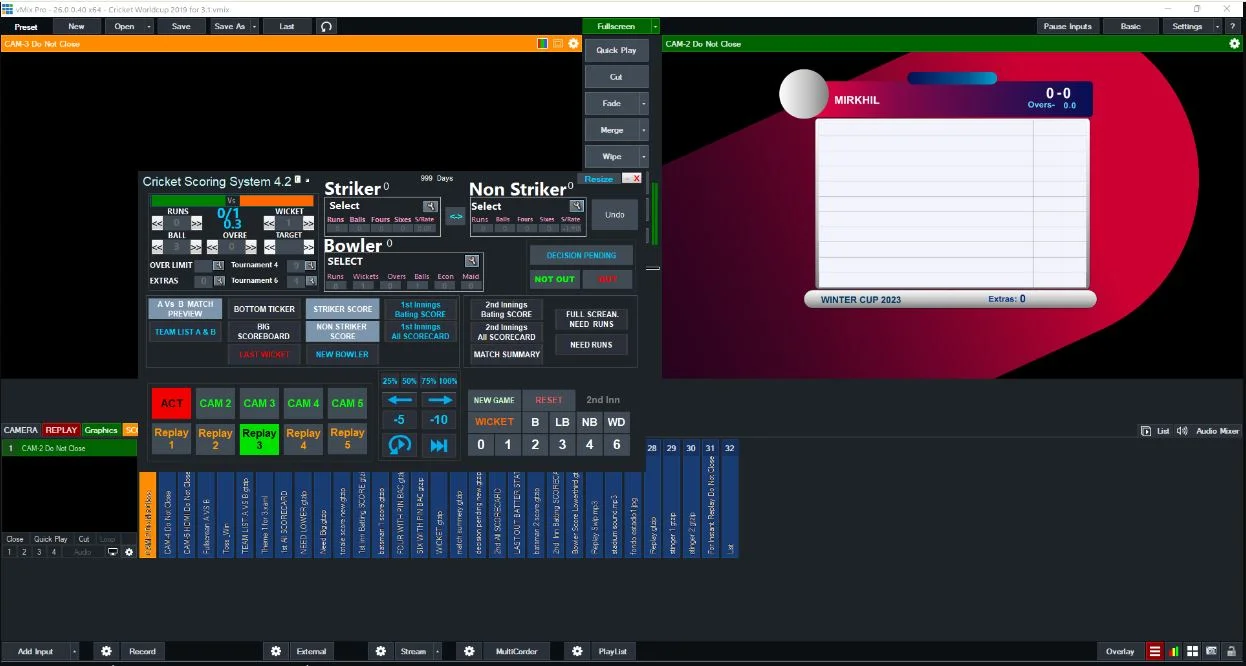
Cricket Scoring System 4.2 is a specialized software solution designed to digitize and streamline the process of recording cricket match statistics. Moving beyond traditional manual scorecards, this application provides a reliable, error-reducing platform for scoring matches across all formats, including Test matches, ODIs, and T20s.
Designed for scorers, coaches, and cricket enthusiasts, version 4.2 enhances accuracy through a user-friendly interface and real-time data entry. By using legitimate cricket scoring software, users eliminate common manual errors and gain immediate access to ball-by-ball updates, player statistics, and fall-of-wicket records. This tool is legally distributed for educational, coaching, and professional match management purposes.
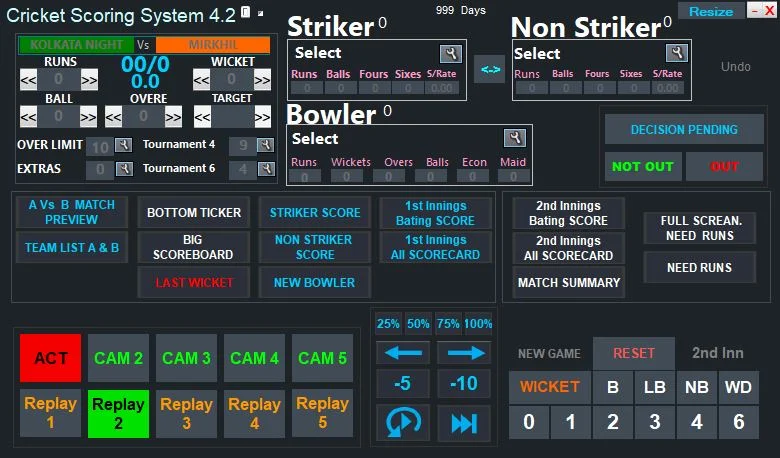
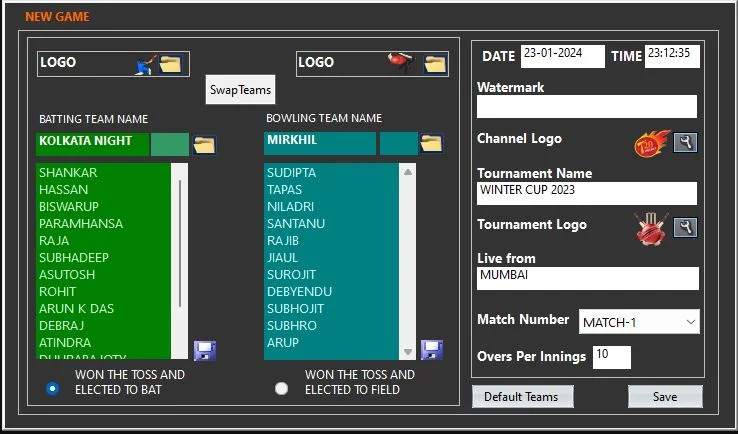
Screenshot:
Key Features of Cricket Scoring System 4.2
The software includes several core functionalities that improve the efficiency of match documentation.
-
Ball-by-Ball Data Entry: Record every delivery, run, wicket, and extra with a few clicks.
-
Automatic Scoreboard Updates: The system calculates team totals, individual batsman scores, bowler figures, and run rates in real time.
-
Fall of Wicket & Partnership Tracking: Automatically logs which batsman is out, the bowler, catcher, and the partnership total.
-
Statistical Reports: Generate detailed summaries including batting averages, economy rates, strike rates, and dot ball percentages.
-
Multiple Match Formats: Switch seamlessly between Test, ODI, T20, and local league rules.
-
Export & Print Options: Save match data as CSV or PDF for archival or broadcast integration.
What’s New in Cricket Scoring System 4.2
Version 4.2 introduces several improvements over previous releases:
-
Enhanced user interface with darker contrast for outdoor use on laptops.
-
Faster database queries for tournaments with over 50 matches.
-
Support for DLS (Duckworth-Lewis-Stern) method calculations for rain-affected matches.
-
Bug fixes related to extras (byes, leg-byes) allocation.
-
Improved export formatting for third-party broadcast software.
System Requirements
Before installing Cricket Scoring System 4.2, ensure your hardware meets these specifications.
| Component | Minimum Requirement |
|---|---|
| Operating System | Windows 10 / 11 (32-bit or 64-bit) |
| Processor | Intel Core i3 or equivalent |
| RAM | 4 GB |
| Storage | 500 MB free space |
| Display | 1366 x 768 resolution |
| Additional | Mouse or touch input recommended |
Note: This software does not support macOS or Linux natively.
Installation Guide
Follow these steps to install the software legally and safely.
-
Download the installer from the official software provider’s website. Avoid third-party download sites.
-
Right-click the downloaded
.exefile and select “Run as Administrator.” -
Accept the End User License Agreement (EULA).
-
Choose the installation directory (default:
C:\Program Files\Cricket Scoring System\). -
Click “Install” and wait for the progress bar to complete.
-
Launch the application from the desktop shortcut or Start Menu.
How to Use the Cricket Scoring Software
Using this tool effectively requires understanding its main workflow.
Setting Up a New Match
-
Click File > New Match.
-
Select the match format (Test, ODI, T20, or Custom).
-
Enter team names, player lists, and toss decision.
-
Set the number of overs (if limited overs match).
-
Click Start Innings.
During the Match
-
To add runs: Click the batsman’s name, then press the number of runs (0–6).
-
To record a wicket: Click Wicket, then choose the type (bowled, caught, LBW, run out, stumped).
-
To add extras: Click Extras and select wide, no ball, bye, or leg bye.
-
To change striker: The system automatically rotates after odd runs or over completion.
After the Match
-
Review the final scorecard.
-
Click Reports > Full Match Summary.
-
Export as PDF for official submission or CSV for further analysis.
Best Use Cases for Cricket Scoring System 4.2
This software serves multiple real-world scenarios:
-
Club and school matches: Volunteer scorers can maintain professional accuracy without deep cricket knowledge.
-
Local tournaments: Organizers track multiple matches simultaneously and generate league tables.
-
Coaching and analysis: Coaches review player performance trends over a season.
-
Practice sessions: Simulate match conditions and record net session stats.
-
Broadcast assistance: Provide real-time scoring overlays for live-streamed local matches.
Advantages and Limitations
Advantages
-
Reduces manual arithmetic errors.
-
Saves time compared to handwritten scorebooks.
-
Generates professional scorecards instantly.
-
Ideal for scorers with basic computer literacy.
-
Lightweight and runs on older Windows laptops.
Limitations
-
No official mobile app (iOS or Android) as of version 4.2.
-
Lacks cloud sync or multi-device collaboration.
-
No live API integration for external scoreboards.
-
Interface is functional but dated compared to modern SaaS tools.
-
Windows-only distribution.
Alternatives to Cricket Scoring System 4.2
For users seeking different features or platforms, consider these legitimate alternatives.
| Software | Platform | Key Strength | Pricing Model |
|---|---|---|---|
| CricHeroes | Android, iOS, Web | Mobile-first, social features | Freemium |
| NV Play | Windows, Cloud | Professional broadcast stats | Paid subscription |
| CricSheet | Web browser | Simple, no installation | Free (basic) |
| Cricket Scorer Pro | Windows, Mac | Multi-format support | One-time purchase |
Each alternative offers unique strengths, but Cricket Scoring System 4.2 remains a strong choice for offline, Windows-based, low-cost scoring.
Frequently Asked Questions (FAQ)
Q1: Is Cricket Scoring System 4.2 free to download and use?
A: The software may offer a trial version. For full features, a legitimate license purchase is typically required. Always download from the official source.
Q2: Can I use this software for a 5-over or 10-over friendly match?
A: Yes. When creating a new match, choose “Custom” and set the desired number of overs per innings.
Q3: Does Cricket Scoring System 4.2 calculate Net Run Rate (NRR)?
A: Yes. After multiple matches in a tournament, the software automatically computes NRR based on runs scored and conceded.
Q4: Can I transfer match data to another computer?
A: Yes. Use the built-in backup feature to save a .cricdb file, then restore it on another installation of the same version.
Q5: Is there technical support available?
A: Basic email support is usually provided for licensed users. Check the official documentation for contact details.
Q6: Does this software work with live TV broadcast software?
A: It supports CSV export, which can be imported into many broadcast graphics systems, but it does not offer direct RTMP or NDI output.
Q7: Can I use Cricket Scoring System 4.2 offline without internet?
A: Yes. The software runs entirely offline after installation. No internet connection is required during matches.
Final Thoughts
Cricket Scoring System 4.2 successfully modernizes traditional scorekeeping by combining accuracy, ease of use, and essential analytics. While it lacks cloud features and mobile support, its reliability on Windows platforms makes it a valuable tool for clubs, schools, and local tournaments. For users who prioritize offline functionality and a one-time purchase model over subscription-based alternatives, this software remains a practical choice. Always obtain software through official channels to ensure security, compliance, and access to updates.
Premium Software Support Service
If you need professional help with software installation, setup, or technical configuration, our team is available to assist you.
Contact & Support
For quick assistance and latest updates, connect with us using the links below:
🔹 Direct Telegram Support
https://t.me/PlayoutKing
🔹 Official Telegram Updates Group
https://t.me/yourgroup
Service Policy
- Remote testing available through AnyDesk before confirmation.
• Verify the setup and performance before completing the order.
• Support available for single or multiple systems.
• Step-by-step guidance to ensure smooth installation and working environment.
Our goal is to provide reliable technical assistance so your software runs smoothly without interruptions.