
Overview of Be.Smart T4R
Table of Contents
Be.Smart T4R (Tools for Revit), formerly known as Holixa Tools for Revit and CADstudio Revit Tools, is a powerful third‑party add‑on suite developed by Arkance Systems . This comprehensive toolset is designed to significantly extend the native capabilities of Autodesk Revit, automating repetitive tasks and streamlining complex workflows for architects, BIM managers, MEP engineers, and structural engineers.
With version 4.3.0.1, Be.Smart T4R continues to build on its reputation as an essential productivity booster, offering around 70 time‑saving features that tackle everyday challenges which Revit alone does not address efficiently . Whether you are looking to enhance your design management or leverage advanced productivity tools, Be.Smart T4R is engineered to help you work faster, more accurately, and with greater consistency.
Key Features of Be.Smart T4R
The Be.Smart T4R suite is packed with a diverse range of features that cater to various aspects of the BIM workflow. The toolset is available in two versions: Be.Smart T4R Free (Bronze) and the full-featured Be.Smart T4R (Silver) , which is available to Arkance Systems customers .
Core Tools for All Users (Free Version)
The free version provides essential design management tools that can save up to 50% of the time spent on searching and filtering objects . Key features include:
-
Extended Filter: A powerful tool for selecting drawing elements based on highly detailed criteria, far surpassing Revit’s native filtering capabilities .
-
Job Time Tracker: Automatically tracks the time spent editing specific projects, invaluable for project management and billing .
-
References List & Link Checker: Provides a comprehensive overview of all referenced files and automatically notifies you of any updates to external references .
-
BIMSign: Watermarks your BIM documents with a permanent, invisible signature to safeguard projects, families, and templates .
-
Who Did That?: Displays the usernames of the last person to edit selected elements, improving collaboration and accountability .
-
Continuous Dimension: Automatically dimensions all walls along a virtual ray .
-
Wall Dimension: Creates multiple dimensions for selected walls with a single click .
-
Duplicate Views: Allows for the bulk duplication of selected views within the current project .
-
Element Connector: Automatically connects all elements whose connectors are touching .
Advanced Tools for Maximum Productivity (Full Version)
The Silver version unlocks a suite of advanced productivity tools that automate routines, enhance consistency, and reduce errors, offering potential time savings of up to 80% on specific tasks . Notable features include:
-
Advanced MEP Tools: New in version 4.3.0.1, these include “Split Bend” to split a pipe or duct bend into two equal bends, and “Move and Connect” which aligns and connects two MEP elements in a single step, streamlining complex system routing .
-
Structure Label: Creates automatic labels that describe the structure of compound walls, roofs, or floors. These labels list the material and thickness of each layer and update automatically whenever the structure changes .
-
Join Geometry: Efficiently connects objects across a project in just a few clicks .
-
Terrain Import: Imports terrain data directly from Autodesk Civil 3D .
-
Schedule Import/Export: Facilitates the import and export of schedules to and from Excel for easy data management .
-
Automated Wall Dimensioning: Automates the dimensioning process for walls across multiple views .
-
Room-based Floor Creation: Generates custom floors based on specific room boundaries .
What’s New in Be.Smart T4R 4.3.0.1
Version 4.3.0.1 of Be.Smart T4R introduces significant enhancements, particularly for MEP (Mechanical, Electrical, and Plumbing) workflows, alongside critical stability and usability improvements. This update also ensures full compatibility with the latest Autodesk Revit 2026 .
Key Enhancements & New Features:
-
Improved MEP Workflows:
-
Split Bend: This new tool allows you to select any bend in a pipe or duct system and split it into two bends of equal size (e.g., a 90° bend into two 45° bends). This increases routing flexibility and reduces rework in complex MEP installations .
-
Move and Connect: A new feature that aligns and connects two MEP elements in a single step. The first selected element stays in place, while the second moves into alignment, and both are automatically connected into a continuous system .
-
Connect Systems: Formally known as “Element Coupler,” this tool connects adjacent MEP couplers into a single system without moving them .
-
-
Enhanced Usability & Management:
-
Level Manager Enhancements: Now includes an “Apply” button, an editable list, automatic floor plan creation, sorting by height, and quick actions for duplicating or deleting levels. Level elevations now correctly reference the project base point .
-
Improved Extended Filter: Allows you to save, edit, and manage filters with greater flexibility using drop-down menus .
-
View Hidden Elements: Displays a clear list of hidden elements, making visibility control easier .
-
-
Bug Fixes & Stability:
-
Various bug fixes to enhance reliability and consistency across different Revit versions .
-
Addressed issues with the Family Parameter Manager, Hide functions, and the Coordinate tool.
-
Resolved license state inconsistencies and updated all F1 help links to point to the correct online T4R documentation .
-
System Requirements for Be.Smart T4R
To ensure optimal performance, your system must meet the requirements for Autodesk Revit, as Be.Smart T4R is a plug-in that operates within it .
Supported Operating Systems:
-
64-bit Microsoft Windows 11
Compatible Autodesk Revit Versions:
-
Autodesk Revit 2027
-
Autodesk Revit 2026
-
Autodesk Revit 2025
-
Autodesk Revit 2024
-
Autodesk Revit 2023
-
Autodesk Revit 2022
It is also recommended that you have the latest updates for your Revit version installed and a stable internet connection for licensing and updates .
Installation Guide for Be.Smart T4R
Installing Be.Smart T4R is a straightforward process, primarily managed through the TOOLS4BIM Dock application. Follow these steps to get started.
Step-by-Step Installation:
-
Download TOOLS4BIM DOCK: Visit the official Be.Smart download page, select your country and desired Autodesk Revit version, and download the TOOLS4BIM DOCK installer .
-
Run the Installer: Double‑click the downloaded file to start the installation. You must be logged in as a local administrator or have permissions to install
.msifiles . -
Follow the Wizard: Read the license agreement, click “Install,” and allow the installer to make changes to your computer if prompted by the User Account Control (UAC) .
-
Launch Revit: Once the installation is complete, launch Autodesk Revit and open any project. The TOOLS4BIM DOCK should be visible. If not, go to the “TOOLS 4 BIM” tab in the Revit ribbon and click “Show Dock” .
-
Install Be.Smart T4R:
-
Find Be.Smart T4R in the Dock and click on it.
-
Click “Install” and then “Yes” to proceed .
-
-
Agree to EULA: Read the End‑User License Agreement and check the box to agree.
-
Complete Installation: Click “Install” and allow the process to complete. You may be prompted by UAC again. Once finished, click “Finish” and restart Revit .
-
Activation: Upon restarting Revit, choose “Web Licence.” Fill in the login details that you received by email or from your contract manager and click “Connect” .
For users who already have the TOOLS4BIM Dock installed, you will be notified of a new version within the Dock itself. Simply click “Update,” wait for the download, restart Revit, and then proceed with step 5 above to install Be.Smart T4R .
Alternative Installation for Large Deployments
For deployment in large-scale companies, you can create a batch file (.bat) to install both the TOOLS4BIM DOCK and Be.Smart T4R simultaneously . The steps include:
-
Creating a new folder (e.g., “Installer”).
-
Downloading and placing the two installers (Be.Smart T4R and TOOLS4BIM DOCK) into the folder.
-
Downloading and editing a sample
.batfile to reference the correct installer file names. -
Running the
.batfile as an administrator .
How to Use Be.Smart T4R Effectively
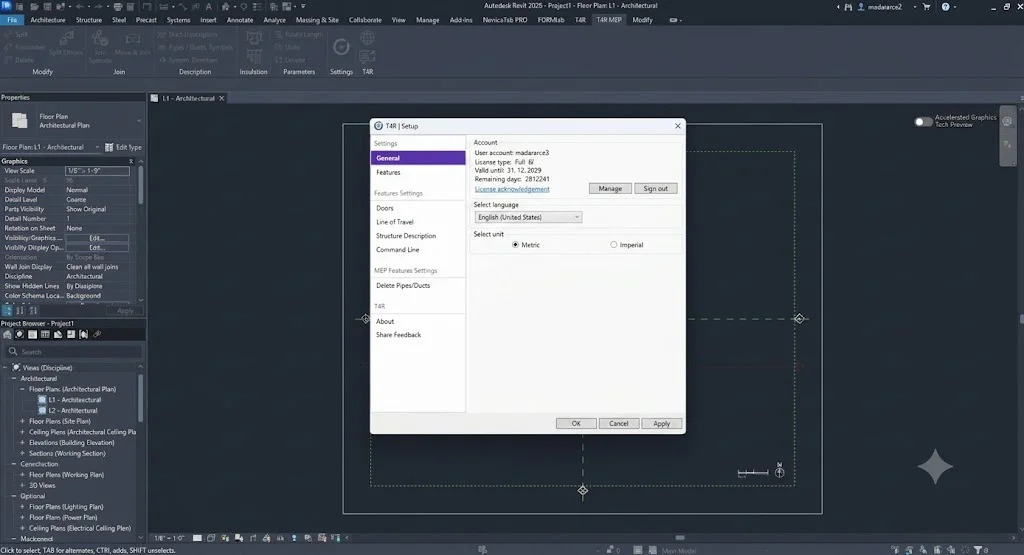
Be.Smart T4R integrates seamlessly into the Revit interface, adding a new ribbon tab with intuitive icons for easy access to all its tools . There is no steep learning curve; the tools are designed to be intuitive and user-friendly.
Basic Workflow Example: Wall Dimensioning
-
Open a project in Revit.
-
Navigate to the T4R tab in the ribbon.
-
Select the Wall Dimension tool.
-
Click on the desired wall. The tool will automatically create dimensions for the wall, potentially including multiple values in a single operation .
Practical Tips:
-
Time Tracking: Use the Job Time Tracker to automatically log your time on a project. This feature runs silently in the background and can be a major asset for generating reports and optimizing project management .
-
Complex Selections: Master the Extended Filter tool to quickly select objects based on specific criteria (e.g., “find all doors of a specific width on a specific floor”). This can save over 50% of the time you would normally spend on such tasks .
-
MEP Efficiency: To quickly redesign a pipe routing, use the new Split Bend tool on existing bends to create the necessary space for a new connection without having to redraw the entire route .
Best Use Cases for Be.Smart T4R
The versatility of Be.Smart T4R makes it an invaluable asset across various disciplines in the AEC industry.
-
For Architects:
-
Automated Wall Dimensioning: Significantly speed up the creation of construction documents.
-
Structure Label: Automatically generate detailed, updating labels for complex wall assemblies.
-
Room-based Floor Creation: Quickly generate floors for specific rooms.
-
-
For MEP Engineers:
-
Split Bend & Move and Connect: Efficiently model and modify complex piping and ductwork systems .
-
Connect Systems: Ensure continuous and correctly connected MEP systems .
-
-
For BIM Managers:
-
BIMSign: Implement a digital signature strategy to protect project data and models.
-
Bulk Upgrade: Update multiple Revit projects and families to newer versions.
-
References List & Link Checker: Maintain the integrity of a project by easily managing all external references .
-
-
For Structural Engineers:
-
Element Connector: Quickly connect structural elements where their connectors meet.
-
Advantages and Limitations of Be.Smart T4R
Advantages
-
Massive Productivity Gains: Automates a wide range of time-consuming, manual tasks, promising savings of up to 80% on specific operations .
-
Comprehensive Toolset: Offers a vast array of over 50-70 tools covering design management, MEP, annotation, and more .
-
Seamless Integration: The tools integrate naturally into the Revit interface as a ribbon, making them easy to discover and use without a steep learning curve .
-
Free Version Available: The Free (Bronze) version provides substantial functionality at no cost, making it accessible for a wide audience .
-
Continuous Development: Arkance Systems actively develops the tool, as seen with the new features in version 4.3.0.1, ensuring compatibility with the latest Revit versions and ongoing improvements .
Limitations
-
Licensing Model: The full suite of productivity tools (Silver) is exclusively available to Arkance Systems customers . This means the advanced tools are not available for purchase on a standalone basis by non-customers.
-
Dependency on Revit: As an add‑on, its performance and stability are inherently tied to the host software, Autodesk Revit.
-
Internet Dependency: The installation and web-based licensing process require an active internet connection .
Alternatives to Be.Smart T4R for Revit
While Be.Smart T4R is a leading productivity suite, several other add‑ins offer similar or complementary functionalities for Autodesk Revit.
-
pyRevit: An open-source and free alternative that provides a large collection of tools for Revit. It is highly extensible and popular for its community-driven development, though it may not offer the same level of polished, enterprise-focused features.
-
BIM39: A more affordable commercial add‑in that offers a comprehensive suite of tools for various tasks, from modelling to documentation. It is known for its user-friendly interface and is a strong competitor for smaller firms.
-
DiRoots: A suite of free and paid Revit add‑ins that focus on sheet management, parameter manipulation, and model checking. While they don’t offer a single comprehensive suite like T4R, they are excellent for specific, advanced workflows.
-
Ideate Software: Offers a suite of powerful BIM tools that excel in model management, data visualization, and quality assurance. They are a more premium, specialized alternative.
When choosing an alternative, consider your specific workflow needs. If you require a broad set of productivity tools with a strong focus on MEP and are an Arkance Systems customer, T4R is an excellent choice. For those seeking free or open-source solutions, pyRevit is a worthy alternative. For specialized tasks like sheet management, DiRoots might be a better fit.
Frequently Asked Questions About Be.Smart T4R
Q1. What is the difference between Be.Smart T4R Free and the paid version?
Answer: Be.Smart T4R Free (Bronze) provides essential design management tools for all users, including the Extended Filter, Job Time Tracker, and BIMSign . The full Be.Smart T4R (Silver) unlocks advanced productivity tools for automating routines, such as the “Move and Connect” MEP tools, Join Geometry, and other features that can save up to 80% of manual effort. The Silver version is available exclusively to Arkance Systems customers .
Q2. Is Be.Smart T4R compatible with the latest version of Revit?
Answer: Yes, Be.Smart T4R version 4.3.0.1 is fully compatible with Autodesk Revit 2027, 2026, 2025, 2024, 2023, and 2022 .
Q3. How can I legally obtain a license for Be.Smart T4R?
Answer: To obtain the full Be.Smart T4R (Silver) license, you must be a customer of Arkance Systems. The license is provided as part of their customer benefits. The Free (Bronze) version, however, is available to all users without any cost and can be downloaded directly from the official Be.Smart website . Always obtain software from official sources to ensure compliance and security.
Q4. Does Be.Smart T4R include any tools for MEP engineering?
Answer: Yes. Version 4.3.0.1 includes several new and improved features specifically for MEP engineering, including Split Bend, Move and Connect, and Connect Systems, designed to streamline the modeling of complex piping and ductwork .
Q5. Can I import and export schedules from Revit to Excel using Be.Smart T4R?
Answer: Yes, the full version of Be.Smart T4R includes a feature that allows you to import schedules from Excel into Revit and export Revit schedules to Excel, facilitating easier data management and manipulation .
Final Thoughts on Be.Smart T4R 4.3.0.1
Be.Smart T4R 4.3.0.1 stands as a cornerstone productivity tool for any professional using Autodesk Revit. By addressing the gaps in Revit’s native functionality, it empowers users to work smarter, not harder. The suite’s ability to automate tedious tasks, from wall dimensioning to complex MEP system modifications, translates directly into significant time savings and a dramatic reduction in human error.
The latest update reinforces Arkance Systems’ commitment to innovation, particularly in the MEP sector, with tools like Split Bend and Move and Connect that address real-world engineering challenges . The availability of a robust Free version ensures that every Revit user can benefit from enhanced design management, while the full suite provides an unparalleled level of power for dedicated professionals.
For BIM managers, architects, and engineers aiming to maximize their efficiency and project quality, the Be.Smart T4R suite is an indispensable asset that will quickly become an integral part of your Revit workflow.