


Overview of the Software
Table of Contents
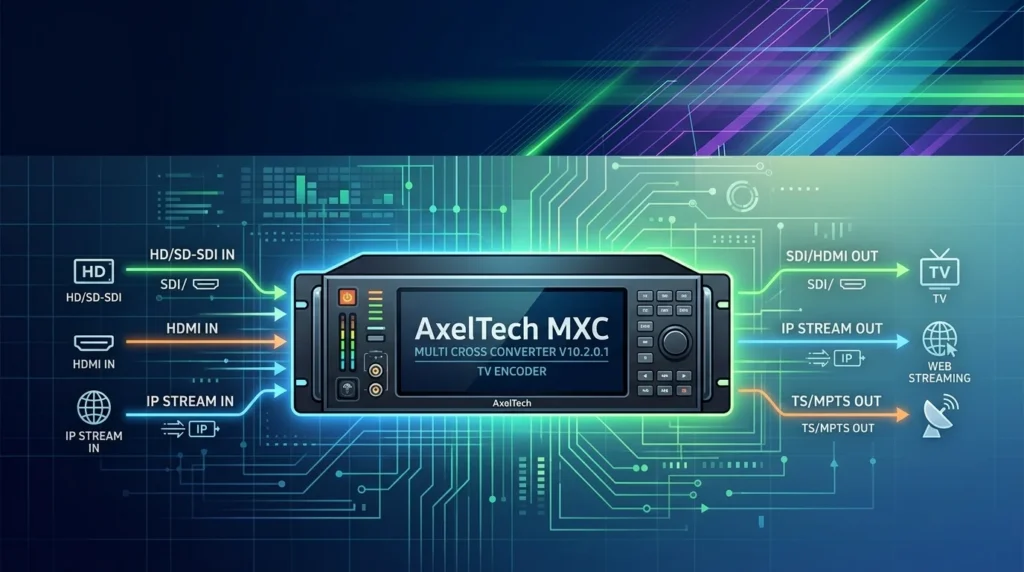
In the fast-paced world of broadcast media, reliable format conversion is non-negotiable. AxelTech MXC – Multi Cross Converter V10.2.0.1 is a professional-grade software encoder designed to bridge the gap between diverse video standards. This powerful tool is engineered for broadcast engineers, post-production facilities, and video professionals who demand precision.
The software excels at converting between a wide array of video formats, including SDI, HDMI, and IP sources. It supports multiple resolutions, frame rates, and color spaces, making it a versatile solution for modern broadcasting workflows. Its primary function is to ensure seamless integration of various signal types within a single, unified infrastructure.
Key Features of AxelTech MXC Converter
The latest version of the AxelTech MXC software is packed with features tailored to meet the rigorous demands of the broadcast industry.
-
Multi-Format Support: Convert between SDI, HDMI, and IP video streams. Handles resolutions from standard definition up to 4K.
-
Frame Rate & Resolution Conversion: Includes high-quality motion-compensated de-interlacing and scaling algorithms.
-
Embedded Audio Processing: Supports up to 16 channels of embedded audio with sample rate conversion and channel remapping.
-
Closed Captioning: Transcodes and passes through closed captioning data (CEA-608/708).
-
Timecode Preservation: Maintains VITC and LTC timecode throughout the conversion process.
-
Low Latency Mode: Optimized for live production, offering a latency of less than one frame.
-
Remote Control API: Full SNMP and HTTP APIs for integration into existing automation and monitoring systems.
What’s New in the Latest Version (V10.2.0.1)
The V10.2.0.1 update to the AxelTech Multi Cross Converter is not just a maintenance release; it brings substantial improvements to performance and usability.
-
Enhanced 4K/Ultra HD Workflows: Improved processing pipeline for 4Kp60 signals with reduced CPU load.
-
New Aspect Ratio Conversion: Added support for non-linear aspect ratio scaling (e.g., 16:9 to 4:3 with Smart Center Cut).
-
Improved Audio Sync: Updates to the audio/video synchronization engine ensure tighter lip-sync, particularly in complex conversion paths.
-
User Interface Overhaul: The control panel has been redesigned for quicker preset management and real-time status monitoring.
-
Bug Fixes: Resolved an issue with specific HDMI EDID handshakes, improving compatibility with third-party monitors.
System Requirements for AxelTech MXC
Before installing the AxelTech TV Encoder, ensure your system meets the following requirements for optimal performance.
Minimum System Requirements
-
Operating System: Windows 10/11 Pro (64-bit) or Windows Server 2019/2022.
-
Processor: Intel Core i7 or Xeon equivalent (6 cores/12 threads).
-
RAM: 16 GB DDR4.
-
Graphics: Dedicated GPU with DirectX 12 support and at least 4GB of VRAM.
-
Storage: 500 MB for software installation; SSD recommended for capture buffers.
-
Network: Gigabit Ethernet for IP workflows.
Recommended System Requirements
-
Operating System: Windows 11 Pro for Workstations.
-
Processor: Intel Xeon or AMD Threadripper (8+ cores).
-
RAM: 32 GB DDR4/DDR5.
-
Graphics: NVIDIA RTX-series GPU with 8GB+ VRAM for hardware acceleration.
-
Storage: NVMe SSD for high-speed I/O.
Installation Guide for the Multi Cross Converter
Installing AxelTech MXC V10.2.0.1 is a straightforward process. Follow these steps for a successful installation.
-
Download the Installer: Log in to your official AxelTech user portal to download the software package.
-
Run as Administrator: Right-click the
AxelTech_MXC_Setup.exefile and select “Run as Administrator.” -
Accept the License Agreement: Read and accept the End-User License Agreement (EULA).
-
Choose Installation Directory: Select the destination folder for the application.
-
Select Components: Choose the core application and optional modules like “IP Gateway Support.”
-
Install Drivers: The installer will prompt you to install necessary drivers for SDI/HDMI capture cards.
-
Complete Setup: Click “Install” and wait for the process to finish. Restart your computer if prompted.
How to Use the AxelTech Software
Effectively using the AxelTech Multi Cross Converter requires understanding its modular workflow. Here is a step-by-step guide for a basic conversion task.
Step 1: Launch the Application
Open the AxelTech MXC Control Panel from your desktop or Start menu.
Step 2: Configure Input
-
Navigate to the “Input” tab.
-
Select your physical input source (e.g., SDI In 1).
-
Verify the detected resolution, frame rate, and audio format.
Step 3: Set Output Parameters
-
Go to the “Output” tab.
-
Set the desired target format (e.g., 1080i 59.94).
-
Adjust the audio output settings.
Step 4: Apply Processing
-
Scaling: Set the scaling method (Anamorphic, Letterbox, or Center Cut).
-
Audio: Remap or adjust audio channels as needed.
Step 5: Start Conversion
-
Click the “Start” button in the transport bar. The software will begin encoding and converting the incoming signal instantly.
Best Use Cases for the TV Encoder Software
The AxelTech MXC is a solution to several complex broadcast problems. Here are some of its most common applications.
-
Live Event Production: Converting a 4K camera feed to a 1080p signal for an external broadcast truck.
-
Master Control: Standardizing incoming satellite or fiber feeds to a single frame rate and resolution for a playout server.
-
Post-Production: Transcoding archival footage into modern codecs for an NLE workflow.
-
Corporate AV: Converting HDMI presentation screens to SDI signals for large venue projectors.
-
Remote Production: Using the IP gateway to send a converted signal over the internet via SRT.
Advantages and Limitations
Like any software, the AxelTech Multi Cross Converter has distinct strengths and some considerations for potential users.
Advantages
-
High-Quality Scaling: The proprietary algorithm provides sharp, artifact-free scaling.
-
Low Latency: Critical for live applications.
-
Comprehensive Formats: Handles nearly every broadcast standard in use today.
-
Stability: Known for its robust 24/7 operational reliability.
-
Active Development: Regular updates from AxelTech provide new features and fixes.
Limitations
-
Hardware Dependency: To fully utilize SDI features, you require specific, often expensive, capture cards.
-
CPU Intensive: Complex conversions (e.g., 4K to 1080p with scaling) can be highly CPU/GPU dependent.
-
Learning Curve: The interface, while improved, has a depth of technical features that can be overwhelming for beginners.
-
Licensing: The software operates on a paid subscription or perpetual license model, which can be a barrier for smaller studios.
Alternatives to AxelTech MXC
When considering the AxelTech MXC – Multi Cross Converter, it’s wise to compare it with other tools in the market.
| Software | Primary Platform | Key Strength |
|---|---|---|
| AxelTech MXC | Windows/Server | High-quality broadcast standardization |
| Vantage by Telestream | Windows/Server | Enterprise-level transcoding & workflow automation |
| FFmpeg | Cross-Platform | Free, open-source, and incredibly versatile |
| MagiX TV Suite | Windows | Affordable, all-in-one TV channel-in-a-box solution |
| CatDV | Windows/macOS | Excellent media asset management and transcoding integration |
Frequently Asked Questions about AxelTech TV Encoder
What is the main function of the AxelTech MXC software?
The AxelTech MXC – Multi Cross Converter is an advanced software TV encoder designed to convert and standardize professional video signals between different formats, resolutions, and frame rates.
Is AxelTech MXC compatible with macOS or Linux?
No. The current version (V10.2.0.1) is designed exclusively for Microsoft Windows operating systems, requiring Windows 10/11 Pro or Windows Server.
Can I use this software without a specialized capture card?
Yes, you can process IP streams and file transcoding. However, to utilize SDI or HDMI inputs, you will require a compatible hardware capture card.
Does the software support 4K UHD conversion?
Yes, the AxelTech Multi Cross Converter fully supports 4K (Ultra HD) up to 60p, including comprehensive scaling and frame rate conversion.
How can I get a trial version?
You can request a fully functional, time-limited trial version directly from the official AxelTech website. This is the only legal way to evaluate the software.
What are the common use cases for this converter?
Common use cases include live production, master control room operations, post-production transcoding, and integration for digital signage.
Final Thoughts
The AxelTech MXC – Multi Cross Converter V10.2.0.1 stands as a pillar of reliability and performance in the broadcast ecosystem. Its ability to handle complex format conversion with high fidelity and low latency makes it an invaluable asset for any professional environment. While the initial cost and hardware requirements might seem steep, the software delivers on its promise of stability and quality. For broadcast engineers and media managers seeking a robust, software-based converter, the latest iteration of AxelTech MXC is a compelling choice that continues to meet the evolving demands of the industry.


