

Download the Autodesk Fusion 360 Review (Cloud-Powered 3D CAD, CAM, and CAE Software) from this link…

Overview of the Software
Table of Contents
Autodesk Fusion 360 is not just another parametric modeling tool; it is a holistic product development ecosystem. Unlike traditional disconnected software suites, Fusion 360 operates on a single cloud-based data management platform. This allows mechanical engineers, product designers, and machinists to collaborate in real time from different geographic locations.
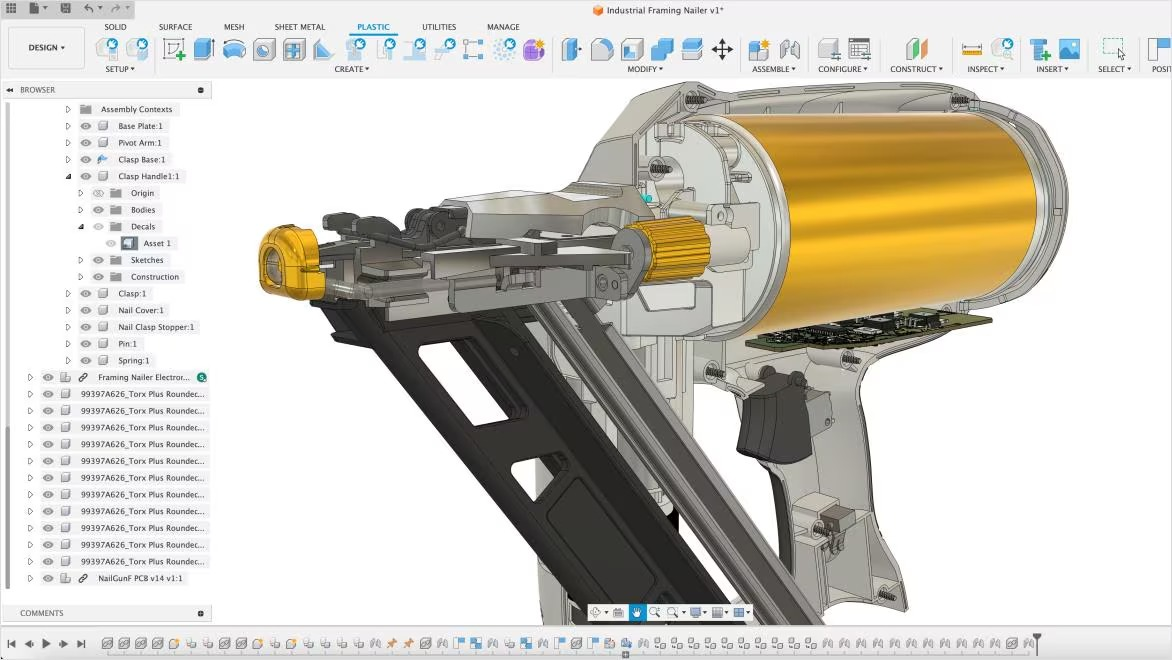
The software bridges the gap between conceptual sketching and physical production. Whether you are designing injection-molded parts, sheet metal enclosures, or complex surfacing for consumer electronics, Fusion 360 provides the simulation, rendering, and toolpath generation necessary to bring ideas to life. It is widely adopted in the startup ecosystem and educational sectors due to its low barrier to entry and robust direct modeling capabilities.
Key Features
Parametric & Direct Modeling
Fusion 360 offers a hybrid modeling environment. Users can switch between parametric history-based modeling (where changes propagate through the timeline) and direct modeling (where geometry is pushed and pulled without breaking downstream features). This flexibility allows for rapid iteration without the fear of breaking a complex assembly.
Generative Design
A standout feature for advanced manufacturing, generative design allows users to input constraints (load points, materials, manufacturing methods). The AI then generates multiple valid geometries, often producing organic, lattice-like structures that reduce weight while maintaining strength—impossible to achieve with traditional manual modeling.
Integrated CAM & 2.5 to 5-Axis Machining
Fusion 360 includes professional-grade CAM tools. Users can program toolpaths for milling, turning, and waterjet cutting directly from the 3D model. Changes to the CAD model automatically update the toolpaths, reducing errors and rework.
Simulation & Analysis
Before committing to physical prototyping, engineers can run static stress, modal frequency, and thermal simulations. This predicts how a part will behave under real-world forces, ensuring structural integrity and reducing material waste.
PCB Design Integration (Electronics)
Via the integrated electronics workspace, Fusion 360 connects mechanical CAD with electronic design. Teams can design printed circuit boards (PCBs) in EAGLE and import them directly into the mechanical enclosure model to check for clearance and interference.
What’s New in the Latest Version (2024-2025 Update)
Autodesk continuously pushes automatic updates via the cloud. The most recent iterations have focused on automation and user experience:
-
Automated Drawing Creation: The “Model-based Definition” (MBD) workflow has been enhanced, allowing users to auto-populate 2D drawings with dimensions from the 3D model, drastically reducing manual detailing time.
-
Sheet Metal Unfolding Enhancements: New algorithms improve the accuracy of flat patterns for complex contoured flanges.
-
Additive Manufacturing (Slicing): The native slicer for 3D printing has been optimized for faster mesh generation and better support structure management for resin printers.
-
Collaborative Data Management: The “Accelerate” workspace now includes deeper integration with Autodesk Upchain for PDM (Product Data Management).
System Requirements
To run Fusion 360 optimally, your hardware must meet specific thresholds. Because the rendering and solving are partially cloud-based, the local requirements are moderate but specific.
Operating System:
-
Windows: 11 or 10 (64-bit only, version 1809 or later)
-
Apple macOS: Ventura v13, Sonoma v14, or Sequoia v15 (Native Apple Silicon support)
-
Linux: Not natively supported (requires virtual machine)
Hardware Minimums:
-
CPU: 64-bit processor (Intel or AMD) with AVX instruction set support (3+ GHz recommended)
-
RAM: 8 GB (16 GB recommended for complex assemblies or simulation)
-
GPU: DirectX 11 or DirectX 12 compliant with 2 GB VRAM (4 GB for rendering)
-
Storage: SSD with 10 GB free space
-
Network: 5 Mbps or faster (critical for save/load times due to cloud architecture)
Installation Guide
Step-by-Step for Windows/macOS
-
Create an Autodesk Account: Navigate to the official Autodesk website. Use a business or educational email for license verification.
-
Download the Desktop Client: Autodesk now uses a universal “Autodesk Access” installer. Download this stub from the “Products & Services” section.
-
Run the Installer: Execute the
.exe(Windows) or.dmg(macOS) file. Accept the license agreement. -
Select Install Type: Choose “Install Now” for typical use or “Create Deployment” for IT administrators managing multiple seats.
-
Sign In: Upon launch, authenticate via your Autodesk account to validate the subscription or trial license.
-
Network Check: Ensure firewalls allow connection to
*.autodesk.comand*.amazonaws.com, as the software verifies entitlement every 14 days.
How to Use the Software
The First Sketch
Start a new design. Select a plane (XY, XZ, YZ). Use the “Sketch” dropdown to draw lines, arcs, or splines. Always fully define your sketches (turning lines from blue to black) by adding dimensions (Shortcut: D).
Turning 2D into 3D
Use the “Create” menu to extrude (Shortcut: E) or revolve your sketch. The timeline at the bottom of the screen records every action. To modify an extrusion depth, double-click the extrusion event in the timeline, not the solid body itself.
Assembling Components
Use the “Assemble” workspace. Insert components via Insert > Insert Component. Use “Joints” (Shortcut: J) instead of traditional mates. Joints define motion (revolute, slider, rigid) between two components, allowing for kinematic analysis.
Best Use Cases
-
Product Design & Consumer Electronics: The surfacing tools and render workspace allow designers to create aesthetic casings for smartphones or wearables.
-
Light CNC Machining (Hobby to Pro): Users with Shapeoko, Avid, or Haas mills use Fusion 360 exclusively because the CAM post-processors are open-scriptable and reliable.
-
Educational Prototyping: Universities use Fusion 360 to teach mechanical engineering because it includes simulation (FEA) without requiring a separate $20,000 simulation suite.
-
Additive Manufacturing (3D Printing): The slicer workspaces eliminate the need for Cura or PrusaSlicer for basic to intermediate FDM printing.
Advantages and Limitations
Advantages
-
All-in-One Ecosystem: Reduces file translation errors (no more STL/STEP back-and-forth).
-
Cost-Effective: Offers free licenses for startups (under $100k revenue) and students.
-
Version Control: Automatic cloud saves prevent data loss and create a non-linear version tree.
-
Collaboration: Multiple users can view and mark up a design simultaneously via a web browser.
Limitations
-
Cloud Dependency: If your internet connection drops, you cannot save or load cloud files (offline mode is limited to 14 days).
-
Large Assembly Performance: Handling assemblies with over 1,000 unique parts can slow down significantly compared to high-end on-premises solutions like SolidWorks or Catia.
-
2D Drawing Detailing: While improved, the 2D drawing environment lacks the maturity of dedicated Drafting software (e.g., DraftSight) for complex GD&T (Geometric Dimensioning and Tolerancing).
Alternatives to the Software
| Software | Best For | Key Difference from Fusion 360 |
|---|---|---|
| SolidWorks | Professional mechanical engineering (large assemblies) | Local file storage; much steeper learning curve; higher cost. |
| Onshape | Cloud-native collaboration | Entirely browser-based (no install); stronger PDM; weaker CAM. |
| FreeCAD | Open-source parametric modeling | Completely free; no cloud lock-in; less polished UI; no integrated CAM. |
| Blender | Organic modeling & animation | Polygon mesh based (not parametric); terrible for engineering tolerances. |
| Shapr3D | iPad/Tablet conceptual design | Intuitive for sketching; lacks simulation and advanced CAM toolpaths. |
Frequently Asked Questions
Is Autodesk Fusion 360 completely free?
Autodesk offers a free 30-day trial of the full version. After that, a free “Personal Use” license exists for hobbyists, but it limits you to 10 active documents and removes advanced simulation and 5-axis CAM.
Does Fusion 360 work offline?
Yes, you can activate “Offline Mode” for up to 14 days. However, you cannot save new versions to the cloud or collaborate while offline. You must reconnect before the 14 days expire to verify your license.
Can Fusion 360 open SolidWorks files?
Directly? No. You must convert SolidWorks files (.sldprt) to a neutral format like STEP (.stp) or Parasolid (.x_t). Fusion 360 will then import the geometry, but the feature tree (history) will be lost.
What file formats does Fusion 360 export?
It exports industry-standard formats including STL (for 3D printing), STEP (for professional manufacturing), IGES, DXF (for 2D laser cutting), OBJ (for rendering), and 3MF (for multi-color printing).
Is Fusion 360 good for 3D printing?
Yes. It contains a native “Additive Manufacturing” workspace that slices models directly for FDM (filament) or SLA (resin) printers, though power users may still prefer dedicated slicers for specific support control.
How often does the software crash?
With modern hardware and a stable internet connection, crashes are rare. Because the solving happens locally but saves to the cloud, recovery files are usually robust. Frequent crashes typically indicate outdated GPU drivers or insufficient RAM (under 8 GB).
Can I use Fusion 360 for architecture or house design?
No. Fusion 360 is mechanical engineering software. It lacks architectural tools like walls, doors, windows, or MEP (Mechanical, Electrical, Plumbing) systems. Use Autodesk Revit or AutoCAD Architecture instead.
Final Thoughts
Autodesk Fusion 360 has democratized access to professional-grade product development. For the solo entrepreneur, the startup, or the engineering student, it offers a legitimate pathway from concept to CNC machining without the $10,000 upfront investment of legacy software.
While its cloud dependency and large-assembly performance may deter enterprise-level users, its rapid iteration cycle, generative design AI, and seamless CAD-to-CAM workflow make it the industry standard for modern, agile manufacturing. If your workflow involves iteration and you value automatic updates over perpetual licenses, Fusion 360 remains the most balanced tool on the market today.
Premium Software Support Service
If you need professional help with software installation, setup, or technical configuration, our team is available to assist you.
Contact & Support
For quick assistance and latest updates, connect with us using the links below:
🔹 Direct Telegram Support
https://t.me/PlayoutKing
🔹 Official Telegram Updates Group
https://t.me/yourgroup
Service Policy
- Remote testing available through AnyDesk before confirmation.
• Verify the setup and performance before completing the order.
• Support available for single or multiple systems.
• Step-by-step guidance to ensure smooth installation and working environment.
Our goal is to provide reliable technical assistance so your software runs smoothly without interruptions.