
Overview of Ahnenblatt Genealogy Software
Table of Contents
Ahnenblatt is a specialized genealogy software designed exclusively for the Windows operating system . Developed by Dirk Böttcher, the software has garnered a strong reputation within the European genealogical community for balancing powerful features with an intuitive user interface.
Unlike web-based platforms that require constant internet connectivity, Ahnenblatt operates as a desktop application, ensuring that your sensitive family data remains private and accessible offline. The software supports the standard GEDCOM format, allowing seamless data exchange between different genealogy platforms. It is particularly praised for its ability to handle large datasets without performance degradation, making it suitable for extensive family trees spanning centuries.
Key Features of Ahnenblatt 4
The latest iteration of Ahnenblatt introduces refined tools that streamline the research process. Below is an analysis of the core functionalities that define this software.
Data Management and Visualization
-
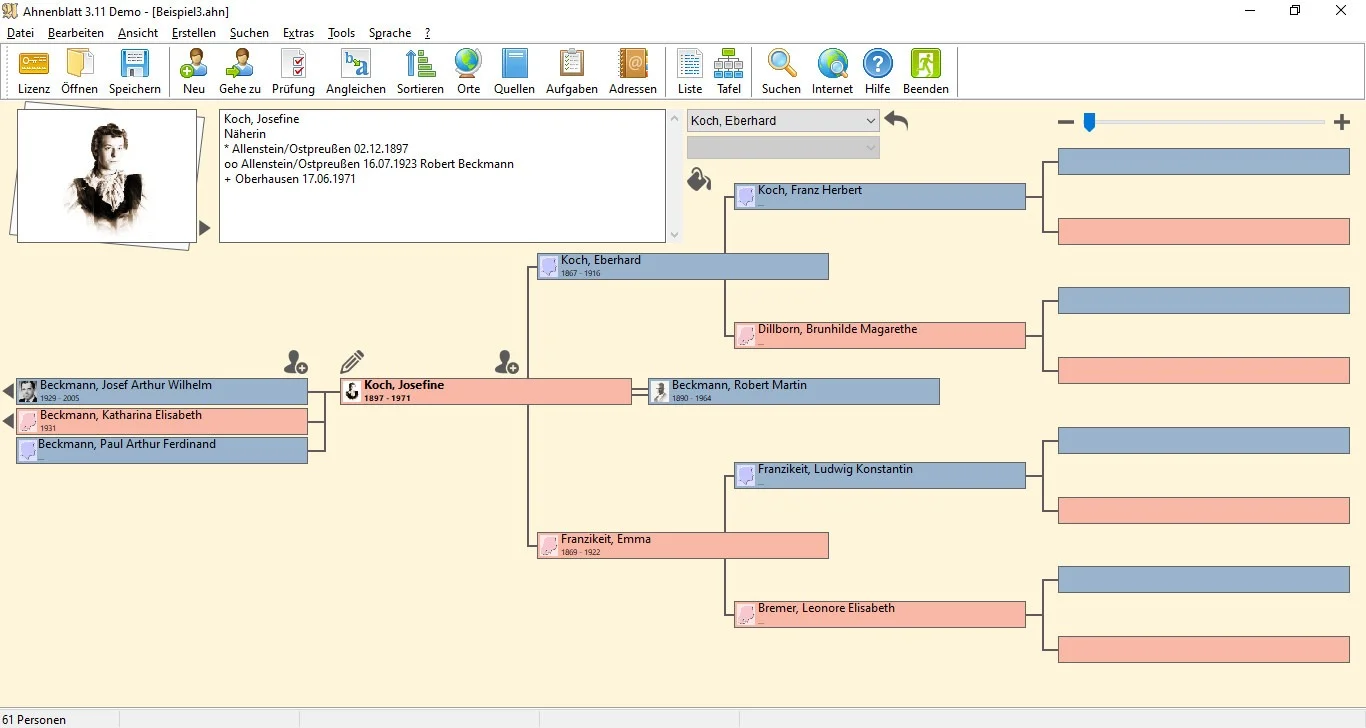
Interactive Family Trees: Users can generate graphical tree charts (ancestor, descendant, and fan charts) that are fully printable.
-
Calendar View: A centralized calendar displays all stored events, birthdays, and anniversaries, helping researchers identify date conflicts or missing data .
-
Person Manager: Allows for detailed entry of life events, occupations, addresses, and multimedia attachments (photos, documents, and scanned certificates).
Import and Export Flexibility
-
GEDCOM Compatibility: Ensures interoperability with platforms like FamilySearch, Ancestry, and MyHeritage.
-
HTML Export: Users can generate static web pages of their family tree for sharing with relatives who do not have the software installed .
Integrated Research Tools
-
Internet Search Integration: Ahnenblatt features built-in links to online databases (including MyHeritage), allowing users to search for historical records directly from the application .
Analysis and Reporting
-
Relationship Calculation: Automatically computes the precise degree of relationship between any two individuals in the tree.
-
Statistics: Generates reports on lifespan averages, surname distribution, and birth locations.
What’s New in Version 4.47 (Latest Release)
Understanding the difference between an update and an upgrade is crucial for current users. Ahnenblatt distinguishes between free updates within the same major version (e.g., 4.45 to 4.47) and paid upgrades (e.g., Version 3 to Version 4) .
While Version 3 focused on stability, Ahnenblatt Version 4 introduces a redesigned interface and improved database handling. Specific refinements in Version 4.47 focus on:
-
Stability Patches: Resolving minor bugs reported by the user community regarding the visualization of complex kinship loops.
-
Improved Plugin Handling: Adjustments to how the software manages third-party extensions and scripts .
Note: The official website currently lists version 4.45 as the latest stable release, with version 4.47 often referring to specific developmental branches or localized updates .
System Requirements and Compatibility
To ensure optimal performance, your Windows machine should meet the following criteria. A significant advantage of Ahnenblatt is its low hardware footprint, allowing it to run efficiently on older hardware or portable storage.
| Component | Requirement |
|---|---|
| Operating System | Windows 11, 10, 8.1, 8, 7, or Vista |
| Architecture | 32-bit and 64-bit versions supported |
| Portable Use | Supports USB flash drive installation (Portable Version) |
| Linux Support | Can be run via Wine compatibility layer on Linux |
| Disk Space | Approximately 50-100 MB for installation |
Installation Guide
There are two primary methods to install Ahnenblatt, depending on your user privileges and mobility needs.
Standard Installation (Local Machine)
-
Download the installer from the official developer portal (
ahnenblatt.de). -
Close other applications to prevent conflicts during file writing.
-
Run the executable file and accept the license agreement.
-
Follow the wizard to install to the default
Program Filesdirectory.
Portable Installation (USB Drive)
-
Download the “Portable Version” zip file.
-
Extract the contents directly to a USB flash drive.
-
Run
Ahnenblatt.exedirectly from the drive. This method is ideal for library computers or users who wish to keep their data physically separate from the host machine, as it writes no data to the Windows Registry .
How to Use the Software: A Practical Guide
For new users transitioning from paper charts or other software, here is a workflow to establish your family tree.
Step 1: Creating a New Tree
Launch Ahnenblatt and select “New”. The software will prompt you to enter the primary individual (the root person). Start with yourself or the earliest known ancestor.
Step 2: Adding Relatives
Use the “Add” button to input parents, spouses, or children. Ahnenblatt automatically manages surname logic; however, users must manually verify sibling relationships. Tip: If the software flags a sibling as “implausible” due to an age gap of 40+ years, review the birth dates for data entry errors, as the algorithm checks for logical consistency .
Step 3: Importing GEDCOM Data
If migrating from Family Tree Maker (FTM) or Legacy Family Tree:
-
Navigate to
File > Import > GEDCOM. -
Select your
.gedfile. -
Review the import log for unmapped fields or encoding errors.
Step 4: Visualizing Data
Switch to the “Ancestor Tree” view. Users can customize the number of generations displayed and adjust the layout for printing.
Best Use Cases for Ahnenblatt
-
Offline Research: Field researchers who visit courthouses or archives without Wi-Fi can rely on the offline database.
-
Privacy-Conscious Users: Because the data resides locally, users maintain full control over living individuals’ records without uploading them to public cloud servers.
-
Book Printing: The software is highly regarded for generating print-ready layouts for family books (“Familienbücher”), a popular tradition in German genealogy .
Advantages and Limitations
Advantages
-
Cost-Effective: Offers a robust free version (Ahnenblatt 3 and basic 4.x) with optional paid upgrades for advanced features .
-
User Rated: Scored 4.45 out of 5 stars on GenSoftReviews (2022 Users Choice Award), indicating high user satisfaction .
-
Lightweight: Does not consume excessive RAM, allowing it to run alongside other research tools like web browsers or PDF readers.
Limitations
-
Windows Only: Native Linux or macOS versions are not available without emulation (Wine) .
-
Update Mechanism: The software does not auto-detect major version upgrades (e.g., 3.x to 4.x), requiring manual download .
-
Collaboration: Lacks real-time cloud synchronization found in modern SaaS genealogy platforms.
Alternatives to Ahnenblatt
While Ahnenblatt excels in the Windows desktop environment, researchers on other ecosystems or those seeking cloud collaboration may consider these alternatives .
| Software | Platform | Key Differentiator |
|---|---|---|
| GRAMPS | Windows, Mac, Linux | Open-source; highly customizable with plugins. |
| Family Tree Builder | Windows, Cloud | Integrates deeply with MyHeritage DNA matching. |
| Ages! | Windows | Focuses heavily on source citation and logical evidence analysis. |
| Family Historian | Windows | Known for advanced diagramming and “smart” data validation. |
| webtrees | Web (Server) | Self-hosted online collaborative viewer. |
Frequently Asked Questions
1. Is Ahnenblatt really free?
Yes, a functional free version (Ahnenblatt 3.x or the basic tier of 4.x) is available. However, upgrades to the full “Version 4” feature set typically require a one-time license fee to support ongoing development .
2. How do I fix incorrect sibling relationships in my tree?
If Ahnenblatt lists individuals as siblings incorrectly, review the parents of each child. Navigate to the specific child’s edit screen and use the red “minus” symbol to remove the erroneous parental link. This removes the connection, not the person .
3. Why doesn’t Ahnenblatt find version 4.47 when I click “Check for Update”?
The “Check for Update” function only looks for minor updates (e.g., 4.45 to 4.47). Moving from version 3 to version 4 is considered an “Upgrade,” not an update, and must be downloaded manually from the official website .
4. Can I share my tree with relatives who don’t have the software?
Yes. Use the HTML Export function. Ahnenblatt generates a static website containing your tree that can be opened in any browser or hosted online.
5. Does the software support DNA integration?
Ahnenblatt focuses on traditional documentary genealogy (paper trails). It does not currently offer native chromosome mapping or DNA match integration, unlike some subscription-based services.
6. Is there a mobile app?
Currently, the developer does not offer a native iOS or Android app. Mobile access is only possible via the HTML export function or third-party GEDCOM viewers.
Final Thoughts
Ahnenblatt 4.47 remains a pillar of the Windows genealogy community due to its stability, respect for user privacy, and the developer’s active engagement with the user base on forums . While it may lack the “bells and whistles” of cloud-based AI record hints, it offers something many serious researchers value: complete control over their data.
For the Windows user who prioritizes speed, print output quality, and logical data entry, upgrading to or downloading the latest version of Ahnenblatt is a strategic move for preserving family history for future generations.
Our Paid Service
“We do not sell or provide any software. We only offer professional support services. If any software on your system is not working properly, or you are facing installation errors, crashes, or any other technical issue — just contact us. We will help you fix the problem quickly and remotely via AnyDesk. No software will be provided from our side — only expert troubleshooting and support.”