

Overview of the Software
Table of Contents
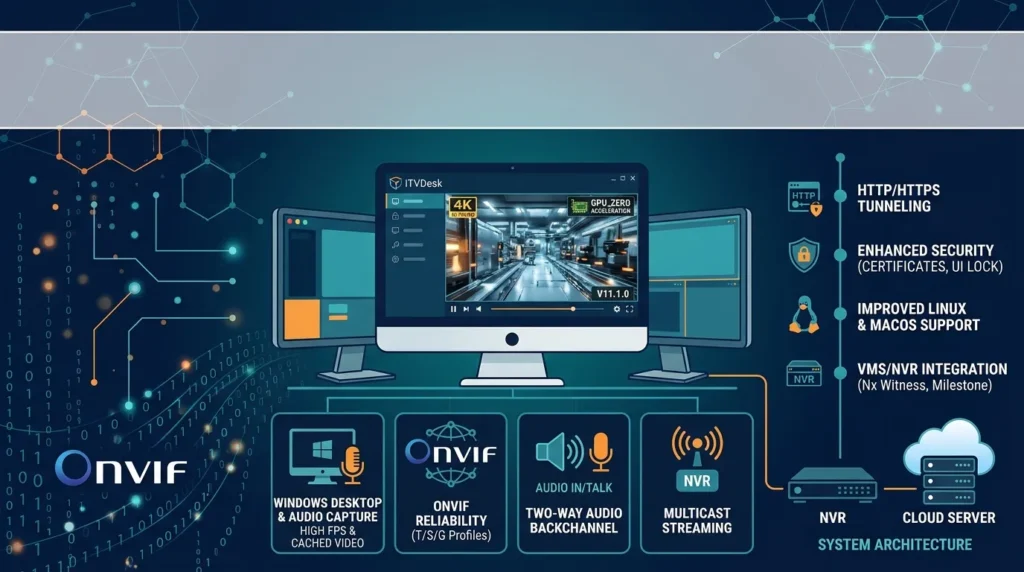
ITVDesk is a software-only virtual IP camera solution designed for professional surveillance environments. It does not require cloud services, external databases, or additional hardware such as capture cards or signal converters. The application runs as a standalone solution on Windows, Linux, and macOS, and it integrates seamlessly with industry-standard video management systems through ONVIF Profiles S, T, and G, as well as RTSP and RTSPS protocols.
The primary value proposition of ITVDesk Pro is its ability to correlate digital activity with video surveillance. By turning workstations, point-of-sale terminals, control-room displays, and industrial systems into live video sources, organizations can achieve comprehensive monitoring without the cost and complexity of installing physical cameras at every endpoint. The software is engineered for 24/7 unattended operation, and in real deployments it has handled high channel counts (approximately 100 RTSP streams) with consistent uptime and predictable resource usage, depending on CPU, GPU, network throughput, codec, resolution, and frame rate.
ITVDesk Pro is widely trusted in environments where monitoring digital screens is as critical as monitoring physical spaces. Typical industries and use cases include retail POS monitoring, control rooms, industrial control systems, financial services, casinos, and security operations centers (SOCs) .
Key Features
ITVDesk Pro X64 V11.1.0 ships with a robust feature set designed for professional integrators, system administrators, and enterprise security teams.
Video and Audio Capture
-
Desktop and application window capture: Stream the full desktop, a specific region, or individual application windows as independent streams.
-
Webcam and HDMI capture integration: Include webcam feeds and HDMI capture devices as additional video sources within the same ONVIF framework.
-
System audio capture: Stream system audio alongside video for complete situational awareness.
-
Two-way audio: Support for audio backchannel enables intercom and announcement functionality when paired with compatible receiving systems.
-
Multi-display support: Capture multiple displays either as a combined stream or as separate, independent streams.
Streaming and Protocol Support
-
ONVIF Profiles S, T, and G: Full compatibility with leading VMS and NVR platforms for discovery, control, event handling, and playback.
-
RTSP and RTSPS: Standards-based video streaming with support for encrypted transport.
-
H.264, H.265 (HEVC), and MJPEG video codecs: Flexible codec selection to balance quality and bandwidth.
-
G.711 and AAC audio codecs: Broad audio compatibility across surveillance ecosystems.
-
On-the-fly transcoding and proxy re-stream: Adapt streams to different client requirements without additional hardware.
-
Automatic reconnect and watchdog behavior: Built for unattended operation with smart reconnect logic that reduces truck rolls and manual intervention.
Security and Access Control
-
HTTPS and RTSPS-only operation: Enforce encrypted communication for all streaming and control traffic.
-
SRTP encrypted media: Protect audio and video transmission with compatible receiving systems.
-
Role-based access control and TOTP authentication: Protect the local user interface with user roles, protection against repeated failed sign-in attempts, and time-based one-time password authentication.
-
AES-256-GCM protected configuration: Stored configuration and secrets are protected with authenticated encryption, with additional Windows-level protection for stored secrets and imported TLS private keys.
-
Security audit and event logging: Security events can be recorded and forwarded to the Windows Application Event Log for compliance and incident response.
-
Offline operation: ITVDesk can operate locally without an Internet connection when using a valid offline license, making it suitable for air-gapped or highly restricted environments.
AI and Analytics Readiness
-
AI smart object detection and counting: Support for AI-powered object detection and counting with Region of Interest (ROI) functionality.
-
ONVIF People Counter support: Integration with NVR, DVR, and VMS systems for people-counting analytics.
-
Event and motion hooks: An AI-friendly pipeline allows ITVDesk to feed event data into analytics platforms and AI pipelines.
What’s New in the Latest Version
ITVDesk Pro X64 V11.1.0 includes several refinements and stability improvements over previous releases. The following updates are relevant to professionals evaluating an upgrade or a new deployment.
Streaming and Protocol Enhancements
-
Improved RTP data transmission: Enhanced efficiency and reliability of Real-time Transport Protocol interfaces.
-
RTSP server shutdown optimization: The server shutdown process now includes message queue clearing for cleaner operation.
-
Improved NTP synchronization: Better time synchronization for audio and video in ONVIF playback scenarios.
-
Audio backchannel stability: Enhanced performance and stability of two-way audio functionality.
-
ONVIF network initialization improvements: More reliable connections through improved initialization of ONVIF network interfaces.
Security and Management Improvements
-
IP address filter management: Add, edit, remove, and quickly save or reload IP address filter rules directly from the main user interface.
-
ONVIF device information dialog: Access ONVIF/RTSP/RTSPS endpoints, firmware and device details, and improved URL/location display from the camera context menu.
-
Improved license handling: Enhanced license management across Windows, Linux, and macOS platforms.
Bug Fixes and Stability
-
SPS/PPS frame prepending: The software now prepends SPS and PPS (from extradata) to each IDR frame in H.264/HEVC streams to ensure decoders have the necessary configuration for proper decoding.
-
Error logging improvements: Incorrect configuration loads are now logged for faster troubleshooting.
-
General code optimization: Streamlined code for better readability, faster processing, and maintainability.
System Requirements
ITVDesk Pro X64 V11.1.0 is designed to run on standard, modern hardware without specialized capture equipment. The following specifications reflect the official documentation and are intended to help you plan a deployment.
Supported Operating Systems
-
Windows: Windows 7, Windows 10, Windows 11, and newer (64-bit). Legacy 32-bit versions are available. Windows Server editions are supported.
-
Linux: Portable AppImage format for major distributions.
-
macOS: Supported, including Apple Silicon (ARM) and Intel-based Macs.
-
Android: Supported for embedded and mobile deployments.
Hardware Requirements
-
CPU: Multi-core processor recommended.
-
GPU: Hardware video acceleration is strongly recommended. ITVDesk supports Intel Quick Sync Video (QSV), NVIDIA NVENC, and AMD AMF for decode, processing, and encode operations.
-
RAM: Minimum 4 GB. Typical ITVDesk usage is approximately 250 MB of RAM and 300 MB of disk space .
-
Network: A stable LAN connection is required for streaming and ONVIF discovery.
Network Ports and Protocols
ITVDesk uses standard video surveillance protocols and operates within a local network environment. The default ports can be changed in the application settings.
| Service | Protocol | Default Port |
|---|---|---|
| ONVIF services | TCP | 7000 |
| RTSP server | TCP | 5554 |
| ONVIF discovery (probe) | UDP | 3702 |
| RTSP over HTTP/HTTPS | TCP | 80 / 443 |
| RTSP media transport | UDP | 22000–30000 |
Ensure that the selected ports are allowed by your firewall and are not already in use by other applications. ITVDesk includes a Network Cleanup Utility for resolving port conflicts that persist after changing settings or closing the application.
Installation Guide
ITVDesk Pro is designed for a straightforward installation process with no complex configuration or external dependencies. The application runs as a standalone solution and does not rely on cloud services or additional databases.
Step-by-Step Installation
-
Download the setup package from the official ITVDesk website or an authorized distribution partner.
-
Run the installer on your Windows, Linux, or macOS system. The installation can be performed on a single computer or on multiple systems, depending on your deployment scale.
-
Launch the application after installation completes.
-
Activate your license: Click the “Try Free Now” button inside the application to activate a trial license. No personal information is required to activate the trial. For production deployments, a valid license can be obtained from ITVDesk or an authorized reseller.
-
Configure streaming settings: Navigate to the streaming configuration section to select your video sources (desktop, application window, webcam, or HDMI capture device) and set your desired codec, resolution, and frame rate.
-
Add ITVDesk to your VMS/NVR: Use the ONVIF discovery feature in your video management system to add ITVDesk as a virtual IP camera. ITVDesk will appear as a standard ONVIF device on your network.
For organizations deploying ITVDesk at scale, the software supports configuration export and import, allowing administrators to standardize settings across multiple installations.
How to Use the Software
ITVDesk Pro is built for both beginners and experienced surveillance professionals. The following walkthrough covers the essential workflows for getting started and for advanced configuration.
For Beginners: Your First Stream in Minutes
-
Open ITVDesk after installation and activation.
-
Select a video source from the main interface. You can choose the full desktop, a specific application window, a webcam, or a connected capture device.
-
Choose your codec and quality settings. For most surveillance integrations, H.264 is widely compatible. H.265 (HEVC) offers better compression but requires compatible receiving systems.
-
Start the stream. ITVDesk will immediately begin serving the stream over RTSP and exposing it via ONVIF.
-
Add the stream to your VMS/NVR using ONVIF discovery or by manually entering the RTSP URL provided by ITVDesk.
For Professionals: Advanced Configuration
-
Multi-source streaming: Configure ITVDesk to stream multiple sources simultaneously—for example, a desktop screen and a webcam as two independent ONVIF channels.
-
GPU acceleration tuning: Select the appropriate hardware encoder (Intel QSV, NVIDIA NVENC, or AMD AMF) in the settings to offload encoding and reduce CPU load.
-
Security hardening: Enable HTTPS-only and RTSPS-only operation, configure IP address filters, and enable TOTP authentication for the local UI.
-
AI and analytics integration: Use ONVIF event hooks and motion detection to feed metadata into AI pipelines or people-counting systems.
-
Port customization: Modify default RTSP, ONVIF, and HTTP ports to align with your network security policies. After changing ports, click Apply Changes and restart streaming if required.
Best Use Cases
ITVDesk Pro excels in scenarios where digital screens and computer activity must be monitored alongside—or instead of—physical camera feeds.
Retail POS Monitoring
Correlate point-of-sale transactions with video of the operator’s screen and the physical environment. ITVDesk can stream both the POS application window and a webcam feed as independent ONVIF channels, providing loss-prevention teams with a complete record of digital and physical activity.
Control Rooms and Security Operations Centers
Stream operator workstations, alarm management consoles, and video walls into the central VMS. This allows supervisors to monitor what operators are seeing and doing in real time, supporting quality assurance, training, and incident investigation.
Industrial and SCADA Environments
In industrial control systems, ITVDesk can capture HMI/SCADA screens and stream them alongside physical process cameras. This provides a unified surveillance view for safety, compliance, and troubleshooting without integrating proprietary SCADA software directly into the VMS.
Financial Services and Casinos
Monitor trading terminals, teller workstations, and gaming systems. The ability to capture application windows as separate streams allows compliance teams to review specific software activity without reviewing the entire desktop.
Training and Demonstration Environments
ITVDesk is used in training labs and demonstration environments to stream instructor screens and application windows to recording systems for later review or live distribution.
Advantages and Limitations
Advantages
-
No additional hardware required: ITVDesk is a software-only solution that eliminates the need for capture cards, signal converters, or dedicated encoder appliances.
-
Broad platform support: Deploy on Windows, Linux, macOS, or Android, standardizing your workflow across servers, workstations, and embedded devices.
-
GPU-accelerated performance: Hardware acceleration with Intel, NVIDIA, and AMD GPUs ensures high-quality streaming (including 4K) with minimal impact on the host system.
-
Scalable from small to large deployments: ITVDesk grows from a handful of streams to large multi-site rollouts with predictable cost and minimal reconfiguration.
-
Enterprise-grade security: HTTPS, RTSPS, SRTP, role-based access control, TOTP, and AES-256-GCM encryption are built in.
-
Standards-based integration: ONVIF Profiles S, T, and G, plus RTSP and RTSPS, ensure compatibility with leading VMS and NVR platforms.
Limitations
-
ONVIF conformance depends on receiving system: While ITVDesk is ONVIF conformant, the feature set available (such as Profile G playback) depends on the capabilities of the receiving VMS or NVR.
-
AI and analytics are external: ITVDesk provides event hooks and an AI-friendly pipeline, but the actual analytics processing is performed by the receiving platform or a third-party AI system.
-
License required for production use: The trial is free, but ongoing professional use requires a valid license. Offline operation requires an offline license.
Alternatives to the Software
ITVDesk Pro competes in the virtual IP camera and desktop streaming category. The following alternatives are commonly evaluated by organizations considering ITVDesk.
DeskCamera
DeskCamera is typically used for basic desktop streaming scenarios. ITVDesk is designed as a full ONVIF platform for advanced surveillance environments, offering broader protocol support, multi-source streaming, and enterprise-grade security features that basic desktop streaming tools do not provide.
VISEC and Guardian Eye
VISEC and Guardian Eye are video management and surveillance platforms that may include screen-capture capabilities. ITVDesk differentiates itself through its dedicated focus on ONVIF/RTSP streaming, its software-only architecture, and its GPU-accelerated media pipeline.
Typical Alternatives (General Category)
When compared with typical alternatives in the virtual IP camera space, ITVDesk generally offers higher stable channel counts with proper hardware configuration, broader codec support (H.264, H.265, MJPEG, G.711, AAC), and built-in 24/7 unattended operation with automatic reconnect and watchdog behavior. Many alternatives are Windows-only, whereas ITVDesk supports Windows, Linux, macOS, and Android.
Frequently Asked Questions
What is ITVDesk Pro used for?
ITVDesk Pro is used to turn a computer into a virtual ONVIF IP camera. It streams desktop screens, application windows, webcams, and system audio into NVR and VMS platforms for professional video surveillance.
Does ITVDesk Pro require additional hardware?
No. ITVDesk is a software-only solution that installs directly on your computer. It does not require capture cards, signal converters, or dedicated encoder appliances.
Which operating systems are supported by ITVDesk Pro X64 V11.1.0?
ITVDesk supports Windows 7, Windows 10, Windows 11, and newer (64-bit), Windows Server editions, Linux (AppImage), macOS (including Apple Silicon), and Android.
How many RTSP streams can ITVDesk handle?
ITVDesk has handled approximately 100 RTSP streams in real deployments with consistent uptime. Actual capacity depends on CPU, GPU, network throughput, codec, resolution, and frame rate.
Is ITVDesk Pro compatible with my existing VMS or NVR?
ITVDesk integrates with leading VMS and NVR platforms through ONVIF Profiles S, T, and G, as well as RTSP and RTSPS. If your platform supports ONVIF or RTSP, ITVDesk can be added as a virtual IP camera.
Does ITVDesk Pro support encrypted streaming?
Yes. ITVDesk supports HTTPS and RTSPS with HTTPS-only and RTSPS-only operation, as well as SRTP-encrypted media for audio and video transmission with compatible receiving systems.
Can ITVDesk Pro run without an Internet connection?
Yes. ITVDesk can operate locally without an Internet connection when using a valid offline license, making it suitable for air-gapped or restricted network environments.
Is there a free trial of ITVDesk Pro?
Yes. ITVDesk offers a free trial that can be activated by clicking “Try Free Now” inside the application. No personal information is required to activate the trial license.
Final Thoughts
ITVDesk Pro X64 V11.1.0 is a mature, professionally engineered RTSP/ONVIF streaming software that solves a specific but increasingly important problem: how to bring computer-based video sources into a standards-based surveillance ecosystem without adding hardware complexity. Its software-only architecture, broad platform support, GPU-accelerated media pipeline, and enterprise-grade security features make it a compelling choice for integrators, security teams, and enterprises that need reliable, scalable, and legally compliant virtual IP camera functionality.
For organizations already invested in ONVIF-compatible VMS or NVR platforms, ITVDesk Pro offers a low-friction path to extending surveillance coverage to workstations, POS terminals, control-room displays, and industrial systems. The free trial and the ability to operate offline further reduce the barrier to evaluation, allowing teams to validate performance in their own environments before committing to a production deployment.
Our Paid Service
“We do not sell or provide any software. We only offer professional support services. If any software on your system is not working properly, or you are facing installation errors, crashes, or any other technical issue — just contact us. We will help you fix the problem quickly and remotely via AnyDesk. No software will be provided from our side — only expert troubleshooting and support.”