

Overview of the Software
Table of Contents
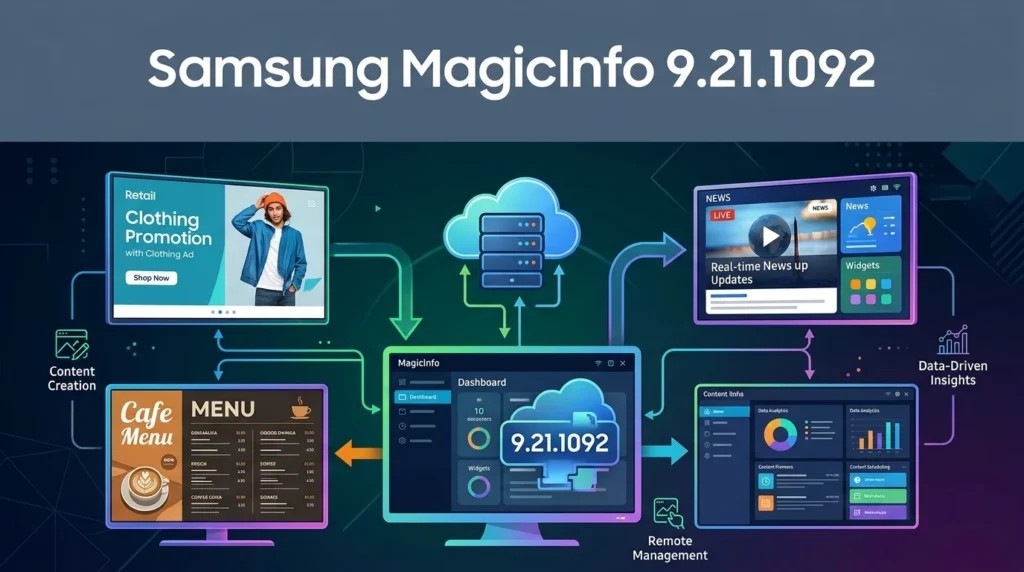
MagicINFO 9 is an all-in-one digital signage solution built around three core components: Author, Server, and Player. Author provides an intuitive content creation environment with templates, multimedia support, and layout tools. Server acts as the central management hub for scheduling, playlist organization, and content distribution. Player runs on Samsung SMART Signage displays (and select external devices) to render content without requiring a dedicated PC or external media player.
Version 9.21.1092 represents a maintenance update within the MagicINFO 9 Server 21.105x release family. It builds upon the foundational features of MagicINFO 9, including ISO 27001 and ISO 27701 security certifications—the first in the digital signage industry to achieve both. The platform also introduces MagicINFO Insight, which collects proof-of-play data and cross-references it with sales data to generate marketing performance reports.
It is important to note that MagicINFO 9 is the final major on-premise generation of the platform. Samsung has announced that MagicINFO On-Premise will reach End of Sale in December 2026, with server support ending in December 2029. Organizations planning long-term deployments should factor this lifecycle into their strategy and consider migration paths to Samsung VXT or alternative solutions.
Key Features
MagicINFO 9.21.1092 inherits the full feature set of the MagicINFO 9 platform, with maintenance updates focused on stability, security, and compatibility.
Content Creation and Management
-
MagicINFO Author offers a drag-and-drop interface with customizable templates, video walls, and multi-zone layouts.
-
Supports a wide range of content formats, including images, video, audio, PowerPoint (97–2013), Word, PDF, and web content.
-
Web Author enables browser-based content editing, eliminating the need for local software installation.
Device and Remote Management
-
Centralized control of display power, input sources, and remote troubleshooting from the Server dashboard.
-
Remote Control supports concurrent management of up to 100 devices in version 21.1050.0 and later.
-
Enhanced device health checks and targeted firmware updates help maintain fleet reliability.
Data Analytics and ROI Tracking
-
MagicINFO Insight aggregates playback history across displays and correlates it with sales data to produce visual performance reports with custom 3D charts.
-
The Insight dashboard provides tools for optimizing content based on real engagement metrics.
Security and Compliance
-
ISO 27001 and ISO 27701 certified, covering information security and privacy management.
-
Supports TLS 1.2 for SMTP, database encryption, and authenticated API access.
-
Role-based access control and organization-level license distribution.
What’s New in the Latest Version
The MagicINFO 9.21.1092 release is part of the 21.105x server line, which introduced several enhancements over earlier MagicINFO 9 builds. Based on official release information for the 21.1050.0 and subsequent hotfixes, key updates include:
-
PostgreSQL 15 support and expanded database compatibility (PostgreSQL 9.6/12/15 and Microsoft SQL Server 2016 or later).
-
Windows 11 Professional edition support for the MagicINFO Server.
-
Tomcat log download directly from the Server Management interface, simplifying troubleshooting.
-
Device-specific log collection, allowing administrators to gather logs from individual devices rather than entire groups.
-
Remote Control view expansion to 100 concurrent devices.
-
Security vulnerability fixes and bug resolutions addressing scheduling inconsistencies, content uploader permissions, and playlist management issues.
These updates are cumulative, meaning version 9.21.1092 incorporates the improvements and fixes from prior 21.105x releases.
System Requirements
MagicINFO 9 Server is a Windows-based on-premise application. The following specifications represent the minimum recommended configuration for a production deployment.
| Component | Requirement |
|---|---|
| CPU | Dual Core 2.5 GHz or greater |
| RAM | 2,048 MB (2 GB) or greater |
| HDD | 200 GB or greater (SSD preferred for content storage) |
| Operating System | Windows 10 Professional, Windows Server 2016, or Windows Server 2019 (Windows 11 Professional supported from 21.1050.0) |
| Database | PostgreSQL 9.6/12/15 or Microsoft SQL Server 2016 or later |
| Browser | Google Chrome (recommended for Web Author and Server access) |
| Network | 1 Gbit Ethernet recommended; 1 Gbit Layer 2 switch with IGMP snooping for video walls |
Important notes:
-
Windows 10 Home Edition is not supported.
-
MagicINFO Server must be installed under a Windows administrator account.
-
The database program (PostgreSQL or MSSQL) must be installed before installing the MagicINFO Server.
-
For multi-display or high-resolution content environments, additional RAM and storage may be required.
Installation Guide
Installing MagicINFO 9 Server requires careful preparation, particularly around database configuration. The following steps outline the standard installation workflow.
Prerequisites
-
Ensure the server meets the system requirements above.
-
Install and configure a supported database (PostgreSQL is the recommended option for most deployments).
-
For PostgreSQL, note the administrator password created during database installation—this will be required during MagicINFO Server setup.
-
If using Microsoft SQL Server, enable Named Pipes and TCP/IP, and set authentication mode to “SQL Server and Windows Authentication mode”.
Installation Steps
-
Launch the installer and select the installation language.
-
Accept the license agreement and choose an installation directory.
-
Select installation type:
-
Express Installation: Automatically configures settings and shortens the setup process.
-
Advanced Installation: Allows customization of FULL, WAS, or DB components.
-
-
Configure the database connection:
-
Select PostgreSQL or MSSQL.
-
Enter the database administrator credentials.
-
Choose SSL protocol (HTTP or HTTPS).
-
-
Complete the installation and note the generated credentials for the database user, general administrator, and organization administrator—these are required for first login.
-
Launch MagicINFO Server and log in with the administrator account.
Upgrading from a Previous Version
When upgrading to 9.21.1092 from an earlier MagicINFO 9 build (e.g., 21.1040.x), Samsung recommends:
-
Backing up the existing PostgreSQL database and restoring it after installing the new database version if applicable.
-
Using the built-in status checking process to verify system readiness before upgrading.
-
Applying the latest hotfix over the base 21.1050.0 installation.
For detailed, version-specific instructions, consult the official MagicINFO 9 release notes and installation guides on Samsung’s documentation portal.
How to Use the Software
MagicINFO 9 operates through the interaction of its three components. A typical workflow proceeds as follows:
-
Create content in Author: Use templates, multimedia elements, and layout tools to design signage content. Publish the content to the MagicINFO Server.
-
Organize and schedule in Server: Log in to the web-based Server interface to create playlists, assign content to device groups, and set publishing schedules.
-
Distribute to Player devices: Approved schedules are pushed to registered Samsung displays or Player installations. The Player renders content without external hardware.
-
Monitor and analyze: Use the Server dashboard to track device health, playback status, and content performance. MagicINFO Insight can correlate playback data with sales data for ROI analysis.
For beginners, Samsung provides extensive documentation, including component-specific user guides for Author, Server, and Player. Administrators can also grant restricted access to Web Author for content editors who do not need full server permissions.
Best Use Cases
MagicINFO 9 is particularly well-suited for organizations that have standardized on Samsung commercial displays and require centralized, on-premise control.
-
Retail and QSR: Schedule promotional content across multiple store locations, synchronize menus, and analyze which displays drive sales.
-
Corporate Communications: Distribute internal messaging, dashboards, and announcements to office displays from a central server.
-
Video Walls: Manage multi-display video walls with supported layouts and network configurations.
-
Education and Healthcare: Display wayfinding, schedules, and informational content with role-based content management.
-
Single-Site Small Businesses: MagicINFO Lite offers a free, feature-limited option for single-screen deployments on Samsung panel SoCs.
MagicINFO is optimized for Samsung-only display estates. Organizations with mixed-brand fleets may find third-party platforms more flexible.
Advantages and Limitations
Advantages
-
Tight Samsung integration: Deep compatibility with Samsung SMART Signage Platform (SSSP) and Tizen-based displays.
-
Enterprise security: ISO 27001 and ISO 27701 certifications provide a recognized security baseline.
-
All-in-one workflow: Content creation, scheduling, device management, and analytics are consolidated in a single platform.
-
Data-driven insights: MagicINFO Insight connects playback data to sales outcomes for measurable ROI.
-
Remote management at scale: Supports concurrent remote control of up to 100 devices in later 21.105x releases.
Limitations
-
Samsung-centric ecosystem: Best suited for organizations committed to Samsung displays; mixed-hardware environments reduce value.
-
On-premise lifecycle constraints: MagicINFO On-Premise reaches End of Sale in December 2026, and server support ends in December 2029.
-
Setup complexity: Requires database configuration and Windows Server administration, which may be challenging for small teams without IT support.
-
Licensing transition: Samsung is shifting to subscription-based VXT; perpetual licenses will not be available indefinitely.
Alternatives to the Software
Organizations evaluating MagicINFO 9.21.1092 should consider the following alternatives, particularly in light of the platform’s end-of-sale timeline.
Samsung VXT
Samsung VXT is the official successor to MagicINFO, built as a cloud-native platform with AI-powered content generation, advanced energy management, and a subscription pricing model. Samsung offers migration incentives for MagicINFO customers, but the licensing model shifts from perpetual to annual subscriptions.
Yodeck
Yodeck is a hardware-agnostic digital signage platform that is often cited as a more user-friendly and cost-effective alternative for small and mid-sized businesses. It offers a free tier for one screen and native support for Samsung Tizen displays, though it lacks the deep Samsung integration of MagicINFO.
LG SuperSign
For organizations with LG displays, LG SuperSign CMS is the direct equivalent of MagicINFO. Like MagicINFO, it is optimized for its manufacturer’s hardware and offers both free (Lite) and paid tiers.
Xibo and Pi Signage
For technically capable teams seeking open-source or self-hosted options, Xibo (community edition) and Pi Signage provide free software with multi-screen support. These solutions trade vendor support for customization and control.
ScreenCloud and OptiSigns
Cloud-based platforms such as ScreenCloud and OptiSigns offer per-screen subscription models with broad hardware compatibility, appealing to organizations that prefer not to manage on-premise infrastructure.
Frequently Asked Questions
What is Samsung MagicINFO 9.21.1092?
It is a maintenance release within the MagicINFO 9 Server 21.105x line, an on-premise digital signage software suite for creating, scheduling, and managing content on Samsung displays. The version number indicates the build within Samsung’s release numbering scheme.
Is MagicINFO 9 free?
MagicINFO Lite is available at no cost for basic single-site use on Samsung commercial panels, but it lacks multi-site management and advanced features. Full MagicINFO 9 Premium requires a per-player license, and Samsung is transitioning to subscription-based pricing with VXT.
What are the system requirements for MagicINFO 9 Server?
At minimum: dual-core 2.5 GHz CPU, 2 GB RAM, 200 GB HDD, Windows 10 Professional or Windows Server 2016/2019, and PostgreSQL 9.6/12/15 or Microsoft SQL Server 2016+. Windows 11 Professional is supported from version 21.1050.0 onward.
How long will MagicINFO 9 be supported?
Samsung has announced that MagicINFO On-Premise will reach End of Sale in December 2026, and server support will end in December 2029. After that date, no further patches or security updates will be provided.
Can MagicINFO 9 run on non-Samsung displays?
MagicINFO Player can run on select external devices and Windows-based players, but the platform is optimized for Samsung SMART Signage displays. Full functionality and hardware integration are best achieved within the Samsung ecosystem.
What database does MagicINFO 9 use?
MagicINFO 9 supports both PostgreSQL (9.6, 12, and 15) and Microsoft SQL Server (2016 or later). PostgreSQL is the recommended option for most deployments due to its open-source nature and ease of setup.
How does MagicINFO Insight work?
MagicINFO Insight collects proof-of-play data from displays and can correlate it with sales data to generate marketing performance reports. The dashboard provides custom 3D charts and ROI visualization tools to help businesses understand which content is effective.
What should I do if I am still using MagicINFO 9?
If you are planning a new deployment, evaluate whether VXT or a third-party platform better aligns with your long-term needs. If you are maintaining an existing MagicINFO installation, begin planning a migration strategy before the 2026 End of Sale and 2029 End of Support deadlines.
Final Thoughts
Samsung MagicINFO 9.21.1092 is a mature, feature-rich digital signage platform that excels in Samsung-centric environments requiring on-premise control, enterprise security, and data-driven content optimization. Its ISO-certified security posture, integrated Author–Server–Player workflow, and Insight analytics make it a capable solution for retail, corporate, and institutional deployments.
However, the platform’s lifecycle is a critical consideration. With on-premise sales ending in 2026 and support concluding in 2029, organizations should treat MagicINFO 9 as a bridge rather than a permanent foundation. Evaluating Samsung VXT, understanding migration incentives, and comparing third-party alternatives will help ensure continuity and value beyond the MagicINFO 9 era. For teams that need a proven, secure signage CMS today—and are prepared to plan for tomorrow—MagicINFO 9.21.1092 remains a reliable choice within its ecosystem.
Our Paid Service