

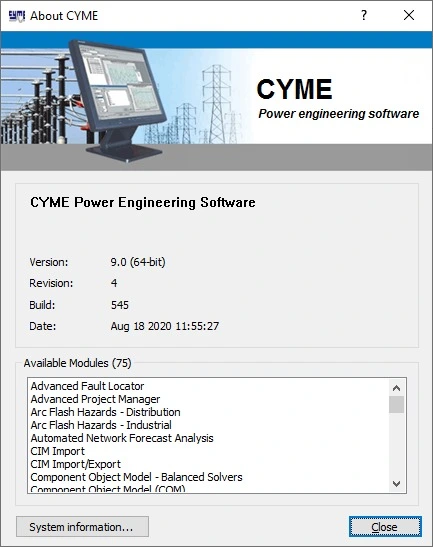
Overview of CYME 9.0 Rev 04
Table of Contents
CYME 9.0 Rev 04 is a modular power system analysis platform composed of a graphical network editor, a library of analysis modules, and customizable model libraries. It supports balanced and unbalanced three-phase, two-phase, and single-phase systems operating in radial, looped, or meshed configurations.
The software is widely adopted by electric utilities, industrial facilities, and engineering consultancies for distribution network planning, DER integration studies, and grid modernization projects. It integrates with GIS platforms, SCADA systems, and enterprise data sources through the CYME Gateway solution, enabling automated network model generation from real-world asset data.
Key entities and technical scope:
-
Developer: CYME International T&D (Eaton)
-
Software category: Power system analysis / electrical network simulation
-
Primary platforms: Windows 7, 8.1, 10; Windows Server 2008–2016
-
Supported languages: English, Spanish, French, Portuguese
-
Core file formats: SQL tables, XML, AutoCAD drawing files, Excel reports
Key Features of CYME 9.0 Rev 04
CYME 9.0 Rev 04 includes a broad set of analysis modules designed for transmission, distribution, and industrial power engineering. The following features represent the core capabilities of the platform.
Power Flow and Voltage Analysis
-
Unbalanced load flow for three-phase, two-phase, and single-phase networks
-
Voltage drop analysis across distribution feeders
-
Optimal capacitor placement and sizing
-
Volt/VAR optimization
Fault and Protection Analysis
-
Comprehensive fault flow analysis including three-phase and single-phase faults
-
Arc flash hazard assessment with risk-level computation
-
Protection device coordination and verification
DER and Microgrid Modeling
-
Distributed generation modeling for solar, wind, and inverter-based resources
-
Load Relief DER Optimization module for battery energy storage systems (BESS) and dispatchable generators
-
Microgrid modeling and analysis for islanded and grid-connected operation
Time-Series and Capacity Planning
-
Load Flow with Profiles for time-range analysis using AMR data and historical consumption patterns
-
Automated Network Forecast Analysis for time-dependent project modeling
-
Integration Capacity Analysis for determining maximum allowable DER interconnection capacity
Harmonic and Dynamic Analysis
-
Harmonic penetration analysis with single-phase and three-phase modeling
-
Frequency scan capability for impedance analysis
-
Long-Term Dynamics simulation for irradiance, wind, and load variations
Network Editor and Integration
-
Drag-and-drop single-line diagram creation
-
AutoCAD drawing import as background maps
-
Export of reports to Excel and Internet Explorer
-
Python scripting tool for automation and batch processing
What’s New in CYME 9.0 Rev 04
Revision 04 of CYME 9.0 introduces several refinements and additions to the CYME 9 series framework. These changes focus on improving analytical accuracy, expanding DER modeling capabilities, and streamlining the user experience.
Load Relief DER Optimization Module
A unique module that optimizes energy storage systems and dispatchable inverter-based generators to mitigate capacity problems on strategic grid assets. The module bundles two algorithms: one for BESS and dispatchable generation optimization, and one for non-dispatchable generation sizing.
Microgrid Modeling and Analysis
New modules enabling unprecedented simulations of islanded and grid-connected microgrids. This addresses the growing need for resilience planning and remote electrification studies.
Revamped Techno-Economic Analysis
An intuitive yet exhaustive financial assessment tool for concurrent grid projects. Engineers can evaluate feasibility and profitability based on the factual system model.
Expanded Load Flow with Profiles Integration
The Load Flow with Profiles analysis is now fully integrated with the Advanced Project Manager, enabling true long-term, time-series capacity analysis.
Continuous Improvement of Core Components
Ongoing enhancements to Load Flow Analysis, DER Impact Evaluation, Integration Capacity Analysis, Arc Flash Hazards Analysis, Harmonic Analysis, and the Python scripting tool. Several improvements have also been made to the software framework, user interface, and one-line diagram navigation.
System Requirements for CYME 9.0 Rev 04
CYME 9.0 Rev 04 requires a 64-bit Windows environment for proper operation. The following hardware and software specifications represent the minimum configuration for stable performance.
Hardware Requirements
| Component | Minimum Requirement |
|---|---|
| Processor | Intel Core i5-based computer |
| RAM | 2 GB free RAM |
| Disk Space | 2 GB available hard disk space |
| Display | Full HD monitor |
Software Requirements
-
Operating System: Microsoft Windows 7, 8, 8.1, or 10; Windows Server 2008, 2008 R2, 2012, 2012 R2, or 2016
-
Framework: Microsoft .NET User Interface Version 4.0 (strongly recommended)
-
Database Engine: Microsoft Access x64 MSI or ACE Database Engine x64 (required for CYME 9.0 64-bit)
Optional Integration Requirements
-
SQL Server or Oracle database for enterprise deployments
-
GIS connectivity for automated model extraction
-
SCADA/DMS interface for real-time data exchange
Installation Guide for CYME 9.0 Rev 04
Installing CYME 9.0 Rev 04 follows a straightforward process. The software is distributed through authorized channels with valid licensing. The following steps outline a standard installation workflow.
Step 1: Verify System Compatibility
Confirm that your workstation meets the hardware and software requirements listed above. Ensure that the 64-bit version of Microsoft Access Database Engine is installed before proceeding.
Step 2: Obtain the Installer
Acquire the CYME 9.0 Rev 04 installation package from an authorized Eaton/CYME representative or through your organization’s licensed distribution channel.
Step 3: Run the Installation Wizard
Launch the installer and follow the on-screen prompts. The wizard will guide you through license agreement acceptance, installation directory selection, and component selection.
Step 4: Install Prerequisites
If not already present, install the .NET Framework 4.0 and the Access Database Engine x64. These components are required for CYME 9.0 64-bit operation.
Step 5: Activate Your License
After installation, activate the software using the license credentials provided with your purchase or maintenance agreement. CYME requires a valid license to unlock analysis modules and network editor functionality.
Step 6: Verify Installation
Launch the CYME Network Editor and open a sample project to confirm that the installation is functional. Tutorial studies and sample models are included with the software to help users get started.
How to Use CYME 9.0 Rev 04
CYME 9.0 Rev 04 follows a model-build-analyze workflow. The following steps describe a typical usage sequence for a distribution network study.
Building a Network Model
-
Open the CYME Network Editor.
-
Drag and drop equipment symbols (buses, lines, transformers, loads) onto the work area.
-
Configure equipment parameters using the database manager and Tree View settings.
-
Import background maps from AutoCAD if geographic context is needed.
-
Save the model as a CYME project file.
Running an Analysis
-
Select the desired analysis module from the CYME menu (Load Flow, Fault Analysis, Harmonics, etc.).
-
Configure analysis settings and output preferences.
-
Execute the simulation.
-
Review results through on-screen overlays, reports, or exported Excel files.
Automating with Python
CYME 9.0 includes a Python scripting tool for batch processing and custom analysis workflows. Engineers can write scripts to automate repetitive studies, integrate with external data sources, or extend the platform’s functionality.
Using Time-Series Analysis
For long-term planning studies, use the Load Flow with Profiles module combined with the Advanced Project Manager. This enables year-by-year simulation of load growth, DER additions, and network modifications.
Best Use Cases for CYME 9.0 Rev 04
CYME 9.0 Rev 04 is designed for professionals who plan, operate, and optimize electrical power networks. The following use cases represent common applications of the software.
Distribution Utility Planning
Utilities use CYME to assess feeder loading, voltage profiles, and capacity headroom. The software supports multi-year planning studies that account for load growth and DER adoption.
DER Interconnection Studies
Engineers evaluate the impact of solar, wind, and storage systems on distribution networks. The Integration Capacity Analysis module determines how much DER can be added at specific points without violating operational limits.
Arc Flash and Safety Analysis
Industrial facilities use CYME to calculate incident energy and arc flash boundaries. The software computes parameters required to assess risk levels and adopt adequate safety procedures.
Microgrid Design
The Microgrid Modeling module supports the design and simulation of islanded and grid-connected microgrids. This is valuable for critical facilities, remote communities, and resilience projects.
Harmonic and Power Quality Studies
The Harmonics module performs harmonic penetration analysis and frequency scans. It helps identify resonant conditions and problematic areas before installing harmonic mitigation equipment.
Cable Ampacity Calculations
CYMCAP, a companion module within the CYME suite, offers 3D modeling and temperature rating of buried cable circuits, including ventilated tunnel configurations.
Advantages and Limitations of CYME 9.0 Rev 04
Advantages
-
Comprehensive module coverage: CYME offers a wide range of analysis capabilities within a single platform, reducing the need for multiple software tools.
-
Utility-proven algorithms: The software is widely adopted by electric utilities and has been validated through decades of industry use.
-
Strong DER and microgrid support: CYME 9.0 specifically addresses modern grid challenges related to renewable integration and resilience.
-
Python scripting: Automation and customization capabilities extend the platform’s usefulness for advanced users.
-
Enterprise integration: CYME Gateway and CYME Server enable connectivity with GIS, SCADA, and DMS systems.
Limitations
-
Windows-only platform: CYME does not natively support Linux or macOS.
-
Licensing cost: The software is positioned as an enterprise engineering tool with pricing that reflects its professional-grade capabilities.
-
Learning curve: New users may require training to fully utilize the advanced analysis modules and scripting features.
-
Resource requirements: Large network models with time-series analysis may require additional RAM and processing power beyond the minimum specifications.
Alternatives to CYME 9.0 Rev 04
Several commercial and open-source tools offer overlapping functionality with CYME. The following alternatives are commonly evaluated alongside CYME in utility and industrial contexts.
| Software | Developer | Primary Focus |
|---|---|---|
| ETAP | ETAP | Full lifecycle electrical grid software |
| DIgSILENT PowerFactory | DIgSILENT | Transmission and distribution analysis |
| PSS Sincal | Siemens | Power system planning and simulation |
| Synergi Electric | DNV | Distribution network analysis |
| NEPLAN | NEPLAN AG | Network planning and optimization |
| OpenDSS | EPRI | Open-source distribution system simulation |
| ELEK Cable HV | ELEK Software | Cable ampacity and high-voltage design |
Each alternative has distinct strengths. ETAP and PowerFactory are broader in scope, covering transmission through industrial systems. OpenDSS is free and script-driven, appealing to researchers. Synergi Electric and PSS Sincal compete directly with CYME in the distribution utility segment.
Frequently Asked Questions About CYME 9.0 Rev 04
What is CYME 9.0 Rev 04 used for?
CYME 9.0 Rev 04 is used for power system analysis, including load flow studies, short-circuit calculations, harmonic analysis, DER impact evaluation, and long-term distribution planning. It is primarily used by electric utilities and industrial power engineers.
What operating systems does CYME 9.0 Rev 04 support?
CYME 9.0 Rev 04 runs on Windows 7, 8, 8.1, and 10, as well as Windows Server 2008 through 2016. It requires a 64-bit environment and the Microsoft Access Database Engine x64.
How do I obtain a legitimate license for CYME 9.0 Rev 04?
Licenses for CYME software are available through Eaton and authorized CYME distributors. Contact an Eaton representative for pricing, trial requests, and maintenance agreements.
What is the difference between CYME 9.0 and CYME 9.5?
CYME 9.5 is a later release in the same series. It includes additional features and refinements beyond the 9.0 revision. Users with active maintenance contracts can typically upgrade to newer revisions.
Does CYME support Python scripting?
Yes. CYME includes a Python scripting tool that allows automation, batch processing, and integration with external data sources.
Can CYME model microgrids?
Yes. CYME 9.0 includes Microgrid Modeling and Analysis modules for both islanded and grid-connected microgrid simulations.
What file formats does CYME support for import and export?
CYME supports SQL database tables, XML files, AutoCAD drawing files (for background maps), and Excel report export.
Is CYME 9.0 Rev 04 compatible with GIS systems?
Yes. The CYME Gateway solution extracts information from GIS and enterprise systems to automatically generate network models for analysis.
Final Thoughts
CYME 9.0 Rev 04 represents a mature, industry-trusted platform for power system analysis. Its modular architecture, comprehensive analysis engine, and modern grid capabilities make it a strong choice for utilities and engineering firms navigating the energy transition. While the software requires a Windows environment and carries enterprise-level licensing costs, the depth of functionality—from unbalanced load flow to DER optimization and microgrid simulation—justifies its position in the professional power engineering toolkit.
For engineers evaluating CYME, the trial request process and sample models provide a practical way to assess the software’s fit for specific project requirements. As grid modernization accelerates, tools like CYME 9.0 Rev 04 will continue to play a central role in ensuring reliable, efficient, and resilient electrical networks.
Our Paid Service