
Overview of Maptek Vulcan Software
Table of Contents
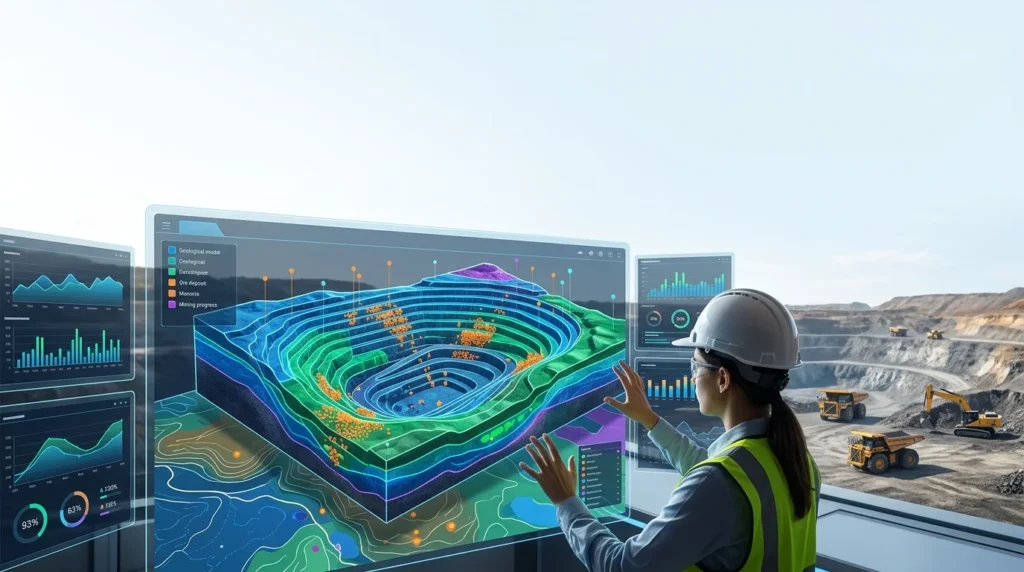
Maptek Vulcan is an industry-leading geological modeling and mine planning software. It is renowned for its powerful 3D visualization capabilities and its ability to handle complex, large-scale datasets. Version 2022.4 reinforces its position by offering enhanced performance and new features that streamline workflows from exploration to extraction. This comprehensive mining software solution allows for the creation of accurate block models, detailed pit and underground designs, and efficient scheduling, all within a single, integrated environment. By using Vulcan, mining professionals can significantly reduce uncertainty and optimize their operations for maximum economic return.
Key Features of Maptek Vulcan 2022.4
Maptek Vulcan 2022.4 is packed with a wide array of features designed to meet the demands of modern mining. These powerful tools are categorized to address every stage of the mine life cycle, ensuring that the software is a complete solution for your project.
-
Advanced Geological Modeling:
-
3D Block Modeling: Create and manipulate detailed block models for resource estimation. This process involves assigning grades and other attributes to blocks based on sample data and geological interpretations.
-
Implicit Modeling: Generate complex geological surfaces and solids from drillhole data quickly and efficiently. This feature helps geologists interpret and visualize ore bodies with greater accuracy.
-
Geostatistical Analysis: Perform robust statistical and geostatistical analyses to ensure the reliability of your resource estimations. This includes tools for variography and kriging.
-
-
Powerful Mine Design Tools:
-
Pit Optimization and Design: Design open-pit mines using sophisticated algorithms that consider economic parameters and geotechnical constraints. The software helps determine the most profitable pit shell.
-
Underground Mine Design: Create and visualize intricate underground designs, including declines, crosscuts, and stopes. The software supports a range of mining methods.
-
Stope Optimization: Maximize the value of underground operations by optimizing stope layouts based on grade distribution and economic factors.
-
-
Comprehensive Production and Scheduling:
-
Mine Scheduling: Develop detailed and achievable production schedules that align with your mine plan and operational targets.
-
Haulage and Fleet Management: Plan and simulate haul road networks and equipment movement to optimize material flow from the pit or underground to the processing plant.
-
-
High-Performance 3D Visualization:
-
Interactive 3D Environment: Navigate and analyze complex 3D mine models with ease. The intuitive interface allows for quick rotation, zooming, and interrogation of data.
-
Data Integration: Seamlessly integrate and visualize data from various sources, including drillhole data, survey points, and laser scanning, within a unified 3D space.
-
What’s New in Maptek Vulcan 2022.4
The 2022.4 version of Maptek Vulcan introduces significant enhancements to improve user experience, performance, and analytical capabilities.
-
Enhanced 3D Visualization and Rendering: The latest version features improved rendering for block models and surfaces, allowing for more realistic and detailed visualizations. This enhancement helps in presenting complex data in a clear and understandable manner.
-
Performance Optimizations: Significant improvements have been made to the software’s performance, particularly for large block models and complex 3D scenes. Users can expect faster load times, quicker model manipulation, and more responsive operations.
-
Improved Implicit Modeling Tools: The implicit modeling workflows have been refined for greater speed and accuracy. This allows geologists to build and update complex geological models more efficiently.
-
Integration with Maptek DomainMCF: Version 2022.4 offers better integration with Maptek’s DomainMCF (Multi-Continuum Framework), enhancing the ability to model multiple geological domains simultaneously, leading to more accurate and geologically sound models.
System Requirements for Maptek Vulcan 2022.4
To ensure optimal performance and a stable working environment, your system should meet or exceed the following hardware and software specifications for Maptek Vulcan 2022.4.
-
Operating System: Windows 10 (64-bit) or Windows 11 (64-bit). Windows Server editions may also be supported for virtualized environments.
-
Processor: A multi-core processor is highly recommended. Intel Xeon or AMD EPYC processors with high clock speeds offer the best performance for computationally intensive tasks.
-
Memory (RAM): A minimum of 16 GB is required. However, for complex models and large datasets, 32 GB or more is strongly advised to ensure smooth operation.
-
Graphics Card: A high-end, dedicated graphics card is essential. Look for NVIDIA Quadro or AMD Radeon Pro series cards with 4 GB or more of dedicated memory for optimal 3D rendering and visualization.
-
Storage: A fast SSD (Solid State Drive) is highly recommended for the operating system and software installation to ensure quick loading times. Additional high-capacity storage is required for project data.
-
Display: A monitor with a resolution of 1920 x 1080 or higher is recommended to fully utilize the software’s interface.
Installation Guide for Maptek Vulcan
Installing Maptek Vulcan is a straightforward process. The following steps provide a general guide for a standard installation on a Windows-based system.
-
Check Your License: Before proceeding, ensure you have a valid software license and the necessary license server information or a hardware key (dongle) from Maptek.
-
Download the Installer: Obtain the official Maptek Vulcan 2022.4 installation package from the Maptek customer portal or your authorized software distributor.
-
Run the Installer: Locate the downloaded executable (.exe) file, right-click on it, and select “Run as administrator” to ensure all necessary permissions are granted.
-
Choose Installation Type: The installer will typically offer a standard or custom installation. The standard installation is recommended for most users.
-
Accept the License Agreement: Carefully read and accept the End-User License Agreement (EULA) to continue with the installation.
-
Specify the Destination Folder: Choose the directory where you want to install the software. The default location is typically
C:\Program Files\Maptek\Vulcan\. -
Configure License Settings: During the installation, you will be prompted to configure the license. This involves pointing the software to your license server or selecting your local hardware key.
-
Complete the Installation: Click “Install” to begin the copying of files. Once the process is complete, click “Finish” to exit the installer. You may be prompted to restart your computer.
How to Use Maptek Vulcan for Mining Projects
Maptek Vulcan is a powerful tool, but its value is unlocked through a structured approach. Its standard workflow follows the mine life cycle from data to design and production.
-
Data Import and Management: The process begins by importing geological data. This includes drillhole data (collar, survey, and assay tables), survey data, and topography data. Vulcan supports a wide range of industry-standard file formats like CSV, SQL databases, and DXF.
-
Geological Database Creation: The imported data is organized into a central database. You can validate, edit, and visualize this data in 3D to ensure its quality and consistency, forming the foundation for your geological models.
-
Geological Modeling: Using the robust modeling tools, you create a 3D representation of the geology. This involves:
-
Creating Wireframe Solids: Interpreting geological boundaries to build 3D surfaces that define ore bodies and other geological features.
-
Creating a Block Model: Building a 3D grid of blocks and assigning attributes (like grade, rock type) to each block using geostatistical interpolation methods.
-
-
Mine Design: With a solid geological model, you can begin the mine design.
-
Open Pit: Use the Pit Optimization tool to define the most profitable pit limits based on economic parameters. Then, design the final pit shells, benches, and haul roads.
-
Underground: Create a comprehensive mine layout including declines, levels, and stoping designs.
-
-
Production Scheduling: Use the Mine Scheduling module to develop a schedule that outlines when and where material will be mined. This integrates with the design to optimize cash flow and resource utilization.
-
Analysis and Reporting: Finally, use Vulcan’s analytical tools to validate your plan. Generate reports on resources, reserves, and production forecasts to support decision-making.
Best Use Cases for Maptek Vulcan
Maptek Vulcan’s versatility makes it an essential tool for various applications across the mining sector. Here are some of its most common and impactful use cases.
-
Exploration and Resource Estimation:
-
Geologists use Vulcan to model and estimate mineral resources and reserves.
-
The software integrates drillhole data and geological interpretations to generate reliable block models, providing accurate tonnage and grade estimates for feasibility studies.
-
-
Open-Pit Mine Planning:
-
Mine planners use Vulcan for creating efficient open-pit designs and schedules.
-
By combining geological data with economic constraints, they can design pits that maximize ore extraction while minimizing waste.
-
-
Underground Mine Design:
-
Engineers can design and optimize complex underground layouts, including declines, stopes, and ventilation systems.
-
Vulcan’s 3D environment helps in visualizing complex geometries and planning for safe and efficient extraction.
-
-
Production Management:
-
The software is used to generate detailed production schedules and manage material movement. By simulating the mining process, planners can optimize equipment allocation and reduce operational costs.
-
Advantages and Limitations of Maptek Vulcan
Like any specialized software, Maptek Vulcan has its strengths and areas where it may present challenges to new or small-scale operators.
-
Advantages:
-
Industry Standard: Widely used by major mining companies, which provides a common platform for collaboration and data exchange with consultants and partners.
-
Powerful Features: Its comprehensive suite of tools covers the entire mine life cycle, reducing the need for multiple third-party applications.
-
Strong 3D Visualization: The high-quality 3D environment makes it easier to understand complex geological and structural relationships.
-
Scalability: The software can handle datasets from small projects to the world’s largest open-pit and underground mines.
-
-
Limitations:
-
High Cost: The licensing for Maptek Vulcan can be a significant investment, making it less accessible for small consultancies, educational institutions, or junior exploration companies.
-
Steep Learning Curve: The software is highly complex and requires substantial training. New users need to invest significant time in learning its powerful features and workflows.
-
Resource Intensive: It demands high-performance hardware. Running Vulcan efficiently requires a powerful workstation, which adds to the total cost of ownership.
-
Alternatives to Maptek Vulcan
While Maptek Vulcan is a dominant player, the market offers several alternative geological and mining software solutions. The best choice often depends on the project’s scope, budget, and specific requirements.
| Software | Category/Key Features | Best Suited For |
|---|---|---|
| Micromine | Geological modeling, mine design, resource estimation. Strong in exploration and early-stage projects. | Junior explorers to mid-tier mining companies. |
| Datamine Studio | Mine design, scheduling, resource estimation. Known for its open-pit optimization tools. | Mine planning and operations for both open-pit and underground. |
| Deswik | Mine design, scheduling, and integrated planning. Strong in complex underground operations. | Modern mining operations needing agile and integrated planning. |
| Surpac | A comprehensive solution for geology, resource modeling, and mine design. | A long-standing alternative suitable for a wide range of mining projects. |
| Leapfrog | Specialized in implicit geological modeling from drillhole data. Fast and user-friendly for geologists. | Geological modeling, particularly during exploration and resource definition. |
Frequently Asked Questions About Maptek Vulcan
1. What is the primary use of Maptek Vulcan software?
Maptek Vulcan is a comprehensive 3D mining software used primarily for geological modeling, mine planning, and design. It helps mining professionals make data-driven decisions by creating accurate 3D models of ore bodies, designing pits and underground structures, and scheduling production.
2. Is Maptek Vulcan difficult to learn for beginners?
Yes, Maptek Vulcan has a steep learning curve due to its extensive features and specialized nature. However, Maptek provides comprehensive training and documentation, and many users find that their productivity increases significantly once they are trained and certified.
3. What is the latest version of Maptek Vulcan?
As of the date of this review, the latest major version discussed is Maptek Vulcan 2022.4. Maptek regularly releases updates, so it is recommended to check their official website for the most current version information.
4. Can Maptek Vulcan handle data for both open-pit and underground mines?
Absolutely. Maptek Vulcan is a versatile tool that provides robust design and planning modules for both open-pit mine design and underground mine design, making it a holistic solution for any mining operation.
5. How does Maptek Vulcan improve the accuracy of resource estimation?
Vulcan improves estimation accuracy through its advanced geological modeling and geostatistical tools. Features like implicit modeling and variography analysis help create a reliable 3D block model that forms a robust foundation for calculating resources and reserves.
6. What are the key system requirements for running Vulcan effectively?
To run Maptek Vulcan effectively, you will need a 64-bit Windows OS, a powerful multi-core processor (like Intel Xeon), at least 16 GB of RAM (32 GB+ recommended), and a dedicated high-end graphics card (e.g., NVIDIA Quadro).
Final Thoughts on Maptek Vulcan for Modern Mining
Maptek Vulcan 2022.4 is more than just software; it is a vital strategic asset for the modern mining industry. Its ability to provide a detailed, 3D view of geological data empowers professionals to make informed, data-driven decisions that are crucial for reducing risk and maximizing operational value. While its cost and complexity may be a barrier for some, the return on investment is clear: it enables more accurate resource estimation, efficient mine plans, and ultimately, more profitable and sustainable mining operations. For any serious mining operation, Maptek Vulcan remains an exceptional and indispensable choice.
Our Paid Service
“We do not sell or provide any software. We only offer professional support services. If any software on your system is not working properly, or you are facing installation errors, crashes, or any other technical issue — just contact us. We will help you fix the problem quickly and remotely via AnyDesk. No software will be provided from our side — only expert troubleshooting and support.”