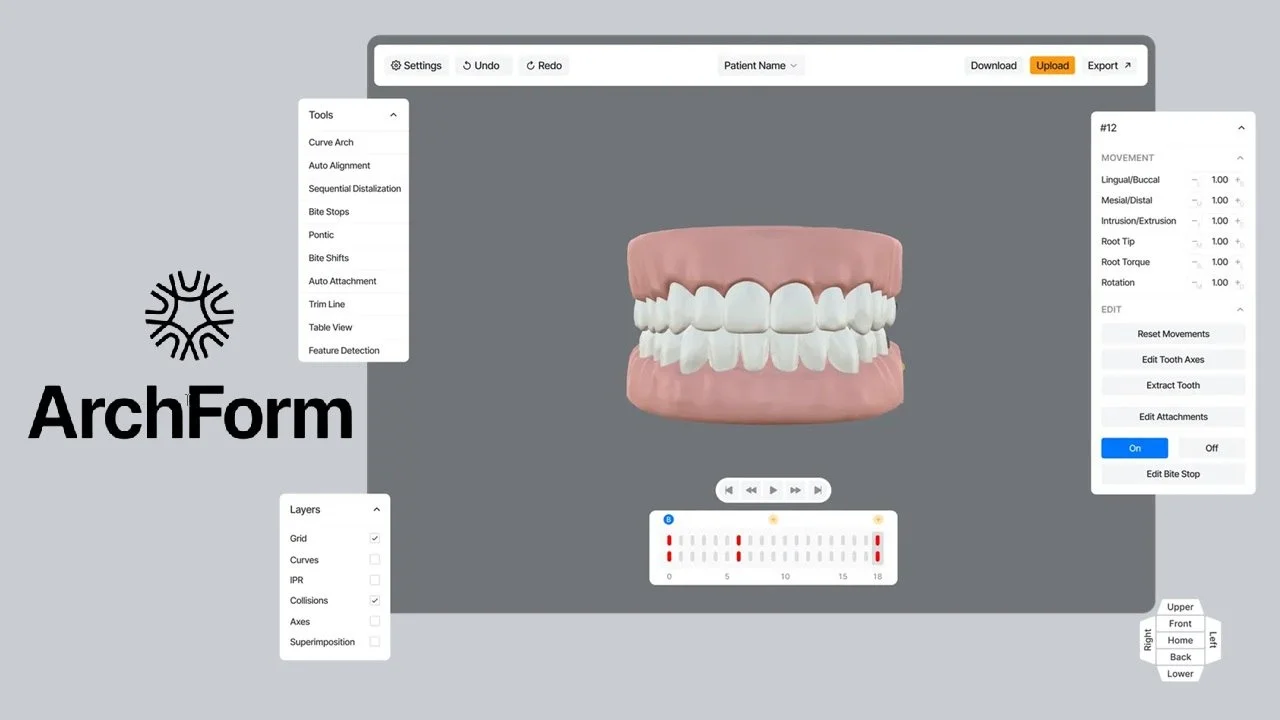
Overview of ArchForm Orthodontic Software
Table of Contents
ArchForm is a specialized orthodontic software platform that enables dental professionals to design, plan, and produce clear aligners directly in their practices. This advanced treatment planning software streamlines the entire aligner workflow—from intraoral scan import to final 3D printing—allowing orthodontists and general dentists to maintain greater clinical control while reducing lab costs by up to 84% .
Developed by ArchForm Inc., a Sunnyvale-based dental technology company, the software combines artificial intelligence with an intuitive interface to simplify complex orthodontic treatment planning . ArchForm’s approach has gained significant traction among practitioners seeking to move aligner production in-house, with more than 800,000 patient cases planned using the platform .
What sets ArchForm apart from traditional aligner services is its pay-per-case pricing model, which allows practices to start with a single case and scale usage as their in-house aligner production grows . This flexibility, combined with FDA 510(k) clearance as a medical device, positions ArchForm as a compliant and accessible solution for modern orthodontic practices .
Key Features of ArchForm Treatment Planning Software
Automated Segmentation and AI-Powered Design
ArchForm leverages machine learning for accurate tooth segmentation, automatically identifying the gingival border of each tooth within seconds . The software’s segmentation algorithm can be manually adjusted using an intuitive brush-editing feature, giving clinicians precise control when needed. Automated initial alignment further accelerates the treatment planning workflow, allowing practitioners to focus on clinical decision-making rather than repetitive setup tasks .
Comprehensive Staging and Movement Control
The software provides granular control over tooth movement sequencing:
-
Multiple intermediate goals can be set to control movement sequence and apply overcorrection
-
Sequential distalization is planned automatically based on treatment objectives
-
The number of aligners adjusts dynamically based on planned tooth movements
-
Clinicians can set multiple intermediate goals to control the sequence of movements
Attachment and Cutout Management
ArchForm offers complete attachment control, allowing clinicians to:
-
Adjust attachment position, size, and gingival tilt
-
Add multiple attachments, including lingual attachments for root angulation and anchorage control
-
Fully adjust placement and sizing for hooks and elastics
-
Add aligner cutouts for hooks or elastics directly from the software interface
Advanced Trim and Model Preparation
The software includes specialized tools for model refinement:
-
A lasso trimming tool allows users to remove unwanted material, such as excess palate coverage, by drawing a circle to cut it out
-
Auto-orientation automatically aligns the midline and occlusal planes regardless of scan angle
-
Hollow model export saves up to 50% of resin costs
Bite Management and Pontic Placement
For complex cases requiring bite management:
-
Bite stops can be added automatically to anterior teeth or placed individually, maintaining a flat plane parallel to the occlusal plane
-
Bite shifts allow full adjustment of mandibular position to show desired end-of-treatment results
-
Pontics can be placed following extraction and will dynamically resize as spaces close
3D Printing Integration
ArchForm streamlines the transition from digital planning to physical production:
-
Auto-export settings prepare models for printing without manual intervention
-
Vertical printing support and auto-labeling are automatically applied
-
Direct Print Aligner (DPA) workflow supports validated 3D printers with integrated software, UV curing, and centrifuge systems
What’s New in ArchForm 2.6.4.1
While detailed release notes for version 2.6.4.1 are not publicly available, ArchForm maintains a rapid development cycle, with continuous software improvements that users describe as making the platform “better and better” . Recent feature enhancements available in the current version family include:
Enhanced AI Automation: Improved automated segmentation and initial alignment algorithms reduce manual adjustment time .
Web-Based Treatment Planning: ArchForm now offers a custom-brandable 3D web editor, enabling practitioners to access treatment planning tools from any browser while maintaining a consistent clinical experience .
Direct Print Aligner Workflow: Expanded support for validated 3D printers and post-processing equipment, enabling clinicians to print aligners directly without thermoforming models .
Automated Manufacturing Pipeline: Bulk export capabilities and specialized CAM software for 5-axis CNC milling of aligners support high-volume production .
System Requirements for ArchForm
Supported Operating Systems
ArchForm runs on Windows operating systems . For web-based features, the platform supports all major browsers including Chrome, Firefox, and Safari .
Hardware Recommendations
-
Processor: Modern multi-core processor (Intel Core i5 or equivalent recommended)
-
RAM: Minimum 8GB RAM, 16GB recommended for complex cases
-
Storage: SSD drive for faster file loading and processing
-
Graphics: Dedicated graphics card with OpenGL support for 3D visualization
Intraoral Scanner Integration
ArchForm integrates with all major intraoral scanners, accepting standard .stl file imports . The software automatically identifies and closes open scans, ensuring complete digital models for treatment planning .
3D Printer Compatibility
The software supports a wide range of 3D printers for in-office aligner production, with Formlabs printers being among the validated solutions . For Direct Print Aligner workflow, specific validated printers, UV curing machines, and centrifuge equipment are required .
Installation Guide for ArchForm Orthodontic Software
Step 1: System Preparation
Before installation, ensure your computer meets the minimum system requirements. Close all other applications and temporarily disable antivirus software to prevent installation conflicts.
Step 2: Download the Installer
Access the ArchForm software download through your ArchForm account portal. The installer file is provided upon subscription activation or trial enrollment.
Step 3: Run the Installation
Double-click the downloaded installer file and follow the on-screen prompts. The installation wizard will guide you through accepting the license agreement, selecting installation directory, and choosing additional components.
Step 4: License Activation
After installation, launch ArchForm and log in with your practice credentials. The software will verify your license status—whether you are on a pay-per-case plan or a practice subscription.
Step 5: Initial Configuration
Configure your settings including:
-
Printer selection and calibration
-
Default export preferences
-
Team member accounts (if applicable)
Step 6: Data Synchronization
ArchForm supports syncing across multiple computers, allowing you to start a design on one machine and continue on another . Ensure your internet connection is stable for cloud synchronization.
How to Use ArchForm: Complete Workflow Guide
Importing Scans
Begin by importing intraoral scan files (.stl format) into ArchForm using the software’s import function . The software will automatically orient the scan, aligning the midline and occlusal planes .
Model Preparation
Use the lasso trimming tool to remove excess material if needed . The software’s automated segmentation then identifies individual tooth borders, which can be refined using the brush-editing feature .
Treatment Planning
-
Set treatment objectives: Define the final position for each tooth by dragging them to target positions
-
Adjust arch shape: Use control points to customize the arch form for each patient
-
Configure attachments: Place and adjust attachments, including lingual options for root control
-
Plan staging: Set intermediate goals and allow sequential distalization to be automatically calculated
Advanced Feature Application
-
Add bite stops for deep bite cases
-
Configure bite shifts to show desired mandibular positioning
-
Place pontics following extractions
-
Adjust IPR amounts with one-click controls
Export for Production
Once planning is complete, use the auto-export function to prepare print-ready files . For in-house production, the software automatically adds printing supports, applies labels, and creates hollow models when needed .
Best Use Cases for ArchForm
In-Office Aligner Production
ArchForm is ideally suited for orthodontic practices and general dentists who want to produce clear aligners in-house . This approach reduces reliance on external aligner manufacturers, eliminating lab back-and-forth and speeding treatment initiation.
Same-Day Treatment Starts
With in-office 3D printing, ArchForm enables delivery of aligners or indirect bonding trays within approximately 30 minutes of scan completion . This capability transforms patient experience and improves case acceptance.
Hybrid Treatment Approaches
Clinicians can begin treatment with fixed appliances and transition to clear aligners for finalization, offering patients faster results while maintaining the clinical advantages of both modalities .
Scaling Aligner Brands and Labs
The enterprise version of ArchForm supports aligner brands and dental labs launching or scaling clear aligner production, with custom-brandable web editors and automated manufacturing pipelines .
Remote Team Collaboration
ArchForm’s sync capabilities enable team members to work on cases across multiple computers, supporting practices with multiple locations or clinicians who need to review cases from home .
Advantages and Limitations of ArchForm
Advantages
Significant Cost Reduction: ArchForm can reduce aligner costs by more than 50%, with some practitioners reporting 84% savings on lab bills .
Clinical Control: Dentists retain full control over treatment planning, staging, attachments, and other critical clinical decisions without third-party interference .
Rapid Treatment Planning: The software enables case setup in minutes rather than days, with automated features reducing manual steps .
Flexible Pricing: Pay-per-case pricing allows practices to scale usage without committing to expensive subscriptions .
Comprehensive Feature Set: From attachment control to bite management and automated print preparation, ArchForm offers a complete aligner production workflow .
FDA Clearance: As a 510(k)-cleared medical device, ArchForm meets regulatory requirements for orthodontic treatment planning software .
Limitations
Learning Curve: While ArchForm emphasizes ease of use, practitioners transitioning from traditional aligner services need training to master digital treatment planning .
Hardware Investment: In-office production requires investment in 3D printers, thermoforming equipment, and post-processing tools .
Continuous Updates: The software’s rapid development cycle means features change frequently, requiring practices to adapt to new workflows .
Alternatives to ArchForm Orthodontic Software
SmileInspector
SmileInspector is a cross-platform orthodontic treatment planning software available as both web and desktop applications for Windows, Linux, and Mac . It offers IP contacts visualization, archform adjustments, one-click IPR adjustment, and anatomically correct tooth reconstruction . The software generates ready-to-print aligner models and supports in-house aligner production .
Key Differentiators
-
ArchForm: Specializes in direct aligner production with integrated printing support, enterprise solutions for aligner brands, and FDA-cleared status
-
SmileInspector: Provides cross-platform compatibility and potentially broader operating system support
Traditional Aligner Manufacturers
Companies like Invisalign offer comprehensive aligner treatment services with established clinical protocols and marketing support. However, these services typically involve higher per-case costs and less direct clinical control compared to ArchForm .
Frequently Asked Questions
Is ArchForm FDA-cleared for orthodontic treatment planning?
Yes, ArchForm Orthodontic Software System received FDA 510(k) clearance (K213916) as a medical device for orthodontic treatment planning . The clearance confirms the software’s safety and effectiveness for its intended use based on performance and software validation testing .
What file formats does ArchForm support?
ArchForm primarily works with .stl files from intraoral scanners, which is the standard format for digital dental models . The software automatically identifies and closes open scans, ensuring complete digital impressions .
Can I try ArchForm without committing to a subscription?
Yes, ArchForm offers a pay-per-case pricing model that allows practices to start with a single case before committing to a subscription . This approach enables dentists to evaluate the software’s suitability for their practice without significant upfront investment .
Does ArchForm work with my existing 3D printer?
ArchForm integrates with a wide range of 3D printers used in dental practices, including Formlabs printers . For the Direct Print Aligner workflow, specific validated printers, UV curing machines, and centrifuge equipment are required .
How long does it take to plan a case with ArchForm?
Clinicians can complete treatment planning in approximately 10 minutes using ArchForm’s automated features, including auto-trimming, segmentation, and initial alignment . The time varies depending on case complexity and practitioner experience.
Can multiple team members work on the same case?
Yes, ArchForm supports collaboration through shared team inboxes and data synchronization across multiple computers . This enables team members to work on cases at different workstations or from different locations .
What training is available for ArchForm?
ArchForm offers comprehensive support including tutorials, webinars, and direct customer service . The company emphasizes ease of use, with the goal of enabling practitioners to learn the software within a few hours .
Can ArchForm be used for hybrid orthodontic treatment?
Yes, ArchForm supports hybrid approaches where practitioners begin treatment with fixed appliances and transition to clear aligners for finalization . The software’s flexibility allows clinicians to choose the best modality for each patient’s needs .
Final Thoughts
ArchForm represents a significant shift in orthodontic aligner treatment, empowering dental professionals to bring production in-house while maintaining clinical control and reducing costs. By combining AI-powered automation with an intuitive interface, the software addresses the traditional barriers to in-office aligner production—complexity, cost, and time .
The platform’s FDA clearance and proven track record across hundreds of thousands of cases provide assurance of its reliability as a treatment planning tool . For practices ready to invest in in-house aligner production, ArchForm offers a scalable solution that can grow with the practice, whether starting with a single case or scaling to enterprise-level production .
As orthodontic technology continues to evolve, platforms like ArchForm will likely become increasingly central to dental practice workflows. The ability to deliver aligners in-house within hours of scanning aligns with patient expectations for faster treatment and represents a competitive advantage for forward-thinking practices .
Our Paid Service
“We do not sell or provide any software. We only offer professional support services. If any software on your system is not working properly, or you are facing installation errors, crashes, or any other technical issue — just contact us. We will help you fix the problem quickly and remotely via AnyDesk. No software will be provided from our side — only expert troubleshooting and support.”