Overview of Trimble TILOS
Table of Contents
TILOS, which stands for Time Location Solution, is a linear project management software developed to improve visualization and control in infrastructure projects. Originally developed in 1998 through collaboration with major German road construction companies, TILOS was acquired by Trimble Inc. in 2015 and integrated into their civil engineering and construction division.
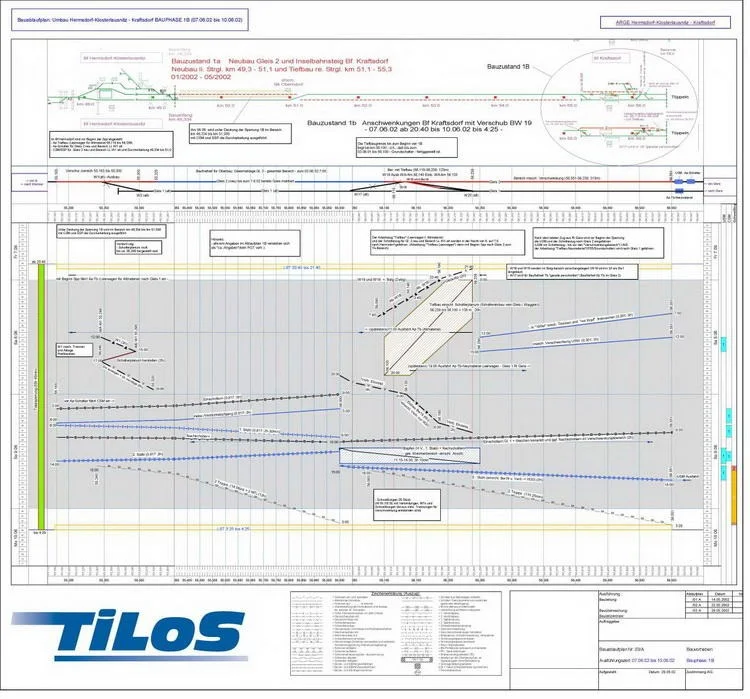
The core innovation of TILOS lies in its time-distance diagram approach. Unlike traditional Gantt charts that show only task timelines, TILOS combines time and location data into a single graphical view. This allows project teams to see exactly where work is happening along a project corridor and when it will occur, providing a comprehensive understanding of construction sequences.
The software serves as a bridge between traditional Critical Path Method (CPM) scheduling and the spatial realities of linear construction. TILOS maintains a full CPM engine while enabling location-based visualization and analysis.
Key Features of Trimble TILOS v11.1
Visual Linear Scheduling
The software’s time-chainage diagrams display tasks along distance and time axes, making it possible to visualize work sequences, identify potential conflicts, and understand productivity trends. Task lines and their slopes represent crew productivity, while overlapping task lines can indicate scheduling conflicts that need resolution.
Integrated CPM Analysis
TILOS supports full Critical Path Method analysis within the time-location view, displaying critical paths directly on the linear schedule. This integration helps planners understand how delays impact both schedule and location-based activities.
Resource and Cost Management
The platform manages equipment allocation, materials, costs, budgets, and resources across large project areas. Users can track resource distribution and utilization across different project locations, supporting better allocation decisions.
What-If Scenario Planning
TILOS supports scenario optimization through project simulations. Planners can connect schedules with project maps to compare different planning approaches and make data-driven decisions.
Progress Tracking and Monitoring
The software enables location-based progress tracking using multiple methods: percentage complete, work quantities, or distance-based metrics. Progress data can be imported from daily reports, allowing teams to compare actual progress against baselines and forecast the impact of remaining work.
Mass Haulage Planning
TILOS is optimized for planning material movement around large civil construction sites, coordinating excavation, fill, and material transport activities through time-chainage visualization.
What’s New in TILOS v11.1
The v11.1 release focuses on enhancing the software’s core linear project management capabilities. Key improvements include:
-
Refined task library functionality for creating and modifying project-specific activities
-
Enhanced profile-based quantity calculations that specify quantities along location axes
-
Improved integration between schedule and map views for more effective project simulation
-
Streamlined progress tracking with more flexible data import options for field reports
-
Updated user interface for improved workflow efficiency in linear scheduling
System Requirements
Trimble TILOS v11.1 is designed for Windows operating systems. While specific hardware requirements depend on project size and complexity, users typically need:
Operating System: Windows 10 or Windows 11 (64-bit)
Processor: Multi-core processor recommended for complex projects
Memory: 8GB RAM minimum, 16GB or more recommended for large infrastructure projects
Storage: Sufficient SSD space for project files and database storage
Display: High-resolution monitor for effective time-distance diagram visualization
Installation Guide
Step 1: Verify System Requirements
Before installation, confirm your system meets the Windows compatibility requirements. Check available storage and ensure you have administrator privileges.
Step 2: Download the Installer
Obtain the official installation package from Trimble or an authorized distributor. Authorized distributors such as FND – Future Network Development provide software, training, and consulting services in over 83 countries.
Step 3: Run the Installation
Execute the installer and follow the on-screen prompts. The process typically includes accepting the license agreement, selecting installation location, and choosing components.
Step 4: License Activation
After installation, activate your license using the provided credentials. TILOS requires a valid license for full functionality.
Step 5: Configure Settings
Set up project-specific preferences and templates according to your organization’s requirements. Task templates can be created to standardize activity descriptions, colors, and shapes.
How to Use Trimble TILOS
Creating a New Project
Begin by defining the project location with relevant geographic information, including existing features like roads, rivers, and terrain conditions. For linear infrastructure projects, the distance axis is established first, followed by the time axis for scheduling.
Developing Task Templates
Create task templates in the TILOS task library to store company-specific activities. These templates set descriptions, colors, shapes, and default parameters, enabling rapid task creation by selecting the appropriate template and drawing at the new location.
Building the Linear Schedule
Tasks are placed on the time-distance diagram with start times and location ranges. TILOS calculates quantities based on task length or advanced profiles that specify quantities along the location axis. The CPM engine manages dependencies and calculates critical paths.
Resource Allocation
Assign equipment, materials, and labor resources to tasks. TILOS tracks resource utilization across project locations, supporting efficient allocation and identifying potential bottlenecks.
Progress Monitoring
Update project progress using daily reports imported from Excel files. Record progress based on percentage complete, work quantities completed, or distance achieved. The software compares actual progress against baseline and highlights deviations.
Running What-If Scenarios
Test different scheduling approaches using scenario optimization. Connect the schedule with project maps and compare alternatives to identify the most effective planning strategy.
Best Use Cases for Trimble TILOS
Highway and Road Construction
TILOS excels in road projects involving repeating work types across different locations. Task templates streamline activity creation, and progress tracking works effectively along corridor-based projects.
Railway and High-Speed Rail Projects
The software has been successfully deployed on major rail infrastructure, including the New Cologne-Rhine/Main Line high-speed project. TILOS enables effective coordination of complex construction sequences across extended distances.
Pipeline and Utility Installation
Pipeline and water channel projects benefit from TILOS’s location-based scheduling and progress monitoring capabilities. The software handles the linear nature of these installations efficiently.
Tunnel Construction
Tunnel projects involve specialized sequencing and resource allocation that TILOS supports through its time-distance visualization and CPM capabilities.
Bridge Construction
Complex bridge projects with multiple work locations can be managed effectively using TILOS’s sub-project management and integration with CPM scheduling.
Transmission Line Construction
The software supports transmission line projects requiring coordination across long distances with specialized resource and material management.
Advantages and Limitations
Advantages
Superior Visualization: TILOS provides an intuitive visual representation of project plans that construction teams can quickly understand, improving communication and reducing misunderstandings.
Improved Conflict Detection: The time-distance diagram highlights potential schedule conflicts through overlapping task lines, enabling proactive resolution.
Location-Based Tracking: Progress is tracked by exact location rather than estimates, providing more accurate project status reporting.
Integrated CPM Capability: Unlike most Linear Scheduling Method tools, TILOS includes a full CPM engine for robust planning and optimization.
Flexible Data Import: Project data can be imported from Excel and other sources, reducing manual data entry.
Proven Industry Adoption: TILOS is used by leading European construction companies and has been applied to major international infrastructure projects.
Limitations
Specialized Focus: TILOS is optimized for linear projects and may not be the best choice for non-linear or purely building-based construction.
Learning Curve: While praised for its intuitive interface, the software requires training to leverage its full capabilities.
Integration Requirements: For organizations already using Primavera P6 or Microsoft Project, integrating TILOS workflows requires careful planning, though the software supports sub-project management compatible with these tools.
Alternatives to Trimble TILOS
Primavera P6
Oracle’s Primavera P6 is the industry standard for CPM scheduling but lacks TILOS’s time-location visualization capabilities. For linear projects, organizations often use both tools, with TILOS providing the visualization layer while P6 handles enterprise-level reporting.
Microsoft Project
Microsoft Project offers accessible scheduling functionality for general construction but does not support time-distance diagramming. Users of linear project management often prefer TILOS for its specialized linear project capabilities.
Powerproject
Powerproject by Elecosoft provides construction scheduling with CPM capabilities but is generally considered less specialized for linear project visualization than TILOS.
Excel and CAD Solutions
Some organizations create linear schedules manually using Excel spreadsheets or AutoCAD. However, these approaches cannot update automatically when changes occur, creating risks for complex projects. TILOS provides a more efficient and reliable solution for professional linear project management.
Frequently Asked Questions
What is Trimble TILOS used for?
Trimble TILOS is linear scheduling software used for planning, managing, and visualizing infrastructure projects like highways, railways, tunnels, and pipelines. It combines time and location data into time-chainage diagrams, offering a comprehensive view of project progress and resource allocation.
What is the difference between TILOS and Primavera P6?
Primavera P6 is traditional CPM scheduling software primarily focused on time-based task management. TILOS adds location-based visualization and scheduling to CPM capabilities, making it better suited for linear infrastructure projects where work location is as critical as timing. Many organizations use both tools for different purposes.
Can I import data from Excel into TILOS?
Yes. TILOS supports flexible data import from Excel files. Project data, progress reports, and location-based information can be imported to reduce manual data entry and enable efficient progress tracking.
Who develops and maintains TILOS?
TILOS was originally developed in 1998 and acquired by Trimble Inc. in 2015. The software is now part of Trimble’s Civil Engineering and Construction division.
Is TILOS suitable for small projects?
While TILOS was originally developed for large road projects, it also supports small and medium-size projects. The task library and template system help streamline work regardless of project scale.
Final Thoughts
Trimble TILOS v11.1 represents a specialized solution for a critical challenge in infrastructure project management: visualizing and controlling work across large geographic areas. By combining time and location data into intuitive diagrams while maintaining full CPM analysis capabilities, the software helps project teams plan, coordinate, and monitor complex linear projects effectively.
The software has earned its reputation as the industry-leading solution for linear project management through decades of development, widespread adoption by major construction firms, and continuous improvement under Trimble’s stewardship. For professionals managing highways, railways, tunnels, pipelines, or transmission lines, TILOS offers capabilities that general-purpose scheduling tools cannot match.
Organizations considering TILOS should evaluate the investment in training and integration required to maximize the software’s value. Authorized training and consulting services are available through global distributors like FND – Future Network Development, which has delivered TILOS services and training for over a decade. With proper implementation, TILOS delivers meaningful improvements in schedule visualization, conflict identification, and progress tracking that translate directly to better project outcomes.
Our Paid Service