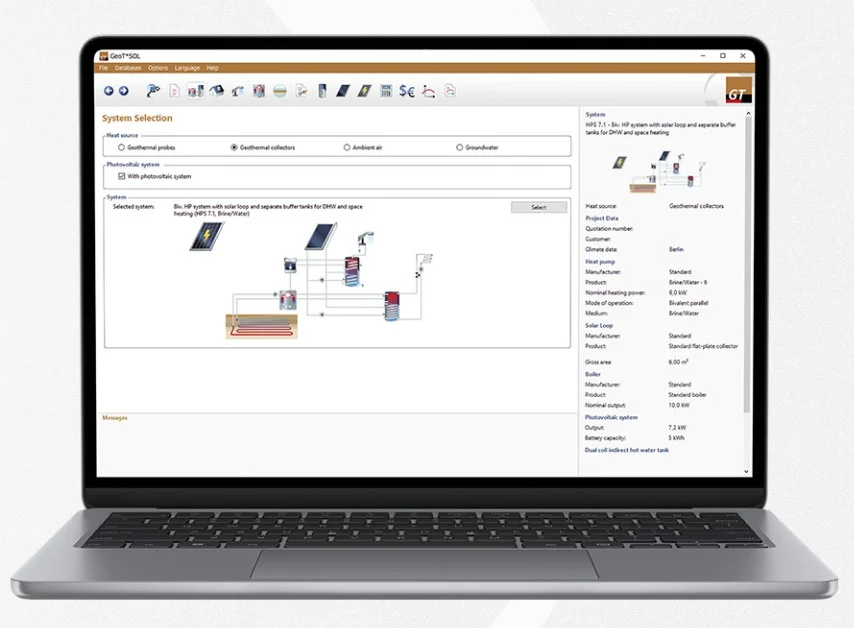
Overview of GeoT*SOL 2026
Table of Contents
Valentin Software has released GeoT*SOL 2026, a professional dynamic simulation program for the planning and design of heat pump systems in both existing and new buildings. This latest version builds on the software’s reputation as a specialized tool for engineers, planners, and installers who need accurate modeling of heat pump systems integrated with renewable energy sources .
GeoT*SOL enables users to simulate complex system configurations with precision. The software supports various heat source types, including ground source heat pumps, air source heat pumps, and water source heat pumps. It also allows seamless integration of photovoltaic and solar thermal systems into system designs, creating a comprehensive approach to building energy planning .
At its core, GeoT*SOL employs a dynamic minute-by-minute simulation engine. This high-resolution approach delivers detailed calculations of electricity consumption, seasonal performance factors (SPF), and operating costs while accounting for utility blocking periods and variable tariffs . This level of detail is essential for accurate system sizing and economic feasibility assessment in real-world conditions.
Key Features
Dynamic Minute-Based Simulation Engine
The software operates on a dynamic simulation model that calculates system performance and energy flows in minute increments. This capability ensures precise modeling of part-load behavior, thermal storage dynamics, and system response to varying environmental conditions. The result is a reliable forecast of annual operating costs and energy consumption for the designed system.
Comprehensive Heat Source Selection
GeoT*SOL offers extensive flexibility in system configuration. Users can design systems based on ground heat exchangers (borehole heat exchangers or horizontal collectors), air source heat pumps, or water source heat pumps. This versatility makes the software suitable for projects with varying geological and climatic conditions.
Seamless Renewable Energy Integration
System designs can incorporate photovoltaic and solar thermal energy generation. This integration enables engineers to evaluate hybrid systems where solar energy supports heat pump operation, reducing grid electricity consumption and improving overall system efficiency .
Professional Project Documentation
The software generates comprehensive project reports suitable for client presentations and regulatory submissions. Reports include system schematics, performance data, energy balance diagrams, and economic analyses. Bivalence point diagrams visualize how heat pumps and auxiliary systems share heating loads .
Multi-Language Interface
GeoT*SOL 2026 now supports five languages: German, English, French, Italian, and Czech. This expanded language support broadens accessibility for international users and project teams, facilitating collaboration across borders .
What’s New in GeoT*SOL 2026
Enhanced Minimum Heat Output Simulation
Version 2026 introduces more realistic modeling of minimum heat pump output, allowing for greater simulation precision. The minimum heating output is now visualized directly in the bivalence point diagram, which supports correct heat pump sizing by showing how the system manages the transition between the heat pump and the backup heating source .
Flexible Domestic Hot Water Input
Users can now specify domestic hot water demand not only in liters but directly as annual energy demand in kilowatt-hours (kWh). This update is particularly valuable for renovation projects where historical consumption data—the most reliable source for system sizing—is typically only available in kWh .
Modernized User Interface
The latest version features an updated interface with modernized design elements, refreshed diagram colors, and new system graphics. These visual improvements enhance clarity and make the planning process more intuitive, particularly when working with complex multi-energy system schematics .
Expanded Language Support
Czech joins the list of supported program languages alongside German, English, French, and Italian, making GeoT*SOL accessible to a wider range of European heat pump professionals .
Upcoming Version
An update to GeoT*SOL 2026 is expected to be available, which is planned to include integration of iDM heat pumps into the software’s product database, further expanding its utility for users working with specific manufacturers .
System Requirements
The system requirements represent the typical technical specifications for running GeoT*SOL effectively. Users should ensure their computer hardware meets or exceeds these standards for optimal performance when conducting complex dynamic simulations.
| Component | Minimum Requirement |
|---|---|
| Operating System | Windows 10 or Windows 11 (64-bit) |
| Processor | Modern multi-core processor (Intel Core i5 or equivalent) |
| RAM | 8 GB minimum, 16 GB recommended |
| Hard Disk Space | 1 GB free space |
| Display Resolution | 1280 x 1024 or higher |
| Internet Connection | Required for software activation and updates |
| .NET Framework | .NET 4.8 or later |
Installation Guide
Step 1: Download the Software
Visit the official Valentin Software website to download the GeoT*SOL 2026 installation package. A free trial version is available for evaluation purposes, allowing users to test the software’s capabilities before purchasing a license .
Step 2: Run the Installer
Launch the downloaded executable file and follow the on-screen installation wizard. Accept the end-user license agreement and select the preferred installation directory. The default path is typically C:\Program Files\Valentin Software\GeoT*SOL 2026.
Step 3: Complete Installation
Wait for the installation to complete. The process usually takes a few minutes. Upon completion, you may be prompted to restart your computer.
Step 4: Launch the Program
Open GeoT*SOL from the desktop shortcut or Start menu. The program will initially run in trial mode, allowing you to explore its features .
Step 5: Activate Your License
Software activation is required for full feature access. The activation process depends on the license type you choose:
User License Activation:
-
When starting the program, an activation dialog appears showing the remaining trial period
-
Select “User License” and click the activation button
-
Enter your registered email address and password
-
Upon successful authentication, the license information dialog confirms activation
Important Licensing Note:
Support for perpetual licenses ended in April 2026. Program versions released after April 7, 2026, can no longer be activated with a perpetual license. Users should transition to user-based rental licenses, which provide access to the latest version, all program and database updates, and technical support via email and telephone .
Step 6: License Management
Licenses can be managed independently through the Valentin License Portal. Rental licenses (available in 3-month and 1-year durations) can be used on multiple devices as long as simultaneous usage is avoided .
How to Use GeoT*SOL 2026
Project Setup and System Configuration
The workflow in GeoT*SOL is structured to guide users through the design process logically, from defining project parameters to generating final documentation.
Define Project Location and Climate Data
Start by specifying the project location. The software incorporates climate data for numerous regions, enabling accurate simulation of local weather patterns and their impact on heating demand and system performance. Users can also import custom climate data for specific sites.
Select Heat Source Type
Choose the primary heat source for the system:
-
Ground source (borehole heat exchangers or horizontal collectors)
-
Air source (outside air)
-
Water source (groundwater or surface water)
The selection determines subsequent configuration parameters such as borehole depth, collector area, or groundwater flow rate.
Configure Heating System
Define the building’s heating system type (radiators, underfloor heating, fan coils) and the design supply temperature. The software uses this information to calculate the heat pump’s coefficient of performance (COP) and seasonal performance factor under realistic operating conditions.
Define Heat Pump Specifications
Select the heat pump from the integrated product database, which includes models from major manufacturers. Users can filter by performance data, COP, or operating characteristics. Custom heat pump profiles can also be created for non-standard units.
Configure Domestic Hot Water System
In GeoT*SOL 2026, domestic hot water demand can be specified either as liters per day or as annual energy demand in kWh, with the latter option simplifying work on renovation projects where historical consumption data is often available only in kWh .
Incorporate Renewable Energy Sources
Add photovoltaic arrays or solar thermal collectors to the system design. The software models the interaction between these renewable sources and the heat pump, evaluating the potential for solar-assisted operation and associated energy savings.
Simulation and Results
Run Dynamic Simulation
Execute the minute-based simulation after configuring the system. The simulation engine calculates:
-
Hourly heating demand
-
Electricity consumption
-
Seasonal performance factors (SPF)
-
Operating costs
-
CO2 emissions
-
System performance under various operating conditions
Analyze Results
Results are presented through interactive charts and tables, including:
-
Bivalence point diagrams visualizing heat pump and backup system contributions
-
Monthly energy balance charts
-
Economic analyses comparing different system configurations
-
Thermal comfort metrics
Generate Reports
Compile a professional project report containing all relevant design data, simulation results, and diagrams. The report can be customized with company branding and exported in various formats for client presentation or regulatory submission .
Best Use Cases
Professional System Design for New Buildings
GeoT*SOL enables HVAC engineers to design optimized heat pump systems during the building planning phase. The software supports evaluation of multiple heat source options, system configurations, and control strategies to identify the most energy-efficient and cost-effective solution .
Renovation and Retrofit Projects
For existing buildings, the software provides valuable assistance in evaluating heat pump retrofit options. The updated feature for specifying domestic hot water demand directly in kWh is particularly useful in renovation scenarios, where historical consumption data is the most reliable basis for system sizing .
Utility and Incentive Applications
The detailed system documentation and performance forecasts generated by GeoT*SOL are often required for utility rebate programs and government incentive applications. The software demonstrates the expected energy savings and environmental benefits of the proposed system .
Educational and Training Purposes
Universities and technical training institutions use GeoT*SOL to teach heat pump design principles and renewable energy system integration. The software’s visual interface and clear results presentation support learning by showing the impact of different system parameters on performance.
Sales and Client Consultation
Installers and consultants use the software to provide clients with professional, data-driven design proposals. Visual system schematics and performance simulations help clients understand the benefits and costs of different system options, supporting informed decision-making .
Advantages and Limitations
Advantages
-
High Simulation Precision: The minute-based simulation engine captures the nuanced behavior of heat pump systems, including part-load operation, thermal inertia, and the impact of control strategies. This precision ensures reliable performance predictions .
-
Flexible System Configuration: Support for multiple heat source types, operating modes, and renewable energy integration allows users to design systems optimized for specific site conditions and client requirements .
-
Renovation and Retrofit Support: The ability to specify hot water demand in kWh, combined with flexible system configuration, makes the software equally suitable for existing building renovation projects .
-
Comprehensive Reporting: Professional project documentation facilitates client communication and regulatory submissions, saving time and ensuring credibility .
-
International Accessibility: Five language options make the software accessible to a global user base, facilitating international projects and collaboration .
-
Rental Licensing Model: User-based rental licenses offer flexibility, allowing access on multiple devices and providing automatic updates and technical support .
Limitations
-
Learning Curve: New users may require training or experience to navigate the software’s advanced features and simulation capabilities effectively.
-
Regional Climate Data Availability: While GeoT*SOL includes extensive climate data, users in less common locations may need to import custom climate data for accurate simulations.
-
License Dependence: The shift to subscription-based licensing requires ongoing investment, which may not suit all users or project budgets .
-
Windows-Only Compatibility: The software requires Microsoft Windows and does not natively support macOS or Linux operating systems.
-
Limited to Heat Pump Systems: While it integrates with solar technologies, GeoT*SOL focuses specifically on heat pump systems and does not provide the broader building simulation capabilities of general-purpose energy modeling software.
Alternatives to GeoT*SOL 2026
PV*SOL premium is Valentin Software’s flagship product for photovoltaic system design, offering detailed simulation of PV arrays with battery storage. While not a direct alternative for heat pump design, the software provides useful synergy for hybrid system planning .
Other alternatives available in the heat pump design space include the following:
-
T*SOL (Valentin Software) focuses specifically on solar thermal system design, providing simulation of solar collectors for domestic hot water and heating support .
-
Hoval Energy Design offers design tools for HVAC systems with integrated heat pumps.
-
GeoT*SOL remains unique in its combination of heat pump design, dynamic simulation, and renewable energy integration, making it a specialized tool with limited direct competitors.
Frequently Asked Questions
What is GeoT*SOL 2026 and who is it for?
GeoT*SOL 2026 is a professional dynamic simulation program for designing heat pump systems . It is intended for planners, installers, and HVAC professionals who need a user-friendly tool for the design and sizing of heat pump systems in both existing and new buildings . It is also suitable for engineers and consultants working on renewable energy projects.
What are the main new features in GeoT*SOL 2026?
The new features include: the ability to simulate minimum heat pump output more realistically, visualization of minimum heating output in the bivalence point diagram to aid sizing, the option to define domestic hot water demand in kWh, a modernized user interface, and expanded language support (now including Czech) .
What are the system requirements for installing GeoT*SOL 2026?
The software requires a Windows 10 or 11 (64-bit) operating system, a modern multi-core processor, a minimum of 8 GB RAM (16 GB recommended), 1 GB free disk space, and a display resolution of 1280 x 1024 or higher. An internet connection is required for installation, activation, and updates.
Is a free trial version of GeoT*SOL available?
Yes, a free trial version of GeoT*SOL is available for download on the official Valentin Software website. This allows potential users to evaluate the software’s capabilities and features before purchasing a license . The trial version provides a good introduction to the user interface, configuration options, and simulation results.
How do I activate GeoT*SOL after installation?
To activate with a user license, a one-time registration is required. When starting the program, a dialog shows the remaining trial period. You must select “User License,” click to activate, and then enter your registered email and password to complete the process . Support for perpetual licenses ended in April 2026.
What licensing options are available for GeoT*SOL?
Valentin Software offers user-based rental licenses for GeoT*SOL, which are available in 3-month and 1-year durations. These licenses can be used on multiple devices (without simultaneous usage) and include all updates and technical support. A perpetual license option is no longer supported for versions released after April 7, 2026 .
Final Thoughts
GeoT*SOL 2026 stands as a robust, professional-grade solution for heat pump system design, combining simulation precision with practical usability for engineers, planners, and contractors. The version 2026 updates—particularly the enhanced minimum output simulation, flexible hot water demand input, and modernized user interface—address real-world challenges faced by HVAC professionals.
For designers seeking to optimize system performance, reduce operating costs, and support sustainability goals, GeoT*SOL provides the tools necessary to evaluate multiple system configurations, verify regulatory compliance, and present professional documentation to clients and authorities. Whether planning a new installation or evaluating a renovation project, users can rely on the software’s dynamic simulation capabilities to make data-driven design decisions.
Our Paid Service