Overview of Elecosoft Asta Powerproject
Table of Contents
Asta Powerproject is a specialized construction project management and scheduling software developed by Elecosoft. Unlike general-purpose tools like Microsoft Project, it is purpose-built for the complexities of the built environment, making it a preferred choice for contractors, schedulers, and project teams worldwide.
The software provides a comprehensive platform for construction scheduling, resource management, and project controls. It enables users to create detailed, dynamic project plans that improve visibility and control over timelines, budgets, and resources. Its powerful, construction-focused tools help teams transition from reactive workflows to proactive, outcome-focused execution.
Key Features and Capabilities
Asta Powerproject is packed with features designed to streamline project delivery from start to finish.
Intuitive Scheduling and Planning
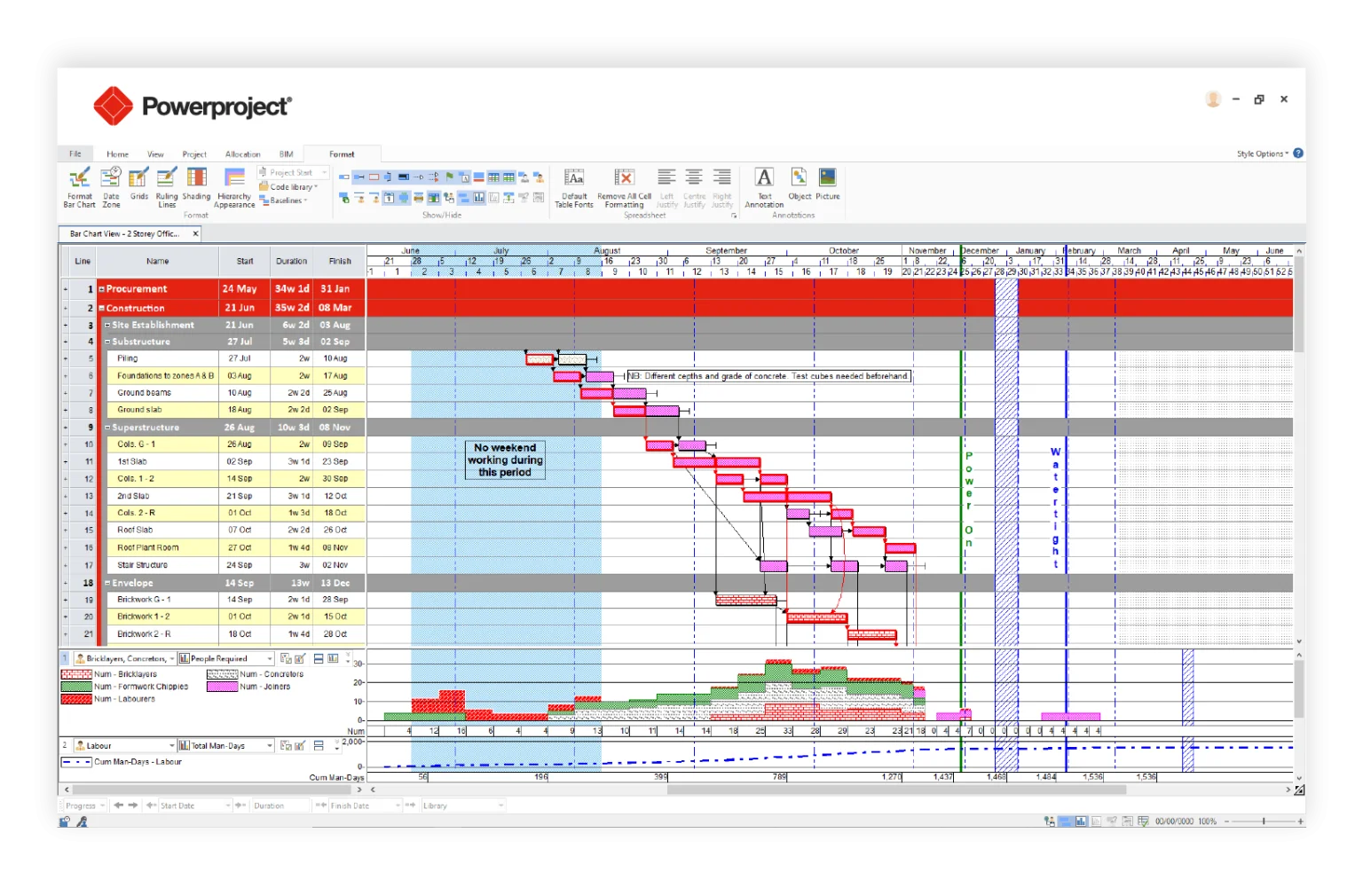
At its core, Asta Powerproject offers robust scheduling capabilities. Its interface allows planners to build complex programmes with ease, moving beyond the limitations of spreadsheets. The “Timeline” feature, for instance, provides a high-level view of key project information like summary tasks and milestones, which can be formatted and exported for use in progress reports for Word, Outlook, or PowerPoint.
4D BIM Integration
A standout capability is its integration with Building Information Modeling (BIM). The Asta Powerproject 4D module links 3D models directly to the project schedule, enabling virtual construction sequencing. This allows project teams to:
-
Link IFC models to tasks using simple drag-and-drop.
-
Visualize project phasing and identify potential issues before they occur on-site.
-
Enhance subcontractor coordination and communication with clear, visual models.
Comprehensive Reporting and Dashboards
The software supports advanced reporting and data visualization through integration with tools like Microsoft Power BI. Project managers can create bespoke dashboards that offer instant insight into project performance, enabling data-driven decision-making and early intervention on potential problems. This ensures stakeholders receive clear, actionable data.
Advanced Resource Management
Resource modeling is a key strength. Users can define resources (e.g., labor, materials) with specific productivity rates. For example, you can set a task duration based on the number of bricklayers and their work rate. The software can then calculate the duration required to complete a given amount of work, offering powerful “what-if” analysis capabilities.
Mobile and Cloud Accessibility
Asta Powerproject keeps the entire team connected. With Asta Vision, project plans can be stored and shared in a central cloud environment on Microsoft Azure, ensuring everyone works from the latest version. A free Project Viewer is also available for team members who need read-only access to project files without requiring a license, promoting organization-wide transparency. While the primary software is Windows-based, a SaaS (Software as a Service) version is available, allowing users on macOS to access the application via a remote desktop client.
What’s New in Asta Powerproject 2025
While specific details for a “2025” version are not exhaustively detailed in the search results, the latest iterations of Asta Powerproject build upon a foundation of continuous improvement. Key focus areas in recent updates and current development include:
-
Enhanced 4D BIM Workflows: Deeper integration with IFC models for more effective coordination and communication, a feature that contractors are actively using to improve project outcomes.
-
Improved Reporting and Dashboarding: Leveraging the export capabilities to create rich, dynamic reports via integration with tools like Power BI, providing deeper insights into project metrics.
-
New Visualization Features: The introduction of the “Timeline” feature, a more modern way to view high-level summary tasks and milestones, demonstrating a commitment to evolving the user interface for better usability.
-
Cloud Collaboration: Continued expansion and refinement of Asta Vision for cloud-based storage and collaboration, ensuring teams can work efficiently from anywhere.
-
Seamless Data Integration: Enhanced data import and export capabilities, including support for formats like .XML, .MPP, and .XER, facilitating smoother workflows with other industry-standard tools.
System Requirements
To ensure optimal performance of the Asta Powerproject client, your system should meet the following minimum and recommended specifications:
Operating System
-
Minimum: Windows 10 or Windows 11 (Professional or Enterprise editions, 64-bit). Also supported on Windows Server 2019 and 2022 (GUI versions).
-
Recommended: Windows 11 Professional or Enterprise (64-bit) with the latest updates.
Processor
-
Minimum: Dual-core 64-bit CPU (e.g., Intel i3, AMD Ryzen 3).
-
Recommended: Quad-core 64-bit CPU (e.g., Intel i5/i7, AMD Ryzen 5/7).
Memory
-
Minimum: 4 GB RAM.
-
Recommended: 8 GB RAM.
Storage
-
Minimum: 2 GB free disk space.
-
Recommended: 4-6 GB free space. An SSD is highly recommended for better performance.
Graphics
-
Minimum: Integrated graphics supporting DirectX 11.
Internet Connection
-
Required for licensing, online help, and optional cloud services (like Asta Vision).
How to Download and Install Asta Powerproject
Installation Guide
1. Standard Windows Installation
-
Ensure your system meets the minimum requirements (Windows 10/11 Pro or Enterprise).
-
Download the installer from the official Elecosoft customer portal.
-
Run the installer and follow the on-screen instructions.
-
Activate your license (single-user or network license). A 30-day trial period is often available for testing.
2. Asta Powerproject SaaS (For macOS and Windows)
-
Eleco provides a subscription-based SaaS version. This is the recommended approach for macOS users or those using “Home” editions of Windows that are not officially supported for the client installation.
-
Step 1: Install the Microsoft Remote Desktop Client on your computer.
-
Step 2: Subscribe to the workspace using the credentials provided by Eleco.
-
Step 3: Launch the ‘Files Share’ app to create a virtual profile and start using Asta Powerproject.
Best Use Cases
Construction Planning and Scheduling
Primarily used for managing complex construction projects, from highways maintenance to large-scale building developments.
Resource Allocation and Management
Optimizing the use of labor and materials by modeling productivity and analyzing resource demands across multiple projects.
4D BIM and Project Visualization
For virtual construction sequencing to improve coordination with subcontractors and communicate project plans to clients more effectively.
Progress Monitoring and Reporting
Tracking project performance against a baseline and generating progress reports for internal teams, clients, and executives.
Academic Training
The Asta Academic Partnership Program provides universities with the software to train the next generation of construction professionals.
Advantages and Limitations
Advantages
-
Construction-Focused: Built specifically for the needs of the construction industry, offering more relevant tools than general-purpose software.
-
Powerful BIM Integration: Seamless 4D BIM functionality allows for enhanced coordination and visualization.
-
Scalability: Suitable for both small projects and large, multi-year contracts, with a folder-based structure for easy management.
-
User-Friendly: Known for an intuitive interface that allows new users to get up to speed quickly.
-
Strong Reporting: Excellent integration with tools like Power BI for advanced data visualization.
Limitations
-
Platform Dependency: The standard client is only directly available for Windows (Professional or Enterprise editions). Mac users must use the SaaS version via a remote desktop connection.
-
Cost: As a professional, enterprise-grade solution, licensing costs can be significant for smaller businesses.
Alternatives to Asta Powerproject
Microsoft Project
A widely-used general-purpose project management tool. While flexible, it often lacks the construction-specific features and intuitive scheduling of Asta Powerproject.
Oracle Primavera P6
A powerful, high-end project management suite often used in mega-projects. It provides strong capabilities for enterprise project portfolio management but is generally considered more complex and less user-friendly than Asta Powerproject.
Trimble (SketchUp / Tekla)
Primarily known for 3D modeling and BIM software (like Tekla Structures), they offer solutions that interface with project management but are often used in conjunction with dedicated scheduling software like Asta Powerproject rather than as a direct replacement.
Frequently Asked Questions
Q: Is Asta Powerproject available for Mac?
A: A native macOS version is not available. However, users can access it via the Asta Powerproject SaaS offering, which runs through the Microsoft Remote Desktop Client on a Mac.
Q: What is the difference between a single license and a concurrent license?
A: A single license is tied to one user on one device. A concurrent license is more flexible, allowing multiple users to share a pool of licenses across different devices, which is often more cost-effective for businesses.
Q: Can I import files from Microsoft Project or Primavera?
A: Yes, Asta Powerproject supports importing schedules from Microsoft Project and Primavera P6 using file formats like .XML, .MPP, or .XER.
Q: Does Asta Powerproject have a free trial?
A: Yes, a 30-day test phase is available upon installation to try out the software before committing to a license.
Q: What file formats does Asta Powerproject support?
A: It supports native project files, as well as importing and exporting from industry-standard formats like .XML, .MPP, and .XER, and integrates with IFC models for BIM functionalities.
Q: Is there a cloud version of Asta Powerproject?
A: Yes, Asta Vision provides a cloud-based storage solution where project files are stored in a shared Azure space, allowing for real-time collaboration and version control. There is also a fully cloud-delivered SaaS version.
Final Thoughts
Elecosoft Asta Powerproject 2025 stands as a premier solution for construction project management, combining powerful scheduling with advanced 4D BIM integration. Its focus on user experience and industry-specific functionality makes it a top choice for contractors aiming to improve project delivery. The continuous evolution of its cloud and reporting capabilities ensures it remains a future-proof investment for businesses of all sizes. For professionals seeking to enhance their project controls and collaboration, Asta Powerproject offers the tools necessary to deliver complex projects more efficiently and effectively.
Our Paid Service