
Overview of Restaurant and Bar POS Software
Table of Contents
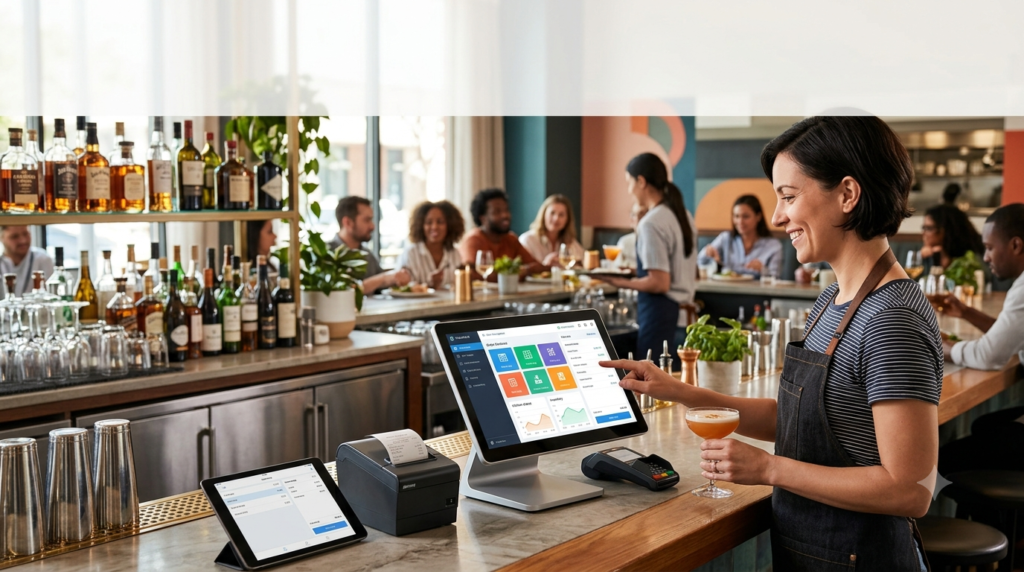
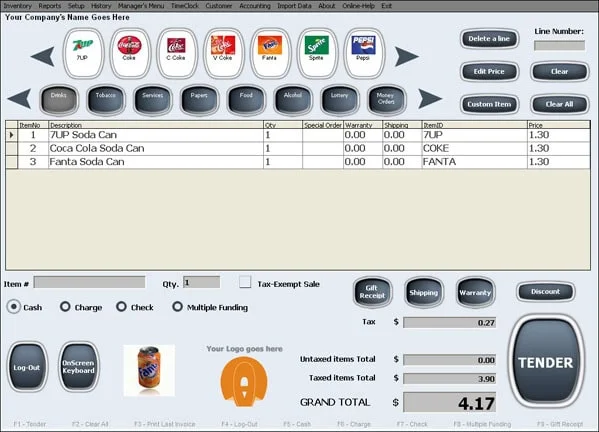
Restaurant Bar Software is the central technology that powers your front-of-house (FOH) and back-of-house (BOH) operations. It processes transactions, manages orders, and tracks sales, but the best restaurant POS systems go much further. They help you manage menus, track inventory, run payroll, and analyze customer data.
The industry is shifting toward cloud-based POS software, which offers real-time data access, automatic updates, and flexibility to manage your business from anywhere . By 2024, 38% of restaurants had adopted integrated POS systems that support both in-store and online orders in real time . According to the National Restaurant Association’s 2025 report, 52% of restaurants plan to dedicate resources to upgrading or implementing a POS system, with 69% of those who have adopted new technology saying it has made their business more efficient .
Key differences to consider:
-
Restaurant-first platforms (e.g., Toast, Otter) are built specifically for foodservice workflows, handling complex modifiers, kitchen routing, and delivery order consolidation as core architecture .
-
Retail-adapted platforms (e.g., Clover) were originally designed for general business and may treat restaurant features as add-ons, potentially creating operational gaps during busy service .
Key Features to Look for in Bar and Restaurant POS Software
Before diving into specific systems, it’s essential to understand the features that define efficient bar management software and restaurant POS solutions.
Order Management and Speed of Service
For bars and quick-service restaurants, speed is everything. The best systems offer one-touch drink ordering, split-ticket handling, and pre-authorization for bar tabs to keep service moving during rush hours .
Lightspeed’s O-Series, for instance, has introduced Tableside powered by Tap to Pay on iPhone, allowing staff to take orders and process payments directly at the table, counter, or outdoors—without returning to a register. This feature works even without Wi-Fi by using cellular data, making it ideal for outdoor events or market stalls . Another feature, Bar Tabs, allows customers to pre-authorize a card and order freely up to a set limit, with staff managing tabs directly from the POS. This eliminates the need to hold cards or handle cash, significantly speeding up service and reducing end-of-night friction .
Integrated Payment Processing
Payment processing fees are a significant operational cost. At $40,000 per month** in card sales, a **2.7% processing rate** costs roughly **$1,080 per month before software or hardware costs . Consider these pricing models:
-
Flat-rate pricing (e.g., Square, Clover) is predictable and easy to budget.
-
Interchange-plus passes the actual card network cost plus a markup. It can be cheaper at high volume but is harder to read on a statement .
Kitchen Display System (KDS)
A Kitchen Display System (KDS) replaces paper tickets with a digital screen in the kitchen, showing live ticket status and helping kitchen staff prioritize orders during a rush. A KDS typically pays for itself in speed and fewer remakes within the first few months for any counter-service or fast-casual format doing meaningful volume . Hardware costs range from $500 to $800 for a KDS versus $200 to $400 for a traditional kitchen printer .
Online Ordering and Delivery Integration
The multi-tablet delivery problem—running separate tablets for DoorDash, Uber Eats, and Grubhub alongside your POS—is the most common operational failure point for independent restaurants doing delivery . A modern POS should consolidate third-party delivery orders into the same queue as in-person orders, creating one screen, one ticket flow, and one set of ticket times for the kitchen .
Menu and Inventory Management
Real-time menu updates across all channels—dine-in, online ordering, and delivery platforms—prevent situations where guests order items that are out of stock. Real-time inventory depletion that integrates with your POS flags sold-out items instantly .
Staff Management and Scheduling
Bar staffing software helps managers build and adjust schedules in real time, respond to call-outs, and keep the team aligned during busy shifts . Key features include time tracking tied to specific shifts, role-based staffing, and team communication tools. Businesses using staff management apps like When I Work have reported a 20% decrease in labor costs, 8x time saved scheduling, and a 3x reduction in no-shows .
Analytics and Reporting
The best POS systems provide sales by item, by hour, and by day—helping you identify top-selling items, optimize menus, and schedule staff effectively . Live Monitoring and advanced reporting on channel performance, product mix, and peak hours are essential for data-driven decision-making .
Leading Restaurant POS Systems Compared
Toast POS: Best All-in-One Platform for Restaurants
Toast is a restaurant-first POS platform founded in 2012 and used in over 171,000 locations across the United States . It connects POS, online ordering, delivery, KDS, handheld ordering, loyalty, payroll, and AI-powered insights in one platform .
Who it’s for: Full-service restaurants, bars, cafes, bakeries, pizzerias, food trucks, and multi-location operators . Reviewers consistently highlight Toast’s ease of use, restaurant-specific features, online ordering, and reporting .
Key features:
-
Handheld ordering: The Toast Go 2 handheld allows servers to take orders and process credit card payments tableside without returning to a terminal .
-
Kitchen Display System: Durable hardware with detailed routing rules, expediter and prep station modes .
-
Online ordering: Integrated commission-free ordering with real-time menus, dynamic order throttling, and Google integration .
-
AI-powered insights: Toast IQ provides AI-powered support for asking questions, surfacing insights, and taking action inside the platform .
Pricing: Monthly software fees range from $0/mo** (Starter Kit, higher processing rates) to **$69/mo (Point of Sale plan, lower processing rates) and $165/mo (Essentials plan with online ordering and delivery included) . Card-present processing fees run approximately 2.49% + 15¢ on the Point of Sale plan .
Hardware: Handheld terminals start at $409–$699 for the Toast Go 2, KDS at $599–$1,199, and Flex Terminal at $799–$1,199 . Hardware is proprietary and cannot be used with other providers .
Contract: Typically requires a 2-to-3-year contract with auto-renewal and early termination fees .
Advantages:
-
Deep feature set for dine-in operations
-
Comprehensive ecosystem with payroll, marketing, and guest engagement
-
24/7 support included with software subscriptions
Limitations:
-
Multi-year contracts and proprietary hardware create long-term lock-in
-
Add-on costs stack quickly; many restaurants report total monthly software costs in the $300–$700 range for smaller operations
-
Requires exclusive use of Toast Payments; cannot bring your own payment processor
Otter POS: Best for Multi-Channel and Delivery-Focused Restaurants
Otter POS was purpose-built for modern restaurants juggling dine-in, online, and delivery orders through one integrated platform. The platform emerged from deep experience in delivery and restaurant technology .
Who it’s for: Fast-casual, quick-service, ghost kitchens, and delivery-first brands that need to manage multiple ordering channels without complexity . It’s particularly strong for operators who want flexibility and transparent pricing without long-term lock-in .
Key features:
-
Order aggregation: Consolidates third-party delivery orders into the same queue as in-person orders, eliminating the multi-tablet setup .
-
Real-time menu sync: Menu updates sync across all channels in real time so the POS matches what guests see online .
-
Analytics included: Advanced Analytics and Live Monitoring are included in all plans at no extra cost .
-
Kitchen Display System: Pulls orders from POS, online ordering, and delivery platforms into one view with workflow prioritization .
Pricing: Plans start at $19/mo** for the Starter plan (Analytics, Menus, Live Monitoring, 24/7 support) and **$49/mo for the Main plan (adds Financials and POS functionality) . Card-present processing runs 2.49% + 15¢ on the Main plan . Online orders run 2.99% + 15¢ .
Hardware: POS Terminal starts around $649** or **$50/mo on lease; KDS around $1,000** or **$75/mo . Leasing available to reduce upfront costs .
Contract: 24-month contracts with hardware buy or lease options. No proprietary hardware lock-in—you can reuse devices with other providers .
Advantages:
-
Lower entry pricing and simpler packages than comparable systems
-
No proprietary hardware lock-in
-
Shorter contract terms and fewer long-term commitments
Limitations:
-
Less feature-rich on the dine-in side compared to Toast—does not support table management with drag-and-drop floor plans or seat-level ordering
-
Advanced delivery management integration is a paid add-on on some plans
Clover: Best for Established Brand Recognition and Hardware
Clover, owned by Fiserv, began as a payment processing solution and expanded into POS systems that serve restaurants alongside retail and professional services . It offers a polished, proprietary hardware ecosystem backed by strong brand recognition .
Who it’s for: Single-location dine-in restaurants, small cafes and coffee shops, and business owners who appreciate a recognizable brand and sleek hardware design .
Key features:
-
All-in-one restaurant POS: Integrated software solution with online ordering, delivery management, and inventory tracking .
-
Restaurant-grade hardware: Clover’s hardware ecosystem includes the Flex (mobile POS), Mini, Station Duo, KDS, and self-ordering Kiosk .
-
Clover Hospitality: Upgraded POS solution with advanced table management, enhanced customer profiles, and omnichannel capabilities .
Pricing: Restaurant plans start at $135/mo** for Quick Service Starter and **$179/mo for Full Service Starter, with 36-month commitments . Card-present processing runs 2.3% + 10¢, but card-not-present jumps to 3.5% + 10¢ .
Hardware: Mini POS terminal: $849** or **$45/mo (36 months); Station Duo: $1,899** or **$180/mo (36 months); Kiosk: $3,499** + **$34.95/mo per device .
Contract: Typically requires 36-month contracts with early termination fees that can exceed $500 .
Advantages:
-
Slightly lower card-present processing fees
-
Polished, aesthetically pleasing hardware
-
Well-known brand with established market presence
Limitations:
-
Significantly higher monthly software costs than Otter ($135+/mo vs. $19/mo)
-
36-month contracts create long-term lock-in
-
Online and card-not-present transaction rates are significantly higher than Otter’s
TouchBistro: Best for Full-Service Restaurants with Tableside Ordering
TouchBistro powers over 16,000 restaurants in 100+ countries with a cloud-based POS system that focuses on full-service dining .
Key features:
-
Easy bill splitting: Instantly split bills between customers, evenly or by item .
-
Reporting & analytics: Over 50 reports providing deep insights into sales trends and staff performance .
-
Offline mode: Continue taking orders, sending orders to the KDS, and taking offline payments even without internet connectivity .
-
Tableside ordering: Mobile POS that moves with servers to take orders, upsell, and split bills at the table .
-
Custom floor plans: Customize and edit floor plans based on distance between tables, time seated, and spend per table .
Lightspeed Restaurant: Best for Bars and Flexible Payment Solutions
Lightspeed’s O-Series is designed for restaurants and bars that want innovative payment solutions and flexible operations .
Key features:
-
Tableside powered by Tap to Pay on iPhone: iPhone can act as a POS and payment terminal, accepting all major cards and digital wallets with a tap .
-
Bar Tabs: Pre-authorize a card to open a tab, allowing customers to order freely up to a set limit and close without re-tapping .
-
Offline mode: Use cellular data to run tableside payments even during internet outages .
-
Integration with Tabin: Self-service kiosk that syncs with your POS .
Libre Bite: Best for WordPress and WooCommerce Users
Libre Bite is a WordPress plugin that turns WooCommerce into a restaurant operations platform—ideal for small gastronomy businesses that want to avoid platform commissions and SaaS lock-in .
Key features:
-
Commission-free ordering: Guests order directly on your website; no platform cut on every transaction .
-
No transaction fees: Works with any WooCommerce-compatible payment gateway (Stripe, PayPal, Twint, etc.) .
-
Live Kanban Order Board (KDS): Visualizes incoming orders as cards with drag-and-drop status updates .
-
QR ordering at the table: Pro feature generates QR codes for each table; guests order directly .
-
Swiss 5-cent rounding: Built-in support for Swiss rounding rule—essential for CHF cash payments .
-
Multi-location management: Pro feature that runs all branches from one WordPress installation .
Pricing: Core features are free with no credit card required. Pro subscription required for multi-location management, table ordering, optimized checkout, tipping, and pickup reminders. Pro plans are “significantly cheaper than dedicated restaurant SaaS platforms” .
Complementary Tools
Backbar offers free bar inventory management software (the only free app in this category) that helps restaurants and bars count inventory, streamline vendor purchasing, track past orders, and cost out cocktail recipes. It connects to POS systems for real-time inventory depletions and offers a global database of over 300,000 wines, beers, and spirits .
When I Work provides bar staffing and scheduling software that helps managers build schedules in real time, respond to call-outs, and keep teams aligned. Users report a 20% decrease in labor costs, 8x time saved scheduling, and a 3x reduction in no-shows .
Advantages and Limitations
Advantages of Modern Restaurant Bar Software
-
Increased efficiency and speed: Tableside ordering reduces service time by up to 25% and increases table turnover during peak hours .
-
Better accuracy: Consolidated ordering prevents the multi-tablet delivery problem that creates missed tickets, wrong items, and refund requests .
-
Real-time insights: Advanced analytics help identify top-selling items, optimize menus, and schedule staff effectively .
-
Flexibility: Cloud-based systems allow management from anywhere and automatically update .
-
Reduced costs: Commission-free online ordering and integrated loyalty programs protect margins .
Limitations to Consider
-
Processing fees: At $40,000/month in card sales, a 2.7% rate costs roughly $1,080/month in processing fees alone .
-
Proprietary hardware lock-in: Some systems (Toast, Clover) require proprietary hardware that cannot be used with other providers .
-
Add-on costs: Monthly costs can escalate significantly. Many Toast users report total monthly software costs in the $300–$700 range for smaller operations .
-
Contract commitment: Multi-year contracts with early termination fees limit flexibility .
-
Complexity: Full-featured platforms may include advanced features that smaller operations rarely use but still pay for .
Frequently Asked Questions
How much does restaurant POS software cost?
Entry-level software plans start at **$19/mo** for Otter and $0/mo for Toast’s Starter Kit (though with higher processing rates). Most full-featured plans range from $69–$179/mo before add-ons and processing fees . Total monthly costs, including processing fees and add-ons, can range from $300–$700 for smaller operations and exceed $1,000/mo for full-service restaurants using a full suite of add-ons .
Can I use my own payment processor with any POS system?
Not with all systems. Toast requires exclusive use of Toast Payments, meaning you cannot bring your own payment processor or negotiate rates . Clover also requires proprietary processing bundled with the hardware . Otter offers more flexibility—while it has its own processing, you can use a third-party processor . Processor lock-in is consistently cited by independent operators as the top thing to avoid .
What is the best POS system for a small bar?
For a small bar, the best system depends on your priorities:
-
If you want flexibility and transparent pricing: Otter offers lower entry costs ($19/mo), transparent pricing, and no proprietary hardware lock-in .
-
If you need full tableside ordering and comprehensive features: Toast offers a complete ecosystem with strong dine-in capabilities, but watch for add-on costs and long-term contracts .
-
If you’re on a very tight budget: Libre Bite offers a free core version if you already use WordPress and WooCommerce .
-
For bar inventory management: Backbar is the only free bar inventory app and works with your existing POS .
What features should I look for in bar staffing software?
Look for real-time schedule building and adjustments, time tracking tied to specific shifts, role-based staffing (bartenders, barbacks, floor staff), team communication tools, and payroll integration . Software like When I Work helps managers respond to call-outs instantly and adjust coverage during busy shifts .
What is the “multi-tablet delivery problem”?
The multi-tablet delivery problem occurs when restaurants run separate tablets for DoorDash, Uber Eats, and Grubhub alongside their POS . During service, a staff member receives an order on one tablet, reads it out loud or writes it on a slip, and either re-enters it into the POS manually or hands it to the kitchen separately. Meanwhile, walk-in orders fire from the register. The kitchen gets tickets from different sources with no shared priority, unified ticket time, or sequencing . A restaurant-native POS should consolidate third-party delivery orders into the same queue as in-person orders, eliminating this operational failure point .
Final Thoughts
Selecting the best restaurant bar software for efficient management in 2025 requires carefully evaluating your specific operational needs, budget, and growth plans. The right POS system should be more than a payment terminal—it should be an operational backbone that consolidates orders from every channel, provides real-time visibility into your business, and gives you the flexibility to adapt as your restaurant grows.
If you’re a full-service restaurant prioritizing tableside ordering and comprehensive features, Toast offers a robust all-in-one platform, though you’ll need to budget for add-ons and commit to a multi-year contract. If you run a fast-casual or delivery-focused concept, Otter provides transparent pricing, lower entry costs, and the critical order consolidation that eliminates the multi-tablet delivery problem. If you’re on a tight budget and already use WordPress, Libre Bite offers a commission-free, no-transaction-fee alternative. For scheduling and staff management, integrated tools like When I Work can save significant time and reduce labor costs.
Remember to calculate your total cost of ownership, including processing fees, hardware, and add-ons, before making a commitment. Request a full written fee schedule before signing anything—including setup fees, monthly minimums, PCI compliance fees, and early termination fees . And most importantly, choose a system that is built for the realities of restaurant work, not a retail system with restaurant features bolted on .
Our Paid Service
“We do not sell or provide any software. We only offer professional support services. If any software on your system is not working properly, or you are facing installation errors, crashes, or any other technical issue — just contact us. We will help you fix the problem quickly and remotely via AnyDesk. No software will be provided from our side — only expert troubleshooting and support.”