
Overview of Siemens SIMARIS Design
Table of Contents
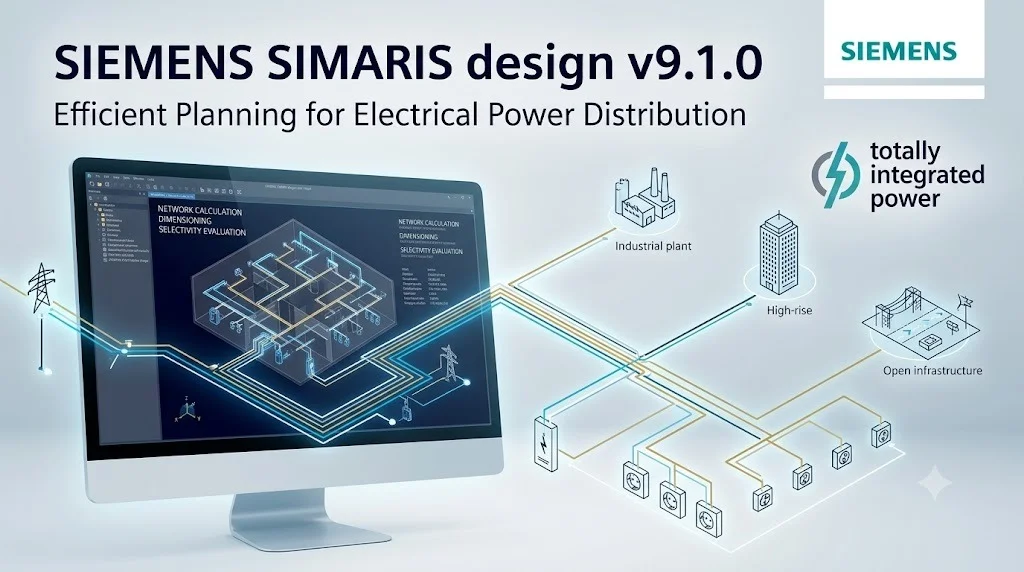
Siemens SIMARIS Design is a specialized engineering application developed by Siemens for power distribution system planning. The software provides a visual, single-line diagram interface where engineers can model electrical networks from simple radial feeders to complex industrial distribution systems. Its primary function is to simplify the complex calculations required for proper system dimensioning, including short-circuit analysis and protective device coordination .
The software supports both low-voltage and medium-voltage applications, making it versatile for projects ranging from commercial buildings to industrial facilities. Users can design entire network topologies, select appropriate equipment, and verify system performance against regulatory standards. The software’s integration capabilities with Siemens’ broader suite of engineering tools and product databases enhance its utility for professional system planners.
Key Features of Siemens SIMARIS Design
Single-Line Diagram Creation and Editing
The software offers an intuitive graphical interface for building power distribution networks. Users can drag and drop components directly onto the canvas, connecting them to form complete system topologies. This visual approach makes complex system design more accessible and reduces errors in network modeling. The interface supports unlimited system expansion, accommodating projects of any scale.
Comprehensive Short-Circuit Current Calculation
SIMARIS Design performs IEC 60909-compliant short-circuit calculations, including contributions from motor loads. This capability is essential for determining appropriate protective device ratings and ensuring system safety. The software calculates both maximum and minimum short-circuit currents, providing comprehensive data for equipment selection and coordination studies .
Protective Device Coordination Analysis
The software includes built-in selectivity analysis tools for evaluating protective device coordination across the network. Engineers can verify that protective devices operate in the correct sequence during fault conditions, preventing unnecessary system outages. This feature is particularly valuable for critical infrastructure where service continuity is essential.
Equipment Selection and Dimensioning
SIMARIS Design incorporates Siemens’ extensive product database, enabling users to select appropriate switchgear, circuit breakers, transformers, and cable systems. The software automatically verifies selected components against calculated system parameters, ensuring all equipment meets technical requirements for the specific application.
Project Documentation and Reporting
The platform generates comprehensive project reports including single-line diagrams, calculation results, and equipment schedules. These documents are suitable for regulatory submissions and as-built documentation, streamlining the approval and construction processes.
What’s New in Siemens SIMARIS Design v9.1.0
The v9.1.0 update introduces improved calculation engines and enhanced usability features. While specific technical details are not explicitly documented in available sources, the software maintains compatibility with current IEC standards. Users should note that as of version 9 and later, the software primarily operates in English. Earlier versions included Russian language support, but this was discontinued in recent releases .
The installation process for version 9.1.0 differs from previous releases. Users now download the SIMARIS Suite installer and select SIMARIS Design as a component rather than installing the standalone application. This change simplifies software management and ensures compatibility with other Siemens engineering tools.
System Requirements for Siemens SIMARIS Design
While specific system requirements for version 9.1.0 are not fully specified in available search results, typical requirements for similar engineering software include:
-
Operating System: Windows 10 or Windows 11 (64-bit)
-
Processor: Multi-core processor (Intel i5/i7 or equivalent) recommended
-
Memory: 8 GB RAM minimum, 16 GB recommended
-
Storage: 10 GB available disk space
-
Display: 1920 x 1080 resolution recommended
-
Internet: Required for activation and updates
Users should consult official Siemens documentation for exact specifications before installation.
Installation Guide for Siemens SIMARIS Design
Step 1: Obtain the Official Software
Download SIMARIS Design from the official Siemens website. The free version is available after registration on the Siemens portal . Access the download page at the official Siemens support or product portal.
Step 2: Install SIMARIS Suite
The installation process for version 9 and later uses the SIMARIS Suite installer. Run the downloaded installer and select SIMARIS Design as a component to install. This approach ensures proper integration and compatibility with other engineering tools.
Step 3: Activate Your License
After installation, activate the software using one of the available options:
-
Free Version: Free registration provides access to the software with core functionality
-
Professional Version: Commercial license with full features and technical support
Follow the on-screen prompts to complete activation using your Siemens account credentials.
Step 4: Update to the Latest Version
The SIMARIS Suite installer will automatically check for available updates. Ensure you have the latest version installed to benefit from the most recent bug fixes and improvements.
How to Use Siemens SIMARIS Design
Getting Started with Your First Project
-
Launch SIMARIS Design from the SIMARIS Suite interface or desktop shortcut.
-
Start a New Project and define project parameters such as voltage levels and system configuration.
-
Build the Single-Line Diagram by adding components from the toolbar:
-
Power sources (transformers, generators)
-
Switchgear and protective devices
-
Cable systems and busbars
-
Loads and distribution panels
-
-
Connect Components using the connection tool to establish system topology.
-
Configure Equipment Parameters by selecting appropriate ratings and settings from the product database.
-
Run Calculations to determine short-circuit currents and verify protective device coordination.
-
Review Results and generate reports for documentation or further analysis.
Tips for Efficient Use
-
Use the component library to maintain consistency across projects
-
Leverage the automatic verification tools to identify potential issues early
-
Save frequently used configurations as templates
Best Use Cases for Siemens SIMARIS Design
Commercial Building Electrical Systems
Designing power distribution for office buildings, shopping centers, and institutional facilities requires careful planning to ensure safety and reliability. SIMARIS Design supports engineers in selecting appropriate equipment and verifying system performance against regulatory requirements.
Industrial Power Distribution
Manufacturing facilities often have complex power distribution networks requiring advanced fault analysis. The software’s short-circuit calculation capabilities enable proper equipment selection and coordination for critical industrial applications.
Infrastructure Projects
Public infrastructure, including transportation systems and utility facilities, demands high reliability. SIMARIS Design supports thorough system verification and documentation for these applications.
Renewable Energy Integration
As renewable energy installations become more common, power distribution systems must accommodate bi-directional power flows. The software helps engineers adapt existing systems to integrate solar, wind, or energy storage installations.
Advantages and Limitations of Siemens SIMARIS Design
Advantages
| Feature | Benefit |
|---|---|
| Free version availability | Accessible for smaller projects and learning |
| Comprehensive calculations | Reduces manual calculation errors |
| Visual interface | Improves understanding of system topology |
| Siemens product database | Ensures compatibility with Siemens equipment |
| Professional documentation | Streamlines project submissions |
Limitations
| Limitation | Consideration |
|---|---|
| Manufacturer-specific focus | Best suited for Siemens equipment users |
| English-only interface (v9+) | May be challenging for non-English speakers |
| Complex installation process | Requires understanding of SIMARIS Suite structure |
| Calculation engine limitations | May not support all specialized applications |
Alternatives to Siemens SIMARIS Design
DOC Software
DOC is an alternative for network calculation and dimensioning. It offers short-circuit calculations and protective device coordination features. A bachelor’s thesis comparing available free software evaluated DOC alongside SIMARIS Design, finding both capable of handling similar network configurations .
Sichr
Sichr provides additional calculation capabilities for electrical network parameters. It offers an interface for dimensioning and verification, though user experience details suggest SIMARIS Design may offer superior graphical interface .
xSpider (Pavouk)
xSpider, also known as Pavouk, is another free available software for electric network calculations. The comparison study evaluated all three alternatives against SIMARIS Design .
Professional Engineering Platforms
For larger organizations, comprehensive engineering platforms such as Siemens NX or Simcenter offer broader capabilities beyond power distribution design. These integrated solutions support full digital twin creation but require substantial investment .
Frequently Asked Questions
Is Siemens SIMARIS Design free?
Siemens offers both free and paid versions of SIMARIS Design. The free version provides core functionality for building network diagrams and performing short-circuit calculations after free registration on the Siemens portal. Professional versions with expanded features and technical support are available through commercial licensing .
What types of calculations does SIMARIS Design perform?
SIMARIS Design performs short-circuit current calculations according to IEC 60909, including contributions from connected motor loads. The software also verifies protective device coordination to ensure proper system selectivity during fault conditions .
What are the system requirements for SIMARIS Design version 9.1.0?
The software is designed for Windows 10 and Windows 11 operating systems. An Intel i5 processor or equivalent is recommended, along with 8 GB RAM and 10 GB of available storage. The installation requires internet access for download and activation. For the latest and most accurate system requirements, users should consult official Siemens documentation.
Can SIMARIS Design be used for medium-voltage systems?
Yes, SIMARIS Design supports both low-voltage and medium-voltage power distribution system design. The software includes appropriate calculation methods and equipment selection capabilities for medium-voltage applications.
What is the difference between SIMARIS Suite and SIMARIS Design?
SIMARIS Suite is a unified installer platform that provides access to multiple Siemens engineering applications, including SIMARIS Design. Users install the suite and select desired components, ensuring better integration and easier management of multiple tools .
What languages are available in SIMARIS Design version 9?
Based on user reports, version 9.1.0 primarily operates in English. Earlier versions included Russian language support, but this was discontinued in more recent releases. Documentation and tutorials are available online in English and other major languages .
How do I install SIMARIS Design 9.1.0?
Installation requires downloading the SIMARIS Suite installer from the official Siemens website. During installation, select SIMARIS Design as a component to install. The software is not available as a standalone installer for version 9 and later.
Is SIMARIS Design suitable for beginners?
The software’s intuitive graphical interface and comprehensive component library make it accessible for beginners who have a basic understanding of electrical power distribution systems. However, proper application requires knowledge of electrical engineering principles and applicable standards. Siemens provides documentation and training materials to support new users.
What alternatives are available to SIMARIS Design?
Several alternatives exist, including DOC, Sichr, and xSpider for free options, and professional platforms such as MATLAB Simulink, SolidWorks Simulation, Autodesk Fusion, and Ansys Mechanical for paid commercial solutions. The best choice depends on specific project requirements and budget .
Final Thoughts
Siemens SIMARIS Design v9.1.0 provides professional-grade power distribution system design capabilities, combining intuitive modeling with essential calculation features. Whether planning a small commercial installation or a complex industrial system, this tool supports engineers in achieving safe, reliable, and efficient network designs. The free version offers considerable value for smaller projects and educational purposes, while professional licensing provides expanded capabilities for commercial applications.
However, users should understand that the software focuses primarily on Siemens equipment compatibility. Those using non-Siemens components may want to consider alternatives. Additionally, users who require non-English language support should verify current availability before committing to the latest version.
For the most effective use, engineers should complement software capabilities with practical engineering knowledge and consult relevant standards and regulations for their specific applications. The official Siemens website provides the most current documentation and technical support for troubleshooting and updates.
Our Paid Service
“We do not sell or provide any software. We only offer professional support services. If any software on your system is not working properly, or you are facing installation errors, crashes, or any other technical issue — just contact us. We will help you fix the problem quickly and remotely via AnyDesk. No software will be provided from our side — only expert troubleshooting and support.”