
Overview of RV DeepClean 2027 for Autodesk Revit
Table of Contents
RV Boost RV DeepClean 2027 v1.4.0 is a powerful optimization add-in designed specifically for Autodesk Revit that helps architecture, engineering, and construction professionals efficiently clean and streamline their Revit models . This Revit model cleaning tool addresses one of the most common challenges faced by BIM professionals: bloated file sizes that slow down performance and complicate project collaboration .
As Revit projects grow in complexity, they accumulate redundant elements, unused parameters, and unnecessary data that can make files sluggish and difficult to share. RV DeepClean 2027 provides over 40 specialized cleaning functions in a single interface, enabling users to reduce Revit file size significantly while maintaining compliance with organizational BIM standards .
The tool integrates seamlessly with Autodesk Revit 2027, offering both automated and customizable cleaning routines that can be saved and reused across multiple projects .
Key Features of RV DeepClean 2027
Comprehensive Model Cleaning Functions
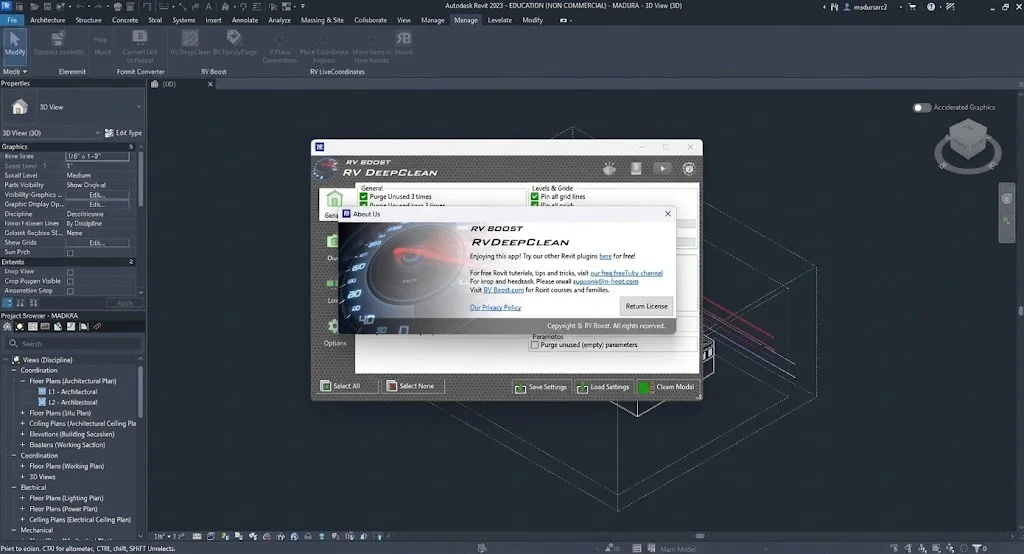
RV DeepClean 2027 consolidates an extensive array of cleaning operations into one accessible dashboard. The most frequently utilized functions include :
-
Removing unused room, area, and space separation lines – These redundant boundary lines are major contributors to slow Revit performance
-
Deleting non-primary design options – Secondary design options can dramatically increase file size if left unchecked
-
Purging duplicate elements – Identifies and removes identical instances in the same location
-
Purging unused parameters – Eliminates parameters that have no value in any applicable Revit elements
View-Specific Cleaning Tools
Reducing the number of views is one of the most effective strategies for optimizing Revit model performance . RV DeepClean 2027 provides targeted functions for view optimization:
-
Cleaning unused view templates and view filters
-
Deleting view-specific elements that are hidden in views
-
Removing temporary views
-
Eliminating orphaned tags and dimensions
-
Deleting unused line styles, line patterns, and fill patterns
External Reference Management
External references like Revit links and CAD files can significantly impact model responsiveness . RV DeepClean 2027 addresses this with powerful link cleaning capabilities:
-
Removing view-specific CAD files
-
Purging CAD imports
-
Deleting 2D CAD files hidden in their views
-
Moving CAD files and Revit links to dedicated worksets for improved performance
-
Removing all Revit links or point clouds
-
Standardizing link path types (Absolute or Relative)
Hands-Free Operation
One of the most valuable features of RV DeepClean 2027 is its automation capability. Users can configure cleaning routines and allow the tool to operate independently :
-
Automatic saving or synchronization of Revit files after processing
-
Auto-dismissal of unimportant Revit warnings and messages
-
Configurable error handling with logging for later review
Configurable Settings Management
RV DeepClean 2027 allows users to save their preferred cleaning configurations for reuse across multiple projects :
-
Save Settings – Store your complete cleaning routine as a settings file
-
Load Settings – Apply previously saved configurations instantly
-
Custom routines – Tailor cleaning intensity based on project requirements
What’s New in RV DeepClean 2027 v1.4.0
The 2027 v1.4.0 release of RV DeepClean delivers enhanced compatibility and performance optimizations for Autodesk Revit 2027 . Key updates include:
-
Full Revit 2027 support – Optimized for the latest Autodesk Revit version
-
Performance improvements – Faster model processing times
-
Enhanced error handling – Improved options for logging and dismissing errors during cleaning operations
-
Updated link management – Expanded capabilities for managing external references and worksets
System Requirements for RV DeepClean 2027
RV DeepClean 2027 v1.4.0 requires Autodesk Revit 2027, which has specific system requirements as outlined by Autodesk .
Minimum System Requirements for Revit 2027
| Component | Minimum Specification |
|---|---|
| Operating System | 64-bit Microsoft Windows 11 |
| CPU Type | Intel or AMD processor with 2+ GHz base core clock speed; highest single-core speed recommended |
| Memory (RAM) | 16 GB for models up to approximately 300 MB; 32 GB recommended for larger projects |
| Video Adapter | DirectX 11 capable graphics card with Shader Model 5; 4 GB video memory minimum recommended |
| Disk Space | 30 GB for installation; 100 GB recommended for temporary files |
| Display Resolution | 1280 x 1024 minimum; 4K UltraHD support |
| .NET Framework | .NET 10 |
| Browser | Chrome, Edge, or Firefox |
Installation Guide for RV DeepClean 2027
RV DeepClean 2027 is designed for straightforward installation as an Autodesk Revit add-in. Follow these steps to install the tool :
Installation Steps
-
Download the installer from RV Boost’s official website or authorized reseller
-
Close all Revit instances before beginning installation
-
Run the installer with administrator privileges
-
Follow the on-screen prompts to complete installation
-
Launch Revit 2027 – RV DeepClean should appear in the Revit ribbon or add-ins menu
-
Activate the license using your purchase credentials
Post-Installation Configuration
-
Check compatibility – Verify the tool appears correctly in Revit 2027
-
Load the add-in – Ensure the add-in loads without errors
-
Review settings – Access the RV DeepClean interface to explore available functions
How to Use RV DeepClean 2027
Getting Started
Using RV DeepClean 2027 is a straightforward process designed to minimize complexity :
-
Open your Revit model in Autodesk Revit 2027
-
Launch RV DeepClean from the Revit ribbon
-
Review the cleaning interface showing over 40 available functions
-
Select desired cleaning operations based on your project needs
-
Configure settings for the cleaning run
Configuring a Cleaning Routine
For optimal results, follow this workflow:
1. Select Cleaning Functions
Review and enable the cleaning functions that address your model’s specific issues. Options include :
-
General cleaning (unused scope boxes, unplaced rooms, duplicate elements)
-
View-related cleaning (temporary views, orphaned tags)
-
Link and CAD management
-
Workset organization
2. Adjust Cleaning Options
Configure how the tool handles the cleaning process:
-
Save after cleaning – Enable to auto-save the file
-
Log warnings – Capture all warnings for review
-
Log errors – Track errors encountered during cleaning
-
Set error limits – Define maximum number of errors to dismiss automatically
3. Save Your Configuration
Once you have your preferred routine established:
-
Click the “Save Settings” button
-
Provide a descriptive filename
-
Reuse the same settings for future model cleaning sessions
Executing the Cleaning Process
After configuration:
-
Click the “Clean Model” button
-
RV DeepClean 2027 will process the model using your selected functions
-
Monitor the log for any reported issues
-
Review the cleaned model for file size reduction and performance improvements
Best Use Cases for RV DeepClean 2027
Project Handover and Issuance
When preparing Revit models for external parties, files need to be lean and clean. RV DeepClean 2027 enables:
-
Removal of external links before sharing
-
Purging view-specific elements that may not be relevant to recipients
-
Standardizing link paths to prevent referencing issues
Performance Optimization
Slow Revit models benefit from targeted cleaning:
-
Duplicate element identification – Removing identical instances reduces file size
-
Unused parameter purging – Eliminates redundant data
-
Design option management – Removing secondary design options dramatically reduces file size
BIM Standard Compliance
Organizations with specific BIM standards can use RV DeepClean to:
-
Place levels and grids on dedicated worksets
-
Pin critical elements to prevent accidental movement
-
Standardize link types across models
Pre-Export Cleaning
Before exporting Revit models to formats like IFC, NWC, or DWG, cleaning the model ensures smaller, more manageable outputs .
Advantages and Limitations of RV DeepClean 2027
Advantages
| Advantage | Description |
|---|---|
| Comprehensive Cleaning | Over 40 cleaning functions in one interface |
| Time Savings | Hands-free operation allows batch processing |
| Configurable Routines | Save and reuse cleaning settings across projects |
| Workset Organization | Ability to move elements to dedicated worksets |
| Error Management | Log and dismiss warnings automatically |
| Revit 2027 Compatibility | Fully optimized for the latest Autodesk release |
Limitations
| Limitation | Description |
|---|---|
| Revit Dependency | Requires Autodesk Revit 2027 installation |
| Learning Curve | Over 40 functions require user familiarization |
| Model-Specific Results | Cleaning effectiveness varies based on model complexity |
| Windows Only | Limited to the Windows platform |
Alternatives to RV DeepClean 2027
Within the RV Boost Product Line
RV Boost offers complementary tools that work alongside RV DeepClean :
-
RV BatchTransmit – Batch-exports Revit models to RVT, NWC, IFC, and DWG formats, with cleaning options integrated
-
RV Browser – Helps users find, select, and manage elements within Revit models
Other Revit Optimization Solutions
| Alternative | Description |
|---|---|
| RV FamilyPurge | Dedicated to purging unused families and parameters |
| Manual Revit Cleaning | Using built-in Revit functions like Purge Unused |
| BIM360 Model Coordination | Cloud-based model management and issue tracking |
Frequently Asked Questions
Is RV DeepClean 2027 compatible with all Revit versions?
RV DeepClean 2027 v1.4.0 is specifically designed for Autodesk Revit 2027 . Older versions of RV DeepClean are available for earlier Revit releases .
What types of elements can RV DeepClean 2027 remove?
RV DeepClean 2027 can remove unused parameters, duplicate elements, non-primary design options, orphaned tags, unused views, temporary views, unused room/area/space separation lines, CAD imports, Revit links, point clouds, and more .
Can I save my cleaning settings for future use?
Yes, RV DeepClean allows you to save your favorite cleaning routine as a settings file. You can load these configurations for future model cleaning sessions to save time .
Does RV DeepClean automatically save cleaned models?
Yes, RV DeepClean can be configured to automatically save the file after cleaning. You can also specify a new filename to avoid overwriting the original .
Will RV DeepClean affect my BIM standards compliance?
RV DeepClean helps enforce BIM standards by allowing you to move elements to dedicated worksets, maintain consistent link paths, and apply organization rules across models .
How does RV DeepClean handle warnings and errors?
RV DeepClean can automatically log and dismiss unimportant warnings. For errors, users can configure the tool to either pause for manual review or proceed with limited error handling based on their risk tolerance .
Is RV DeepClean a one-time purchase or subscription?
Please visit the RV Boost official website for current pricing and licensing information.
Final Thoughts
RV Boost RV DeepClean 2027 v1.4.0 represents a significant advancement in Revit model optimization for Autodesk Revit 2027 users. With its comprehensive suite of over 40 cleaning functions, configurable workflows, and hands-free automation, this Revit cleaning plugin addresses the critical challenge of file bloat that affects BIM professionals across the industry.
Whether you need to prepare models for external sharing, optimize performance for large projects, or maintain consistent BIM standards, RV DeepClean provides a robust, legally compliant solution that delivers measurable efficiency gains. The ability to save and reuse cleaning configurations makes it particularly valuable for organizations with standard workflows.
For Revit users looking to reduce file size, improve model responsiveness, and streamline project collaboration, RV DeepClean 2027 offers a compelling combination of functionality and ease of use. The tool’s focus on automation and customization ensures that both beginners and experienced Revit professionals can benefit from its capabilities.
Our Paid Service
“We do not sell or provide any software. We only offer professional support services. If any software on your system is not working properly, or you are facing installation errors, crashes, or any other technical issue — just contact us. We will help you fix the problem quickly and remotely via AnyDesk. No software will be provided from our side — only expert troubleshooting and support.”