

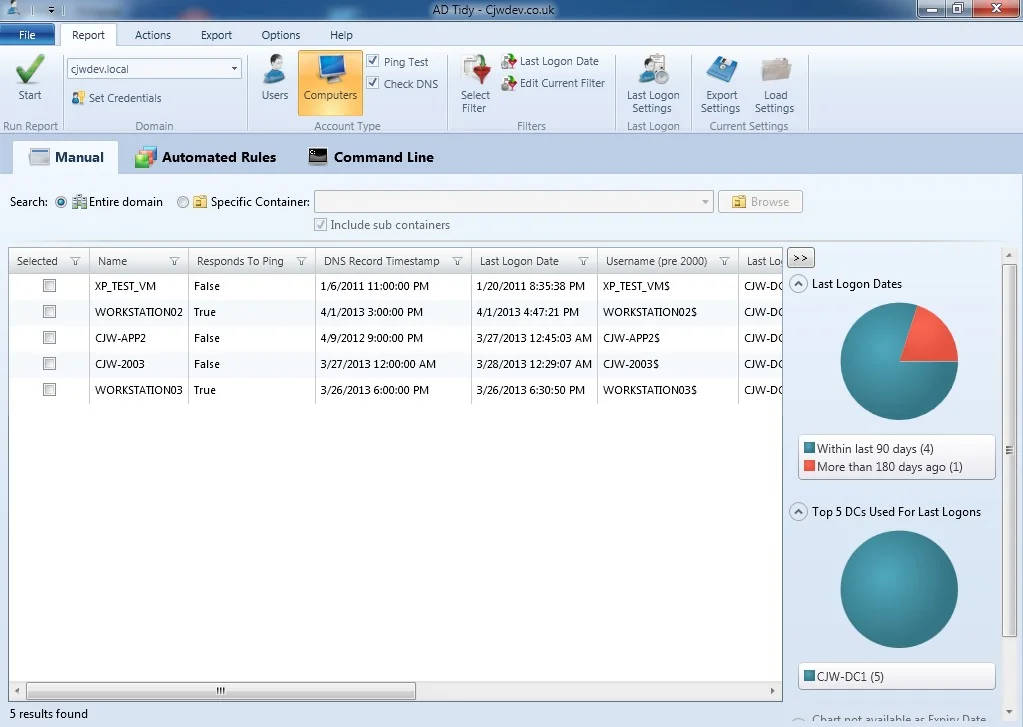
Overview of AD Tidy v2.6.1
Table of Contents
AD Tidy is a dedicated Windows application that provides administrators with the tools needed to search for and act on accounts that represent security vulnerabilities and administrative overhead . Whether you are dealing with former employees or obsolete computer objects, the software enables you to filter your entire domain or specific Organizational Units (OUs) using detailed criteria such as last logon time, DNS record timestamps, and group membership . The latest version, 2.6.1, ensures compatibility with modern Windows infrastructures by running on the .NET Framework 4.8 and offers an improved upgrade path for users transitioning from the Free to the Standard Edition . With both a free and a paid Standard edition, AD Tidy scales from basic reporting needs to fully automated, enterprise-grade account lifecycle management.
Key Features
AD Tidy is packed with a wide array of features that set it apart from native Active Directory tools. It combines comprehensive reporting capabilities with powerful bulk-action management.
Advanced Search and Filtering
The software offers a flexible and powerful filtering system, allowing you to zero in on exactly the accounts you need to manage .
-
Search Scope: Scan the entire domain or limit your search to a specific Organizational Unit (OU) .
-
Multi-Domain Support: Connect to any domain and even use alternate credentials for environments with complex trust relationships .
-
Flexible Logon Analysis: Calculate last logon times using two methods. You can use the
lastLogonTimeStampattribute for a fast query of a single Domain Controller (DC) or thelastLogonattribute, which contacts every DC to provide the absolute most recent logon time . -
Additional Criteria: Refine searches based on account name, description, group membership, expiration date, and the account’s ability to respond to a network ping .
Account Cleanup Actions
Once the search is complete, AD Tidy empowers you to take action directly, eliminating the need for complex PowerShell scripts for bulk operations .
-
Core Actions: Disable, delete, or move accounts to a different OU.
-
Security Actions: Set random passwords or configure a password to never expire.
-
Group Management: Add accounts to a group, remove them from a group, or remove them from all groups.
-
Advanced Actions: Set an expiration date, clear LDAP attribute values, remove a user’s home drive, hide accounts from the Exchange address list, and even run external scripts .
Action Sequences
A standout feature of AD Tidy is the ability to create “Action Sequences” . This allows you to link multiple individual actions into a single, automated procedure.
-
Example Use Case: You can create a sequence that automatically disables an account, moves it to a “Disabled Users” OU, and removes it from all distribution groups—all with a single click on a selected account .
Comprehensive Reporting
AD Tidy is as much a reporting tool as it is a cleanup utility .
-
Export Options: Export search results and reports directly to CSV or Excel (XLSX) files for detailed analysis, auditing, or record-keeping .
-
Save and Share Settings: Save your custom report filters and settings to a file. This makes it easy to re-run the same report on a schedule or share configurations with colleagues to ensure consistency across the team .
Dual Editions: Free and Standard
AD Tidy is available in two editions to suit different organizational needs.
-
Free Edition: A powerful tool perfectly suited for ad-hoc reporting and manual cleanups. It includes all the core search, filter, and action features .
-
Standard Edition: Adds critical automation capabilities for enterprise environments, including:
-
Automated Rules: A server-side service that scans AD based on your criteria and automatically applies actions to accounts.
-
Command Line Support: Run reports and actions from scripts or Windows Task Scheduler for complete automation.
-
Undo Functionality: The ability to reverse actions performed, offering an extra layer of security .
-
What’s New in AD Tidy v2.6.1
The latest update, version 2.6.1, focuses on improving compatibility and the user experience .
-
Modern Framework Support: The application now requires and runs on the Microsoft .NET Framework 4.8, ensuring stability and compatibility with the latest Windows operating systems and security updates .
-
Seamless Edition Upgrades: Users of the Free Edition can now directly upgrade to the Standard Edition without needing to perform a separate, manual installation. This simplifies the transition process for growing organizations .
-
Improved Update Check: A bug that affected the application’s ability to check for new updates has been fixed, ensuring users stay informed about future releases and critical patches .
System Requirements
Before installing AD Tidy, ensure your system meets the following requirements for optimal performance .
-
Operating System: Windows 7 and above (compatible with modern versions like Windows 10 and Windows 11).
-
Framework: Microsoft .NET Framework 4.8 must be installed.
-
Network: An Active Directory domain with network connectivity.
-
Permissions: Administrative rights on the workstation and sufficient permissions within Active Directory to perform queries and actions on user and computer objects.
Installation Guide
Installing AD Tidy is a straightforward process and can be completed in just a few minutes .
-
Download the Installer: Visit the official CJWDEV website (www.cjwdev.com) and navigate to the AD Tidy download page. Download the
ADTidyInstaller.zipfile . -
Extract the Files: Right-click the downloaded
.zipfile and select “Extract All” to access the installer executable. -
Run the Installer: Double-click on the
ADTidyInstaller.exefile to begin the installation process. -
Follow the Wizard: Follow the on-screen prompts in the installation wizard. Accept the license agreement and choose your preferred installation directory.
-
Launch the Application: Once the installation is complete, launch the application. It will automatically check for the required
.NET Frameworkand will prompt you to install it if necessary. You can now begin searching and cleaning your Active Directory.
How to Use AD Tidy
The software is designed to be intuitive. Here is a typical workflow to get started .
-
Launch the Application: Open AD Tidy from your Start Menu or desktop shortcut.
-
Configure Credentials: If needed, you can specify alternate credentials to connect to a domain different from your current login session.
-
Select a Search Scope: Choose whether to search the “Entire domain” or a “Specific container” (OU). If you select a specific OU, you can browse the AD tree to find it.
-
Configure Filters: Under the “Filters” tab, set your criteria. This is where you define what makes an account “inactive” by setting the “Last Logon Date” threshold and applying other filters like account name or description.
-
Run the Report: Click the “Run Report” button. The software will query your AD and display a list of accounts that match your filters in the results dashboard.
-
Review and Select Results: Review the list of accounts. You can click on individual entries to view more details. You can select multiple entries using standard Windows selection (Ctrl+click or Shift+click).
-
Take Action: Right-click on a selected account to bring up the actions menu. You can choose a single action or apply a predefined “Action Sequence.”
-
Export or Save: Export the results to a CSV or Excel file for reporting, or save your settings for future use.
Best Use Cases
AD Tidy is invaluable in several common scenarios for system administrators.
-
Offboarding and User Lifecycle Management: The primary use case is identifying and deactivating accounts belonging to former employees to prevent unauthorized access and secure company data .
-
Security Audits and Vulnerability Reduction: Inactive accounts are a prime target for cyberattacks. AD Tidy allows you to regularly scan for and eliminate these “dormant” accounts to reduce your attack surface .
-
Compliance and Governance: For organizations subject to regulations like HIPAA or GDPR, proving that you have control over user access is crucial. AD Tidy’s detailed reporting provides the necessary documentation and audit trails to demonstrate compliance .
-
Active Directory Housekeeping: Cleaning up stale computer accounts improves the performance of AD queries and reduces clutter, making the environment easier to manage .
-
Bulk Operations: Instead of manually updating hundreds of user accounts, AD Tidy allows you to perform bulk actions like moving or modifying groups, saving hours of time .
Advantages and Limitations
Advantages
-
Powerful Free Edition: The free tier is exceptionally generous, offering all core search, filter, and action features without any time limitations .
-
Robust Automation: The Standard Edition’s automated rules and command-line support make it ideal for enterprise automation .
-
User-Friendly Interface: The tool has a clean, intuitive GUI that is much easier to use than complex PowerShell scripts .
-
Time-Saving: Bulk actions and action sequences transform what could be hours of manual work into a task that takes just minutes .
-
Detailed Reporting: The ability to export to CSV and Excel provides excellent data for analysis and audits .
Limitations
-
Windows-Only: AD Tidy is a Windows application, meaning it requires a Windows machine to run. It cannot be managed from macOS or Linux natively .
-
.NET Dependency: The tool requires the .NET Framework 4.8, which may require an update on older systems .
-
Cost for Automation: The advanced automation features are only available in the paid Standard Edition, which may not be within budget for all small businesses .
Alternatives to AD Tidy
While AD Tidy is an excellent choice, several alternatives exist for Active Directory management and cleanup. Many are also available in the SourceForge directory .
-
AD Query: A completely free utility from SysOp Tools. It is designed for quick and easy auditing of any user or computer object and shows all LDAP data in a “human-readable” format .
-
SolarWinds Admin Bundle: A free suite of tools that includes dedicated utilities for removing inactive user and computer accounts and importing users in bulk .
-
ManageEngine ADManager Plus: A comprehensive web-based Active Directory management and reporting solution. It excels in bulk management and provides a centralized console for all AD tasks .
-
Spiceworks: A free tool that combines network monitoring, help desk, and Active Directory management features within a single platform, great for small to medium-sized IT teams .
-
Active Directory Reports (AD Reports): A paid, comprehensive reporting tool that is “built around an intuitive easy to use user interface” and allows for custom LDAP filters .
Frequently Asked Questions (FAQ)
Q: What is AD Tidy used for?
AD Tidy is an Active Directory management tool used to identify and clean up inactive user and computer accounts within a domain . It helps improve security and compliance by removing unnecessary digital clutter.
Q: Is AD Tidy free to use?
Yes, CJWDEV offers a feature-rich Free Edition of AD Tidy . A paid Standard Edition is also available for organizations that require advanced automation features like a server-side service and command-line support .
Q: What’s the difference between AD Tidy Free and Standard Edition?
The Free Edition is for manual reporting and cleanup. The Standard Edition includes automated rules, command-line support, and an undo feature, making it suitable for automated, enterprise-scale operations .
Q: How do I install AD Tidy?
AD Tidy is installed by downloading the ADTidyInstaller.zip file from the official CJWDEV website, extracting the files, and running the installer executable .
Q: What are the system requirements for AD Tidy v2.6.1?
AD Tidy v2.6.1 requires Windows 7 or later and the Microsoft .NET Framework 4.8 .
Q: What are “Action Sequences” in AD Tidy?
Action Sequences allow you to combine multiple actions (like disabling an account and moving it to a different OU) into a single, automated procedure that can be run with one click .
Q: How does AD Tidy calculate account inactivity?
The software can calculate inactivity using the lastLogonTimeStamp attribute (fast) or the lastLogon attribute (accurate, as it queries all Domain Controllers) .
Q: Are there alternatives to AD Tidy for Active Directory management?
Yes, popular alternatives include AD Query, SolarWinds Admin Bundle, ManageEngine ADManager Plus, and Spiceworks .
Final Thoughts
AD Tidy v2.6.1 stands out as an indispensable tool for any Windows system administrator tasked with managing an Active Directory domain. Its combination of powerful search capabilities, a user-friendly interface, and an extensive library of cleanup actions makes it a superior alternative to manual methods and native Microsoft tools. The recent update to .NET Framework 4.8 ensures it remains a modern and secure application. Whether you choose the robust Free Edition for occasional cleanups or the Standard Edition for enterprise-grade automation, AD Tidy is a reliable, efficient, and essential solution for maintaining a tidy, secure, and well-organized Active Directory environment.