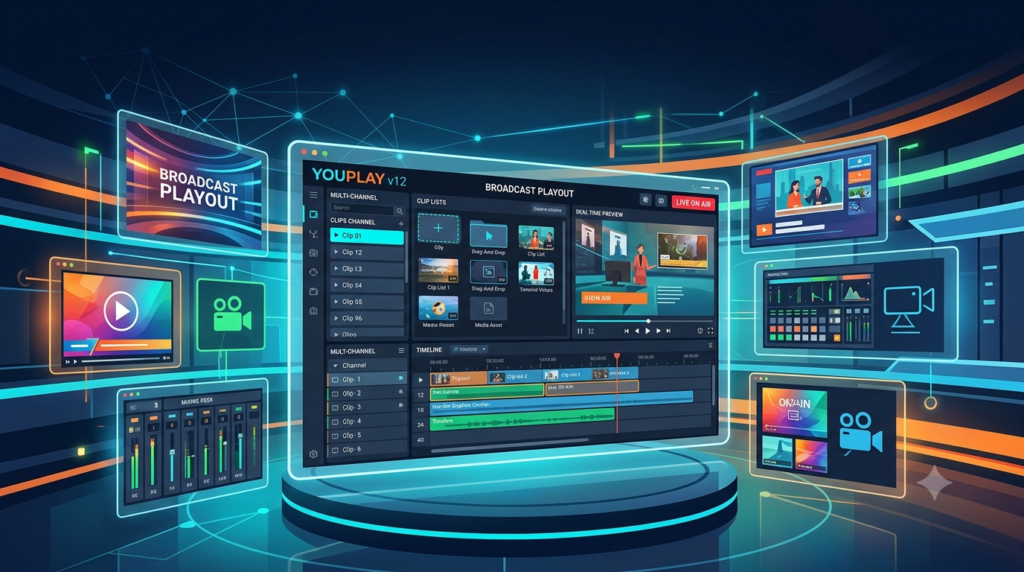

Overview of YouPlay Broadcast Edition
Table of Contents
YouPlay Broadcast Edition is designed as a comprehensive video playout system that serves as the backbone of modern tapeless broadcast workflows. The software provides reliable playback capabilities for live IP broadcast, news production, talk shows, and event coverage, eliminating the need for specialized hardware while offering the flexibility that modern production environments demand .
The software features an intuitive user interface that requires minimal training, making it accessible for operators at any skill level. It supports up to 4K video resolution and multi-track audio, with automatic upscaling and downscaling capabilities that ensure seamless playback across different display formats . Whether you need to feed studio video walls, manage live on-air contributions, or automate playlist-based broadcasting, YouPlay Broadcast Edition delivers professional-grade performance.
For broadcast facilities transitioning from legacy hardware to software-defined workflows, YouPlay Broadcast Edition represents a significant advancement in production technology. The software can be deployed on standard hardware platforms, reducing capital expenditure while maintaining the reliability broadcasters require.
Key Features
YouPlay Broadcast Edition v12 offers an extensive feature set designed to meet the demands of professional broadcast and production environments:
Comprehensive Format Support
The software supports virtually any video and audio file format, including DV, HDV, DVCPRO, MJPEG, MPEG-2, TS, MPG, VOB, H.264, H.265, AV1, MP4, QuickTime, PRORES, DNxHD, AVI, WMV, ASF, MXF, XDCAM, IMX, GXF, LXF, FLV, MKV, WebM, HuffYUV, VP8, VC3, JPEG2000, and DPX . This broad compatibility ensures that YouPlay can handle media from virtually any source without requiring time-consuming file conversions.
Professional Playout Capabilities
YouPlay Broadcast Edition includes advanced playout features essential for professional broadcast :
-
Frame-accurate playback: Ensures precision timing for live productions
-
Up to 16 audio channels: Dynamic selection of enabled audio channels for complex audio workflows
-
4K video support: Full resolution playback with automatic scaling to fit any display
-
Automatic up/down scaling and aspect ratio adjustment: Handles 16/9, 4/3, and other aspect ratios seamlessly
-
Timecode support: RP188-VITC-LTC timecode integration for broadcast synchronization
-
Slow-motion capability: Variable speed playback from -2x to +2x with professional quality
Graphics and Overlay Features
The broadcast version supports comprehensive graphics capabilities that enhance production value :
-
Logo overlays: Persistent branding integration
-
Tickers, rolls, and crawls: Dynamic text animations for news and information displays
-
CGComposer app: Free application for creating custom CG templates
-
Timed CG on playlist: Graphics triggered at specific points with dynamic text metadata
-
Key output on SDI: 32-bit bitmap sequences, QuickTime Animation, and ProRes 4:4:4 support
Remote Control and Integration
YouPlay Broadcast Edition supports extensive remote control options and third-party integration :
-
Blackmagic Design ATEM emulation: Control via ATEM protocol
-
NewTek TriCaster emulation: Integration with popular production switchers
-
Blackmagic HyperDeck emulation: Emulates deck control protocols
-
VDCP mixer control: Support for industry-standard control protocols
-
GPI/RS-422 control: Integration with traditional broadcast control systems
-
MOS protocol: Multiple channel gateway integration for newsroom systems
-
SNMP monitoring: MIB, TRAPS, and Alerts for network monitoring
-
RESTAPI commands: Programmatic control for automation systems
User Interface and Workflow
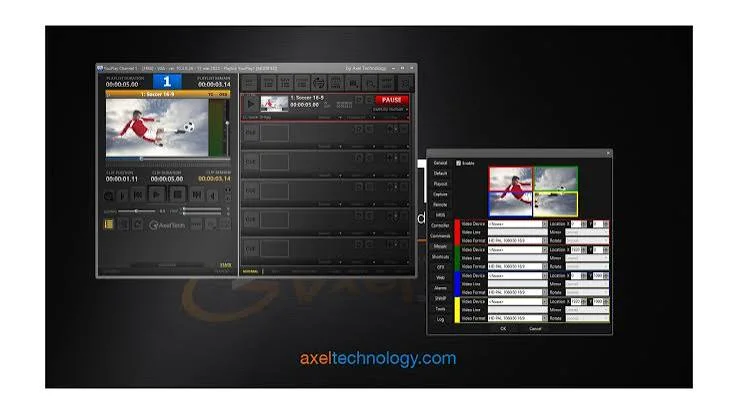
The graphical user interface has been optimized for efficient broadcast operations :
-
Customizable shortcuts for common functions (CUE, PLAY, FIRST FRAME)
-
Drag-and-drop file management, including between channels
-
Real-time video preview with OSD (timecode display)
-
Customizable skins and color schemes for channel identification
-
Configurable VU-meters and waveform displays
-
Independent and resizable GUI for each channel
-
Preview frame rate adjustment for RDP optimization
What’s New in YouPlay Broadcast Edition v12
Version 12 of YouPlay Broadcast Edition introduces significant enhancements that expand the software’s capabilities for modern broadcast environments :
SRT – Secure Reliable Transport
The addition of SRT protocol support enables secure, reliable video transport over unpredictable networks, making remote production workflows more viable. This feature allows broadcasters to reliably transport high-quality video across public internet connections with reduced latency and packet loss protection .
4K and Multi-Track Audio Enhancements
Version 12 improves support for 4K video workflows and introduces a multi-track audio re-shuffling tool, giving operators greater control over audio channel assignments. The software now supports up to 16 audio channels with dynamic selection of enabled audio channels .
Asymmetric LED Board Support
A major update in this version includes support for asymmetric LED boards, allowing for per-screen configuration. The software enables real-time content transformation without the need to pre-render or deform content in advance. This includes configuration of non-linear transformation from the main camera view position and auto-switching between copying content to multiple rows and overlapping both rows based on content resolution height .
Background Video Playback
Version 12 introduces background video playback from NDI or URL sources, along with backup capture sources on alternative data paths. This feature enhances reliability and provides greater flexibility in content sourcing .
Enhanced Media Player
The media player has received performance improvements and bug fixes, including correct handling of pause functions near clip ends, scenes now waiting correctly for video preloading to complete, and support for BGRA and ARGB pixel formats without conversion. The preload period for media players is now user-configurable .
System Requirements
YouPlay Broadcast Edition v12 operates on professional-grade hardware with specific video card requirements:
Video Card Compatibility
The software supports the following professional video cards :
-
Blackmagic Design: DeckLink and Intensity series
-
AJA: Corvid series
-
Bluefish: Supported models
Supported Resolutions
-
SD (Standard Definition)
-
HD (High Definition)
-
2K (Digital Cinema)
-
4K (Ultra High Definition)
-
Depends on the capabilities of the installed video card
Operating System
-
Windows-based PC with professional specifications
-
NVIDIA GPU recommended for H.264 and H.265 hardware decoding
IP and Network Requirements
-
Support for SDI, NDI, and IP I/O (SMPTE 2022 & SMPTE 2110 with specific video cards)
-
Network connectivity for remote control, MOS integration, and NDI sources
Installation Guide
Step 1: Verify Hardware Compatibility
Before installing YouPlay Broadcast Edition, confirm that your system meets the requirements and that your video card is fully compatible with the software version you are installing.
Step 2: Install Required Drivers
Install the latest drivers for your video card:
-
Blackmagic DeckLink: Install Desktop Video software
-
AJA Corvid: Install AJA drivers
-
Bluefish: Install Bluefish drivers
Step 3: Download and Install YouPlay Broadcast Edition
Obtain the installer from the official Axel Technology distribution channel. Run the installer as administrator and follow the on-screen instructions.
Step 4: Configure Video Output Settings
Launch YouPlay and configure the video settings:
-
Select the installed video card under Output settings
-
Set the resolution and format matching your broadcast requirements
-
Configure audio output channels
-
Configure timecode and reference settings
Step 5: Activate License
Enter your YouPlay Broadcast Edition license key to activate the software. YouPlay Free version is available for trial and evaluation, but it includes branding overlays and limited output .
Step 6: Set Up Audio and Video Monitoring
Configure VU-meters, waveform displays, and output monitoring according to your production needs. Adjust audio routing and video preview options as required.
Step 7: Customize User Preferences
Set up shortcuts, skins, and user interface preferences to match your workflow requirements. Configure channel aliases, icons, and colors for quick identification.
How to Use the Software
Creating and Managing Playlists
The playlist management system is central to YouPlay Broadcast Edition operation:
-
Add media files: Drag and drop media files into the playlist
-
Arrange clips: Reorder clips by dragging within the playlist
-
Set MarkIn/MarkOut: Define the portion of each clip to play
-
Configure clip transitions: Set up CG overlays, loops, and other effects
-
Save and load playlists: Store playlists for repeated use
Playing Content
YouPlay supports multiple playback methods:
-
CUE: Preview the content before going live
-
PLAY: Begin playback of the selected clip
-
FIRST FRAME: Jump to the start of a clip
-
Loop: Frame-accurate single clip loops
-
Slow-motion: Variable speed playback (up to -2x/+2x)
Incorporating CG and Graphics
Add graphics to your broadcast playout:
-
Use CGComposer to create templates
-
Add CG elements to playlist items
-
Configure timed CG appearances with dynamic metadata
-
Set up tickers, rolls, and crawls for continuous information displays
Remote Control and Automation
YouPlay Broadcast Edition supports multiple control methods:
-
ATEM emulation: Control from Blackmagic ATEM switchers
-
TriCaster: Integration with NewTek TriCaster systems
-
HyperDeck emulation: Deck-like control interface
-
VDCP: Industry-standard video disk control protocol
-
GPI: General purpose input/output control
-
RESTAPI: Web-based API for custom automation
Monitoring During Live Production
The software provides comprehensive monitoring tools:
-
Real-time video preview with OSD overlay
-
VU-meters and waveform displays
-
Timecode display for synchronization
-
Playlist duration and remaining time
Best Use Cases
News Production
YouPlay Broadcast Edition excels in news production environments. The software can manage the complex playlist requirements of a news broadcast, handling pre-recorded packages, live contributions, and graphic overlays seamlessly .
Live Sports Broadcasting
With support for slow-motion playback, multiple channels, and precise frame-accurate control, YouPlay Broadcast Edition is well-suited for sports production. The ability to handle various file formats and resolutions is particularly valuable when working with multiple camera feeds and replay sources .
Studio Video Walls
The software serves as an ideal solution for feeding content to studio video walls. YouPlay can manage multiple channels simultaneously, playing loops, still frames, and animations to create immersive studio environments .
Event Coverage and Talk Shows
YouPlay’s intuitive interface and support for live and pre-recorded content make it suitable for talk shows and event coverage. Operators can quickly adapt playlists on the fly while maintaining professional broadcast quality.
Broadcast Automation
For facilities requiring automated playout, YouPlay Broadcast Edition includes scheduling tools and can be integrated with automation systems through its RESTAPI and MOS protocols .
Ingest and Capture
The server version of YouPlay includes ingest capabilities, allowing simultaneous playout and capture of content. This is valuable for recording live feeds and managing time-shifted broadcast schedules.
Advantages and Limitations
Advantages
-
Format versatility: YouPlay supports virtually any video and audio file format, eliminating the need for time-consuming transcoding workflows .
-
Cost-effective deployment: The software-based approach reduces capital expenditure compared to traditional hardware video servers .
-
Intuitive interface: Minimal training is required for operators, reducing the learning curve and accelerating adoption .
-
Scalable: Support for up to 4 channels (in Broadcast and Server versions) allows facilities to expand as needed .
-
Professional integration: Support for industry-standard protocols (MOS, VDCP, GPI, ATEM, TriCaster) ensures compatibility with existing broadcast infrastructure .
-
Flexible hardware options: Works with multiple video card brands (Blackmagic, AJA, Bluefish), providing choice in hardware investment .
-
Advanced graphics: Built-in CG capabilities with the free CGComposer application reduce the need for separate graphics systems .
Limitations
-
Hardware dependency: Performance and supported resolutions depend on the quality of the installed video card.
-
Windows-based: YouPlay currently requires a Windows operating system, which may not be suitable for facilities running Mac or Linux-based workflows.
-
Licensing model: Full-featured Broadcast Edition requires a paid license; the free version includes branding overlays and limited output capabilities .
-
Network dependency: Advanced features such as SRT, NDI, and MOS integration require a stable network infrastructure.
-
Learning curve for advanced features: While basic operations are intuitive, advanced features such as CG creation and automation integration require dedicated learning.
Alternatives to YouPlay Broadcast Edition
vMix
vMix is a popular software-based video production solution offering live mixing, switching, and streaming capabilities. It provides a comprehensive feature set including virtual sets, replay, and multiple inputs. However, its primary focus is live production switching rather than playout automation, making it better suited for event production than automated broadcast playout.
OBS Studio
OBS Studio is an open-source solution for video recording and live streaming. While it is free and widely used, it lacks the professional broadcast features such as advanced CG, timecode support, and automation protocols essential for professional broadcast environments.
PlayBox Neo
PlayBox Neo offers a comprehensive broadcast playout and automation platform targeted specifically at broadcasters and media companies. It provides channel branding, media management, and automation capabilities similar to YouPlay Broadcast Edition but typically requires more complex infrastructure and higher investment.
CasparCG
CasparCG is an open-source broadcast graphics and playout solution supporting SDI and NDI output. It offers professional features including CG, playout, and automation. However, it requires more technical expertise to set up and maintain compared to YouPlay’s user-friendly approach.
Frequently Asked Questions
What file formats does YouPlay Broadcast Edition support?
YouPlay Broadcast Edition supports virtually any video and audio file format, including DV, HDV, DVCPRO, MJPEG, MPEG-2, TS, MPG, VOB, H.264, H.265, AV1, MP4, QuickTime, PRORES, DNxHD, AVI, WMV, ASF, MXF, XDCAM, IMX, GXF, LXF, FLV, MKV, WebM, HuffYUV, VP8, VC3, JPEG2000, and DPX . This comprehensive format support eliminates the need for file conversion before importing content into the playout system.
Can YouPlay Broadcast Edition output 4K video?
Yes, YouPlay Broadcast Edition supports 4K video output, along with SD, HD, and 2K resolutions . The specific maximum resolution depends on the capabilities of the installed video card.
What video cards are compatible with YouPlay Broadcast Edition?
YouPlay Broadcast Edition is compatible with video cards from Blackmagic Design (DeckLink and Intensity), AJA (Corvid), and Bluefish . When selecting a video card, ensure it meets your required resolution, frame rate, and output format specifications.
What is the difference between YouPlay Free and YouPlay Broadcast Edition?
YouPlay Free is a fully functional version with the same features as the PRO version but includes an advertisement overlay on VGA output and a 30-second countdown screen. After the countdown, the output is clean and suitable for real production. The broadcast version removes these limitations and unlocks professional features for live production use .
Can YouPlay Broadcast Edition control external broadcast equipment?
Yes, YouPlay Broadcast Edition supports extensive remote control integration with broadcast equipment through protocols including Blackmagic ATEM, NewTek TriCaster, Blackmagic HyperDeck emulation, VDCP mixers, RS-422, and GPI control . This allows YouPlay to serve as a central hub in a broadcast production environment.
Does YouPlay support NDI output?
Yes, YouPlay Broadcast Edition supports simultaneous NDI output along with traditional SDI output . This enables integration with IP-based production environments and allows for flexible signal routing across networks.
What CG capabilities does YouPlay provide?
YouPlay includes a free CGComposer application for creating custom CG templates and supports timed CG on playlists with dynamic text metadata. The software also supports tickers, rolls, crawls, logo overlays, and advanced CG with clocks and bitmap animations .
Final Thoughts
YouPlay Broadcast Edition v12 represents a robust, professional solution for video playout and broadcast production. Its extensive format support, intuitive interface, and comprehensive feature set make it suitable for a wide range of applications, from news production to live event coverage.
The software’s ability to operate on standard hardware while maintaining broadcast-quality performance offers significant advantages over traditional hardware-based solutions. The flexible licensing model, including a functional free version, allows organizations to evaluate the platform’s capabilities before committing to a full deployment.
For broadcast facilities seeking to modernize their playout infrastructure, YouPlay Broadcast Edition provides a well-balanced solution that combines professional features with operational simplicity. The continued development evident in version 12, with features such as SRT support and asymmetric LED board handling, demonstrates Axel Technology’s commitment to keeping the platform relevant for evolving broadcast requirements.
Whether used for single-channel playout or multi-channel broadcast automation, YouPlay Broadcast Edition v12 provides the reliability, flexibility, and professional quality that broadcasters demand.