
Overview of PSOFT Pencil+ 4.2.7 for 3ds Max
Table of Contents
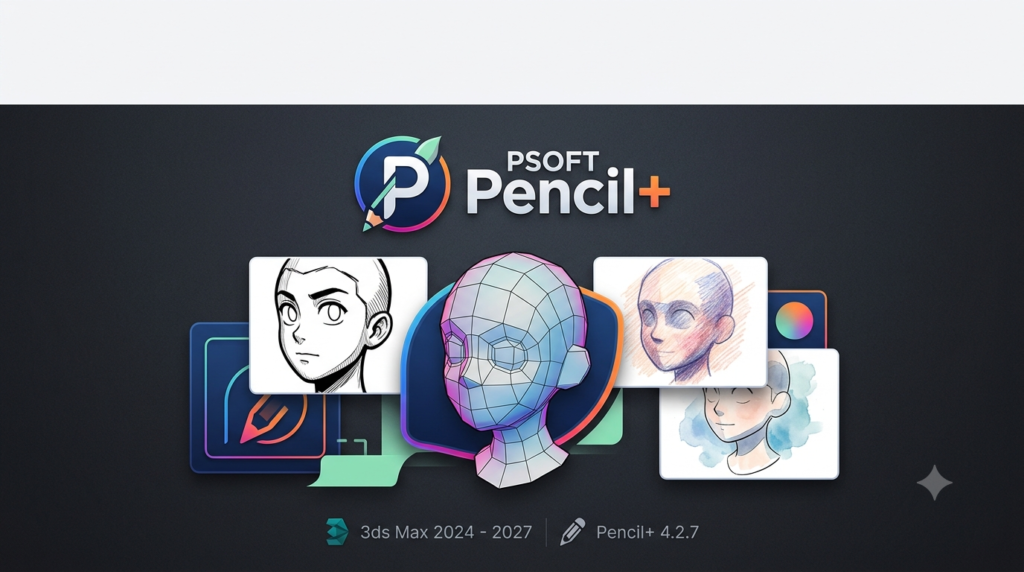
PSOFT Pencil+ 4.2.7 is a specialized non-photorealistic rendering (NPR) plugin for Autodesk 3ds Max that transforms 3D scenes into hand-drawn animations, cel-shaded artwork, and pencil-sketch illustrations. This rendering plugin has been widely adopted in the Japanese animation industry, with notable usage in major productions such as Evangelion and Your Name .
The Pencil+ 4 plugin combines two core technologies: Pencil+ Material for cel-shaded surfaces and Pencil+ Line for stylized contour drawing . These tools enable 3D artists to replicate the distinct visual language of anime, manga, and illustration directly within the 3ds Max environment.
Version 4.2.7 marks a significant compatibility update, extending official support to 3ds Max 2027 while maintaining full functionality with versions 2024 through 2026 . This release ensures that animation studios and freelance artists can continue working with the latest Autodesk releases without workflow interruptions.
Key Features of Pencil+ 4 for 3ds Max
Material Capabilities
Pencil+ 4 delivers sophisticated NPR material controls that set it apart from standard renderers:
| Feature | Description |
|---|---|
| Cel Shading | Creates flat, animation-style color zones with customizable gradation bars |
| Nitrous Viewport Shader | Real-time GPU-accelerated preview of materials in the 3ds Max viewport with quality near final render results |
| Material Penetration | Renders hidden materials as if they were in front, enabling unique compositing workflows |
| Light Intensity Control | Per-material light influence adjustment for precise highlight and shadow management |
| Stroke Maps for Hatching | Adds hand-drawn cross-hatching and rough sketch textures to surfaces |
| Highlight Design | Visual control over highlight shapes with crescent and wrap-around effects |
| Shadow Blend | Independent shadow color settings separate from zone gradations |
Line Rendering Capabilities
The Pencil+ 4 Line engine produces high-quality stylized outlines with extensive customization:
-
Multithreaded Rendering Engine – Dramatically faster line rendering compared to previous versions. In testing on a 22.3 million polygon scene with 7,438 objects, Pencil+ 4 completed line rendering in 25 seconds versus 28 minutes and 22 seconds with Pencil+ 3 .
-
Comprehensive Edge Detection Settings – Supports outlines, open edges, object boundaries, intersections, smoothing boundaries, material ID boundaries, selected edges, normal angles, and wireframes .
-
Brush Customization – Detailed brush settings including distance-based size reduction, line size maps, and roughness controls .
-
External Reference Support – Line settings can be referenced externally for improved project management .
Utility Plugins
Pencil+ 4 includes several companion utilities to enhance productivity:
-
Pencil+ 4 Bridge – Facilitates line data import/export between applications .
-
Pencil+ 4 Converter – Converts materials from previous versions or other platforms .
-
Pencil+ 4 Spreadsheet – Batch edits Pencil+ 4 Material and Line parameters across multiple objects (note: currently has compatibility limitations with 3ds Max 2027.0) .
What’s New in Pencil+ 4.2.7 (April 2026)
The 4.2.7 update is primarily a compatibility and maintenance release :
Key Changes
-
3ds Max 2027 Support – Full compatibility with the latest Autodesk 3ds Max release .
-
Online Manual Migration – The installer no longer includes a local manual; documentation is now accessed online .
-
Minor Bug Fixes – Various stability and performance improvements .
Utility Plugin Updates
-
Pencil+ 4 Bridge – Updated to version 1.0.8 with 3ds Max 2027 support .
-
Pencil+ 4 Converter – Updated to version 4.1.1 with 3ds Max 2027 support .
Important Limitation
Due to a bug in the 3ds Max 2027.0 library, Pencil+ 4 Spreadsheet does not currently support 3ds Max 2027. PSOFT is investigating support once Autodesk releases a fix .
Registered users can update to version 4.2.7 free of charge .
System Requirements
Host Application Support
Pencil+ 4.2.7 officially supports the following versions of Autodesk 3ds Max :
-
Autodesk 3ds Max 2024
-
Autodesk 3ds Max 2025
-
Autodesk 3ds Max 2026
-
Autodesk 3ds Max 2027
Hardware Requirements
The plugin operates within the hardware requirements of the host 3ds Max version. Recommended specifications include :
| Component | Minimum | Recommended |
|---|---|---|
| CPU | Intel or AMD 64-bit processor | High-performance multi-core CPU |
| RAM | 8 GB | 16 GB or higher |
| Graphics Card | OpenGL-compatible | Professional-grade for stability |
| Operating System | Windows 10 / 11 (64-bit) | Windows 10 / 11 (64-bit) |
| Disk Space | Approximately 300 MB | 500 MB (for project files) |
Renderer Compatibility
-
Operates with the 3ds Max Scanline Renderer .
-
Supports Backburner network rendering with no limit on render nodes .
Installation Guide for Pencil+ 4.2.7
Prerequisites
Before installing Pencil+ 4.2.7, ensure:
-
A licensed copy of Autodesk 3ds Max 2024–2027 is installed.
-
You have administrative privileges on your Windows system.
-
You have registered your Pencil+ 4 license with PSOFT.
Installation Steps
-
Log in to the PSOFT User Page – Access the “Product Downloads” section .
-
Download the Installer – Select “Pencil+ 4 for 3ds Max” version 4.2.7.
-
Download Utility Plugins – Also download updated versions of Bridge and Converter if needed.
-
Run the Installer – Execute the downloaded file and follow the on-screen instructions.
-
Activate License – Use the license settings tool for online authorization. Online license returns are also supported for flexible license transfers between computers .
Network License Installation
For network license versions, the .mod file path is typically:
C:\Program Files\PSOFT\Pencil+ 4 for 3ds Max (NL)\modules\
Standalone licenses are installed at:
C:\Program Files\PSOFT\Pencil+ 4 for 3ds Max\modules\
Upgrading from Previous Versions
-
Version 4.2.7 is a free update for all registered users of Pencil+ 4 .
-
Uninstall the previous version before installing 4.2.7 (recommended).
-
Your projects and settings from version 4.1.1 and above are compatible with 4.2.7.
How to Use Pencil+ 4 for 3ds Max
Getting Started with Pencil+ Materials
-
Apply Pencil+ Material – In the Material Editor, select Pencil+ 4 Material from the material list.
-
Configure Gradation – Use the gradation bar to define color zones for cel shading.
-
Adjust Highlights – Customize highlight design and position.
-
Enable Nitrous Viewport Preview – View real-time material updates in the viewport for efficient iteration .
Working with Pencil+ Lines
-
Access Line Settings – Open the Pencil+ 4 Line panel from the 3ds Max menu.
-
Select Edge Detection Type – Choose from outline, open edge, object, intersection, smoothing boundary, material ID boundary, selected edge, normal angle, or wireframe .
-
Customize Brush Settings – Adjust line width, taper, and variation.
-
Apply Reduction Settings – Distance-based line thinning for natural hand-drawn effects.
Batch Editing with Pencil+ 4 Spreadsheet
The Spreadsheet utility enables bulk parameter editing across multiple materials and line sets. However, note the current limitation with 3ds Max 2027.0 described earlier .
Output and Compositing
-
Render Elements – Output materials and lines to separate layers for post-production.
-
EPS Output – Export line data in EPS format for vector editing.
-
PLD File Export – Save line data in PLD format for re-editing in Pencil+ 4 Line for After Effects .
Best Use Cases for Pencil+ 4
3D Animation Production
Pencil+ 4 is particularly strong in anime-style animation production, offering:
-
Cel-shaded character rendering with consistent, flat colors.
-
Stylized line work that mimics hand-drawn animation cels.
-
Faster iteration with Nitrous viewport preview.
Practical application: Production studios can model environments in 3D while rendering with Pencil+ 4 to achieve the look of traditional 2D animation .
Game Art and Concept Development
Game artists use Pencil+ 4 for:
-
Creating stylized concept art with NPR rendering.
-
Developing cel-shaded game assets.
-
Producing promotional artwork directly from 3D models.
Architectural Visualization with Artistic Flair
Architects and designers can:
-
Generate hand-drawn style architectural illustrations.
-
Create sketch-like presentation materials.
-
Produce artistic mood boards from 3D models.
Comic and Manga Production
The plugin enables:
-
Manga-style line rendering with brush-like strokes.
-
Screentone and hatching effects.
-
Quick iteration on panel layouts using 3D reference.
Advantages and Limitations
Advantages
| Advantage | Benefit |
|---|---|
| Industry-Standard NPR Solution | Proven in major animation productions |
| Fast Multithreaded Line Rendering | Up to 68x faster than Pencil+ 3 in complex scenes |
| Real-Time Nitrous Viewport Preview | Efficient iteration without constant test renders |
| Comprehensive Customization | Granular control over materials, lines, and modifiers |
| Network Rendering Support | Scalable for studio environments with unlimited render nodes |
| Flexible Licensing | Online authorization/return for easy license transfers |
Limitations
| Limitation | Impact |
|---|---|
| Scanline Renderer Dependency | Requires the 3ds Max scanline renderer; not compatible with Arnold, V-Ray, or other renderers |
| Pencil+ 4 Spreadsheet Limitation | Currently incompatible with 3ds Max 2027.0 |
| Windows Only | No native macOS support |
| Learning Curve | NPR workflows require understanding of cel-shading principles |
| Demo Version Restrictions | Watermarked output, settings cannot be saved |
Alternatives to PSOFT Pencil+ 4
3ds Max-Compatible NPR Plugins
| Tool | Key Features | Best For |
|---|---|---|
| Pencil+ 4 | Cel shading, line rendering, Nitrous preview, multithreaded lines | Anime and animation production |
| VRayToon | Toon shading within V-Ray, limited line controls | V-Ray workflows needing basic toon shading |
| FinalToon | Comprehensive line and toon shading system | Complex toon renderings requiring extensive settings |
Standalone NPR Solutions
| Tool | Description | Primary Use |
|---|---|---|
| Blender Line Art | Grease Pencil and Line Art modifier for NPR workflows | Open-source animation and illustration |
| SketchUp with Styles | Built-in sketch and watercolor effects | Architectural sketching |
| Procreate | Digital illustration with 3D painting support | 2D illustration and concept art |
When to Choose Pencil+ 4
Pencil+ 4 is the optimal choice when:
-
You work in 3ds Max and need native NPR rendering.
-
You produce anime, cel-shaded, or illustration-style content.
-
You require fast, multithreaded line rendering for complex scenes.
-
You value real-time viewport preview for efficient iteration.
Frequently Asked Questions
Is Pencil+ 4.2.7 compatible with 3ds Max 2027?
Yes, PSOFT Pencil+ 4.2.7 officially supports Autodesk 3ds Max 2027 along with versions 2024, 2025, and 2026 . However, the Pencil+ 4 Spreadsheet utility does not currently work with 3ds Max 2027.0 due to an Autodesk library bug. PSOFT is monitoring the situation and will investigate support once the bug is fixed .
Is Pencil+ 4 free to use?
Pencil+ 4 is a commercial plugin. A free demo version is available for evaluation purposes . The demo version includes:
-
Watermark on rendered images.
-
Material, line, and modifier settings cannot be saved.
-
EPS and PLD output functions are disabled .
PSOFT does not provide technical support for the demo version and encourages users to confirm the product meets expectations before purchasing a full license .
Can I use Pencil+ 4 with other renderers like Arnold or V-Ray?
No, Pencil+ 4 operates with the 3ds Max Scanline Renderer exclusively . It does not support Arnold, V-Ray, Corona, or other third-party render engines. If you need to combine Pencil+ 4 rendering with other renderer outputs, you can render Pencil+ elements separately and composite them in post-production.
What file formats does Pencil+ 4 export?
Pencil+ 4 supports several output formats:
-
Standard image formats – BMP, JPEG, PNG, TIFF (through 3ds Max)
-
EPS – Vector format for line data
-
PLD – Proprietary Pencil+ Line Data format for re-editing in Pencil+ 4 Line for After Effects
-
Render Elements – Separate output for material zones and lines for compositing workflows
What is the Pencil+ 4 Spreadsheet utility?
Pencil+ 4 Spreadsheet is a utility plugin that enables batch editing of Pencil+ 4 Material and Line parameters across multiple objects simultaneously . It was developed to reduce the burden of custom tool development for 3ds Max, particularly for animation studios. It helps prevent settings mistakes by allowing users to review parameters in an overview format .
Note: Pencil+ 4 Spreadsheet currently does not support 3ds Max 2027.0 due to an Autodesk library issue. Support will be investigated after the bug is fixed .
Can Pencil+ 4 render animation sequences?
Yes, Pencil+ 4 fully supports animation rendering within 3ds Max. The multithreaded line rendering engine enables efficient rendering of animated sequences. The plugin works with the standard 3ds Max animation workflow and can output rendered frames to image sequences or video files through the scanline renderer .
What was improved in Pencil+ 4 compared to Pencil+ 3?
Pencil+ 4 introduced major improvements, including:
-
Multithreaded line rendering – Up to 68x faster in complex scenes .
-
Nitrous shader – Real-time viewport preview of materials .
-
Material penetration – Ability to render hidden materials as if in front .
-
Light intensity control – Per-material light influence adjustments .
-
New edge detection settings – Selected edges, open edges, group merging, and self-intersection .
-
Online license management – Internet-based license authorization and return .
-
External reference support – Line settings can be referenced externally .
Does Pencil+ 4 support network rendering?
Yes, Pencil+ 4 supports network rendering using Autodesk Backburner. There is no limit on the number of computers used for rendering . The network rendering dedicated plugin can be installed on render nodes without requiring full licensing.
Final Thoughts
PSOFT Pencil+ 4.2.7 for 3ds Max stands as a mature, production-proven non-photorealistic rendering solution tailored for animation studios, game developers, and artists seeking to bridge 3D efficiency with 2D artistic expression . The 4.2.7 update ensures continued compatibility with the latest 3ds Max releases while maintaining the powerful feature set that has made Pencil+ 4 a standard tool in the anime industry.
For professionals working in 3ds Max who regularly produce cel-shaded, hand-drawn, or illustration-style content, Pencil+ 4 remains a compelling investment. Its multithreaded line rendering engine, real-time Nitrous viewport preview, and comprehensive customization options set it apart from simpler toon shading solutions .
However, users should note the software’s reliance on the scanline renderer and the current limitation with Pencil+ 4 Spreadsheet on 3ds Max 2027. Evaluating the demo version is strongly recommended to verify performance and workflow compatibility before purchasing a full license .
As the animation industry increasingly blends 3D and 2D workflows, tools like Pencil+ 4 offer a practical bridge—enabling artists to achieve hand-drawn aesthetics while leveraging the efficiency and consistency of 3D production pipelines.
Our Paid Service
“We do not sell or provide any software. We only offer professional support services. If any software on your system is not working properly, or you are facing installation errors, crashes, or any other technical issue — just contact us. We will help you fix the problem quickly and remotely via AnyDesk. No software will be provided from our side — only expert troubleshooting and support.”