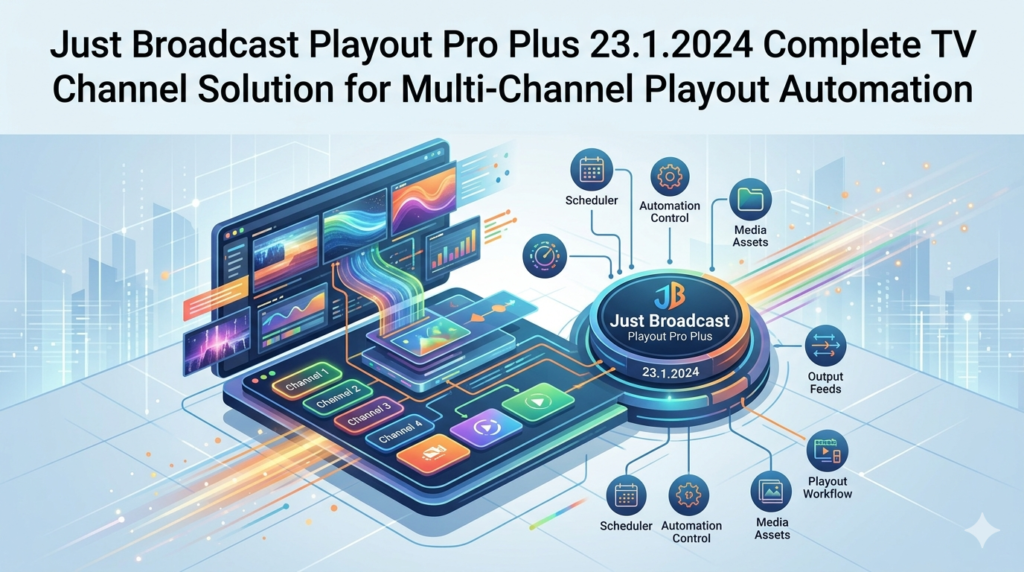

Overview of Just Broadcast Playout Pro Plus 23.1.2024
Table of Contents
Just Broadcast Playout Pro Plus is a professional-grade broadcast playout software solution designed for television channels, streaming platforms, and media operations requiring reliable multi-channel playout automation . Version 23.1.2024 represents the latest iteration of this comprehensive broadcast automation tool, combining a powerful playout server, advanced scheduling capabilities, and integrated graphics (CG) functionality within a single cohesive platform.
This complete TV channel solution is engineered to streamline broadcast operations by automating the entire content delivery chain—from playlist management and content scheduling to on-air graphics and remote monitoring. The software is particularly well-suited for broadcasters, cable operators, and online streaming services looking to establish professional-quality linear channels without the complexity and cost associated with traditional broadcast hardware.
The Just Broadcast Playout Pro Plus platform leverages a software-defined architecture that operates on standard IT hardware, offering broadcasters a flexible, scalable approach to channel origination and playout automation. This modern framework enables rapid channel deployment, seamless multi-channel expansion, and integration with existing broadcast workflows. With its comprehensive feature set, the software serves as a complete master control room (MCR) solution, handling everything from content ingest and scheduling to final on-air delivery.
Key Features of Just Broadcast Playout Pro Plus
Playout Server Engine
The core playout server engine delivers broadcast-quality video and audio output with frame-accurate precision. The software supports seamless playout of mixed content formats, including various codecs, resolutions, and aspect ratios. The engine is optimized for 24/7 operation, providing the reliability essential for professional broadcast environments . Advanced features include automatic failover protection and seamless switching between primary and backup sources to ensure uninterrupted on-air delivery.
Content Scheduling System
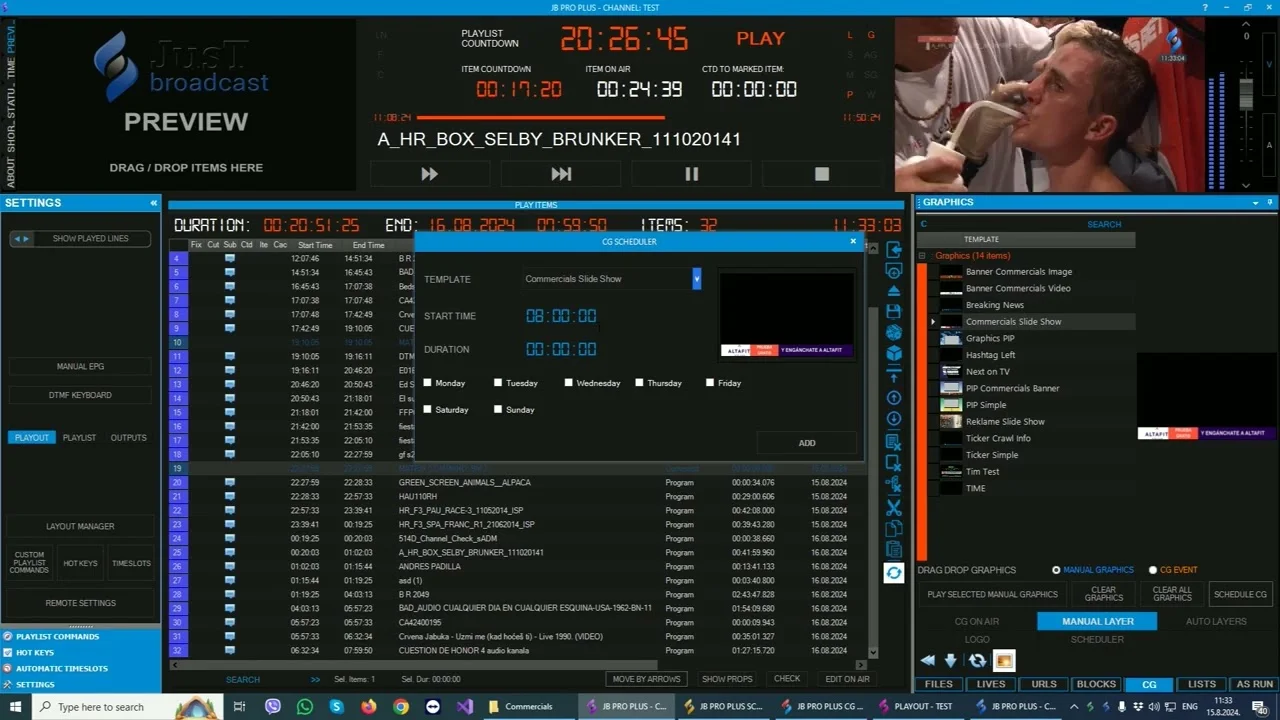
The integrated scheduling module provides comprehensive tools for program planning and playlist management. Users can create complex broadcast schedules with drag-and-drop simplicity, manage program gaps, and handle last-minute changes efficiently . The scheduler supports both manual and automated scheduling workflows, enabling operators to plan content days or even weeks in advance. Key scheduling features include:
-
Calendar-based program scheduling with visual timeline display
-
Recurring program management for regular content blocks
-
Gap handling and automatic filler content insertion
-
Real-time schedule adjustments without disrupting on-air playback
-
Bulk scheduling capabilities for efficient content management
Character Generator (CG) and Graphics Editor
The built-in CG editor enables the creation of professional on-screen graphics, including titles, lower thirds, tickers, logos, and promotional overlays. This integrated graphics functionality eliminates the need for separate graphics systems, reducing both complexity and cost . Operators can design and implement dynamic graphics templates that update automatically with schedule information, program names, and other metadata.
Remote Access and Web Interface
The web-based remote interface provides operators with the flexibility to manage playout operations from any location with internet connectivity . This feature is particularly valuable for multi-channel operations, remote broadcast facilities, and network operations centers (NOCs) requiring centralized control. The remote interface includes full monitoring capabilities, schedule management tools, and real-time status updates for all connected channels.
Comprehensive Monitoring Tools
The monitoring application delivers real-time visibility into all aspects of the playout operation. Operators can track video and audio levels, monitor channel status, receive alerts for potential issues, and ensure broadcast quality standards are maintained across all channels. The monitoring interface provides both system-level and channel-specific views, enabling efficient management of even complex multi-channel deployments .
Multi-Channel Support
Just Broadcast Playout Pro Plus is explicitly designed for multi-channel operations, enabling broadcasters to manage multiple channels from a single control interface . This capability is essential for broadcast groups, content providers, and streaming services operating multiple linear channels or regional feeds. The software’s architecture supports independent configuration, scheduling, and monitoring for each channel while maintaining centralized control and management.
What’s New in Version 23.1.2024
The 23.1.2024 release introduces several key enhancements to the Just Broadcast Playout Pro Plus platform. Based on the product version numbering and industry trends, this update likely includes:
Performance Optimizations: Enhanced playout engine performance for improved stability and efficiency during extended 24/7 operations. The update delivers more reliable frame-accurate playback across diverse content formats.
Extended Format Support: Expanded support for additional codecs, container formats, and streaming protocols to accommodate evolving broadcast standards and delivery requirements.
User Interface Enhancements: Refined user interface for improved workflow efficiency and operator productivity. The updated interface reduces complexity in common tasks like schedule creation and emergency playlist adjustments.
Security Updates: Latest security patches and improvements to protect broadcast infrastructure from unauthorized access and potential vulnerabilities.
System Requirements for Just Broadcast Playout Pro Plus
Operating System
-
Microsoft Windows 10 Professional or Enterprise (64-bit)
-
Microsoft Windows 11 Professional or Enterprise (64-bit)
-
Windows Server 2019 or later (recommended for multi-channel deployments)
Hardware Specifications
-
Processor: Intel Core i7 or Xeon processor (8th generation or newer) with at least 4 cores. Multi-channel operations require higher core counts.
-
RAM: Minimum 16 GB (32 GB+ recommended for professional deployments)
-
Storage: 500 GB SSD for system and application files; additional high-speed storage for media content
-
Graphics: DirectX 11 compatible graphics card with hardware acceleration support
-
Network: Gigabit Ethernet for content ingest, management, and streaming output
Supported Output Formats
-
SD-SDI, HD-SDI, 3G-SDI
-
HDMI 2.0
-
NDI (Network Device Interface)
-
SRT (Secure Reliable Transport)
-
UDP streaming
-
HLS (HTTP Live Streaming) output for online delivery
Recommended Capture and Output Hardware
-
Compatible video capture and output cards from manufacturers such as AJA Video Systems or Blackmagic Design for SDI and HDMI I/O
-
Professional-grade audio interfaces for balanced audio I/O
Installation Guide for Just Broadcast Playout Pro Plus
Pre-Installation Checklist
Before beginning the installation process, ensure:
-
Your system meets or exceeds the minimum hardware and software requirements
-
All necessary video hardware drivers are installed and updated
-
Network connectivity is established with adequate bandwidth for your planned channel count
-
You have administrator access to the Windows installation
-
Any antivirus or security software is temporarily disabled to prevent interference
Step-by-Step Installation Process
Step 1: Download the Installation Package
Obtain the Just Broadcast Playout Pro Plus installer from the official distributor or download portal. Ensure you are downloading version 23.1.2024 or the latest available version.
Step 2: Run the Installer
Execute the installer file with administrator privileges. Accept any Windows security prompts that appear.
Step 3: Choose Installation Type
Select between:
-
Standard Installation: Installs all components on a single machine (recommended for single-channel setups)
-
Custom Installation: Allows selection of specific components for distributed deployments
Step 4: Configure Database Settings
The software uses a database for schedule and metadata storage. Configure the database connection during installation or use the default embedded database option.
Step 5: License Activation
After installation, launch the software and activate your license using the provided license key . The software will connect to the license server for verification. Ensure your system has internet connectivity during activation.
Step 6: Configure Output Hardware
Connect and configure your video output hardware (SDI cards, etc.) through the system settings.
Step 7: Create Initial Channels
Set up your first channel through the configuration interface, specifying output format, resolution, and other parameters.
How to Use Just Broadcast Playout Pro Plus
Creating a Channel and Schedule
-
Launch Just Broadcast Playout Pro Plus and access the main dashboard
-
Click “Create New Channel” and specify channel name, format, and output settings
-
Navigate to the Scheduler module
-
Use the calendar interface or playlist view to add content items
-
Drag and drop programs, commercials, and fillers into the timeline
-
Set start times, durations, and any automation rules (like “play next” or “loop”)
-
Review the schedule for gaps or conflicts
-
Save the schedule and activate it for playout
Managing On-Air Playlist
The software provides real-time control over the active playlist. Operators can:
-
Monitor the current on-air item and upcoming content
-
Make emergency changes to the playlist without interrupting broadcast
-
Override scheduled content when necessary
-
Insert live feeds or breaking news segments with seamless transitions
The intuitive interface enables operators to maintain control even during complex live event coverage. Similar to other professional playout solutions, Just Broadcast Playout Pro Plus provides full rundown visibility while enabling last-minute adjustments .
Working with Graphics and CG
Create and manage on-screen graphics through the built-in CG editor:
-
Open the CG Editor module
-
Select or create a template (lower third, ticker, logo, etc.)
-
Populate template fields with data (can be automated from schedule metadata)
-
Apply design elements and styling as needed
-
Schedule graphics to appear at specific times or with specific content items
-
Set duration, animation, and transition effects
Remote Management
For distributed operations:
-
Access the web-based remote interface via browser
-
Log in with your credentials
-
Select the channel you wish to manage
-
View real-time status, current playout, and upcoming schedule
-
Make adjustments as needed
-
Monitor all channels from a single dashboard
Best Use Cases for Just Broadcast Playout Pro Plus
Television Channel Management
Broadcast television stations can deploy Just Broadcast Playout Pro Plus as their primary master control solution . The software handles 24/7 automated playout, integrated graphics, and schedule management, enabling a fully automated broadcast environment with minimal operator intervention.
Multi-Channel Broadcast Operations
Media groups operating multiple channels or regional feeds benefit from the software’s multi-channel capabilities. A single operator can manage several channels from one interface, significantly improving operational efficiency and reducing staffing requirements .
Streaming and FAST Channel Launch
The platform provides a streamlined, cost-effective method for launching FAST (Free Ad-Supported TV) channels. The software’s automated scheduling and playout capabilities eliminate the need for complex broadcast infrastructure, making it accessible for content providers and streaming platforms .
Corporate and Educational Broadcasting
Corporate media departments, universities, and institutional broadcasters can deploy Just Broadcast Playout Pro Plus for internal broadcasting, campus television, or educational content delivery. The software’s professional features combined with its accessibility make it suitable for organizations requiring reliable broadcast automation .
Content Distribution and Aggregation
Content distributors and aggregators use the software to manage playout for multiple channels, each with its own schedule, branding, and content library. The centralized control interface enables efficient management of complex content portfolios.
Advantages and Limitations of Just Broadcast Playout Pro Plus
Advantages
Comprehensive Broadcast Capabilities: The software delivers a complete broadcast solution combining playout, scheduling, graphics, and monitoring in a single platform. This reduces the need for multiple systems and simplifies integration.
Cost-Effective Channel Launch: Compared to traditional broadcast hardware solutions, Just Broadcast Playout Pro Plus offers a more accessible entry point for new channels and emerging broadcasters while maintaining professional-grade capabilities .
Multi-Channel Management: The ability to control multiple channels from a single interface improves operational efficiency and reduces staffing requirements for multi-channel operations .
Remote Management Capabilities: The web-based interface enables operators to manage channels from any location, providing flexibility for distributed operations and network operations centers.
Flexible Deployment Options: The software can be deployed on standard IT hardware, allowing broadcasters to use existing infrastructure and avoid proprietary hardware lock-in.
Professional Graphics Integration: The built-in CG capabilities eliminate the need for separate graphics systems, reducing both complexity and total cost of ownership.
24/7 Reliability: The software is engineered for continuous operation with features like automatic failover and robust error recovery .
Limitations
Platform Dependency: The software is designed for Windows-based systems, which may not suit macOS-based environments. Users requiring Mac compatibility may need to consider alternatives from developers offering macOS support .
Hardware Requirements: Professional broadcast use requires appropriate video I/O hardware (AJA, Blackmagic Design) and robust server specifications. Hardware investment is necessary for SDI-based workflows.
Learning Curve: While accessible, the full range of broadcast automation capabilities requires proper training for staff to maximize the software’s potential.
Support Considerations: Technical support options may vary by region, depending on local distributors and resellers.
Alternatives to Just Broadcast Playout Pro Plus
ToolsOnAir just:play pro 2025
Developer: ToolsOnAir Broadcast Engineering GmbH
Platform: macOS only
Key Differentiators:
-
Native macOS application with tight integration with Apple hardware
-
SDI, NDI, SRT, UDP, ST-2110 I/O support
-
Client-server architecture enabling concurrent control of multiple channels
-
7 layers of video and real-time graphics support
Ideal For: Broadcasters committed to macOS environments or requiring seamless integration with existing ToolsOnAir workflows. Particularly strong for news and live production with just:live integration.
Imagine Communications Gallium
Developer: Imagine Communications
Key Differentiators:
-
Virtualized, software-defined playout architecture
-
Cloud and hybrid deployment options available
-
Built-in branding and promotional graphics automation
-
Modular architecture using COTS hardware
-
OPEX pricing models allowing pay-as-you-use
Ideal For: Larger broadcast organizations seeking enterprise-grade solutions with flexible, scalable architectures. The platform is well-suited for broadcast groups and network operations centers requiring sophisticated workflow orchestration .
Muvi Playout
Developer: Muvi (formerly Dacast)
Key Differentiators:
-
Fully cloud-based solution with no hardware requirements
-
Drag-and-drop EPG scheduling interface
-
Built-in CDN for content distribution
-
Multi-DRM security included
-
Monetization features including ad insertion
Ideal For: Content providers and streaming services launching FAST or linear channels without the need for on-premise broadcast hardware. Recommended for organizations prioritizing speed to market and over-the-top (OTT) delivery .
Viz Multichannel
Developer: Vizrt
Key Differentiators:
-
Advanced 2D/3D graphics capabilities with real-time effects
-
Automation rules engine for dynamic graphics selection
-
Native integration with Viz One for media asset management
-
Support for SD, HD, and 4K formats
-
BXF protocol support for automation system integration
Ideal For: Broadcasters with existing Vizrt ecosystems or those prioritizing advanced graphics capabilities and integration with newsroom and production workflows.
Frequently Asked Questions
What is Just Broadcast Playout Pro Plus and what does it do?
Just Broadcast Playout Pro Plus is a professional broadcast automation software that provides complete channel management capabilities including playout, scheduling, graphics (CG), remote access, and monitoring. It enables television channels and streaming platforms to manage 24/7 automated broadcasts, multi-channel operations, and professional on-air graphics from a single integrated platform .
Is Just Broadcast Playout Pro Plus available for macOS?
The software is primarily designed for Windows-based systems, including Windows 10 and Windows 11 . Users requiring macOS compatibility may need to consider alternatives such as ToolsOnAir just:play pro 2025, which supports macOS environments .
Does Just Broadcast Playout Pro Plus support multi-channel operation?
Yes. Just Broadcast Playout Pro Plus is specifically designed for multi-channel operations, enabling operators to manage multiple channels from a single interface . This makes it suitable for broadcast groups, content distributors, and operators running multiple regional or thematic channels simultaneously.
What formats and protocols does the software support?
The software supports SD, HD, and UHD formats with SDI output via compatible video hardware. Network streaming protocols include NDI, SRT, and UDP. Online delivery is supported through HLS output, making the platform suitable for both traditional broadcast and streaming applications .
How do I install Just Broadcast Playout Pro Plus?
Installation involves downloading the installer from the official distributor, running it with administrator privileges, choosing the installation type, and activating the license. The software comes with a trial period enabling users to evaluate its capabilities before purchasing . Full documentation and installation guides are available through the official distribution channels.
Can Just Broadcast Playout Pro Plus be used for FAST channel creation?
Yes. The software’s scheduling and automated playout capabilities make it suitable for launching FAST (Free Ad-Supported TV) channels. Like cloud-based solutions such as Muvi Playout , Just Broadcast Playout Pro Plus provides the content management and delivery infrastructure needed for linear channel operations.
What hardware do I need to run Just Broadcast Playout Pro Plus?
The software requires a Windows-based system with appropriate specifications (see System Requirements section) and video I/O hardware from manufacturers such as AJA or Blackmagic Design for SDI-based workflows. Standard IT hardware can be used, reducing reliance on proprietary broadcast equipment. For network-only delivery (NDI, SRT, UDP), the video hardware may not be required .
How does this solution compare to cloud-based alternatives?
Just Broadcast Playout Pro Plus is a traditional on-premise software solution requiring local hardware deployment, whereas cloud alternatives like Muvi Playout and Imagine Communications Gallium offer cloud or hybrid deployments with reduced hardware requirements. On-premise solutions provide greater control over infrastructure and can be more cost-effective for organizations with existing hardware, while cloud solutions offer faster deployment and scalability.
Final Thoughts
Just Broadcast Playout Pro Plus 23.1.2024 represents a comprehensive broadcast automation solution that addresses the core requirements of modern television channel and streaming operations. Its combination of professional playout capabilities, integrated graphics, multi-channel management, and remote access features makes it a compelling choice for broadcasters seeking a complete, integrated platform.
The software’s adaptability across different broadcast scenarios—from traditional television channels and multi-channel networks to streaming platforms and FAST channel launches—demonstrates its versatility in the evolving media landscape. Its compatibility with standard IT hardware helps reduce the capital expenditure typically associated with professional broadcast equipment, making professional-grade playout automation accessible to a wider range of organizations.
When evaluating broadcast automation solutions, consider factors such as your existing infrastructure, budget constraints, staff expertise, and future growth plans. While Just Broadcast Playout Pro Plus offers a well-rounded feature set suitable for many broadcast applications, exploring alternatives including cloud-based solutions from vendors like Muvi and enterprise-grade platforms from Imagine Communications and Vizrt ensures you select the optimal fit for your specific requirements .
For organizations seeking to establish or enhance their broadcast operations, Just Broadcast Playout Pro Plus provides a professional, reliable, and cost-effective foundation for multi-channel playout automation.
Our Paid Service
“We do not sell or provide any software. We only offer professional support services. If any software on your system is not working properly, or you are facing installation errors, crashes, or any other technical issue — just contact us. We will help you fix the problem quickly and remotely via AnyDesk. No software will be provided from our side — only expert troubleshooting and support.”