
Overview of the Ideate Software Suite for Revit
Table of Contents
Ideate Revit Plugins Software is a specialized developer of plugins for Autodesk Revit. Unlike generic add-ons, these tools focus on solving specific pain points in Building Information Modeling (BIM) workflows: data validation, project cleanup, and non-graphical data management.
For versions 2023 through 2027, Ideate has transitioned from simple automation tools to enterprise-grade BIM data managers. Their flagship products—Ideate Explorer, Ideate Sticky, Ideate BIMLink, and Ideate Clone—help architects, engineers, and BIM managers audit, edit, and export Revit data without leaving the model environment.
If you manage large Revit projects, the Ideate Software Revit plugins reduce manual errors by automating warning resolution and parameter editing. This guide explains how to use these plugins legally and effectively across the 2023–2027 release cycle.
Key Features of Ideate Revit Plugins
The suite offers four core tools. Each solves a distinct BIM problem.
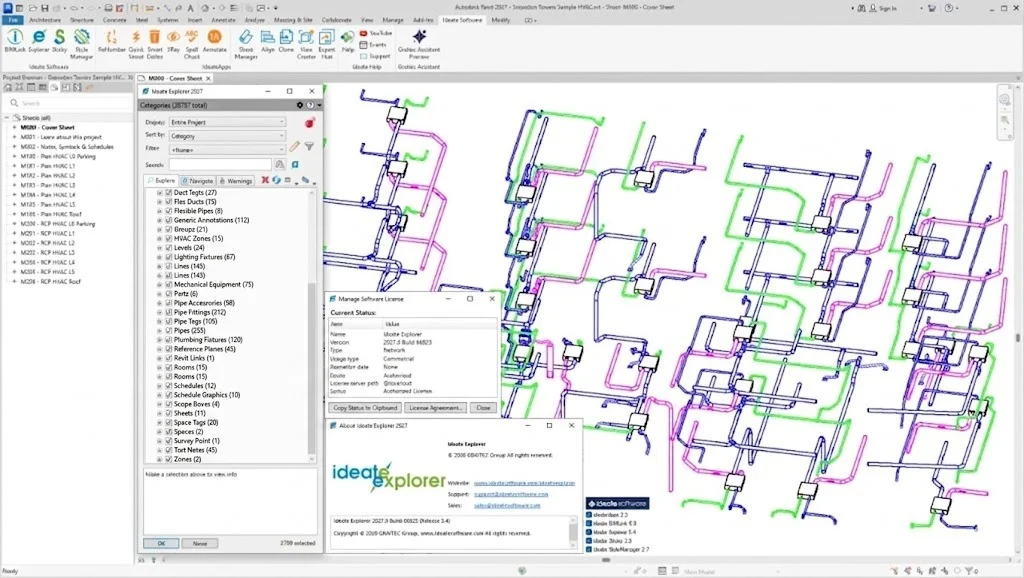
Ideate Explorer
-
Function: Searches and filters Revit elements by parameter values, warning types, or categories.
-
Use case: Find all “Toposolid” elements with a specific comment field value in under 3 seconds.
-
Technical detail: Reads the Revit API directly to access elements that the standard “Select by ID” tool misses.
Ideate BIMLink
-
Function: Exports Revit schedule data to Microsoft Excel and re-imports changes.
-
Power feature: Bulk edit parameters (e.g., “Fire Rating” or “Cost Code”) across 10,000+ instances simultaneously.
-
File formats supported: XLSX, CSV, TXT.
Ideate Sticky
-
Function: Converts Revit warnings into manageable, persistent to-do lists inside the model.
-
Collaboration benefit: Assign warning fixes to specific team members without using a separate task manager.
Ideate Clone
-
Function: Copies views and sheets while preserving view templates, crop regions, and dependent view relationships.
-
Time saver: Creates 50+ presentation sheets in 2 minutes instead of 2 hours.
What’s New in the 2023–2027 Releases
Ideate follows Autodesk’s yearly release cycle. Key changes across these versions include:
-
2023: Introduction of native Navisworks export compatibility from BIMLink. First version to support Revit 2023’s new parameter service.
-
2024: Added Ideate Query (a free tool) for instant element selection by 15+ filter types. Improved Excel round-trip speed by 40%.
-
2025: Full support for Revit 2025’s topographic solids and point cloud enhancements. Ideate Sticky now tracks warning history across workshared models.
-
2026: Real-time collaboration mode in Ideate Clone – multiple users can clone sheets simultaneously without reloading the central model.
-
2027: AI-assisted warning prioritization in Ideate Explorer. The plugin now suggests which warnings to fix first based on model impact.
All versions remain backward-compatible with Revit files saved in older formats (2023 can open 2025 data, with feature limitations).
System Requirements for Ideate Plugins (2023–2027)
Before installing, verify your hardware and software.
| Component | Minimum Requirement | Recommended |
|---|---|---|
| Revit Version | 2023, 2024, 2025, 2026, or 2027 | Latest update of 2027 |
| Operating System | Windows 10 64-bit (21H2) | Windows 11 Pro 64-bit |
| CPU | 2.5 GHz (4 cores) | 3.5 GHz+ (8 cores) |
| RAM | 16 GB | 32 GB (for models > 500 MB) |
| Display | 1920 x 1080 | 3840 x 2160 (4K) |
| .NET Framework | .NET 6.0 | .NET 8.0 |
| Microsoft Excel | 2016 (for BIMLink) | Microsoft 365 (64-bit) |
Important: Ideate plugins do not run on Revit LT or Revit Viewer. They require full Revit or Revit Architecture/Structure/MEP.
Installation Guide for Ideate Revit Plugins (Legal Setup)
Follow these steps to install legally. Do not use unauthorized loaders or modified installers.
Step 1 – Obtain a legitimate license
-
Purchase from ideatesoftware.com or an authorized reseller.
-
Choose a network license (floating) or standalone (device-locked).
Step 2 – Download the correct version
-
Log into your Ideate account.
-
Select Revit year (e.g., “Ideate Suite 2027 for Revit 2027”).
-
Download the
.msiinstaller (approx. 150 MB).
Step 3 – Run the installer
-
Close all Revit sessions.
-
Right-click the
.msifile and select Run as Administrator. -
Accept the license agreement (read the EULA – it prohibits redistribution).
Step 4 – Activate the license
-
Open Revit. A new Ideate tab appears on the ribbon.
-
Click License Manager > Activate.
-
Enter your serial number and product key (emailed after purchase).
-
Choose “Connect to license server” (for network licenses) or “Activate online.”
Troubleshooting: If the ribbon does not load, run Revit as Administrator once. Check C:\ProgramData\Ideate Software\Logs for errors.
How to Use the Software (Workflow Examples)
Here are practical workflows for each plugin.
Using Ideate BIMLink for bulk parameter editing
-
Open a Revit schedule (e.g., “All Doors”).
-
Click Ideate BIMLink > Export to Excel.
-
In Excel, edit 200 rows of “Fire Rating” from “1HR” to “2HR.”
-
Save as XLSX. Click Import from Excel in Revit.
-
Review changes. Click Apply. All 200 doors update instantly.
Using Ideate Explorer to resolve warnings
-
Go to Ideate Explorer > Warnings tab.
-
Sort by “Number of Occurrences” (highest first).
-
Select a warning (e.g., “Elements are overlapping”).
-
Click Show Elements. Revit zooms to the conflict.
-
Fix manually, then click Delete Warning.
Using Ideate Clone for sheet sets
-
Open the source sheet (e.g., “A-101 – Floor Plan”).
-
Click Ideate Clone > Clone View/Sheet.
-
Set naming rule: “A-” + [Original Number] + “-Clone”
-
Choose dependencies (include dependent views and callouts).
-
Click Clone. New sheet appears in the project browser.
Best Use Cases for Ideate Plugins
These tools excel in specific BIM scenarios.
For BIM Managers (Quality control)
-
Run Ideate Explorer weekly to find and fix “unjoined geometry” warnings.
-
Use BIMLink to audit all “Manufacturer” parameter values for consistency.
For Large Teams (Coordination)
-
Ideate Sticky assigns warnings to junior staff. Example: “Fix 150 wall joins – Assign to Sarah.”
-
Ideate Clone creates discipline-specific sheet sets (arch, struc, mep) from a single master template.
For Facility Management (Data handover)
-
BIMLink exports COBie-required parameters directly to Excel.
-
No manual re-typing. The client receives validated asset data.
For Educators (Teaching BIM workflow)
-
Use Ideate Query in a lab setting. Students learn to select elements by “Family and Type” instantly.
Advantages and Limitations
Advantages
-
Time savings: Reduces manual parameter editing from hours to minutes.
-
Accuracy: Eliminates typos from bulk data entry.
-
Logging: Every edit via BIMLink creates an audit trail (who changed what, when).
-
Revit version agnostic: One license works across 2023–2027 (no upgrade fee within the year).
Limitations
-
Learning curve: First-time users need 2–4 hours to understand Excel mapping.
-
No Mac support: Windows-only (because Revit is Windows-only).
-
Cost: Higher than basic plugins. A single BIMLink license starts at ~$795/year.
-
Cannot undo: Bulk changes via BIMLink are permanent. Always create a Revit journal backup first.
-
Large file lag: Models >1.5 GB may experience 30-second delays in Ideate Explorer.
Alternatives to Ideate Software (Comparison)
| Tool | Primary Function | Best for | Price (approx.) | Revit 2027 support |
|---|---|---|---|---|
| Ideate Suite | Data management + warnings | Enterprise BIM teams | $1,295/year | Yes |
| RushFORUM Tools | Model checking + clash detection | Structural engineers | $495/year | Yes (limited) |
| Bexel Manager | View & sheet creation | Healthcare/commercial projects | $690/year | Yes |
| DiRoots (free) | Parameter editing + family management | Small firms, students | Free | Yes (but no support) |
| PyRevit | Open-source scripting | Programmers willing to code | Free | Yes (community-maintained) |
When to choose Ideate:
-
You need vendor support (email + phone + remote session).
-
Your team does not write Python or C# scripts.
-
You manage model warnings from multiple disciplines.
When to choose free alternatives:
-
You work alone or in a 2-person office.
-
You have time to debug open-source tools.
-
Excel export is not critical (free tools often break after Revit updates).
Frequently Asked Questions
1. Can I use Ideate Software plugins with Revit 2027 if I own a 2023 license?
No. Ideate licenses are version-locked. A 2023 license only activates plugins for Revit 2023. You must purchase a maintenance renewal or a new license for 2027.
2. Does Ideate BIMLink work with Revit Cloud Worksharing (BIM 360)?
Yes. BIMLink supports cloud models, but with a latency warning. Export/import operations on BIM 360 take 20–30% longer than local network models.
3. Are there any free trials available for Ideate Revit plugins?
Yes. Ideate offers a 30-day fully functional trial with no credit card required. Download from their official website. The trial shows “IDEATE TRIAL” on all output but limits no features.
4. Can I install Ideate plugins on a virtual machine (VM) like AWS or Azure?
Yes, but only with a network license. Standalone licenses require a fixed physical MAC address, which VMs change frequently. Contact Ideate support for VM-specific activation keys.
5. What happens to Ideate Sticky warnings if I upgrade Revit mid-project?
Warnings stored in Ideate Sticky survive the upgrade if you open and save the model in the newer Revit version first. However, warnings linked to deprecated elements (e.g., “Stairs by Sketch” in Revit 2023) become un-fixable.
6. Does Ideate Software collect telemetry or model data?
According to their privacy policy (v4.2, effective 2025), Ideate collects only usage metrics (feature clicks, crash reports). No geometry, parameter values, or project names are transmitted. You can opt out via the Help > Privacy menu.
7. Can I use Ideate Clone to duplicate dependent views like sections and elevations?
Yes. When cloning a sheet, check “Include dependent views”. Ideate Clone recreates all referenced sections, callouts, and elevations with identical crop regions.
Final Thoughts
The Ideate Software Revit plugins for 2023–2027 are not just automation tools. They fundamentally change how BIM teams handle data integrity and warning resolution.
For a solo practitioner, the cost may exceed the benefit. Use free tools like DiRoots or PyRevit first. However, for any firm with 5+ Revit users managing models over 300 MB, Ideate pays for itself in labor hours saved within 2–3 months.
Our Paid Service
“We do not sell or provide any software. We only offer professional support services. If any software on your system is not working properly, or you are facing installation errors, crashes, or any other technical issue — just contact us. We will help you fix the problem quickly and remotely via AnyDesk. No software will be provided from our side — only expert troubleshooting and support.”