
Overview of the Software
Table of Contents
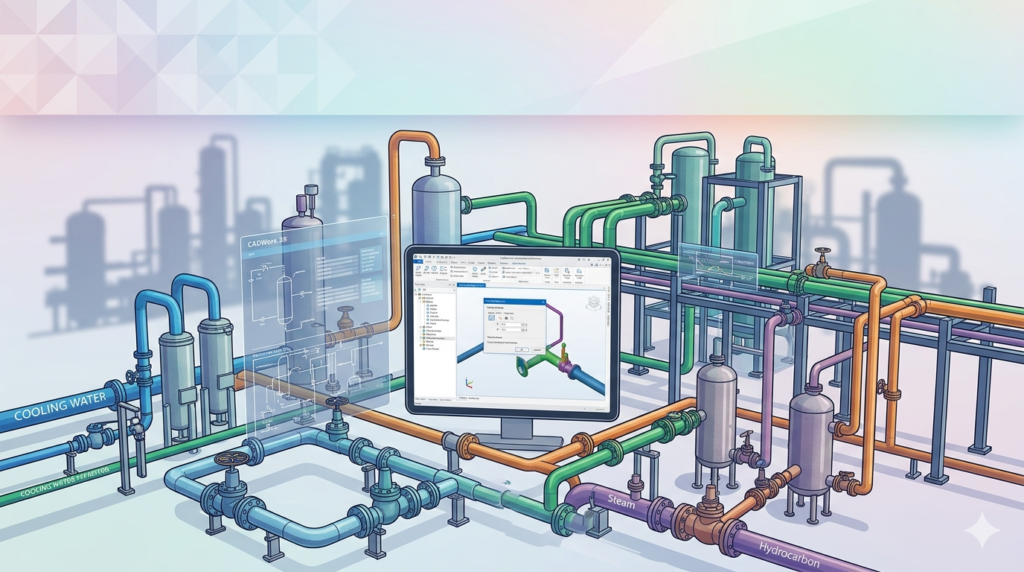
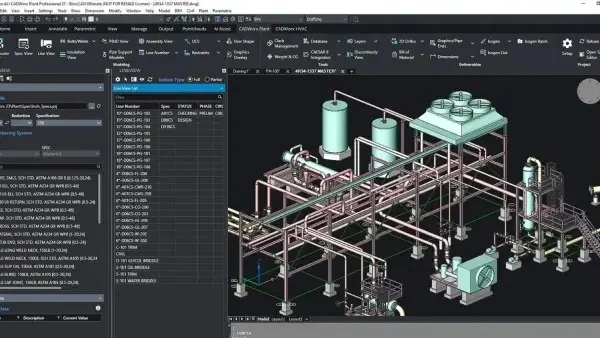
CADWorx 24 is a leading plant design software solution developed by Hexagon PPM. It enables engineers and designers to create intelligent 3D models for industrial facilities, including piping systems, equipment, and support structures. Unlike generic CAD tools, CADWorx uses specification-driven technology to ensure every component meets industry standards.
This piping engineering software operates seamlessly within AutoCAD and BricsCAD, offering a familiar environment for drafters. As a result, teams can transition from 2D schematics to 3D plant design without extensive retraining. The software supports ASME, ANSI, and DIN standards, making it suitable for global projects. For professionals seeking an alternative to AVEVA or SmartPlant, CADWorx 24 delivers a flexible, cost-effective solution for industrial infrastructure modeling.
Key Features
CADWorx 24 provides a robust toolset for mechanical and piping engineers. Below are the core components that improve workflow efficiency.
Specification-Driven Design
-
Auto-routing: Pipes automatically connect to equipment using predefined specs.
-
Component validation: The system prevents mismatched flanges or incorrect bolt lengths.
-
Material control: Automatic generation of bill of materials (BOM) reduces manual errors.
Integrated Analysis Tools
-
CADWorx Analysis: Built-in stress analysis for high-temperature or high-pressure lines.
-
Nozzle loading checks: Verifies that pipe connections do not exceed equipment tolerances.
-
Wind and seismic load calculators: Essential for outdoor refinery and power plant projects.
ISOGEN & Orthographic Outputs
-
Automated isometrics: Extract ISO drawings directly from the 3D model.
-
Customizable spool drawings: Generate fabrication-ready spools with weld counts.
-
Clash detection: Identify interferences between pipes, structures, and cable trays.
Collaboration & Data Exchange
-
Open interoperability: Import/export PNG, STEP, IGES, and DWG formats.
-
Point cloud integration: Scan existing facilities to build accurate retrofit models.
-
BIM compatibility: Export data to Revit or Navisworks for multidisciplinary reviews.
What’s New in the Latest Version
The 2024 release focuses on automation and usability. Here are the major updates.
-
Enhanced Spec Editor: A new filter system allows engineers to locate bolting or gasket types 50% faster.
-
Smart Support Placement: Intelligent algorithms now suggest strut and hanger locations based on pipe stress calculations.
-
Cloud-based Review: The new CADWorx Viewer lets stakeholders mark up models in a web browser without a license.
-
Improved Line Numbering: Dynamic tagging automatically updates when you modify a pipe segment.
-
Direct SQL Database Export: Generate piping material takeoffs directly into Microsoft SQL Server for procurement teams.
System Requirements
Before installing CADWorx 24, verify that your workstation meets these specifications.
| Component | Minimum Requirement | Recommended |
|---|---|---|
| Operating System | Windows 10 (64-bit) | Windows 11 Pro |
| Processor | Intel Core i5 (2.5 GHz) | Intel Xeon or i7 (3.0 GHz+) |
| RAM | 16 GB | 32 GB (64 GB for large refineries) |
| GPU | 2 GB VRAM (OpenGL 4.5) | NVIDIA Quadro RTX 4000 |
| Disk Space | 30 GB SSD | 1 TB NVMe SSD |
| CAD Platform | AutoCAD 2022 or BricsCAD V22 | AutoCAD 2024 or BricsCAD Pro V24 |
Note: For point cloud processing, a dedicated NVIDIA RTX GPU is strongly advised.
Installation Guide
Follow these steps for a standard network or standalone installation.
Pre-installation Checklist
-
Disable antivirus temporarily (false positives occur with license managers).
-
Ensure .NET Framework 4.8 is installed.
-
Close all running instances of AutoCAD or BricsCAD.
Step-by-Step Setup
-
Run
Setup.exefrom the official Hexagon PPM installation package. -
Select “Plant Design Suite” as the installation type.
-
Choose your host CAD platform (AutoCAD or BricsCAD).
-
Enter your company’s license server IP or activate a trial license via Hexagon’s portal.
-
Complete the wizard and restart your workstation.
Post-installation Validation
-
Launch AutoCAD and verify the CADWorx ribbon tab appears.
-
Open the Specification Viewer to confirm database paths.
How to Use the Software
This section provides a practical workflow for building a small chemical skid.
Setting Up a New Project
-
Navigate to Project Manager > New Project.
-
Define the working directory and project name (e.g., “Chemical_Skid_01”).
-
Assign the primary piping spec (e.g., ANSI B16.5 Class 150).
Modeling a Pipe Run
-
Insert an equipment nozzle using the Equipment ribbon.
-
Select the Line Number and route a pipe from the nozzle to a pump.
-
Use the Auto-Route function to avoid structural beams.
-
Add fittings (elbows, tees, reducers) manually if auto-routing fails.
Generating Drawings
-
Switch to an orthographic view (Top/Front/Side).
-
Click Drawings > Ortho to extract a 2D view.
-
Use the ISOGEN menu to create a single-line isometric for fabrication.
Best Use Cases
CADWorx 24 excels in specific industrial scenarios.
-
Oil & Gas Refineries: Model complex pipe racks with multiple layers and insulation.
-
Pharmaceutical Plants: Use stainless steel specs and sanitary clamp fittings.
-
Power Generation: Model high-energy steam lines requiring stress analysis.
-
Mining Infrastructure: Design slurry pipelines with wear-resistant liners.
-
Retrofit Projects: Overlay new design onto laser-scanned point clouds of old factories.
Advantages and Limitations
Advantages
-
Cost-effective: Lower licensing fees compared to AVEVA E3D or Intergraph Smart 3D.
-
Fast learning curve: AutoCAD users become productive in under two weeks.
-
Flexible CAD hosts: Operates on both AutoCAD and BricsCAD.
-
Strong support community: Active forums and Hexagon’s knowledge base.
Limitations
-
Database size: Projects exceeding 10,000 components can slow down regeneration.
-
AutoCAD dependency: The Windows-only environment excludes macOS users.
-
Advanced steel modeling: Lacks the structural detailing depth of Tekla or Revit.
-
Cloud collaboration: Requires third-party tools (like SharePoint) for real-time sync.
Alternatives to the Software
If CADWorx 24 does not fit your budget or workflow, consider these plant design software alternatives.
| Software | Best For | Key Difference |
|---|---|---|
| AutoCAD Plant 3D | Small firms using Autodesk suites | Tighter integration with Revit but weaker stress analysis. |
| AVEVA E3D | Mega-refineries and offshore platforms | Superior database handling for teams of 50+ users. |
| SolidWorks Piping | Manufacturing skid designers | Better for small skids (under 200 components) but poor for long pipe runs. |
| BricsCAD BIM | Budget-conscious startups | No subscription fees, but limited piping spec libraries. |
| SmartPlant 3D | Owner-operators (Shell, Exxon) | Extremely powerful but requires dedicated IT administration. |
Frequently Asked Questions
1. What is the difference between CADWorx and AutoCAD Plant 3D?
CADWorx offers built-in stress analysis (CAESAR II integration) and supports BricsCAD. AutoCAD Plant 3D requires a separate Robot Structural Analysis license for similar checks.
2. Can CADWorx 24 open older version files (v2020 or v2022)?
Yes. The 2024 version includes a migration tool that converts legacy projects. However, you cannot save back to older versions once upgraded.
3. Does CADWorx require an Internet connection to work?
No. The local license server or standalone node-locked license allows offline operation. Cloud collaboration tools (like the viewer) do require connectivity.
4. Is training available for piping design beginners?
Hexagon offers a 5-day CADWorx Fundamentals course. Additionally, YouTube channels like “Piping Engineering World” provide free tutorials.
5. What file formats can I export for 3D printing?
Export your model as STL or 3MF via the “Export Mesh” command. For CNC fabrication, use STEP AP242 or DXF.
6. How does the software handle large point clouds?
CADWorx 24 uses LOD (Level of Detail) culling. It renders only visible portions of a laser scan, keeping frame rates stable on standard workstations.
7. Can I use CADWorx for HVAC or plumbing design?
Technically yes, but it is not optimized for ductwork. For HVAC, consider Revit or CADduct instead.
8. What are the legal ways to extend the trial period?
You can request a one-time 30-day extension from your Hexagon reseller. No other legal extensions exist.
Final Thoughts
CADWorx 24 remains a dominant force in industrial piping engineering for mid-to-large scale projects. Its specification-driven workflow reduces rework, while the new 2024 automation tools cut modeling time by roughly 30%.
For teams already using AutoCAD, the learning investment is minimal. However, if you manage offshore platforms with 50+ concurrent users, AVEVA E3D might justify its higher cost. Conversely, small fabrication shops should evaluate BricsCAD to avoid subscription fees.
To maximize your ROI, attend Hexagon’s free webinars on clash detection and spool generation. Always obtain a valid commercial license or trial directly from an authorized Hexagon partner. This ensures you receive critical security updates and technical support for your plant design software investment.
Our Paid Service
“We do not sell or provide any software. We only offer professional support services. If any software on your system is not working properly, or you are facing installation errors, crashes, or any other technical issue — just contact us. We will help you fix the problem quickly and remotely via AnyDesk. No software will be provided from our side — only expert troubleshooting and support.”