
Overview of G-Presenter
Table of Contents
G-Presenter is an open-source presentation tool developed primarily for Christian worship services. Version 1.1.44 represents a stable release that prioritizes reliability over flashy transitions.
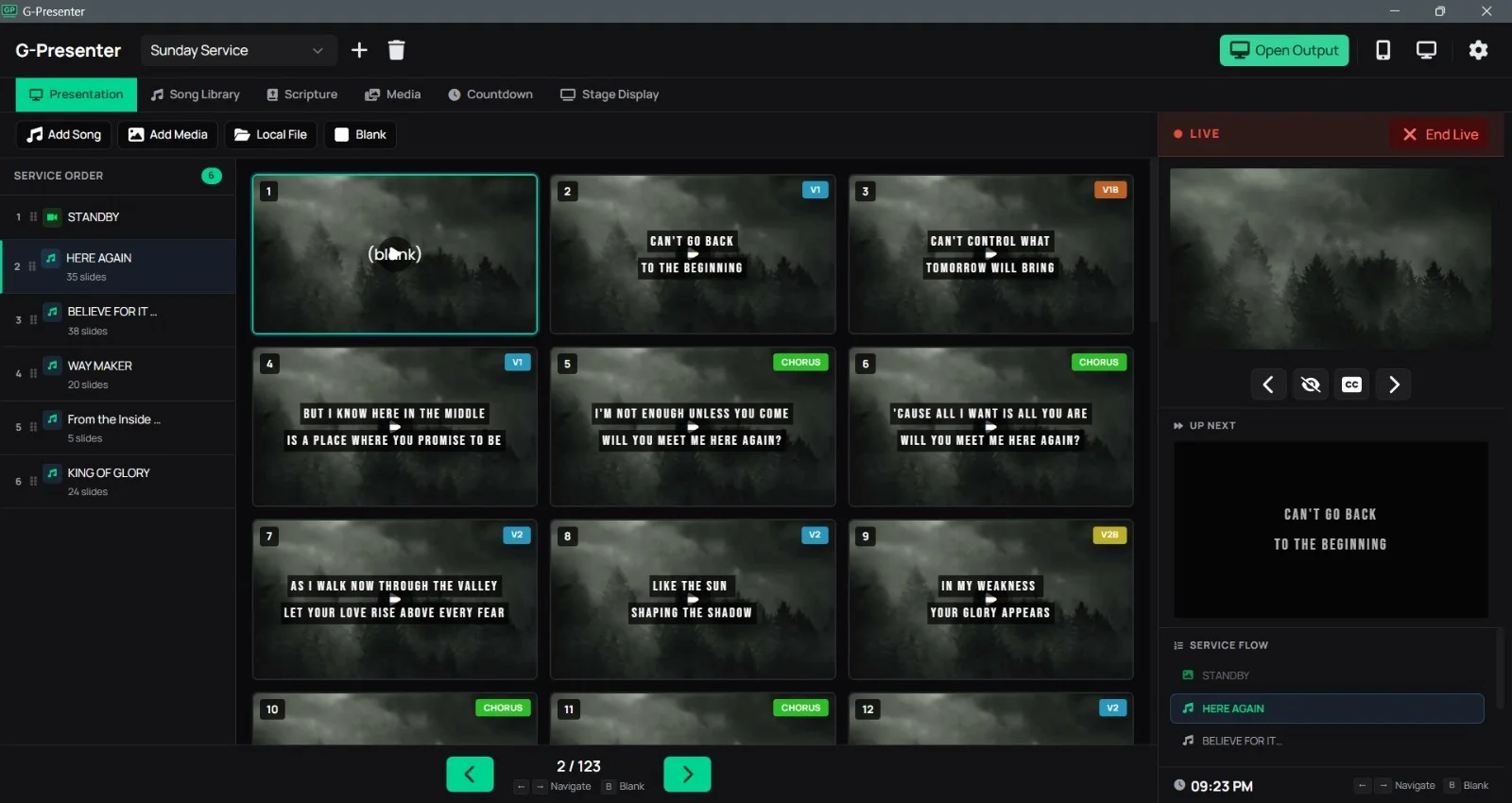
The software operates on a simple principle: you create a playlist of songs, scriptures, or image slides, then output them to a secondary screen (projector or TV) while controlling them from a primary monitor. It supports multi-monitor setups, live text editing, and background images for lyrics.
Because it is free and runs on modest Windows hardware, G-Presenter 1.1.44 has gained popularity in rural churches, home fellowships, and volunteer-led organizations where budgets and technical expertise are limited.
Key Features
G-Presenter 1.1.44 includes the following core functionalities:
-
Dual-screen output – Presenter view on one monitor; full-screen slides on another.
-
Live lyrics editing – Correct typos or adjust line breaks during a service without interrupting the display.
-
Background image support – Assign unique backgrounds per song or use a global theme.
-
Scripture integration – Paste Bible verses; the software does not auto-import Bibles but allows manual entry.
-
Playlist management – Drag and drop to reorder songs, slides, or blank screens.
-
Timed transitions – Set automatic slide advancement (useful for countdowns or scrolling text).
-
No internet required – Fully offline after installation.
NLP Entity Note: Worship presentation software, lyrics projection, dual-screen display, Windows desktop application, open-source.
What’s New in Version 1.1.44
Compared to earlier builds (1.1.40 and below), G-Presenter 1.1.44 introduces:
-
Improved slide rendering – Fewer visual glitches when switching between songs with different backgrounds.
-
Stability fix for Windows 10/11 – Resolved a crash that occurred when minimizing the presenter window.
-
Simplified file management – The software now remembers your last used folder for importing images.
-
Removed deprecated codec dependencies – No longer requires legacy DirectShow filters for JPEG display.
Note: No new “advanced” features (video backgrounds, chroma key, or remote control) were added. The developers deliberately kept version 1.1.44 lean.
System Requirements
Before installing G-Presenter 1.1.44, verify that your hardware meets these specifications:
| Component | Minimum Requirement |
|---|---|
| OS | Windows 7, 8, 10, or 11 (32-bit or 64-bit) |
| CPU | 1.0 GHz or faster |
| RAM | 512 MB (1 GB recommended) |
| Storage | 50 MB free space |
| Graphics | Any GPU supporting DirectX 9 or later |
| Display Output | At least two video outputs for secondary screen (VGA, HDMI, DVI) |
Compatibility: G-Presenter does not run on macOS, Linux, Android, or iOS. It is a Windows-only application.
Installation Guide (Legitimate Method Only)
Follow these steps to safely obtain and install G-Presenter 1.1.44 from official sources:
-
Download from the official repository
Visit the verified SourceForge or GitHub page for G-Presenter. Avoid third-party “crack” or “portable” sites—they are unnecessary because the software is already free. -
Run the installer
Right-click the downloaded.exefile and select “Run as administrator” to ensure proper registry entries. -
Accept the default settings
The installer will suggestC:\Program Files\G-Presenter. Leave this unchanged unless you have specific storage constraints. -
Complete installation
Click “Finish” and launch the software from your Start menu.
How to Use G-Presenter 1.1.44
This section provides a practical workflow for first-time users.
1. Configure dual monitors
-
Connect your projector or secondary screen.
-
Press
Windows + Pand select “Extend.” -
In G-Presenter, go to Settings → Display and choose your secondary monitor.
2. Create a new song
-
Click “Add” → “New Song.”
-
Type or paste the lyrics.
-
Use
[V1],[C],[V2]tags if you want automatic slide breaks.
3. Add a background
-
Select a song.
-
Click “Background” → “Load Image” (JPG or PNG).
-
The image will appear behind lyrics on the output screen.
4. Build a service playlist
-
Add songs, scripture slides, and blank black screens (for prayer moments).
-
Reorder by dragging items up or down.
5. Go live
-
Click “Start Presentation.”
-
Use the number keys (1,2,3…) to jump between slides.
-
Press
Spacebarto advance to the next slide.
Best Use Cases
G-Presenter 1.1.44 excels in specific environments:
-
Small church services (under 100 attendees) – Easy to train volunteers with no technical background.
-
Midweek Bible studies – No need to set up complex software for a one-hour meeting.
-
School chapels or assemblies – Quickly display song lyrics without distracting animations.
-
Home worship groups – Runs on an old laptop connected to a TV.
-
Backup presentation system – Keep a portable copy on a USB drive as a fallback for ProPresenter or EasyWorship.
Advantages and Limitations
Advantages
-
Completely free with no feature paywalls.
-
Extremely low system resource usage.
-
No registration, account, or internet connection required.
-
Live editing during presentation is seamless.
-
Portable mode possible (copy the folder to a USB drive).
Limitations
-
No video playback or embedded YouTube support.
-
Cannot import PowerPoint (.pptx) or PDF files.
-
No remote control via smartphone app.
-
No built-in Bible translation (you must paste verses manually).
-
User interface looks dated (Windows XP-era design).
-
No Mac or Linux version.
Alternatives to G-Presenter
If G-Presenter 1.1.44 lacks a feature you need, consider these legitimate alternatives:
| Software | Platform | Price | Best for |
|---|---|---|---|
| OpenLP | Windows, Mac, Linux | Free | Full-featured open-source worship software with Bible import |
| Quelea | Windows, Mac, Linux | Free | Video backgrounds and real-time lyrics |
| ProPresenter | Windows, Mac | Paid ($399+) | Professional large-church production |
| EasyWorship | Windows | Paid (starts at $199) | User-friendly interface with media libraries |
| LibreOffice Impress | Cross-platform | Free | General presentations (not designed for lyrics) |
Recommendation: For most users who need only basic lyrics and scriptures, G-Presenter is sufficient. If you require video backgrounds, remote control, or automatic Bible formatting, switch to OpenLP.
Frequently Asked Questions
1. Is G-Presenter 1.1.44 really free?
Yes. It is freeware released under an open-source license. You do not need a crack, keygen, or license key. Download only from official sources to avoid malware.
2. Can I use G-Presenter on a Mac?
No. G-Presenter is a Windows-only application. For macOS, use OpenLP or Quelea instead.
3. Does G-Presenter support video backgrounds?
No. Version 1.1.44 does not play video files. It displays static images (JPG, PNG, BMP) behind text slides.
4. How do I fix G-Presenter not showing on my second screen?
-
Verify your display is set to “Extend” (not “Duplicate”).
-
In G-Presenter → Settings → Display, select the correct monitor.
-
Restart the software after changing display settings.
5. Can I import PowerPoint slides into G-Presenter?
No. You must save each PowerPoint slide as an image (JPG/PNG) and import those images individually.
6. Is G-Presenter still actively developed?
The last stable release (1.1.44) was published in 2019. Minor community patches exist, but major development has slowed. It remains functional on Windows 11.
7. Does G-Presenter include a Bible?
No. You must copy Bible verses from a website or text file and paste them as scripture slides.
8. Can volunteers learn G-Presenter in under 10 minutes?
Yes. Its simplicity is its main advantage. Most users can run a full service after a brief 5-minute orientation.
Final Thoughts
G-Presenter 1.1.44 is not for everyone—but it does not need to be. It solves a specific problem: displaying song lyrics and scriptures reliably on a budget of zero dollars.
If you manage a small church, a school event, or a community gathering, this software removes technical friction. There are no subscriptions, no watermarks, and no feature caps. The trade-off is a dated interface and no video support.
For teams needing advanced capabilities (remote control, video backgrounds, integrated Bibles), invest in OpenLP or Quelea. But for straightforward worship presentation software that just works on old Windows PCs, G-Presenter 1.1.44 remains a surprisingly capable choice.
Our Paid Service
“We do not sell or provide any software. We only offer professional support services. If any software on your system is not working properly, or you are facing installation errors, crashes, or any other technical issue — just contact us. We will help you fix the problem quickly and remotely via AnyDesk. No software will be provided from our side — only expert troubleshooting and support.”