

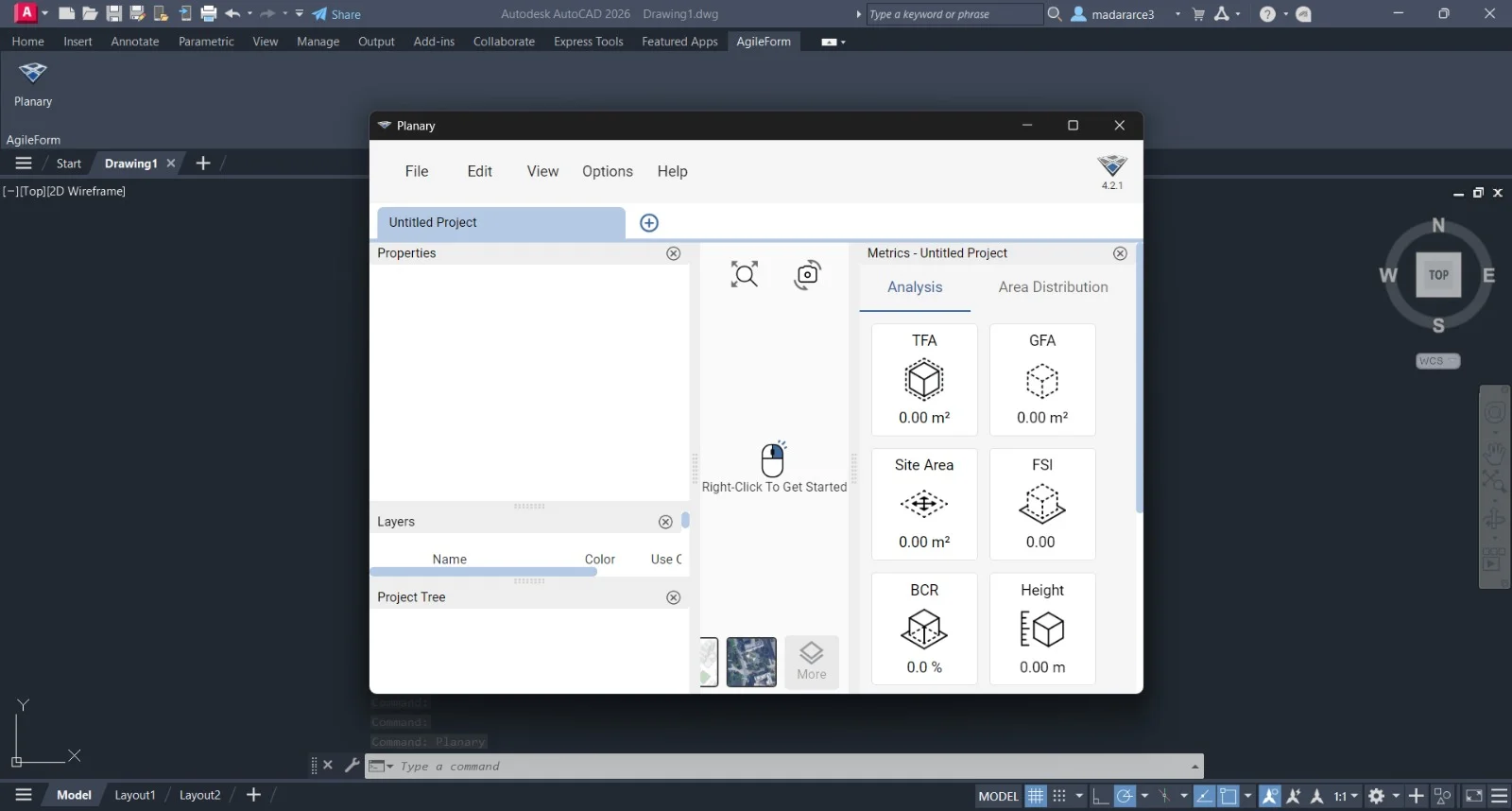
Overview of Agile Form Planary for AutoCAD
Table of Contents
Agile Form Planary for Autodesk® AutoCAD® 5.0.6 is a specialized plugin designed to enhance form-based design, plan layouts, and geometric calculations directly within the AutoCAD environment. This tool bridges the gap between conceptual planning and detailed drafting, allowing architects, urban planners, and civil engineers to generate parametric forms and plan diagrams faster than native AutoCAD tools permit.
As a lightweight yet powerful extension, Agile Form Planary 5.0.6 automates repetitive tasks such as form zoning, area labeling, and shape optimization. By operating entirely inside AutoCAD’s trusted interface, it preserves native file formats (DWG) while adding a layer of intelligent automation for early-stage design and feasibility studies.
Key Features of Agile Form Planary 5.0.6
This version focuses on parametric control and interoperability. Below are the core features:
-
Parametric Form Generation – Create dynamic shapes (rectangles, polygons, curved forms) linked to real-time dimension controls.
-
Automated Plan Zoning – Divide large floor plans or site layouts into functional zones with automatic area calculation.
-
Planary Layout Tools – Generate repeating plan modules (e.g., office units, residential lots) using array-like logic with variable spacing.
-
DWG Native Integration – No file conversion needed; works directly with standard .dwg files.
-
Customizable Form Libraries – Save and reuse your own shape templates across multiple projects.
-
Batch Area Reporting – Extract area data from multiple forms into an editable table inside AutoCAD or export to CSV.
-
Layer Management – Automatically assign generated forms to predefined layers with color coding.
Advanced Design Automation
Unlike basic block insertion, Agile Form Planary 5.0.6 uses constraint-based editing. Changing one dimension updates all related forms and their labels instantly – saving hours of manual revision.
What’s New in Agile Form Planary 5.0.6
The latest release introduces several workflow improvements:
-
Performance optimization – Up to 40% faster regeneration of complex planary layouts.
-
Updated UI panel – Rearranged toolbars for quicker access to form settings.
-
Enhanced snapping – Better alignment with AutoCAD’s object snap (OSNAP) for precise placement.
-
Multi-language support – English, Spanish, German, and Simplified Chinese.
-
Bug fixes – Resolved a memory leak when generating more than 500 form instances in one session.
System Requirements
Ensure your system meets these specifications before installation:
| Component | Minimum Requirement | Recommended |
|---|---|---|
| Operating System | Windows 10 (64-bit) | Windows 11 Pro |
| AutoCAD Version | 2021, 2022, 2023, 2024, or 2025 | AutoCAD 2025 |
| CPU | 2.5 GHz dual-core | 3.0 GHz+ quad-core |
| RAM | 8 GB | 16 GB or more |
| GPU | 1 GB VRAM, DirectX 11 compliant | 4 GB VRAM |
| Disk Space | 500 MB for plugin files | 1 GB (for templates) |
| Display | 1920 x 1080 resolution | 1920 x 1080 or higher |
Installation Guide for Agile Form Planary 5.0.6
Follow these steps to install the plugin safely and legally.
Step-by-Step Installation
-
Purchase or download the official plugin from Autodesk App Store or the developer’s website.
-
Close all running AutoCAD instances before installation.
-
Run the installer (AgileFormPlanary_5.0.6.exe) as administrator.
-
Accept the license agreement – Read the terms carefully.
-
Select your AutoCAD version(s) if multiple are installed.
-
Complete installation – The installer will add a new toolbar named “Agile Planary”.
-
Launch AutoCAD – You may see a security warning; click “Always Load” for trusted publisher.
-
Verify installation – Type
APLANARYin the command line to open the main panel.
Troubleshooting Tips
-
If the toolbar does not appear, type
NETLOADand manually select the .dll file fromC:\Program Files\AgileForm\. -
For permission errors, ensure AutoCAD is not running in a sandboxed environment.
How to Use Agile Form Planary for AutoCAD
Creating Your First Parametric Form
-
Open AutoCAD and load a new or existing .dwg file.
-
Type
APLANARYto launch the plugin panel. -
Select Form Type (e.g., “Residential Zone” or “Mixed-Use Block”).
-
Click in the drawing area to place the form.
-
Use the Properties Palette to adjust width, depth, and rotation.
-
The area label updates automatically.
Generating a Planary Layout
-
Draw a boundary polyline for your site.
-
Click Planary Grid > Fill Boundary.
-
Choose a module shape (e.g., 10m x 20m rectangle).
-
Set spacing and offset values.
-
Click Generate – the plugin fills the boundary while respecting edge gaps.
Exporting Form Data
-
Right-click any generated form > Export Area Table.
-
Choose CSV or paste directly into an AutoCAD table.
Best Use Cases for Agile Form Planary 5.0.6
This plugin excels in four primary scenarios:
-
Mixed-Use Site Planning – Quickly test different building footprints on a master plan.
-
Subdivision Layouts – Generate hundreds of residential lots with varying widths.
-
Early Concept Design – Explore massing options without manual redrawing.
-
Area Compliance Checks – Automatically flag forms that exceed local zoning area limits.
Real-World Example
A civil engineering firm used Agile Form Planary to redesign a 20-acre commercial campus. They generated 14 layout alternatives in 2 hours – a task previously requiring 2 days using native AutoCAD commands.
Advantages and Limitations
Advantages
-
Saves time – Automates repetitive form creation and labeling.
-
Reduces errors – Parametric constraints prevent manual miscalculations.
-
No file conversion – Works natively with .dwg, preserving all AutoCAD data.
-
Affordable – Lower cost than full BIM software for early-stage form planning.
Limitations
-
AutoCAD dependency – Does not function as a standalone tool.
-
Learning curve – Users new to parametric design may need 1–2 hours of practice.
-
No 3D extrusion – Focuses on 2D plan views only (no automatic 3D massing).
-
Large layouts – Performance may slow with >2,000 forms on older hardware.
Alternatives to Agile Form Planary
If this plugin does not fit your workflow, consider these alternatives:
| Software | Primary Use | AutoCAD Integration | Price Model |
|---|---|---|---|
| Dynamo for AutoCAD | Visual programming for geometry | Native (free) | Free (with AutoCAD) |
| SpaceMaker | Automated urban block generation | Exports .dwg only | Subscription |
| Lumion Pro | 3D visualization | Import .dwg only | Subscription |
| Manual AutoCAD Blocks + Fields | Basic form repetition | Native | Included |
When to Choose Agile Form Planary
Select Agile Form Planary over Dynamo if you prefer a ready-to-use toolbar instead of writing node-based scripts. Choose it over SpaceMaker if your work stays entirely within 2D planning.
Frequently Asked Questions (FAQ)
1. Is Agile Form Planary 5.0.6 compatible with AutoCAD LT?
No. The plugin requires full AutoCAD (not LT) because it uses .NET APIs that are disabled in LT versions.
2. Can I try Agile Form Planary before purchasing?
Yes. The developer offers a 15-day fully functional trial via the Autodesk App Store. No credit card is required for the trial.
3. Does this plugin work with other CAD software like BricsCAD or ZWCAD?
Officially it is designed only for Autodesk AutoCAD. Some users have reported partial functionality in BricsCAD, but technical support is not provided.
4. How do I update from an older version (e.g., 4.x) to 5.0.6?
Uninstall the previous version via Windows Control Panel, then install version 5.0.6. Your custom form libraries remain intact if stored outside the plugin’s install folder.
5. What file formats can I export area data to?
CSV (comma-separated values), TXT, and direct insertion into an AutoCAD table entity.
6. Does Agile Form Planary support dynamic blocks?
Partially. You can insert dynamic blocks as form backgrounds, but the plugin’s parametric logic overrides block properties. For full dynamic block control, use native AutoCAD tools.
7. Is there a network license for teams?
Yes. Contact the vendor for floating network license pricing for 5+ users.
8. Can I use this for landscape architecture (irregular shapes)?
Yes. While optimized for rectilinear forms, version 5.0.6 includes a “Spline Boundary Fill” tool for organic shapes like planting zones.
Final Thoughts
Agile Form Planary 5.0.6 is a practical, time-saving plugin for professionals who repeatedly generate and modify plan-based forms inside AutoCAD. It does not aim to replace full BIM software but excels as a focused tool for early-stage zoning, site planning, and parametric layout exploration.
For architects preparing feasibility studies, civil engineers subdividing land, or urban designers testing block configurations, this plugin delivers measurable efficiency gains. The latest version’s performance improvements and expanded language support make it a worthwhile consideration for any AutoCAD-based planning workflow.
Our Paid Service
“We do not sell or provide any software. We only offer professional support services. If any software on your system is not working properly, or you are facing installation errors, crashes, or any other technical issue — just contact us. We will help you fix the problem quickly and remotely via AnyDesk. No software will be provided from our side — only expert troubleshooting and support.”