

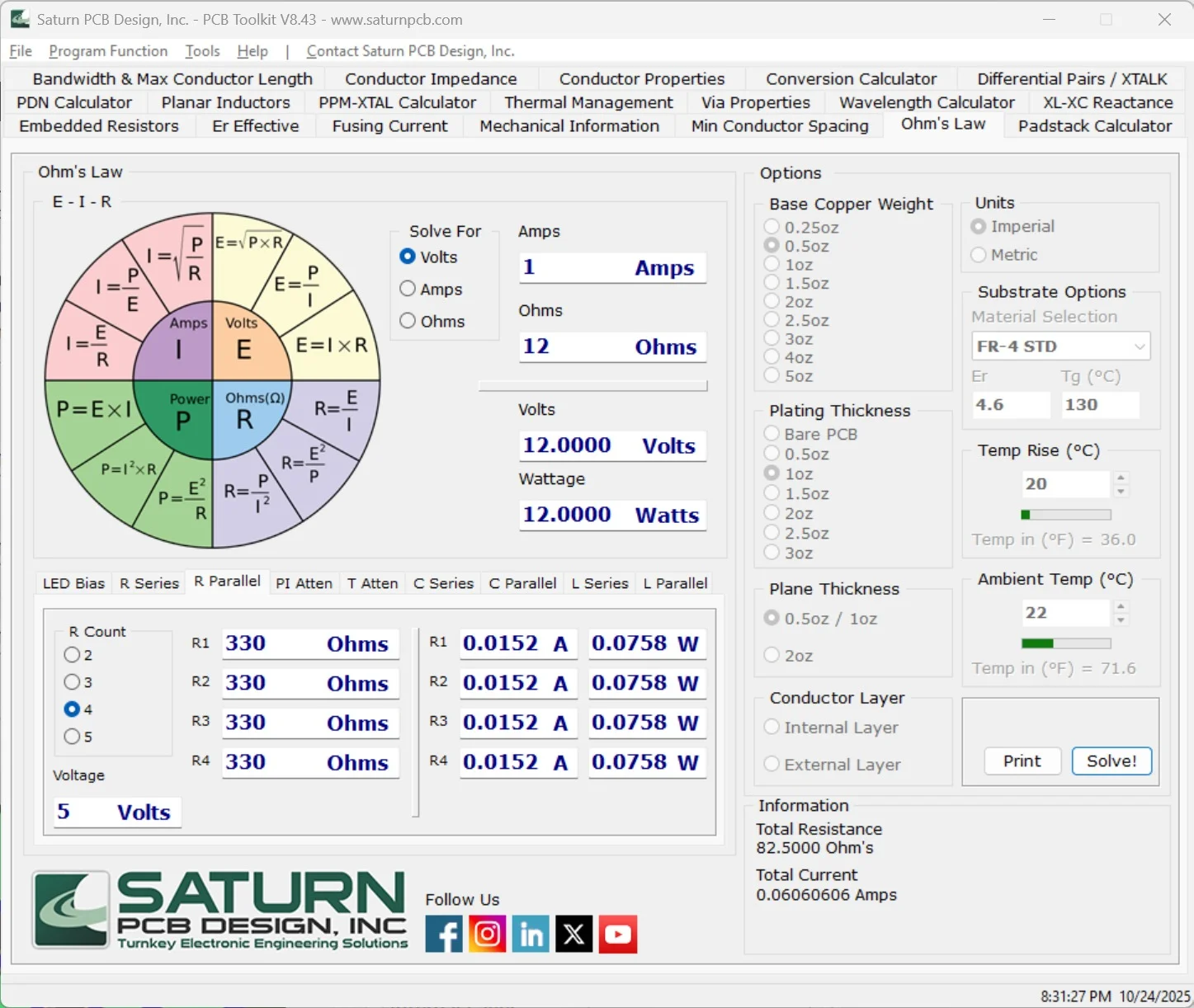
Saturn PCB Toolkit V8.02 is a free, industry-respected Windows-based utility that replaces dozens of manual calculations and scattered Excel sheets with a single, validated design tool. This article provides a complete, legally compliant guide to using V8.02 for high-quality PCB layout and analysis.
Overview of Saturn PCB Toolkit
Table of Contents
Saturn PCB Toolkit is a specialized software utility developed by Saturn PCB Design, Inc. Unlike full-fledged EDA (Electronic Design Automation) suites like Altium or KiCad, this toolkit focuses exclusively on the analytical and calculation layer of board design. Version 8.02 represents a mature iteration known for its stability, accuracy, and compliance with IPC-2152 (the standard for determining current-carrying capacity).
The toolkit integrates over 15 distinct calculators, covering everything from thermal dissipation and via properties to differential pair impedance and PCB conductor resistance. Its primary value lies in reducing design risk by providing validated, worst-case analysis before manufacturing.
Key Features of Saturn PCB Toolkit V8.02
This version is structured into modular tabs, each serving a specific engineering need:
-
Conductor Width & Current Calculator: Determines optimal internal or external trace width based on current, temperature rise, and copper weight.
-
Via Properties: Calculates current capacity, temperature rise, and voltage drop for plated through-hole vias.
-
Impedance Calculators: Supports microstrip, stripline, coplanar waveguide, and differential pair geometries.
-
Voltage Drop: Computes loss over length for power distribution networks (PDN).
-
PCB Conductor Resistance: Calculates resistance per unit length for any trace geometry.
-
Spacing & Creepage: Assists with high-voltage safety compliance (IPC-2221).
-
PCB Temperature Rise: Estimates board surface temperature given power dissipation.
-
Unit Conversions: Quick conversions between metric and imperial units (mm/mils/ounces).
What’s New in Saturn PCB Toolkit V8.02
While Saturn PCB Toolkit does not follow an aggressive release schedule, V8.02 brought several refinements over earlier versions (V7.x):
-
Improved IPC-2152 Implementation: More accurate derating for internal layers and via arrays.
-
Enhanced Differential Pair Calculator: Better support for edge-coupled surface microstrips.
-
User Interface Scaling: Better rendering on high-DPI monitors (1920×1080 and above).
-
Bug Fixes: Resolved rare rounding errors in the resistance calculator.
-
Preset Library Updates: Additional common substrate materials (e.g., Isola, Rogers) preloaded.
System Requirements for Saturn PCB Toolkit V8.02
Saturn PCB Toolkit is lightweight and runs on virtually any modern Windows system.
| Component | Requirement |
|---|---|
| Operating System | Windows 7, 8, 10, or 11 (32-bit and 64-bit) |
| Processor | 1 GHz or faster |
| RAM | 512 MB minimum (2 GB recommended) |
| Storage | 50 MB free space |
| Additional Software | .NET Framework 4.7.2 or later (installed automatically if missing) |
Note: The toolkit does not require an internet connection after installation, making it suitable for secure or air-gapped engineering environments.
Installation Guide for Saturn PCB Toolkit V8.02
Follow these steps for a clean, safe installation.
-
Download the installer: Visit the official Saturn PCB Design, Inc. website. Avoid third-party download sites.
-
Verify the executable: Ensure the downloaded file is named similarly to
Saturn_PCB_Toolkit_V8.02_Setup.exe. Check the digital signature if possible. -
Run as administrator: Right-click the installer and select “Run as administrator” to avoid permission issues.
-
Accept security prompts: Windows SmartScreen may appear; proceed only if you trust the verified publisher.
-
Choose installation path: The default
C:\Program Files (x86)\Saturn PCB Toolkitis recommended. -
Complete installation: Click “Finish” when complete. No license key or activation is required – the software is genuinely freeware.
How to Use Saturn PCB Toolkit V8.02
Mastering this tool requires understanding its workflow. Here is a practical guide for common tasks.
Calculating Trace Width for a Power Rail
-
Launch the toolkit and select the Conductor Width tab.
-
Input your Current (e.g., 2.5 Amps).
-
Set Temperature Rise (standard is 10°C above ambient).
-
Define Copper Weight (1 oz/ft² is common for external layers).
-
Select External (air-cooled) or Internal (embedded) layer.
-
Click Calculate. The tool outputs required trace width in mils and millimeters.
Designing a 50-Ohm Microstrip
-
Navigate to the Impedance tab.
-
Choose Microstrip as the structure.
-
Enter Dielectric Height (core thickness, e.g., 0.2 mm).
-
Enter Dielectric Constant (Er value, e.g., 4.5 for FR-4).
-
Set Trace Thickness (derived from copper weight).
-
Click Calculate. The tool returns the required trace width for 50Ω impedance.
Best Use Cases for Saturn PCB Toolkit V8.02
This software excels in specific engineering scenarios:
-
Power Electronics Design: Sizing traces for high-current DC-DC converters.
-
Signal Integrity Analysis: Pre-layout impedance matching for USB, HDMI, or Ethernet.
-
Thermal Management: Estimating temperature rise before thermal simulation.
-
Design Rule Checking (DRC) Setup: Generating accurate constraints for EDA tools.
-
Educational Labs: Teaching fundamental PCB electrical concepts without EDA complexity.
-
Quick Feasibility Studies: Determining if a board layout is physically possible given current and space constraints.
Advantages and Limitations
Advantages
-
Free and legitimate – no license, subscription, or piracy required.
-
Validated against IPC standards (IPC-2152, IPC-2221).
-
Saves hours of manual spreadsheet errors.
-
Lightweight – runs on older Windows machines.
-
Regularly updated (though V8.02 remains stable for years).
Limitations
-
Windows-only – no native macOS or Linux version.
-
No API or scripting – cannot batch-process hundreds of designs.
-
No 3D visualization – strictly numerical output.
-
Interface is utilitarian – lacks modern UI polish.
-
Not a layout tool – it does not draw schematics or board shapes.
Alternatives to Saturn PCB Toolkit V8.02
Depending on your needs, consider these legitimate alternatives.
| Software | Platform | Pricing | Best For |
|---|---|---|---|
| Saturn PCB Toolkit | Windows | Free | General PCB calculations |
| KiCad PCB Calculator | Win/Mac/Linux | Free | Integrated with open-source EDA |
| Advanced Circuits’ PCB Tools | Web browser | Free | Cloud-based trace width and impedance |
| EEWeb PCB Calculators | Web browser | Free | Quick, single-purpose calculations |
| Mentor HyperLynx | Windows | Paid ($$$) | High-end signal integrity simulation |
| Altium PDN Analyzer | Windows | Paid ($$) | Power delivery network simulation |
Recommendation: For 95% of small-to-medium PCB tasks, Saturn PCB Toolkit V8.02 matches or exceeds the free alternatives.
Frequently Asked Questions
Is Saturn PCB Toolkit V8.02 really free?
Yes. Saturn PCB Design, Inc. distributes it as freeware without advertisements, spyware, or hidden fees. No license key or online activation is required.
Can I use Saturn PCB Toolkit on a Mac?
Not natively. However, some engineers report success using Wine or a Windows virtual machine (VMware, Parallels) on Intel-based Macs. Apple Silicon (M1/M2/M3) users will need a full Windows VM via UTM or Parallels.
What is the difference between V8.02 and V7.x?
V8.02 introduces improved IPC-2152 thermal calculations, better high-DPI scaling, and updated material presets. The core calculations remain consistent and reliable.
How accurate are the trace width calculations?
When using correct inputs (copper weight, temperature rise, ambient temperature), the results are within ±5% of physical measurements, fully compliant with IPC-2152 standards.
Does this tool replace my EDA software?
No. Saturn PCB Toolkit is a companion calculator. It does not replace PCB layout tools like Altium, KiCad, or Eagle. It provides the design rules you then apply within your EDA tool.
Is there a portable version available?
No official portable version exists. However, the installer writes minimal registry entries, and you can copy the installation folder to a USB drive for use on other machines, though not officially supported.
Can I export results to my CAD tool?
V8.02 does not have direct integration. You must manually copy the values (e.g., trace width in mils) into your EDA design rules.
Final Thoughts
Saturn PCB Toolkit V8.02 remains an essential, legally safe, and highly authoritative tool for PCB design. Its adherence to IPC standards, combined with a zero-cost entry point, makes it invaluable for hobbyists, students, and professional engineers alike. While the interface lacks modern gloss, the mathematical rigor behind each calculator has been proven in thousands of real-world board designs. For anyone designing reliable, manufacturable PCBs, this toolkit belongs on your engineering workstation.
Our Paid Service
“We do not sell or provide any software. We only offer professional support services. If any software on your system is not working properly, or you are facing installation errors, crashes, or any other technical issue — just contact us. We will help you fix the problem quickly and remotely via AnyDesk. No software will be provided from our side — only expert troubleshooting and support.”