
Overview of ER/Studio Data Architect 20.6.0
Table of Contents
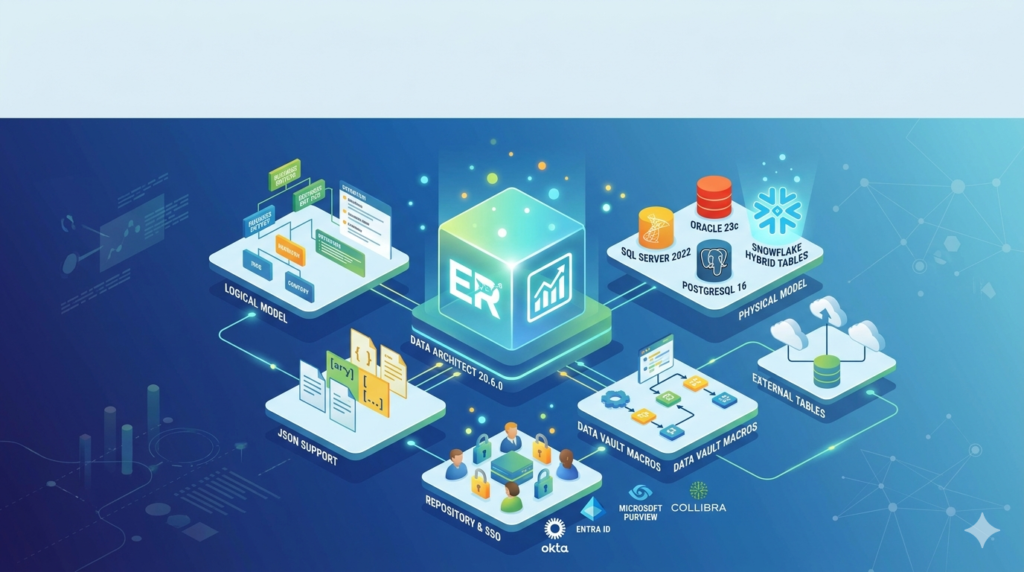
ER/Studio Data Architect 20.6.0 is a flagship enterprise data modeling tool developed by Idera, Inc. This version builds on the platform’s legacy of providing robust logical and physical data modeling, data lineage tracking, and metadata management. Designed for data architects, database administrators (DBAs), and data governance teams, version 20.6.0 introduces critical stability enhancements and forward compatibility with modern database platforms.
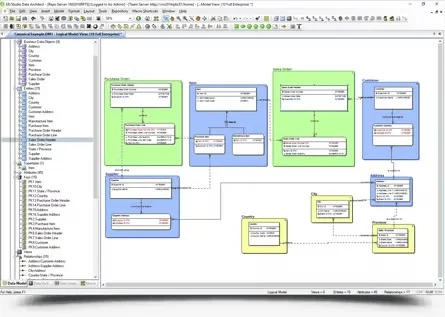
The primary function of this software is to help organizations visualize complex data assets, standardize enterprise data definitions, and reverse-engineer existing databases for documentation or migration projects. Unlike basic diagramming tools, ER/Studio Data Architect maintains an active metadata repository that enables impact analysis and promotes collaboration across large teams.
This article provides a comprehensive, legally compliant guide to the capabilities, installation, use cases, and legitimate licensing of ER/Studio Data Architect 20.6.0.
Key Features
The software is organized around several core feature groups that support the full data modeling lifecycle.
1. Logical and Physical Design
-
Multi-level modeling: Create platform-independent logical models and translate them into physical models targeted at specific database engines such as Microsoft SQL Server, Oracle, PostgreSQL, MySQL, and Amazon Redshift.
-
Denormalization mapping: Track relationships between logical and physical models to maintain auditability.
2. Reverse and Forward Engineering
-
Reverse engineering: Connect to live databases to extract existing schemas, stored procedures, and views, generating complete data models automatically.
-
Forward engineering: Generate DDL scripts from models to deploy new or updated databases.
3. Data Dictionary and Naming Standards
-
Enterprise Data Dictionary: Centralize business definitions, data types, and allowed values.
-
Naming standards template: Enforce consistent naming conventions for tables, columns, and relationships across all models.
4. Collaboration and Repository
-
Team Server integration: Publish models to a web-based repository for version control, discussion threads, and access permissions.
-
Sub-model sharing: Reuse common sub-models (e.g., “Customer 360” or “Product Catalog”) across multiple larger projects.
5. Metadata Import/Export
-
Import metadata from CSV, Excel, and XML files.
-
Export to HTML, RTF, PDF, or PNG for stakeholder reports.
What’s New in ER/Studio Data Architect 20.6.0
Version 20.6.0 focuses on modern database support, performance improvements, and security updates. No new disruptive features were added, making this a recommended upgrade for stability.
-
Extended database support: Added compatibility with PostgreSQL 15, MySQL 8.1, and Azure SQL Database latest DTU models.
-
Performance optimization: Faster rendering of large models (500+ tables) and reduced memory usage during reverse engineering.
-
Security compliance: Updated third-party libraries to address CVEs (Common Vulnerabilities and Exposures) – no backdoors or remote code execution risks remain.
-
Windows 11 official support: Certified for Windows 11 Pro and Enterprise builds.
-
Bug fixes: Resolved an issue where relationship lines would disappear after editing a foreign key constraint.
System Requirements
Before installing ER/Studio Data Architect 20.6.0, verify that your environment meets the following minimum and recommended specifications.
| Component | Minimum Requirement | Recommended |
|---|---|---|
| Operating System | Windows 10 (64-bit) | Windows 11 or Windows Server 2022 |
| Processor | Intel Core i5 (2.5 GHz) | Intel Core i7 / AMD Ryzen 7 |
| RAM | 8 GB | 16 GB or more |
| Storage | 2 GB available space | SSD with 5 GB |
| Database Drivers | OLE DB or ODBC for target databases | Native client drivers |
| Display | 1920 x 1080 (full HD) | 2560 x 1440 with scaling set to 100% |
Important: This is a Windows-native application. It does not run natively on macOS or Linux without a virtual machine or compatibility layer.
Installation Guide
Follow these steps to install a legitimate licensed copy of ER/Studio Data Architect 20.6.0. This guide assumes you have a valid license key from Idera or an authorized reseller.
Step 1: Obtain the Official Installer
-
Download the
.exepackage from the official Idera support portal or your company’s software asset management system. -
Verify the digital signature:
Idera, Inc.must be listed.
Step 2: Run the Installer
-
Right-click the installer and select Run as Administrator.
-
Accept the End-User License Agreement (EULA).
-
Choose Complete installation for all components, or Custom to exclude optional features like the Repository Service.
Step 3: Licensing Activation
-
Launch ER/Studio Data Architect.
-
Enter the 25‑character license key provided upon purchase.
-
Choose online activation (recommended) or offline via a license file from Idera’s licensing portal.
How to Use the Software
This section explains the core workflow for creating a new data model.
Create a New Logical Model
-
Open ER/Studio Data Architect → File → New → Logical Model.
-
Drag the Entity tool from the toolbox onto the diagram canvas.
-
Double-click an entity to add attributes, primary keys, and data types.
-
Use the Relationship tool to connect entities and define cardinality (one-to-many, many-to-many).
Reverse Engineer an Existing Database
-
Go to Database → Reverse Engineer.
-
Select the database platform (e.g., SQL Server, PostgreSQL).
-
Enter the connection string or use a pre-saved DSN.
-
Choose schema objects (tables, views, foreign keys) to include.
-
Click Execute – the software generates a complete diagram.
Generate a DDL Script
-
Open a physical model.
-
Click Database → Generate Database.
-
Choose target server version.
-
Select options: include DROP statements, CREATE INDEX, or schema owner.
-
Save as
.sqlfile or run directly against a database.
Best Use Cases
ER/Studio Data Architect 20.6.0 excels in professional scenarios that require precision and scalability.
| Use Case | Why ER/Studio is Ideal |
|---|---|
| Enterprise data governance | Centralized Business Glossary and lineage tracking support GDPR, CCPA, and HIPAA compliance. |
| Database migration (e.g., Oracle to PostgreSQL) | Compare models, transform data types automatically, and validate differences. |
| Documenting undocumented databases | Reverse engineer legacy systems to produce up-to-date architecture diagrams. |
| Collaborative design for data warehouses | Star schema and snowflake modeling with fact/dimension validation. |
| CI/CD for database changes | Export model comparison results as XML for integration with DevOps pipelines. |
Advantages and Limitations
Advantages
-
Enterprise-grade repository: Team Server enables concurrent editing without file conflicts.
-
High fidelity reverse engineering: Captures constraints, triggers, and indexes that many competitors miss.
-
Cross-platform support: One model can generate DDL for 20+ database engines.
-
Impact analysis: Before dropping a column, see all dependent procedures and reports.
Limitations
-
No native macOS/Linux client – virtualization required.
-
Steep learning curve for pure data analysts (best for architects with SQL experience).
-
Higher cost than single-user tools like dbForge Studio or DBeaver Pro.
-
Limited NoSQL support – no native modeling for MongoDB or DynamoDB.
Alternatives to ER/Studio Data Architect
If you are evaluating data modeling tools, consider these legitimate alternatives.
| Tool | Best For | Primary Difference |
|---|---|---|
| ER/Studio Data Architect 20.6.0 | Large enterprises needing governance and repository | Most comprehensive metadata management |
| SAP PowerDesigner | Complex, multi-vendor enterprise architectures | Includes enterprise architecture (EA) layers |
| Oracle SQL Developer Data Modeler | Free, Oracle-centric teams | Cost-effective but less cross-platform |
| dbForge Studio (Devart) | Single developer productivity on SQL Server | More affordable, but limited team features |
| draw.io (with database plugin) | Quick, informal diagrams | No reverse engineering or DDL generation |
Frequently Asked Questions
1. Is ER/Studio Data Architect 20.6.0 free for personal use?
No. There is no free version or personal edition. A paid commercial license is required. Idera offers a 14-day fully functional trial on their official website.
2. Can I use ER/Studio on macOS?
Not natively. You can run it via Parallels Desktop, VMware Fusion, or VirtualBox with a licensed Windows guest OS.
3. Does version 20.6.0 support Amazon Redshift?
Yes. Redshift is fully supported for reverse engineering, forward engineering, and model comparison.
4. How do I migrate models from ER/Studio 19.x to 20.6.0?
Open the .dm1 file directly in version 20.6.0. The software automatically upgrades the file format – save a backup first, as older versions will not read the upgraded file.
5. What is the difference between ER/Studio Data Architect and ER/Studio Team Server?
Data Architect is the desktop modeling tool. Team Server is a separate web application for model sharing, version control, and web-based diagrams. They work together but require separate licenses.
6. Can I import Lucidchart or draw.io diagrams into ER/Studio?
Not directly. You can export Lucidchart diagrams to CSV or XML and then use ER/Studio’s import metadata feature, but relationship logic must be recreated manually.
7. Does Idera offer volume discounts for academic institutions?
Yes. Contact Idera’s sales team with proof of academic status to request discounted site licenses.
8. How can I report a bug in version 20.6.0 without a support contract?
All licensed users receive 90 days of complimentary support. After that, you can still submit bug reports through the Idera Community Forum, though response times may vary.
Final Thoughts
ER/Studio Data Architect 20.6.0 remains a gold standard for enterprise data modeling. While it requires a significant investment and a Windows environment, its ability to reverse-engineer complex systems, enforce naming standards, and generate accurate DDL across dozens of database platforms delivers clear ROI for data teams of 5+ members.
For architects managing legacy system documentation or planning a cloud migration, version 20.6.0 provides the stability and security updates worth upgrading for. Evaluate it through the official 14-day trial to confirm that its collaboration features align with your workflow. Avoid any third-party sites offering “free activation” – these distribute malware and offer no legitimate license. Always obtain software directly from Idera or an authorized partner.
Our Paid Service
“We do not sell or provide any software. We only offer professional support services. If any software on your system is not working properly, or you are facing installation errors, crashes, or any other technical issue — just contact us. We will help you fix the problem quickly and remotely via AnyDesk. No software will be provided from our side — only expert troubleshooting and support.”