

Download the TUKAcad 2017 (Comprehensive Guide to Digital Pattern Making Software) from this link…

Overview of TUKAcad 2017
Table of Contents
TUKAcad 2017 is a specialized CAD (Computer-Aided Design) software solution designed specifically for the fashion and apparel industry. Unlike general design tools, this platform focuses on digital pattern making, grading, and marker making. It allows fashion designers, manufacturers, and students to move away from manual paper drafting and into a fully digital workflow .
Released as part of the award-winning TUKAtech lineup, TUKAcad 2017 helps streamline production processes and reduce operating expenses by minimizing fabric waste and manual errors . Whether you are a freelance designer creating bespoke garments or a large-scale manufacturer managing size specifications, this software provides the technical precision required for modern apparel production.
Key Features
TUKAcad 2017 distinguishes itself from standard illustration tools through its industry-specific functionality. Here are the core features that define this software:
-
Digital Pattern Making: Intuitive tools for creating slopers and design patterns from scratch using precise measurement inputs. You can draft complex shapes like circular skirts or tailored jackets using specific CAD tools rather than manual rulers .
-
Automated Pattern Grading: The software supports rule-based grading, allowing users to input size specifications and automatically generate nested sizes from a base pattern.
-
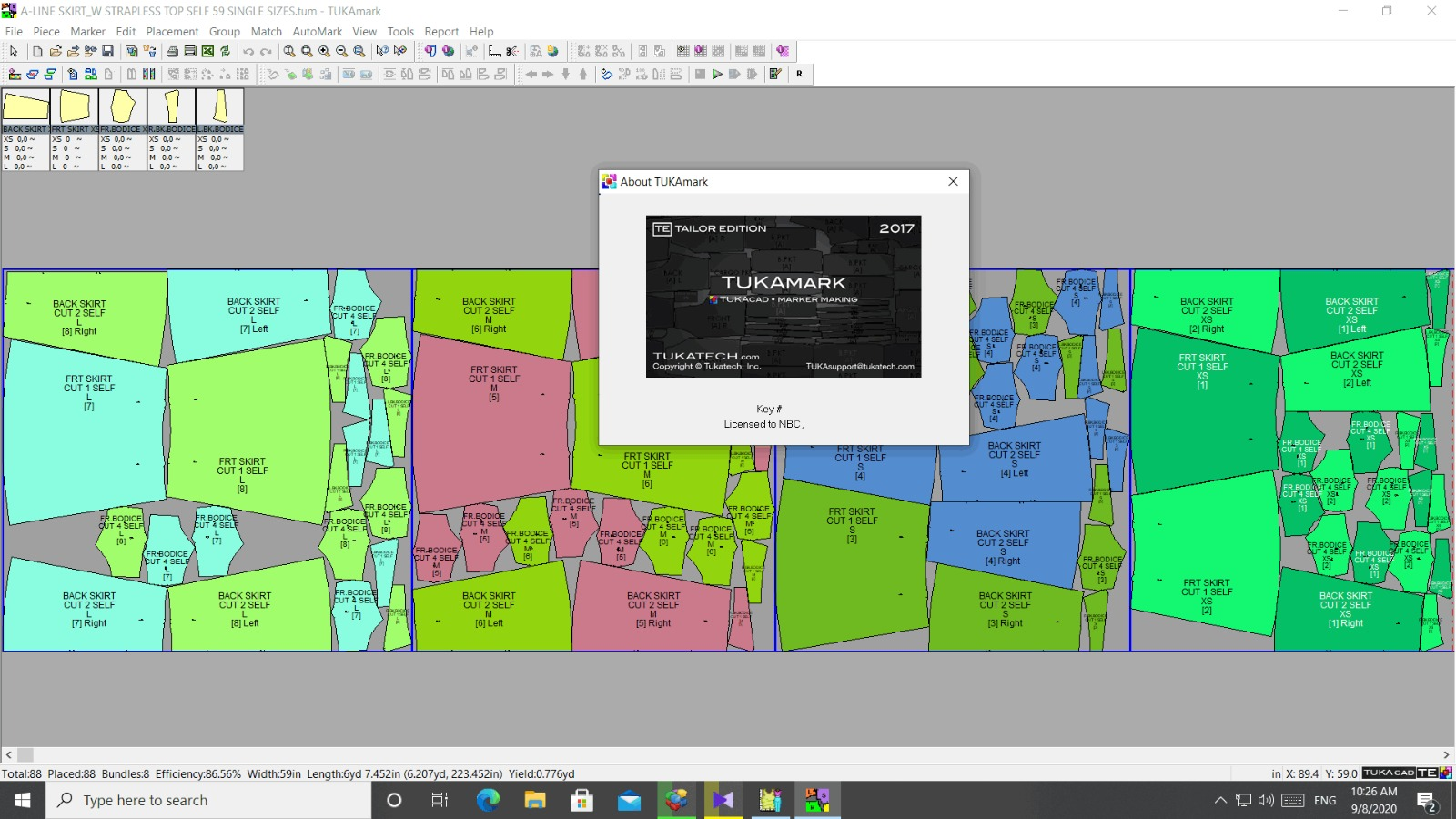
Marker Making Efficiency: TUKAcad includes advanced algorithms for marker making, helping manufacturers arrange pattern pieces to maximize fabric yield and reduce waste.
-
TUKA3D Simulation (Integration): While the core software handles 2D patterns, TUKAcad 2017 integrates with 3D simulation tools to visualize how fabric will drape and move on a virtual model .
-
Data Import/Export: Supports standard industry file formats (such as DXF/AAMA and ASTM), allowing for seamless transfer between digitizers, plotters, and other CAD systems .
-
Learning Ecosystem: The software features built-in audio/video help, “TUKAtips,” and support for subscription-based learning editions suitable for students .
What’s New in Version 2017
For users migrating from older legacy systems (such as TUKAcad 2015 or earlier), version 2017 brought several refinements:
-
Enhanced User Interface (UI): Streamlined toolbars and icon sets to reduce screen clutter, making it easier for new users to locate grading and digitizing tools.
-
Improved Simulation Bridges: Better compatibility with TUKA3D, reducing lag when simulating high-polygon garment models.
-
Stability Updates for Windows 10: Optimized to run smoothly on Windows 10 environments, a crucial update following the decline of Windows 7 support .
-
Subscription Flexibility: This version coincided with TUKAtech’s push toward accessible pricing, including the popular $19/month Learning Edition, making professional-grade software accessible to students .
System Requirements
Before installing TUKAcad 2017, ensure your hardware meets the necessary specifications. Unlike 3D rendering software, TUKAcad is relatively lightweight on GPUs but relies heavily on RAM and CPU speed for grading calculations.
| Component | Recommended Specification |
|---|---|
| Operating System | Windows 10, Windows 8, or Windows 7 (64-bit recommended) |
| RAM | 8 GB (64-bit) or 4 GB (32-bit) |
| Processor (CPU) | Intel Core i5 or higher (High speed required for complex grading) |
| Storage | 2 GB available space (SSD recommended for faster file saving) |
| Graphics | Any DirectX 10 compatible card; dedicated GPU not mandatory but helpful |
| Other Hardware | Digitizer tablet (for tracing paper patterns) and Plotter/Cutter support |
Note: TUKAcad 2017 is not compatible with Windows RT or tablets like the Microsoft Surface RT .
Installation Guide
Installing TUKAcad 2017 requires attention to licensing. Since this is professional software, installation differs from standard consumer apps.
Step 1: Acquire a Legal License
Always download directly from the official TUKAweb portal or authorized resellers. Options include monthly subscriptions, perpetual licenses, or the specific “Learning Edition” for students .
Step 2: Run as Administrator
To ensure the hardware drivers (specifically for the software dongle or USB license key) install correctly, right-click the installer and select Run as Administrator.
Step 3: Configure the Database Path
During setup, you will be prompted to select a data directory. It is best practice to place this on a network drive or cloud-synced folder (like Dropbox) if you work on multiple computers, rather than saving locally to C:\Program Files.
Step 4: Hardware Setup
If using a digitizer tablet for tracing existing paper patterns, calibrate the puck (cursor) within the “Digitizer Setup” menu before beginning your first project.
How to Use the Software
Understanding the workflow is key to mastering TUKAcad 2017. The standard apparel production workflow follows this path:
1. Pattern Creation (Drafting)
Using the “Rectangle” and “Circular” tools, input base measurements (e.g., waist circumference, hip depth). For example, to create a half-circle skirt, you would utilize the specific Circular tool to input the radius based on waist specs, then add seam allowances using the “Offset” function .
2. Digitizing (Optional)
If you have existing paper slopers, use a digitizing tablet to trace the pieces. The puck sends the X/Y coordinates directly into TUKAcad, converting physical paper into digital vectors.
3. Grading
Once the base pattern is cleaned up, apply the grading rules. You define the increments (e.g., Size S to XL adds 1 inch to the waist). The software automatically calculates and draws the new sizes.
4. Marker Making
After grading, you move to the marker layout screen. You can use the Automatic Nesting feature, or manually arrange pieces to minimize fabric waste before exporting to a plotter.
Best Use Cases
-
Fashion Design Students: The Learning Edition ($19/month) offers a low-cost entry point to learn industry-standard CAD skills .
-
Boutique Owners: Use TUKAcad to grade patterns for small-batch manufacturing, ensuring consistency across sizes without manual redrafting.
-
Large-Scale Manufacturers: Utilize the marker making tools to calculate precise fabric consumption for bulk orders, directly impacting the bottom line.
-
Freelance Pattern Graders: Accept digital files (DXF) from designers, grade them to spec sheets, and return digital files ready for production.
Advantages and Limitations
Advantages
-
Cost-Effective Entry: Compared to competitors like Gerber or Lectra, TUKAcad offers a very aggressive entry price, especially the subscription model .
-
Niche Focus: Tailored specifically for apparel, unlike AutoCAD which requires extensive customization for garment design.
-
Learning Support: Excellent built-in tutorials (TUKAtips) reduce the learning curve.
-
Low Hardware Requirements: Runs efficiently on standard business laptops without needing a high-end graphics card.
Limitations
-
UI Learning Curve: The interface, while improved in 2017, can feel dated compared to modern consumer design software.
-
3D Simulation Limitations: Full 3D rendering requires the separate TUKA3D module, which is more resource-intensive.
-
Platform Restriction: Strictly Windows-based; native MacOS support is absent (requires Bootcamp/Parallels).
Alternatives to TUKAcad
When evaluating TUKAcad 2017, it is helpful to compare it against similar CAD software for fashion:
-
SnapFashun: A strong alternative that integrates with Adobe Illustrator. It is slightly more expensive (starting around $19.95) but is often preferred by designers who want a more illustrative, free-form drawing interface .
-
Gerber Accumark: The industry giant. It is significantly more expensive and complex, suited primarily for massive enterprise operations rather than freelancers or students.
-
CLO 3D / Browzwear: These focus heavily on 3D simulation. If your primary need is visualizing fabric drape on a virtual model (rather than exporting to a plotter), these might be better, though they are generally subscription-only.
Frequently Asked Questions (FAQ)
Q1: Is TUKAcad 2017 compatible with Windows 11?
While TUKAcad 2017 was officially released for Windows 10, many users report stable functionality on Windows 11. However, IMSI/Design officially recommends using the latest version of the software for full OS compatibility.
Q2: Can TUKAcad open Adobe Illustrator files?
TUKAcad does not natively open .ai files. You typically need to export from Illustrator as a DXF file to import geometry into TUKAcad.
Q3: What is the difference between TUKAcad and TUKA3D?
TUKAcad is the 2D pattern making and grading software. TUKA3D is a separate visualization tool that takes the 2D patterns and simulates them on an avatar .
Q4: Is there a free trial available for TUKAcad?
Yes, TUKAtech historically offers a free trial for TUKAcad, along with a specialized low-cost “Learning Edition” subscription for students .
Q5: Does TUKAcad work with a digitizer?
Yes, it supports standard digitizer tablets (pucks and boards), which is essential for converting existing hard-copy paper patterns into digital files.
Q6: Is TUKAcad good for knit fabrics?
Yes, professional users utilize the grading tools to apply negative ease or stretch factors, specifically calibrating the marker for knits rather than wovens.
Final Thoughts
TUKAcad 2017 represents a robust, value-driven entry point into the world of digital pattern making. While newer versions exist, the 2017 edition remains a viable tool for students and small businesses due to its stable performance on Windows 10 and its focus on essential CAD tasks like grading and marker making .
For fashion professionals looking to eliminate paper waste, reduce manual grading errors, and speed up the time-to-production, investing time in learning TUKAcad offers a high return on investment. Always ensure you obtain the software legally through official subscriptions to receive updates and technical support.
Premium Software Support Service
If you need professional help with software installation, setup, or technical configuration, our team is available to assist you.
Contact & Support
For quick assistance and latest updates, connect with us using the links below:
🔹 Direct Telegram Support
https://t.me/PlayoutKing
🔹 Official Telegram Updates Group
https://t.me/yourgroup
Service Policy
- Remote testing available through AnyDesk before confirmation.
• Verify the setup and performance before completing the order.
• Support available for single or multiple systems.
• Step-by-step guidance to ensure smooth installation and working environment.
Our goal is to provide reliable technical assistance so your software runs smoothly without interruptions.