
Overview of Giglad
Table of Contents
Giglad is not a conventional DAW, and it is not a simple auto-accompaniment plug-in. It is a host application that behaves like a virtual arranger keyboard: you play chords with your left hand, melody with your right, and the software generates a full backing arrangement in real time. Deltarray designed it around the workflows of players who have used hardware arrangers from Korg, Yamaha, and Ketron, but who want the flexibility of VST instruments, larger sample libraries, and a computer-based setup.
The software sits in a narrow but demanding category. Unlike vArranger, which is Windows-only, Giglad runs on both PC and Mac. Unlike ReChord, which operates as a MIDI effect inside an existing DAW, Giglad is a standalone performance environment with its own arranger engine, style editor, and sound library. That standalone design is either its greatest strength or its main limitation, depending on how you already work.
Since March 2023, Deltarray has collaborated with Dynamix Audio, a company known for aftermarket sound and style products for hardware arranger keyboards. That partnership produced Giglad’s native VST3 sound library and a ready-to-play style ecosystem, which is one reason the software feels less like a generic MIDI tool and more like a dedicated arranger platform.
Key Features
Arranger Engine with Chord-Driven Accompaniment
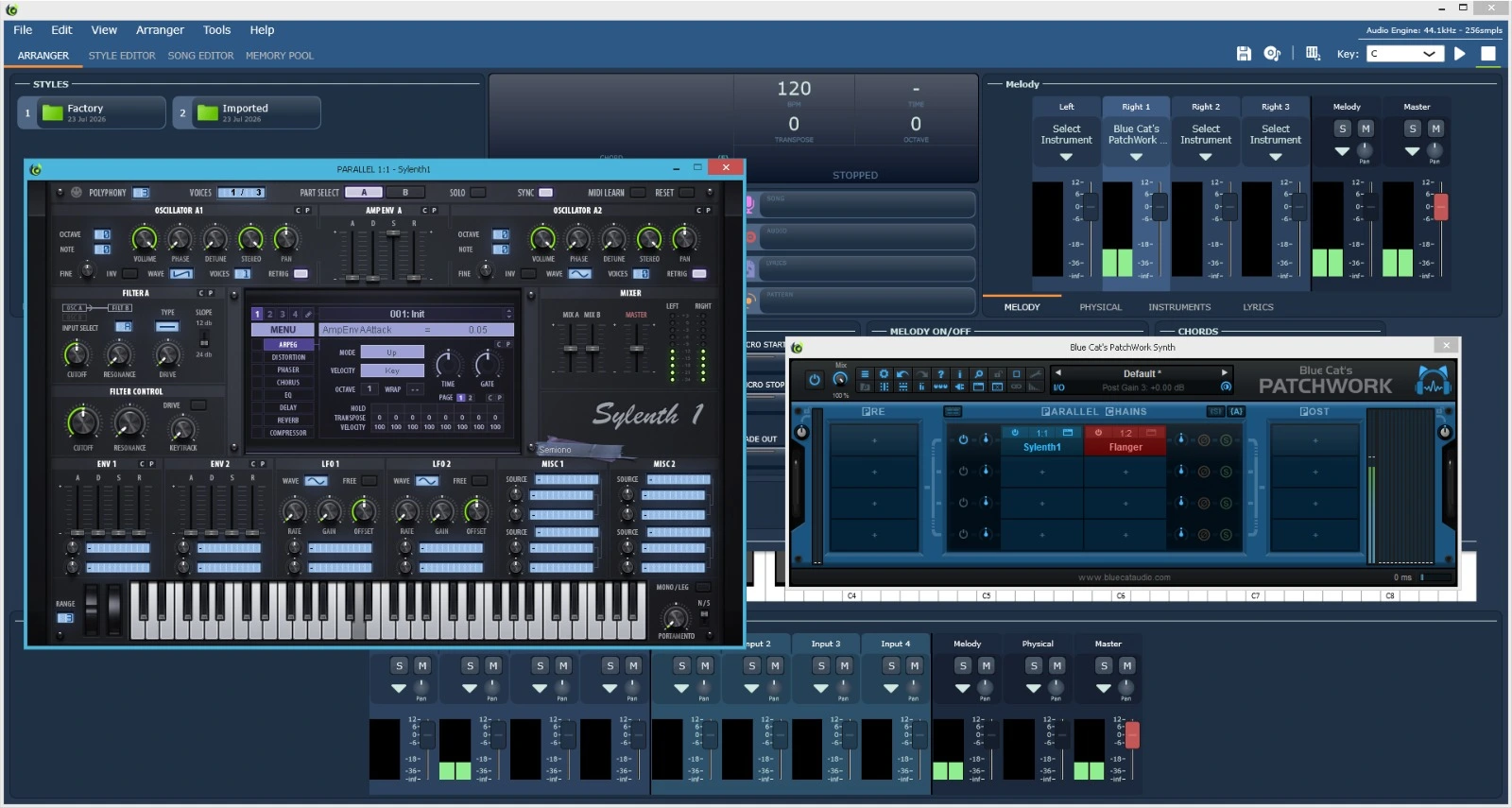
At the center of Giglad is the Arranger window, where live performance happens. The engine reads chord input from a MIDI controller and responds by generating bass, drums, accompaniment patterns, and pads in real time. The arranger supports section changes, fill-ins, tempo adjustments, and style memory linking—behaviors that hardware arranger players expect to control without looking away from the keyboard. Version 5.0.1 added the ability to link Style Memories to specific style sections, which makes it possible to recall instrument and effect configurations alongside a musical section change.
Style Editor and Yamaha Style Compatibility
Giglad ships with an embedded Style Editor that functions as a MIDI editing environment for building styles from scratch or re-voicing existing ones. You can describe MIDI events, define variations and sections, and apply transposition algorithms without leaving the application.
The software can read and play Yamaha SFF2 and SFF3 styles—the format used by Yamaha’s PSR, Tyros, and Genos arranger keyboards. When you load a Yamaha style, Giglad maps the instruments to its native sound library, so you can audition and play the style immediately. The Style Editor then lets you tweak voicings, event data, and section behavior. This is a significant bridge for players with existing Yamaha style collections: it means your investment in SFF content does not become obsolete when you move to a software rig.
Native Sampler, Audio Loops, and Virtual Instruments
The Native Sampler introduced in version 5.0.0 gives Giglad the ability to import user samples and build custom instruments without relying entirely on third-party plug-ins. It supports SFZ import, pitch and layer selection, and—as of version 5.1.0—portamento and scale tuning. The 5.1.5 release added disk streaming for the sampler, which reduces RAM pressure when working with larger sample libraries.
Audio loops extend the arranger beyond purely MIDI-generated content. You can import audio files and use them as the rhythmic foundation of audio styles, which is useful for genres where programmed MIDI drums sound too rigid. The 5.1.6 update specifically addresses a bug that could cause audio loops to play out of sync—a meaningful fix for anyone using loop-based styles in performance.
Giglad hosts VST3 and Audio Units synth and effect plug-ins on macOS, and VST2/VST3 on Windows. It also supports SoundFonts on both platforms. The bundled Dynamix Audio library provides more than 128 instrument flavors in VST3 format, giving you a playable palette out of the box.
MIDI Routing and Hardware Integration
The MIDI engine can send program changes, controller data, and note information to external hardware sound modules or to another DAW. Version 5.0.0 added MIDI output to controllers for LED feedback, which means supported hardware controllers can reflect Giglad’s state rather than operating blindly. Encoder support was also implemented, making tempo changes and parameter adjustments more tactile during performance.
Song Editor and Memory Pool
Two supporting windows round out the workflow. The Song Editor lets you assemble chord changes, section changes, tempo changes, and other instructions into a structured song that the arranger can follow automatically. The Memory Pool keeps frequently used virtual instruments loaded in memory so that style and melody changes do not trigger long reload times during a set. These are not headline features, but they matter in real performance scenarios where dead air between songs is unacceptable.
What’s New in Giglad 5.1.6
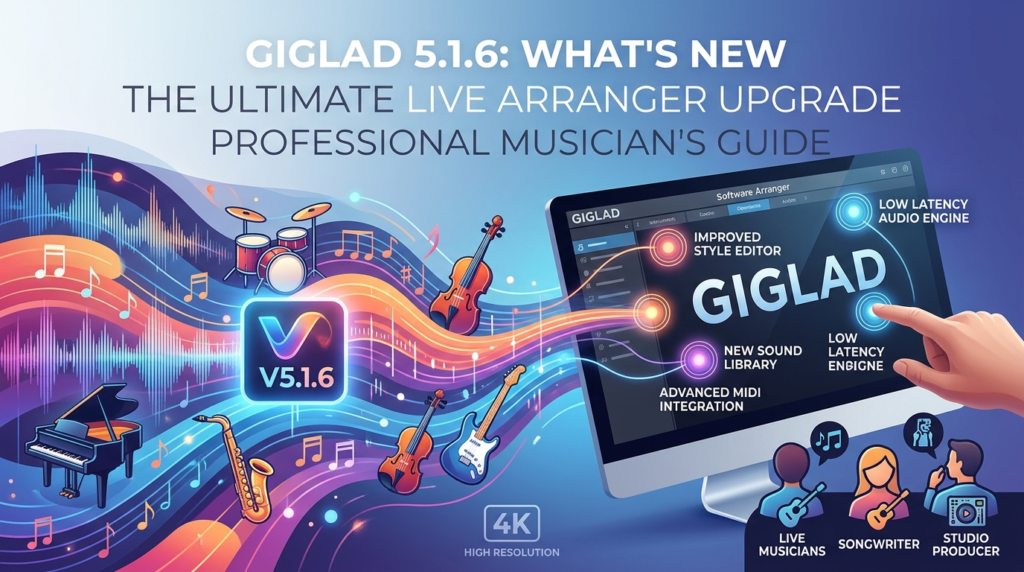
Giglad 5.1.6 (released June 13, 2026) is a stability and correctness release, not a feature release. The two changes are specific:
-
Audio loop synchronization fix: A major bug that could cause audio loops to play out of sync has been resolved. This is the more consequential change, because timing drift in loop-based styles undermines the entire purpose of an arranger engine.
-
Bundle-related bug fixes: Minor issues in bundle handling were corrected. Bundles are Giglad’s mechanism for sharing resources between users, so these fixes affect collaboration and resource exchange rather than core performance.
To understand where 5.1.6 sits, it helps to look at the releases immediately before it. Version 5.1.5 introduced Native Sampler disk streaming and bundle improvements. Version 5.1.0 added portamento, scale tuning, improved SFZ import, and significant bundle work. Version 5.1.6 closes out the 5.1 branch by fixing the remaining loop-sync defect. If you are already on 5.1.5, the update is recommended, especially if your styles rely on audio loops. If you are on an older 5.0.x build, the cumulative changes in the 5.1 line—disk streaming, improved sampler pitching, and bundle refinements—make the jump more substantial.
A note on version history: the official documentation is written against version 5.0 and is not updated with every release. The release history page on Deltarray’s site is the authoritative source for what changed in 5.1.6.
System Requirements
Deltarray does not publish a rigid CPU/RAM minimum table in the style of a game or a DAW. Instead, the documentation frames requirements around audio and MIDI workflow, which is more useful for a performance tool.
Operating system: Giglad runs on Windows and macOS. Windows supports the default Windows Audio driver; macOS uses Core Audio. The application is signed on macOS as of version 5.0.0, which removes the permission warnings that earlier builds triggered.
Audio interface: The internal sound card will work, but an external USB or Thunderbolt audio interface is strongly recommended. Low-latency performance through ASIO on Windows or Core Audio on macOS depends on the interface, not just the software. If you plan to route Giglad to a PA system, a balanced output from an external interface is effectively non-negotiable.
MIDI controller: Any MIDI keyboard can send note data to Giglad, but a controller with buttons, faders, and ideally encoders will let you control tempo, fill-ins, style selection, and volume without returning to the mouse. The documentation is direct about this: playing notes on a computer keyboard is technically possible but impractical for real performance.
Touch screen (optional): A touch screen is not required, but the documentation notes that it “can significantly improve your live performance experience” by making panel navigation more direct.
Processor and memory: The software’s performance depends heavily on the plug-ins and sample libraries you load. The Native Sampler disk streaming in 5.1.5 reduces the memory footprint of sample-based instruments, but a modern multi-core CPU and sufficient RAM for your chosen VSTs remain the practical baseline. Apple Silicon performance was specifically improved in version 5.0.0, so Mac users on M-series chips should see better audio handling than on earlier builds.
Installation Guide
Because Giglad uses a proprietary activation system and a bundled sound library, the installation process has a few more steps than a typical standalone app.
Step 1 — Prepare the environment first. The documentation advises preparing your audio interface and MIDI controller before installing Giglad. Connect the interface, install its ASIO driver (Windows) or confirm Core Audio recognition (macOS), and connect your MIDI controller. This avoids the common situation where the software is installed but cannot produce low-latency audio because the interface is not configured.
Step 2 — Download and install the application. Obtain the installer from Deltarray’s official download page. Run the installer and follow the platform-specific prompts. On macOS, the signed application should launch without additional permission dialogs after installation.
Step 3 — Install and register the sound library. Giglad’s factory sound library is based on the Dynamix Audio VST3 sampler. Ensure the VST3 is installed in the location your system expects, then launch Giglad and confirm that the native library is detected. The software’s Memory Pool and style loading depend on this library being available.
Step 4 — Configure audio and MIDI. Open the Settings window and select your audio driver: ASIO on Windows for best results, or Core Audio on macOS. Then assign your MIDI controller as the input device and verify that note data and controller messages are being received.
Step 5 — Activate the license. Giglad uses an activation/deactivation server. Version 5.0.2 fixed an issue that could occur when contacting the server for activation purposes, so if you are installing an older build, update to 5.1.6 before troubleshooting activation problems. A single license covers the software without a subscription requirement, according to user reports.
Step 6 — Test with a factory style. Load one of the bundled styles and play chords with your left hand. If the arranger responds and the audio is clean, the core installation is complete. The quick-start video in the documentation is worth watching before diving into the Style Editor.
How to Use Giglad
The Four Core Windows
Giglad organizes its workflow around four primary windows accessible from the top tab bar: Arranger, Style Editor, Song Editor, and Memory Pool. Understanding what each window is for prevents the common beginner mistake of trying to edit styles inside the Arranger window or build songs without using the Song Editor.
Live Performance in the Arranger
In the Arranger window, your left hand triggers chords and your right hand plays melody. The arranger engine generates the backing parts according to the active style, section, and chord input. Use your MIDI controller’s buttons or faders to change sections, trigger fill-ins, and adjust tempo. If you have linked Style Memories to sections, the corresponding instrument and effect settings will recall as the section changes.
Creating or Editing a Style
Open the Style Editor to create a style from scratch or modify an existing one. The editor embeds a MIDI editing environment and exposes the event data, variations, sections, and transposition settings that define how the style responds to chords. If you are importing a Yamaha SFF2 or SFF3 style, load it first in the Arranger to verify the instrument mapping, then open it in the Style Editor to adjust voicings or event behavior. Multiple styles can be opened in the Style Editor simultaneously as of version 5.0.0, which makes comparison and copying between styles more practical.
Building an Audio Style with Loops
Load audio files into the audio loops plug-in and assign them to style sections. The 5.1.6 sync fix ensures that loops align with the arranger’s timing rather than drifting. Audio styles are particularly useful for drum and percussion parts where MIDI programming sounds too uniform.
Preparing a Set with the Song Editor
The Song Editor lets you sequence chord changes, section changes, and tempo changes into a structured song. This is the tool to use when you want the arranger to follow a predetermined arrangement rather than responding entirely to live chord input.
Managing Instrument Load Times with the Memory Pool
Keep the virtual instruments you need for your set loaded in the Memory Pool. When a style or melody part calls for an instrument that is already in memory, it loads faster than if it had to be initialized from scratch. On a set with multiple style changes, this reduces the risk of audible loading gaps.
Best Use Cases
Solo and duo live performance. Giglad is designed for players who need full arrangements from a small footprint. A keyboard controller, a laptop, an audio interface, and Giglad replace a hardware arranger keyboard and a separate sound module. The portability argument is stronger if you already carry a laptop for other purposes.
Players with existing Yamaha style libraries. If you have accumulated SFF2 or SFF3 styles from Yamaha arranger keyboards, Giglad gives those files a software host that maps them to a modern VST3 sound library. This is one of the clearest practical advantages over arrangers that do not read Yamaha formats.
Custom style creation and re-voicing. The embedded Style Editor and MIDI editing tools make Giglad a practical choice for musicians who want to build their own accompaniment patterns rather than relying entirely on factory content. The audio loops feature extends this to rhythm programming with recorded audio.
Studio sketching and arrangement prototyping. The Song Editor and arranger engine can be used to sketch arrangements quickly, even if the final production happens in a DAW. MIDI output allows Giglad to drive external sound modules or another DAW’s instruments.
Cost-sensitive hardware arranger replacement. User reports consistently compare Giglad favorably to high-end hardware arrangers on price. One reviewer cited the cost of a flagship hardware arranger as a reason for switching to a software rig with Giglad. The absence of a subscription requirement reinforces that cost advantage over time.
Advantages and Limitations
Advantages
Genuine cross-platform support. Giglad runs on both Windows and macOS, which is not universal in the software-arranger category. vArranger, its closest direct competitor, is Windows-only.
Yamaha SFF2/SFF3 compatibility. The ability to load Yamaha styles and map them to a native sound library lowers the migration barrier for hardware arranger users.
Integrated style creation workflow. The Style Editor, Native Sampler, and audio loops are part of the same application, rather than separate purchases or plug-ins. Users who create their own styles describe the workflow as a significant time saver.
Active development and responsive support. The release history shows a steady cadence of fixes and feature additions through the 5.x line, and user reviews repeatedly mention responsive support and free updates.
No subscription requirement. A single license without an ongoing subscription is a meaningful differentiator for musicians who perform regularly but do not want recurring software costs.
Limitations
Setup is more involved than a hardware arranger. A vArranger forum user summarized the trade-off directly: “vArranger just works while Giglad requires more setup”. Giglad assumes you will configure an audio interface, a MIDI controller, and a sound library. That flexibility comes at the cost of initial friction.
Style format support is Yamaha-centric. Giglad reads Yamaha SFF2 and SFF3 styles. If your style library is in Ketron or Solton formats, Giglad is not the right fit, and vArranger has broader format support.
CPU load management is the user’s responsibility. One user noted that effects in Giglad need to be managed carefully to avoid overloading the CPU. The software does not automatically police plug-in efficiency, so performance stability depends on sensible project design.
Documentation lags behind releases. The official documentation is written against version 5.0 and may not reflect every 5.1.x change. Users on 5.1.6 should consult the release history for authoritative version-specific information.
Alternatives to Giglad
vArranger
The most frequently compared tool. vArranger is Windows-only, supports a wider range of style formats (including Ketron and Solton in addition to Yamaha), and is often described as requiring less initial configuration. It is also more expensive. The practical decision usually comes down to platform and style format: if you are on Mac or your library is primarily Yamaha SFF, Giglad is the more natural fit; if you need Ketron-style compatibility or want the lowest-friction Windows setup, vArranger has the edge.
One Man Band
One Man Band is a MIDI-based auto-accompaniment program that appears in arranger software discussions as a lighter, more traditional alternative. It is typically mentioned alongside Giglad and vArranger but does not offer the same integrated VST hosting and Style Editor depth.
JJazzLab
JJazzLab is a free, song-driven arranger tool. It is a reasonable option for musicians who want automated accompaniment without a commercial investment, but it is not positioned as a direct hardware-arranger replacement in the way Giglad is.
ReChord
ReChord takes a different architectural approach: it is a VST MIDI effect that turns your existing DAW into an arranger, rather than a standalone performance environment. If you already work inside a DAW and want arranger functionality without switching applications, ReChord is conceptually closer to that workflow. Giglad’s advantage is that it provides the complete performance environment—sound library, style editor, and arranger—without requiring a separate DAW.
Hardware arranger keyboards
The alternative that Giglad explicitly positions itself against. A hardware arranger offers integrated controls, a known sound set, and no computer configuration. Giglad’s counterargument is cost, portability, VST flexibility, and the ability to use any MIDI controller. Users who have made the switch often cite price and the freedom to choose their own keyboard action as the deciding factors.
Frequently Asked Questions
Is Giglad 5.1.6 a free update for existing users?
The 5.1.6 release is a maintenance update within the 5.x line. Deltarray’s version history indicates that version 5 was partially free, with many features and fixes provided at no cost, while the most advanced features required a small upgrade fee. Check your license tier before assuming every 5.1.x feature is included at no charge.
Can Giglad run on macOS with Apple Silicon?
Yes. Version 5.0.0 included significantly improved audio performance on Apple Silicon, and the application is signed for macOS, removing the permission dialogs that earlier builds triggered. Version 5.1.6 continues that support.
Does Giglad work without an external audio interface?
It can use the computer’s internal sound card, but the documentation recommends an external USB or Thunderbolt interface for low-latency performance and professional PA connectivity. ASIO on Windows and Core Audio on macOS are the preferred driver paths.
What style formats does Giglad support?
Giglad reads and plays Yamaha SFF2 and SFF3 styles. It maps the instruments to its native sound library and allows further editing in the Style Editor. It does not natively read Ketron or Solton style formats; vArranger is the better alternative for those formats.
Does Giglad require an internet connection to work?
User reports indicate that Giglad does not require an internet connection for normal operation, and the license is a single purchase rather than a subscription. Activation and deactivation do contact a server, but performance use is offline.
Can I use my own VST plug-ins in Giglad?
Yes. Giglad hosts VST3 and Audio Units on macOS and VST2/VST3 on Windows, in addition to SoundFonts. The bundled Dynamix Audio library is the factory sound source, but you are not limited to it.
What was the main fix in Giglad 5.1.6?
The primary fix addresses a major bug in audio loops that could cause them to play out of sync. A secondary fix corrects minor issues in bundles. It is a stability release, not a feature release.
How does Giglad compare to a hardware arranger keyboard for live use?
The arranger workflow is designed to mirror hardware behavior: chord-driven accompaniment, section changes, fill-ins, and style memories. The differences are practical rather than conceptual. Giglad offers VST flexibility, a larger potential sound palette, and lower cost, but it requires a computer, an audio interface, and MIDI controller configuration. A hardware arranger is self-contained. The right choice depends on whether you value flexibility and cost or integrated simplicity.
Final Thoughts
Giglad 5.1.6 is not a dramatic release, and Deltarray does not present it as one. It fixes the audio-loop sync problem that could undermine loop-based styles and cleans up bundle handling. For a version at the tail end of a minor branch, that is the correct scope: resolve the remaining correctness issues and keep the platform stable for live players.
The larger case for Giglad sits in its design priorities. It takes the arranger-keyboard workflow seriously—chord input, style sections, fill-ins, style memories, Yamaha SFF compatibility—and rebuilds it as a cross-platform host for VST instruments and custom samples. The Style Editor and Native Sampler are not afterthoughts; they are the reason the software can move beyond factory presets. The trade-off is setup complexity and a Yamaha-centric style format footprint. Neither is a flaw so much as a boundary condition: Giglad is at its best for players who want a flexible software arranger and are willing to invest the time in configuring an audio interface, a MIDI controller, and a sound library to their liking.
If you are evaluating the software-arranger category in 2026, Giglad 5.1.6 is a mature and actively maintained option, particularly on macOS and for anyone with an existing collection of Yamaha styles. The free trial, according to user reports, allows you to test the full feature set before purchasing—which is the most sensible way to determine whether its workflow fits yours.