

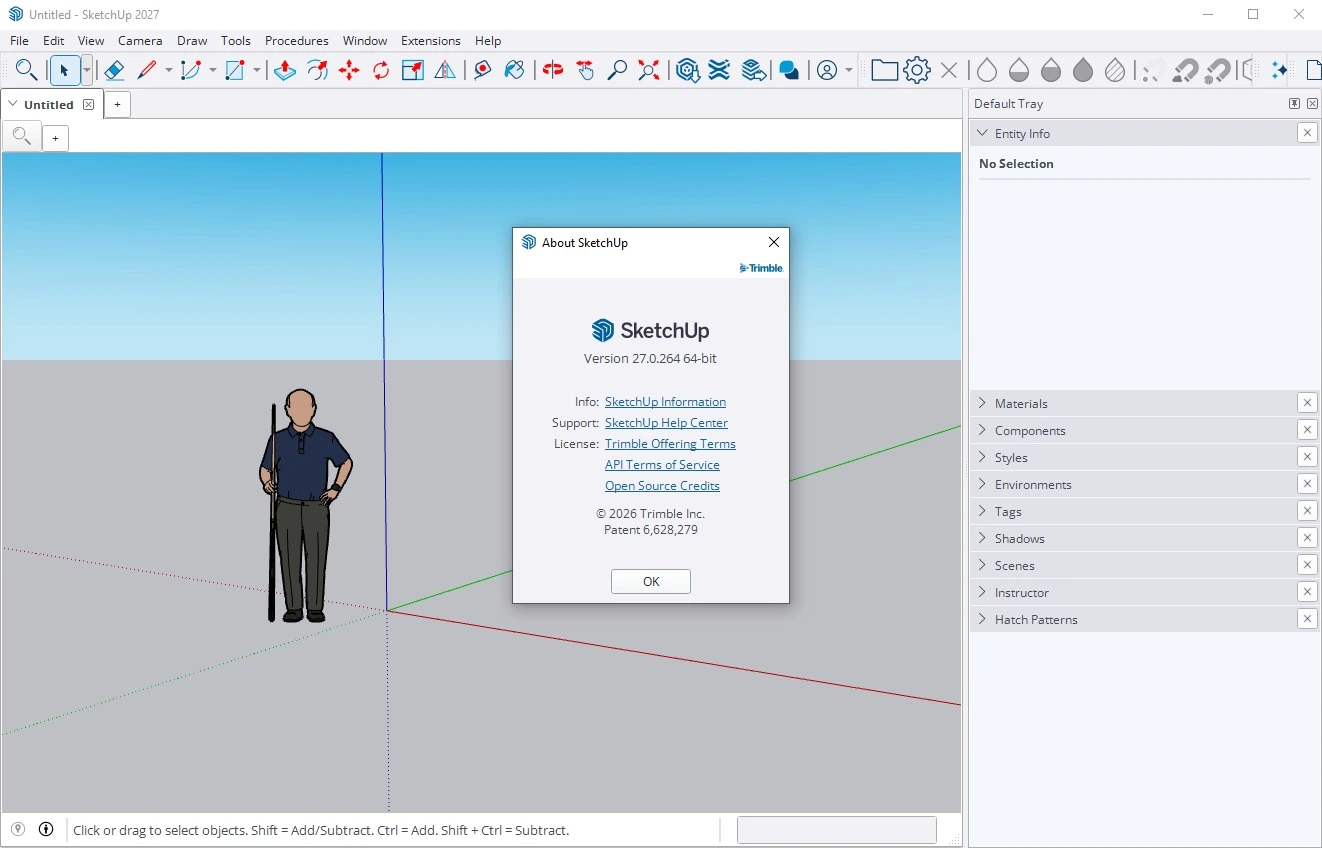
Overview of SketchUp Pro 2027
Table of Contents
SketchUp Pro remains a subscription-based desktop application that pairs a fast, accessible 3D modeler with LayOut, a dedicated 2D documentation and presentation tool. The 2027 release (version 27.0.264) is positioned as a workflow-refinement update rather than a complete interface overhaul, focusing on late-stage editability, AI-assisted ideation, and construction-document efficiency.
Unlike BIM-centric platforms that enforce parametric constraints from the outset, SketchUp Pro 2027 preserves its core strength: rapid concept massing and spatial exploration with minimal upfront setup. The addition of procedural operations means that many modeling actions now remain editable after creation, reducing the need to rebuild geometry when client revisions arrive.
Who it is for: Architects producing concept-through-documentation packages, interior designers coordinating FFE (furniture, fixtures, and equipment), landscape designers modeling terrain and planting, and construction professionals who need clear, scaled 2D deliverables from a 3D model.
Key Features
Core Modeling Tools
SketchUp Pro’s signature Push/Pull tool allows users to extrude any 2D face into 3D geometry with a single click, making it one of the fastest tools for early-stage massing. The Follow Me tool sweeps profiles along paths for moldings, railings, and curved elements, while Solid Tools perform boolean union, subtraction, and intersection operations on grouped geometry. Dynamic Components enable parametric behavior—such as configurable doors and windows—without external scripting.
3D Warehouse and Extension Warehouse
The 3D Warehouse provides access to millions of free, manufacturer-supplied, and community-uploaded components, from furniture to entourage to urban context models. The Extension Warehouse hosts over 750 third-party plugins that extend SketchUp’s native capabilities, including rendering engines, terrain tools, and automation scripts. Both libraries are accessible directly within the desktop application.
LayOut for 2D Documentation
LayOut transforms SketchUp models into scaled drawings, presentation boards, and construction documents. Viewports link dynamically to the SketchUp model, so design changes propagate to documentation without manual redrawing. LayOut supports vector and hybrid rendering modes, dimensioning, annotation, and multi-page drawing sets.
PreDesign and Add Location
PreDesign delivers early-stage climate analysis—solar exposure, daylight potential, and energy considerations—to inform massing decisions before detailed modeling begins. Add Location now includes enhanced context geometry, allowing users to import surrounding city buildings and terrain without third-party plugins, useful for shadow studies and site planning.
What’s New in SketchUp Pro 2027 (v27.0.264)
Non-Destructive Procedural Modeling
The headline modeling addition is a procedural system that keeps operations editable after they are applied. Procedural Follow Me allows sweeps and profiles to be modified without re-running the tool from scratch. Procedural Solid Tools enable reversible boolean operations, so a subtracted volume can be adjusted or removed later. Procedural Copy Along creates path-based arrays that update automatically when the underlying path or component changes. This is particularly valuable in late-stage design development, where geometry previously had to be rebuilt to accommodate revised dimensions.
Expanded Native AI Tools
SketchUp 2027 integrates several AI-powered utilities directly into the modeling environment, available through subscription AI credits:
-
AI Render for generating concept visualization options from the current view.
-
AI Assistant for in-app technical guidance and troubleshooting.
-
Generate Textures for producing contextual materials from text prompts.
-
Claude Connector for advanced, AI-driven assistance within the SketchUp workflow.
These tools are intended for ideation and material exploration, not as replacements for dedicated rendering or documentation engines. AI credit allocations vary by subscription tier.
LayOut Performance and Drawing Enhancements
LayOut receives substantial updates in 2027, especially on Windows:
-
Multi-threaded Hidden Line Rendering and faster PDF/DWG exports, with Trimble reporting up to 85% reduction in processing time for heavy vector tasks.
-
New CAD-style drawing tools (Extend, Trim, Fillet, Chamfer) for editing 2D linework directly in LayOut, reducing round-trips to AutoCAD.
-
Native DWG layer mapping, which converts SketchUp tags to DWG layers during export, preserving organizational structure for downstream CAD coordination.
-
Infinite Canvas Draw Mode, a paperless drafting environment for developing details at full scale before committing to sheet layouts.
-
Non-destructive viewport image adjustments (brightness, contrast, hue, saturation, opacity) that modify presentation without altering the source model.
Collaboration and Display Improvements
A built-in comment and markup panel allows teams to annotate model views, create comment threads, and attach screenshots within the desktop application, with records stored in Trimble Connect. Rendering improvements include Color Ambient Occlusion with adjustable tone and intensity, and Invert Roughness support for PBR material workflows. SketchUp and LayOut now share a more unified interface across Windows and macOS, and multiple open documents can be managed as tabs within a single application window.
System Requirements
SketchUp Pro 2027 enforces stricter platform baselines than previous releases. Windows 10 and Intel-based Macs are no longer supported.
Windows (Recommended)
-
Operating system: Windows 11 (64-bit).
-
Processor: 2+ GHz.
-
RAM: 8 GB minimum; 16–32 GB recommended for professional use.
-
GPU: Discrete graphics card (AMD or NVIDIA) with at least 8 GB VRAM; 32 GB VRAM recommended when working with PBR materials, ambient occlusion, and image-based lighting.
-
Hard disk space: 6 GB available.
-
Input: 3-button scroll-wheel mouse.
-
Graphics API: OpenGL 3.1 support required for the classic renderer.
macOS
-
Operating system: macOS 26 (Tahoe), 15 (Sequoia), 14+ (Sonoma), or 13+ (Ventura).
-
Processor: Apple Silicon (M-series) required; Intel Macs are not supported in 2027.
-
RAM: 8 GB minimum.
-
GPU: Modern integrated or discrete GPU with at least 1 GB memory.
-
Hard disk space: 6 GB available.
An internet connection is required to install, authorize, and periodically validate the subscription. Users who rely on third-party renderers such as V-Ray or Enscape should prioritize GPU performance and VRAM, as those engines place heavier demands on graphics hardware than SketchUp’s native viewport.
Installation Guide
SketchUp Pro 2027 is distributed exclusively through Trimble’s official subscription channels. No legitimate installation method involves unauthorized patches, pre-activated builds, or bypass tools; such sources expose users to security risks and violate the software license agreement.
-
Purchase a subscription through the official SketchUp website or an authorized reseller. The Pro plan is listed at $399 per year (or $33.25 per month, billed annually), with regional pricing and promotional discounts available.
-
Sign in with a Trimble ID and access the Trimble Admin Console to assign licenses to individual users.
-
Download the installer from the confirmation email or the Trimble account portal. SketchUp Pro and LayOut are installed together.
-
Authorize the license by signing in with the assigned Trimble ID upon first launch. An internet connection is required for activation.
-
Install extensions from the Extension Warehouse through the in-app Extension Manager after the core application is running.
For classroom, lab, or enterprise deployments, Trimble provides network licensing and administrative tools; contact Trimble Sales for volume and education pricing.
How to Use SketchUp Pro 2027
A Practical Workflow for Design and Documentation
-
Set up the modeling environment. Choose a template with the appropriate units (architectural inches/feet or metric) and style. For documentation-bound projects, organize the model with tags (layers) from the start—separating walls, floors, casework, and site context.
-
Establish scale and context. Import a scanned floor plan or CAD underlay, scale it accurately, and use Add Location to bring in site geometry and terrain context.
-
Build with groups and components. Keep raw geometry separated into logical groups or components. Use components for repeated elements (windows, doors, furniture) so that edits propagate across all instances.
-
Apply procedural operations where revisions are expected. Use Procedural Follow Me for moldings and railings, and Procedural Solid Tools for openings and subtractive details that may change later.
-
Create scenes for documentation. Set standard views (plan, section, elevation, perspective) as scenes. These scenes become viewports in LayOut.
-
Move to LayOut for 2D deliverables. Insert the SketchUp model into LayOut, place viewports on scaled sheets, add dimensions and annotations, and export to PDF or DWG. The 2027 DWG export maps SketchUp tags to CAD layers automatically.
-
Iterate non-destructively. When the model changes, LayOut viewports update. Use viewport image adjustments for presentation clarity without modifying the source model.
For beginners, Trimble’s official learn.sketchup.com portal and the SketchUp YouTube channel provide structured fundamentals courses covering navigation, drawing tools, components, and LayOut basics.
Best Use Cases
Architectural Concept and Massing
SketchUp Pro’s push-pull workflow remains unmatched for quickly testing building volumes, spatial relationships, and fenestration options. Procedural tools in 2027 extend this advantage into later design stages by allowing massing elements to remain adjustable.
Interior Design and FFE Coordination
Interior designers use SketchUp Pro to model room layouts, specify furniture from 3D Warehouse, and produce finish plans and elevations in LayOut. The built-in collaboration panel supports review cycles with clients and consultants directly on the model.
Landscape and Site Planning
Add Location’s enhanced context geometry supports shadow studies, terrain modeling, and surrounding-building massing without external plugins. Combined with sandbox tools and planting components, SketchUp Pro handles site-scale visualization efficiently.
Construction Documentation
LayOut 2027 is explicitly optimized for drawing-set production. Multi-threaded rendering, CAD-style editing tools, and DWG layer mapping make it viable for small-to-medium documentation packages, particularly for firms already modeling in SketchUp.
Woodworking and Furniture Design
Precise dimension input, component nesting, and the ability to generate cut lists through extensions make SketchUp Pro a practical tool for furniture and cabinetry design.
Advantages and Limitations
Advantages
-
Fast learning curve: The push-pull modeling paradigm is accessible to beginners while remaining efficient for experienced users.
-
Editable procedural operations: 2027’s procedural tools reduce rework when design changes occur late in a project.
-
Integrated AI assistance: Native AI Render, texture generation, and in-app guidance reduce friction during ideation and material exploration.
-
Substantially faster LayOut: Multi-threaded rendering and CAD-style tools improve documentation throughput.
-
Extensive ecosystem: 3D Warehouse and Extension Warehouse provide a vast library of components and plugins.
Limitations
-
No native BIM: SketchUp Pro does not produce intelligent BIM objects with embedded data for coordination, quantity takeoff, or clash detection. Workflows requiring full BIM typically transition to Revit or ArchiCAD.
-
Complex curved geometry: While improved, SketchUp’s NURBS-free modeling environment is less suited to doubly curved surfaces and organic forms than Rhino.
-
Rendering requires plugins: Native visualization is limited; photorealistic output depends on V-Ray, Enscape, or similar third-party engines.
-
Platform restrictions: Windows 10 and Intel Macs are no longer supported, which may require hardware upgrades for some users.
-
Subscription-only licensing: Perpetual licenses are no longer offered, and AI features are metered by subscription-tier credits.
Alternatives to SketchUp Pro 2027
Blender (Free, Open Source)
Blender excels at rendering, animation, and high-polygon scene handling, with Cycles and Eevee producing photorealistic output without paid plugins. The BlenderBIM add-on introduces IFC export and basic BIM workflows. The tradeoff is a steeper, shortcut-heavy learning curve—typically two to four weeks for SketchUp users to reach comparable fluency. Best suited to visualization-focused studios and budget-constrained teams.
Autodesk Revit (BIM Standard)
Revit is the dominant platform for BIM documentation, coordination, and data-rich modeling on Windows. It is slower for early-stage massing and concept exploration compared with SketchUp’s push-pull workflow. Many firms adopt a hybrid approach: SketchUp for concept design, Revit for documentation and construction administration.
Rhino 3D + Grasshopper (Complex Geometry)
Rhino is preferred for complex, doubly curved, and organic geometry, and Grasshopper enables computational and parametric design. It is a one-time purchase ($995 list price) and runs on Windows and macOS. It lacks native BIM but pairs well with documentation tools through plugins.
ArchiCAD (Design-Oriented BIM, Mac-Friendly)
ArchiCAD is a BIM authoring platform with strong macOS support and a design-centric interface. It is well suited to Mac-based practices seeking integrated BIM without Revit’s Windows dependency.
SketchUp Free / Go (Entry-Level Options)
SketchUp offers web-based and iPad-based plans at lower price points. SketchUp Go ($129/year) includes web and iPad modeling with cloud storage but lacks the full desktop modeler and LayOut documentation toolset. These plans are appropriate for students, hobbyists, and light-duty concept work, not professional documentation.
Frequently Asked Questions
Does SketchUp Pro 2027 run on Windows 10?
No. Starting with SketchUp 2026.1, Trimble removed Windows 10 support, and SketchUp Pro 2027 requires Windows 11 (64-bit). Windows 10 installations are no longer tested or supported.
Does SketchUp Pro 2027 work on Intel-based Macs?
No. SketchUp Pro 2027 requires Apple Silicon (M-series) processors. Intel Macs are not supported in this release.
Are the AI features included in the Pro subscription?
SketchUp Pro subscriptions include monthly AI credits, with allocations varying by plan tier. AI tools include AI Render, AI Assistant, Generate Textures, and a Claude Connector. Credit consumption depends on feature usage.
What is the difference between SketchUp and LayOut?
SketchUp is the 3D modeling environment. LayOut is a separate application included with SketchUp Pro for creating scaled 2D drawings, presentations, and construction documents from SketchUp models. LayOut viewports remain linked to the model, so design changes update documentation automatically.
How much does SketchUp Pro 2027 cost?
The Pro plan is listed at $399 per year (approximately $33.25 per month, billed annually). SketchUp Studio, which adds Revit import, point-cloud modeling, and high-quality rendering/export tools, is listed at $819 per year. Regional pricing and promotional discounts may apply.
Is there a student or education discount?
Yes. Trimble offers education pricing at approximately $55 per user per year for students and educators in the United States and Canada, with regional variations for other markets. Verification through an educational institution is typically required.
Can SketchUp Pro open Revit files?
SketchUp Studio includes a Revit-to-SketchUp importer for bringing Revit geometry into the SketchUp environment. SketchUp Pro itself does not natively open RVT files; Pro users typically rely on IFC or DWG exchange formats.
How steep is the learning curve for SketchUp Pro 2027?
The core push-pull modeling workflow is generally considered one of the most approachable in 3D software. Beginners can produce simple architectural models within days. Proficiency in LayOut documentation and procedural modeling typically develops over several weeks of project-based practice. Trimble’s official learning portal and structured courses provide a guided path.
Final Thoughts
SketchUp Pro 2027 v27.0.264 is a targeted update that strengthens the software’s position as a concept-to-documentation tool for design professionals. The procedural modeling system addresses a long-standing limitation—the need to rebuild geometry after design changes—while LayOut’s performance and drafting improvements make the documentation workflow more competitive for small and mid-sized project packages. The AI features are pragmatic additions for ideation and material exploration rather than autonomous design tools.
The stricter platform requirements (Windows 11, Apple Silicon only) will require hardware planning for some users, and the subscription model means ongoing cost should be factored into adoption decisions. For firms whose workflows center on fast spatial exploration, client-facing visualization, and clear 2D deliverables, SketchUp Pro 2027 remains a highly efficient choice. For projects demanding full BIM coordination or complex organic geometry, a hybrid workflow with Revit, ArchiCAD, or Rhino may be more appropriate.
Our Paid Service