

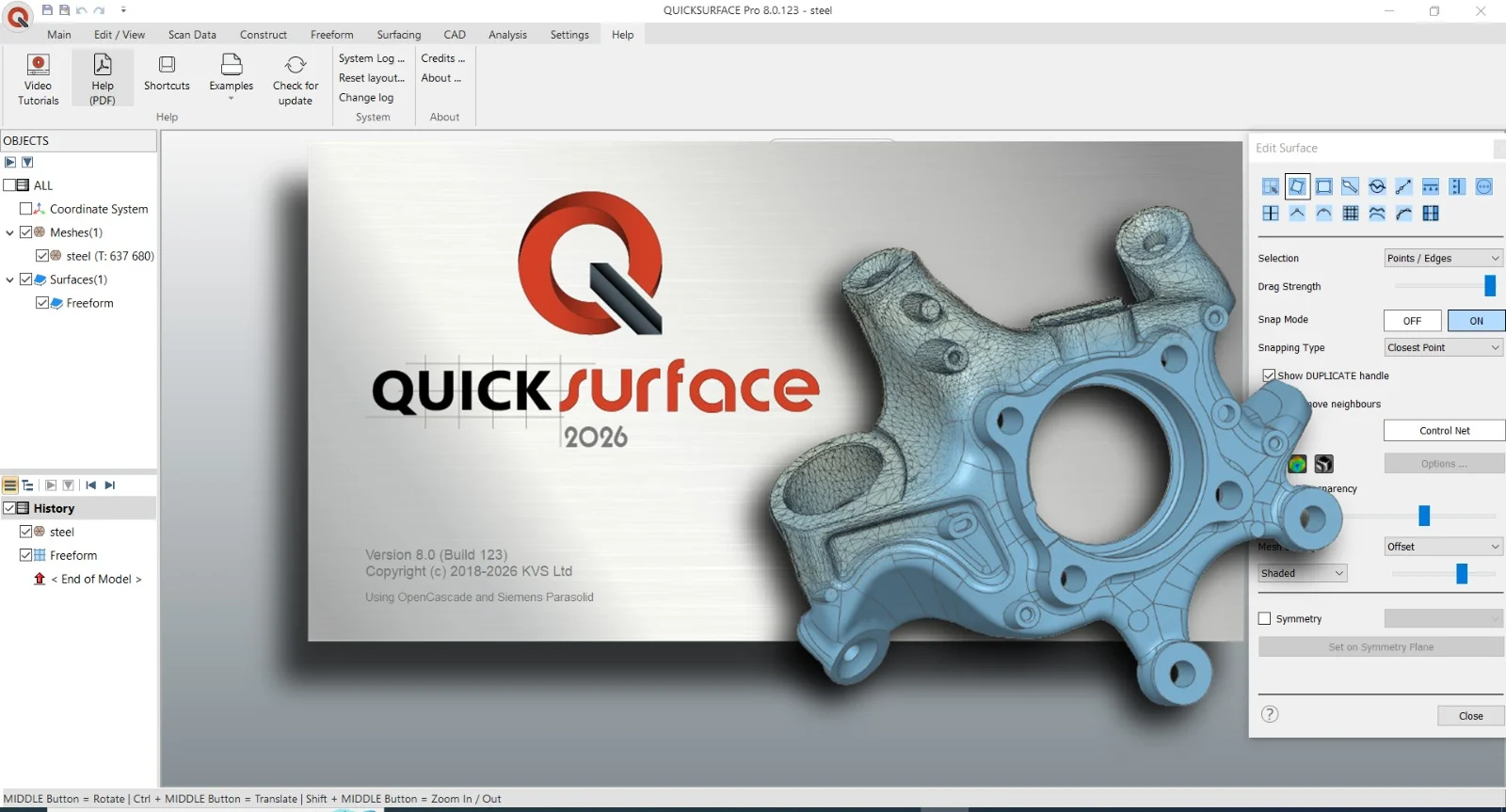
Overview of QuickSurface Pro 2026
Table of Contents
QuickSurface Pro 2026 represents the most comprehensive update to the QuickSurface line, introducing powerful CAD functionality powered by the Siemens Parasolid kernel. Unlike many reverse engineering tools that require a separate CAD platform for final modeling, QuickSurface Pro operates as a self-contained solution with its own parametric 3D CAD modeling capabilities.
The software is developed by KVS Ltd. and distributed through authorized resellers and 3D scanner manufacturers worldwide. It is available in multiple editions—QuickSurface Lite for beginners and hobbyists, QuickSurface Pro for professional engineers, and QuickSurface for SOLIDWORKS for teams already working within the SOLIDWORKS ecosystem.
The 2026 release builds on years of development with a focus on three core pillars: accuracy through the Parasolid kernel, speed via AI-powered automation, and flexibility through hybrid parametric and freeform modeling tools.
Key Features
QuickSurface Pro 2026 offers a comprehensive feature set designed for professional reverse engineering workflows.
Hybrid Parametric and Freeform Modeling
The software allows users to create both free-form surfaces and parametric solid models within the same project. This hybrid approach means you can handle prismatic mechanical parts and organic shapes in one unified workflow.
AI-Powered Automatic Surfacing
QuickSurface Pro leverages AI-driven automatic surfacing to accelerate the most time-consuming parts of the reverse engineering process. This feature reduces manual modeling time while maintaining high accuracy.
Real-Time Deviation Analysis
A color-map deviation analyzer continuously compares the CAD model against the original scan data. This real-time feedback confirms that your model stays faithful to the source mesh at every stage of modeling.
Siemens Parasolid Kernel Integration
The 2026 version is powered by the Siemens Parasolid kernel, delivering faster performance, enhanced solid editing stability, and rock-solid reliability for complex CAD operations.
Multi-Format Scan Data Import
QuickSurface Pro supports mesh data in STL, OBJ, and PLY formats, as well as PTX point clouds for long-range scanner data. As a 64-bit application, it can handle meshes of virtually any size.
Advanced CAD Export Options
High-quality models can be exported in IGES or STEP formats for seamless integration with CAD/CAM systems, or prepared directly for 3D printing and CNC machining.
Direct SOLIDWORKS Integration
QuickSurface for SOLIDWORKS brings reverse engineering capabilities directly into the SOLIDWORKS environment, streamlining workflows for teams already using that platform.
What’s New in QuickSurface 2026 (v8.0 Build 123)
The 2026 release introduces twelve new major features designed to boost productivity and accuracy.
Selection-Based Symmetry Plane
This new tool compensates for real-world imperfections while maintaining precision in critical regions. It is particularly useful when working with scan data from parts that may have minor asymmetries or manufacturing tolerances.
Advanced Lofting Tools
Create smooth, continuous surfaces with ultimate flexibility. The enhanced lofting capabilities support more complex surface transitions and guide curve configurations.
Enhanced Thickening and Shelling
Produce production-ready geometry faster and more reliably. The improved thickening and shelling tools reduce manual cleanup work on thin-walled parts.
Draft & Move Face
Make quick manufacturability adjustments with precision and ease. These tools allow you to introduce draft angles and reposition faces directly on the model without rebuilding features.
Advanced Fillets
The updated fillet tools provide better control over edge blending and transitions, essential for producing manufacturable geometries.
Surface Flattening
Generate outlines for decals, patterns, or marking applications from curved surfaces.
Mesh Split with 3D Sketch
The new mesh splitting capability with 3D sketch tools gives users greater control when segmenting complex scan data into manageable regions for individual surfacing.
System Requirements
QuickSurface Pro 2026 runs exclusively on Windows platforms. Below are the minimum and recommended specifications.
Minimum System Requirements
| Component | Requirement |
|---|---|
| Operating System | Windows 10 (64-bit) |
| Processor | Intel Core i5 or equivalent |
| Memory | 16 GB RAM |
| Storage | 256 GB |
| Graphics | Dedicated NVIDIA or AMD graphics card |
| Internet | Required for software activation |
Recommended Specifications
For optimal performance with large scan datasets and complex parametric models, the following configuration is recommended:
| Component | Recommendation |
|---|---|
| Operating System | Windows 11 (64-bit) |
| Processor | Intel Core i7 or higher |
| Memory | 32 GB RAM or more |
| Storage | 512 GB SSD |
| Graphics | NVIDIA Quadro or AMD Radeon Pro series |
The software supports Windows 10 and Windows 11 (64-bit versions). As a 64-bit application, QuickSurface Pro can load and manipulate meshes of any size without the memory limitations of 32-bit software.
Installation Guide
Installing QuickSurface Pro 2026 follows a straightforward process. Here is the step-by-step procedure.
Step 1: Obtain the Installer
Download the installation file from the official QuickSurface website or through your authorized reseller. The installer is provided as an MSI package for Windows.
Step 2: Run the Installer
Locate the downloaded file (typically named QSSetup_x64.msi or similar) and double-click to launch the installation wizard.
Step 3: Accept the License Agreement
Review the end-user license agreement and accept the terms to proceed with the installation.
Step 4: Choose Installation Directory
Select the destination folder for the software. The default location is typically C:\Program Files\QuickSurface Pro 2026. You may change this if needed.
Step 5: Complete the Installation
Follow the remaining prompts to complete the installation. The process should take only a few minutes on a modern system.
Step 6: Activate Your License
Upon first launch, you will be prompted to enter your license key. An internet connection is required for activation. License keys are delivered via email after purchase, typically within three business days.
Step 7: Verify Installation
Open the software and navigate to the Help menu to confirm the version number displays as 8.0 Build 123. You can also load one of the built-in example files to verify functionality.
How to Use QuickSurface Pro 2026
The reverse engineering workflow in QuickSurface Pro follows a logical progression from scan data to finished CAD model. Here is an overview of the primary steps.
Step 1: Import Scan Data
Begin by importing your scan mesh data. QuickSurface Pro accepts STL, OBJ, and PLY mesh files, as well as PTX point clouds. Use the File > Import command and navigate to your scan data location.
Step 2: Clean and Prepare the Mesh
Before beginning surfacing work, use the mesh editing tools to:
-
Reduce polygon count without losing quality
-
Fill holes in the mesh
-
Remove outliers and noise
-
Smooth rough areas
The built-in polygon reduction function lets you create meshes with an appropriate number of triangles while preserving quality.
Step 3: Align and Register Scan Data
Use the alignment tools to position the scan data correctly in the world coordinate system. QuickSurface Pro supports alignment by features, scan-to-scan registration, and scan-to-CAD alignment.
Step 4: Extract Geometric Features
Identify and extract key geometric primitives such as planes, cylinders, spheres, and cones from the scan data. These features serve as the foundation for parametric modeling.
Step 5: Create Surfaces and Solids
Choose between two primary modeling approaches:
Freeform Surfacing: Use automatic surfacing tools to generate smooth NURBS surfaces from the mesh data. The AI-powered algorithms handle the complex math behind surface creation.
Parametric Modeling: Use traditional CAD commands—extrude, revolve, loft, sweep—to build models with full feature trees and design history.
Step 6: Analyze Deviation
Throughout the modeling process, use the real-time deviation analyzer to compare your CAD model against the original scan data. The color-map display makes it immediately clear where your model deviates from the source.
Step 7: Export or Integrate
Once complete, export your model in IGES or STEP format for use in other CAD/CAM systems, or proceed directly to manufacturing preparation. Users with QuickSurface for SOLIDWORKS can work directly within that environment.
Best Use Cases for QuickSurface Pro 2026
QuickSurface Pro serves a wide range of industries and applications. Here are the most common use cases.
Reverse Engineering Legacy Parts
When original CAD files are lost or unavailable, QuickSurface Pro allows you to reconstruct accurate parametric models from physical parts. This is essential for maintaining and repairing older equipment.
Tooling, Molds, and Fixtures
Reconstruct tooling, molds, and fixtures from physical scan data. The software handles both prismatic and organic freeform shapes in a single workflow, making it suitable for complex tooling geometries.
Industrial and Product Design
From concept development to production-ready models, QuickSurface Pro supports industrial designers in creating accurate digital representations of physical products.
Automotive and Aerospace
The automotive and aerospace industries rely on QuickSurface Pro for aerodynamic surface reconstruction, component reverse engineering, and manufacturing preparation.
Medical and Dental
Custom medical and dental appliances require precise fit to patient anatomy. QuickSurface Pro enables the creation of patient-specific CAD models from scan data.
Arts and Heritage
Museums and heritage organizations use QuickSurface Pro to digitally preserve artifacts and create reproductions while maintaining the integrity of original pieces.
Quality Inspection and Comparison
Use the scan-to-CAD comparison tools to verify manufactured parts against design intent. The deviation analysis capabilities make QuickSurface Pro a valuable tool for quality control workflows.
Advantages and Limitations
Key Advantages
Standalone Operation: QuickSurface Pro does not require a separate CAD platform for modeling. Everything needed for the reverse engineering workflow is included in one application.
Parasolid Kernel: The Siemens Parasolid kernel provides industry-standard geometric modeling reliability and compatibility.
AI-Powered Automation: Automatic surfacing and smart feature recognition reduce the manual effort required for complex reconstructions.
Hybrid Modeling: The ability to work with both freeform surfaces and parametric solids in the same project eliminates workflow breaks and data translation issues.
Broad Scanner Compatibility: The software works with any 3D scanner that exports STL, OBJ, or PLY mesh files, or PTX point clouds. This means you are not locked into a specific scanner brand.
Real-Time Validation: Continuous deviation analysis confirms model accuracy throughout the modeling process, reducing the risk of errors.
Limitations to Consider
Windows Only: QuickSurface Pro runs exclusively on Windows 10 and 11 (64-bit). Mac and Linux users will need virtualization or alternative solutions.
Learning Curve: While the software is more intuitive than many professional CAD tools, new users should expect a learning period, particularly for the parametric modeling features.
Graphics Card Requirement: A dedicated NVIDIA or AMD graphics card is required. Systems with only integrated graphics may not perform adequately.
No Native Mac Support: There is no macOS version available.
Price Point: As professional-grade software, QuickSurface Pro represents a significant investment. However, the standalone nature of the software means there is no need to purchase an additional CAD license for basic modeling tasks.
Alternatives to QuickSurface Pro
Several other reverse engineering and scan-to-CAD solutions are available on the market. Here is a comparison of key alternatives.
| Software | Developer | Key Strength | Best For |
|---|---|---|---|
| Geomagic Design X | 3D Systems | Comprehensive parametric reverse engineering | Large engineering teams |
| Mesh2Surface | KVS Ltd. | Rhino integration | Rhino users |
| Ansys SpaceClaim | Ansys | Direct modeling with reverse engineering tools | Simulation-focused workflows |
| Fusion 360 | Autodesk | Integrated CAD/CAM/CAE platform | Small to mid-size businesses |
| SOLIDWORKS with ScanTo3D | Dassault Systèmes | Native SOLIDWORKS integration | Existing SOLIDWORKS users |
QuickSurface Pro’s primary advantage over these alternatives is its combination of standalone operation, Parasolid kernel support, and competitive pricing for multiple licenses. As one distributor notes, “Multiple licenses cost the same as a single seat of comparable mainstream software”.
Frequently Asked Questions
What file formats does QuickSurface Pro 2026 support for import?
QuickSurface Pro imports mesh data in STL, OBJ, and PLY formats, as well as PTX point clouds for long-range scanner data. The 64-bit architecture allows it to handle meshes of virtually any size.
Can QuickSurface Pro export models to other CAD software?
Yes. QuickSurface Pro exports high-quality models in IGES and STEP formats, which are universally compatible with major CAD/CAM systems including SOLIDWORKS, Fusion 360, and others.
What is the difference between QuickSurface Lite and QuickSurface Pro?
QuickSurface Lite is designed for beginners and hobbyists, offering essential mesh editing, feature extraction, and freeform surfacing tools with export to IGES and STEP. QuickSurface Pro adds full parametric modeling, boolean operations, feature trees, point cloud support, and direct SOLIDWORKS integration. Pro is recommended for professional engineers and complex projects.
Does QuickSurface Pro work with any 3D scanner?
Yes. QuickSurface Pro is compatible with any 3D scanner that exports STL, OBJ, or PLY mesh files, as well as PTX point clouds. This open format support means you are not restricted to a specific scanner brand.
Is QuickSurface Pro available for macOS?
No. QuickSurface Pro is a Windows-only application, requiring Windows 10 or Windows 11 (64-bit). Mac users would need to run the software through virtualization or Boot Camp.
What is the Siemens Parasolid kernel and why does it matter?
Parasolid is a geometric modeling kernel developed by Siemens that is used in many professional CAD applications. Its integration into QuickSurface 2026 means the software produces CAD models that are fully compatible with downstream engineering workflows, with greater stability and performance than previous versions.
Can I try QuickSurface Pro before purchasing?
Yes. QuickSurface offers a free 30-day trial of QuickSurface Pro. This allows you to evaluate the software’s capabilities with your own scan data before committing to a purchase.
Does QuickSurface Pro support CNC machining and 3D printing workflows?
Yes. Models created in QuickSurface Pro can be exported directly for CNC machining or 3D printing. The software includes manufacturing-focused tools such as draft analysis, wall thickness checking, and surface flattening to prepare models for production.
Final Thoughts
QuickSurface Pro 2026 v8.0 Build 123 represents a significant step forward for professional reverse engineering software. The integration of the Siemens Parasolid kernel addresses a long-standing need for greater stability and compatibility in scan-to-CAD workflows. The twelve new features in this release—from Selection-Based Symmetry Plane to Advanced Lofting Tools—demonstrate a commitment to continuous improvement based on real user feedback.
For engineers and designers who regularly work with 3D scan data, QuickSurface Pro offers a compelling combination of power, flexibility, and value. The standalone nature of the software eliminates the need for a separate CAD license for many reverse engineering tasks, while the hybrid modeling approach supports both organic freeform shapes and precise parametric components.
The learning curve is real, but the investment in learning the software pays dividends through faster project completion and higher-quality output. Whether you are reconstructing legacy parts, preparing models for manufacturing, or exploring reverse engineering for the first time, QuickSurface Pro 2026 provides the tools and reliability needed for professional results.
For teams already working in SOLIDWORKS, the dedicated QuickSurface for SOLIDWORKS edition offers a natural integration that preserves existing workflows while adding powerful reverse engineering capabilities. For everyone else, QuickSurface Pro stands as one of the most capable and cost-effective standalone reverse engineering solutions available today.
Our Paid Service
“We do not sell or provide any software. We only offer professional support services. If any software on your system is not working properly, or you are facing installation errors, crashes, or any other technical issue — just contact us. We will help you fix the problem quickly and remotely via AnyDesk. No software will be provided from our side — only expert troubleshooting and support.”