
Download Elements Elite v.5.7.2 (Professional Broadcast Playout & Media Server Software) from this link…

Overview of Elements Elite
Table of Contents
Elements Elite v.5.7.2 is a professional-grade broadcast playout and media server software designed for television studios, production houses, and live event environments. Unlike consumer video players, this automation software provides reliable, multi-format playback and scheduling with professional video I/O hardware support.
As a comprehensive channel-in-a-box (CiaB) solution, Elements Elite combines video server functionality, graphics rendering, and playout automation into a single platform. This latest version, v.5.7.2, focuses on enhancing workflow stability, expanding streaming capabilities, and improving the efficiency of media asset management for broadcast professionals.
The software serves as the central hub for broadcasting operations, enabling users to manage playlists, insert real-time graphics, and output content to various destinations, including SDI, IP streams, and NDI networks.
ScreenShots :
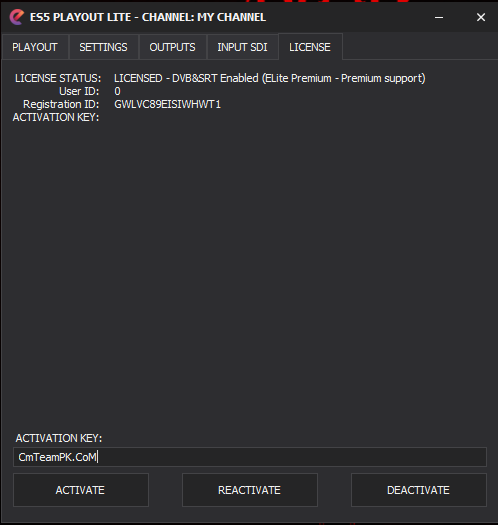
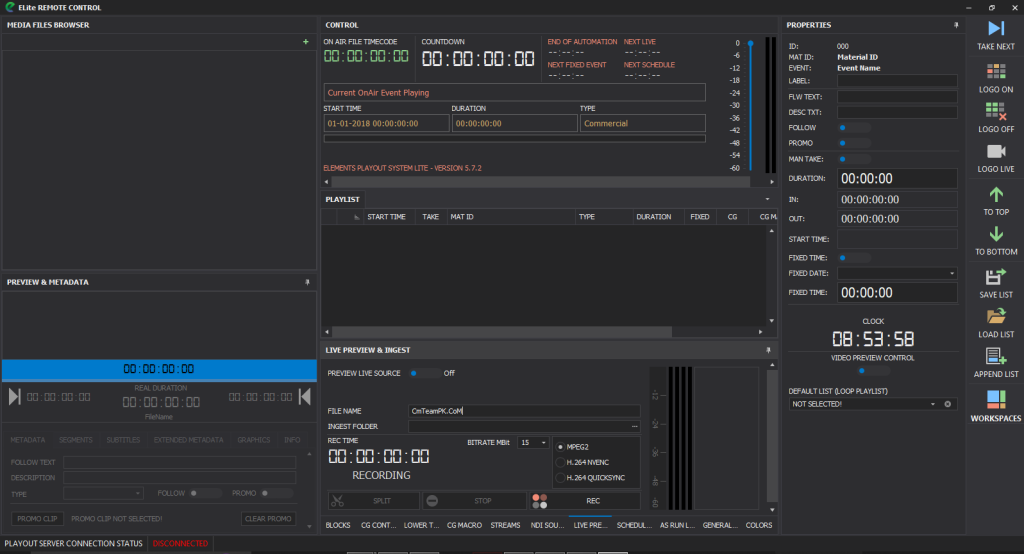
Key Features
Elements Elite v.5.7.2 is packed with features that cater to the rigorous demands of 24/7 broadcasting. Below is a detailed breakdown of its core functionalities.
Professional Video I/O and Output Destinations
The software bridges the gap between software flexibility and broadcast hardware reliability. It supports high-quality output to a wide range of professional systems:
-
SDI Output: Native support for Blackmagic Design (DeckLink, Intensity, UltraStudio) and AJA Video cards for SD/HD/2K/4K SDI output.
-
IP Streaming: DVB-compliant UDP multicast/unicast streaming with H.264 and H.265 codecs, leveraging NVIDIA NVENC or Intel QuickSync for efficient encoding.
-
Modern Transport Protocols: Support for SRT (Secure Reliable Transport) in both Caller and Listener modes for secure, reliable video contribution over unpredictable networks.
-
NDI Integration: Full support for NewTek NDI IP output, allowing seamless integration with production switchers like vMix and TriCaster over standard Gigabit networks.
Broadcast-Quality Graphics and CG
Creating a professional on-air look requires robust graphics capabilities. Elements Elite includes a built-in Character Generator (CG) for creating and managing on-screen graphics without leaving the software.
-
CG Editor & Templates: Comes with predefined, ready-to-use CG templates that can be customized for your brand.
-
Dynamic Data Links: Move beyond static text by linking graphic elements to external files. The software monitors changes to TXT files, PNG, and JPG images, updating them on-air dynamically with animation. This is perfect for live scores, news tickers, or social media feeds.
-
Multi-Layer Graphics: Play multiple CG templates simultaneously, enabling complex on-air looks with lower thirds, bugs, and full-screen graphics all at once.
-
Advanced Channel Branding: Create sophisticated promotional elements like “Now & Next” bars, upcoming promos, and music title overlays.
-
Video Squeeze & Macros: Trigger a video squeeze (picture-in-picture) when a CG template is activated, and use macro commands for complete CG automation.
Advanced Playout Scheduling and Automation
Reliable automation is the backbone of any broadcast channel. Elements Elite provides professional tools to manage your schedule.
-
Scheduler Tool: Plan your broadcast weeks in advance using the included Scheduler application. Create a playlist, define the start time, and “Publish” it. The playout engine automatically analyzes the schedule and executes it precisely.
-
Comprehensive Playlist Management: Full drag-and-drop support allows for easy organization of media from any source into the playlist, including seamless playlist reordering.
Multiple Input and Media Source Support
The software is not just a player; it can also ingest live sources.
-
Live Capture (Ingest Engine): Capture video directly from SDI SD/HD/2K/4K sources using supported Blackmagic or AJA cards.
-
NDI and Streaming Inputs: Add NDI inputs or streaming sources (UDP, RTMP, SRT) directly into your playlist. These sources feature automatic reconnection, making them reliable for live feeds.
Compliance Recording and Monitoring
For legal and archival purposes, 24/7 recording is essential. Elements Elite includes a built-in compliance recorder.
-
Continuous Recording: Record the main program output or a specific NDI/SDI source around the clock.
-
Intelligent File Management: The recorder supports automatic file splitting at adjustable minute intervals, file rounding, and auto-delete to manage storage space.
-
On-Screen Metadata: Overlay the current date and time on the recording for verification purposes.
What‘s New in Elements Elite v.5.7.2
The v.5.7.2 update focuses on refining the user experience and expanding codec support. Based on the feature set, key improvements in this version likely include:
-
Enhanced H.265/HEVC Streaming: Improved stability and performance for DVB-compliant H.265 streaming, ensuring higher quality at lower bitrates.
-
Refined SRT Protocol Handling: More robust error correction and latency control for SRT streams, making it more reliable for long-distance contribution links.
-
Workflow Optimizations: While the “instant licensing” feature was present in v.5, v.5.7.2 likely includes further optimizations to the media asset management database and the workspace manager for saving and recalling custom UI layouts.
-
Expanded Format Support: Continued refinement of native playback for formats like MXF, MOV, and ProRes without the need for transcoding.
System Requirements
To run Elements Elite v.5.7.2 effectively, your system must meet specific hardware criteria, especially concerning GPU and I/O cards. Note that these are generalized requirements based on the software’s professional nature.
Minimum Requirements:
-
Operating System: Windows 10 Pro or Windows 11 Pro (64-bit)
-
CPU: Intel Core i7 (or equivalent) with QuickSync support
-
RAM: 16 GB
-
GPU: Dedicated NVIDIA GeForce or Quadro card with NVENC support
-
Storage: Fast SSD for OS and software; high-capacity HDD or RAID array for media storage
-
I/O Hardware: Compatible Blackmagic Design or AJA Video card (for SDI I/O)
Recommended Requirements (for 4K workflows):
-
Operating System: Windows 11 Pro (64-bit)
-
CPU: Intel Core i9 or Xeon (or AMD equivalent)
-
RAM: 32 GB or more
-
GPU: NVIDIA Quadro RTX series (for robust NVENC encoding and processing)
-
Storage: High-speed NVMe SSD for OS and cache; enterprise-grade RAID 5/6 array for media
-
I/O Hardware: 4K-capable Blackmagic Design DeckLink or AJA Kona card
Installation Guide
Installing professional broadcast software requires attention to detail, especially with driver dependencies.
-
Prepare Your System: Ensure your Windows installation is fully updated. Install the latest drivers for your graphics card (NVIDIA/Intel) and, crucially, the official drivers for your Blackmagic Design or AJA hardware.
-
Run the Installer: Execute the Elements Elite v.5.7.2 setup file as an Administrator. This ensures it has the necessary permissions to install drivers and dependencies.
-
Follow the Wizard: The installation process is streamlined, requiring just a few steps. There is no need for manual SQL database setup; the integrated database is installed and configured automatically.
-
Activate the Software: Upon first launch, you will be prompted to activate your license. The “instant licensing” system validates your purchase in seconds. Remember that you can deactivate and return the license to the server if you need to migrate to new hardware in the future.
-
Initial Configuration: Open the software and navigate to the settings to configure your video output device (e.g., Blackmagic card), audio routing, and media storage paths.
How to Use the Software
Here is a basic workflow to get a channel on air using Elements Elite v.5.7.2.
-
Configure Hardware: Go to
Settings > Output. Select your primary output device (e.g., “Blackmagic DeckLink 4K Extreme”). Set your video standard (e.g., 1080p 59.94). -
Build a Playlist: Click on the “Playlist” tab. Use the media browser to locate your video files (MXF, MP4, MOV, etc.). Drag and drop the clips onto the playlist timeline. You can easily reorder clips using the same drag-and-drop method.
-
Add Graphics: To add a lower third, go to the “CG” panel. Select a template (e.g., “Lower Third Dynamic”). Drag it onto the timeline above your video track. In the template properties, link the text field to an external TXT file for live updates, or type in static text.
-
Schedule a Playlist: Open the “Scheduler” tool. Create a new event, select the playlist you just built, and set its start date and time. Click “Publish.” The main playout engine will take over and start the playlist automatically at the scheduled time.
-
Start Compliance Recording: In the “Recorder” panel, enable recording. Choose to record the “Program Out” and set your file splitting preferences, such as creating a new file every 60 minutes.
Best Use Cases
Elements Elite v.5.7.2 is tailored for professional environments where reliability and feature-depth are non-negotiable.
-
24/7 Television Channels: The primary use case. Its advanced scheduler, compliance recorder, and automation features make it ideal for running a broadcast channel with minimal manual intervention.
-
Live Sports Production: The ability to integrate live SRT feeds, overlay dynamic scoreboard data via TXT file monitoring, and trigger instant replays with graphics makes it a powerful tool for sports production trucks.
-
News Production: Journalists can benefit from the dynamic text and image links. A producer can update a “Breaking News” TXT file, and the CG element on air will update automatically with a smooth animation.
-
Playout for Houses of Worship: For large churches or organizations that broadcast services, Elements Elite can manage hymns, live camera feeds, and sermon slides with professional transitions and graphics.
-
Master Control for Cable Channels: As a channel-in-a-box solution, it can replace multiple pieces of traditional broadcast hardware (video servers, character generators, logo inserters) in a master control environment.
Advantages and Limitations
Advantages
-
Comprehensive Feature Set: Integrates playout, graphics, scheduling, and recording into one platform, eliminating the need for multiple systems.
-
Hardware Flexibility: Supports both Blackmagic Design and AJA cards, giving users choice in their I/O hardware.
-
Modern IP Workflows: Strong support for industry standards like NDI and SRT ensures it fits into modern, IP-centric broadcast facilities.
-
Robust Automation: The scheduler tool allows for advanced, long-term planning of broadcast weeks with precision.
-
Dynamic Graphics Engine: The ability to link on-air graphics to live external data sources is a significant advantage for dynamic content.
Limitations
-
Windows-Only Platform: The software is built exclusively for Windows, which may be a limitation for studios operating on macOS or Linux-based workflows.
-
Hardware Dependency: To utilize SDI I/O, users must invest in compatible and sometimes costly Blackmagic Design or AJA hardware.
-
Learning Curve: The depth of features, particularly the scheduler and CG tools, requires a dedicated period of training to master.
-
Resource Intensive: High-resolution (4K) multi-layer playback and encoding demand a high-performance workstation with a powerful GPU.
Alternatives to Elements Elite
Depending on your specific needs and budget, several alternatives exist in the broadcast software space.
| Software | Key Focus | Platform | Best For |
|---|---|---|---|
| Elements Elite | All-in-one Playout & CG | Windows | Mid-range broadcast, IP/SDI hybrid workflows |
| OBS Studio | Live Streaming & Recording | Win/macOS/Linux | Live streaming, entry-level production (free) |
| vMix | Live Production & Switching | Windows | Live event production, streaming, studio switching |
| CasparCG | Playout & Graphics Server | Windows | Broadcast automation, server-based playout (open-source) |
| PlayBox Technology | Channel-in-a-Box | Windows | Enterprise-level broadcast, multi-channel management |
| Imagine Communications | Playout & Channel Branding | Windows/Linux | Large-scale broadcast facilities, end-to-end solutions |
For users requiring professional SDI I/O and a robust scheduler, Elements Elite holds a strong position against general-purpose tools like OBS, while being more accessible than some enterprise-level platforms.
Frequently Asked Questions
1. What is Elements Elite software used for?
Elements Elite is a professional broadcast playout and media server software used to run television channels. It plays video files, displays dynamic graphics, schedules programs, and outputs the final signal to air via SDI or IP.
2. Is Elements Elite v.5.7.2 compatible with Blackmagic Design hardware?
Yes, it has native support for Blackmagic Design cards, including DeckLink, Intensity, and UltraStudio models for SDI input and output [citation:original text].
3. Can I stream live events with Elements Elite?
Absolutely. The software supports streaming via RTMP (using NVENC encoding) and SRT, making it suitable for live contribution and distribution to platforms or between studios [citation:original text].
4. What is the Scheduler tool in Elements Elite?
The Scheduler is a built-in application that allows you to plan your broadcast content days or weeks in advance. You assign playlists to specific times, and the main playout engine executes them automatically.
5. How does the dynamic CG feature work?
The Character Generator can monitor external files. For example, if you link a text template to a TXT file on your hard drive, any time that file is updated and saved, the on-air graphic will automatically update with a smooth animation.
6. Does Elements Elite support 4K video playback?
Yes, the software supports 4K workflows when paired with compatible 4K-capable Blackmagic Design or AJA hardware and a sufficiently powerful computer.
7. What is the compliance recorder?
The compliance recorder is a feature that automatically records your on-air output 24/7. It can split recordings into files by duration (e.g., every 60 minutes) and overlay the date and time for legal and archival records.
Final Thoughts
Elements Elite v.5.7.2 stands out as a robust and versatile channel-in-a-box solution for the broadcast industry. Its strength lies in bridging the gap between traditional SDI hardware and modern IP-based workflows, all while providing powerful automation and dynamic graphics capabilities. By integrating scheduling, playback, and compliance recording into a single platform, it offers a compelling value proposition for broadcasters looking to streamline their operations.
For professionals seeking a reliable, feature-rich playout server that supports standard broadcast I/O cards from Blackmagic Design and AJA, Elements Elite v.5.7.2 is a solution worthy of a technical evaluation. Its focus on stability and professional-grade outputs ensures it remains a relevant tool in the evolving landscape of television broadcasting.
Premium Software Support Service
If you need professional help with software installation, setup, or technical configuration, our team is available to assist you.
Contact & Support
For quick assistance and latest updates, connect with us using the links below:
🔹 Direct Telegram Support
https://t.me/PlayoutKing
🔹 Official Telegram Updates Group
https://t.me/yourgroup
🔹 WhatsApp Community Group
https://chat.whatsapp.com/yourlink
Service Policy
- Remote testing available through AnyDesk before confirmation.
• Verify the setup and performance before completing the order.
• Support available for single or multiple systems.
• Step-by-step guidance to ensure smooth installation and working environment.
Our goal is to provide reliable technical assistance so your software runs smoothly without interruptions.