

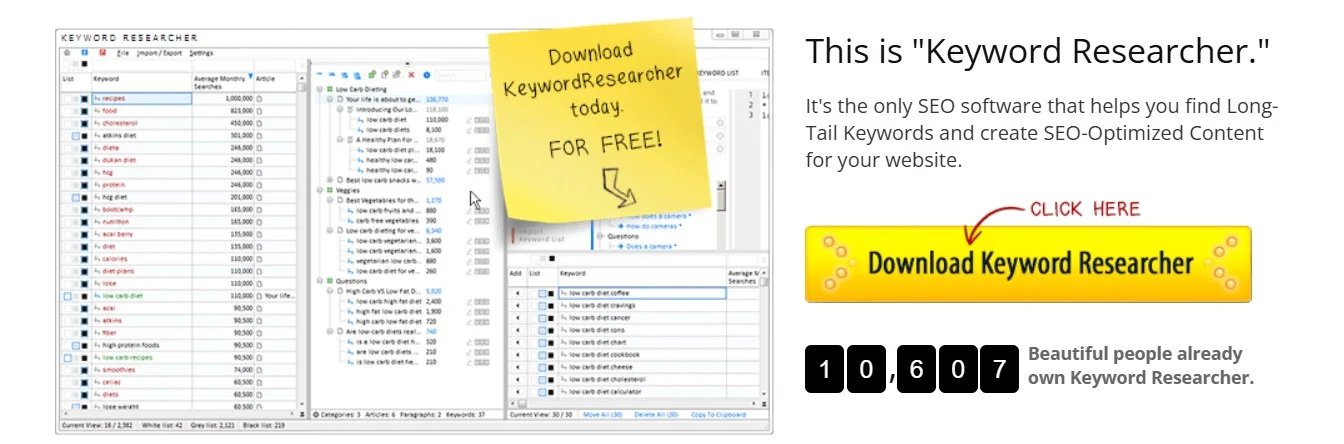
Overview of Keyword Researcher Pro
Table of Contents
Keyword Researcher Pro is a dedicated desktop-based SEO software developed by Web Marketing Magic. It is engineered to help users generate a vast list of keyword ideas, analyze search volume and cost-per-click (CPC) data, and assess the competitiveness of specific search terms. Unlike many browser-based tools, this software operates locally on your machine, providing speed and a robust set of features for in-depth, offline analysis.
The primary goal of Keyword Researcher Pro is to eliminate the guesswork in keyword selection. It provides actionable data and metrics, allowing users to identify high-value, low-competition opportunities that can drive significant organic traffic. The software is renowned for its user-friendly interface, making it accessible to both beginners and experienced SEO professionals.
Key Features of Keyword Researcher Pro
Keyword Researcher Pro is packed with features that streamline the keyword research process. Here are some of its most notable capabilities:
-
Extensive Keyword Generation: The software utilizes multiple sources to generate keyword ideas. You can start with a “seed keyword” and the tool will expand it into hundreds or even thousands of related long-tail keywords. It also features a “Related Keywords” module, which mines suggestions from various search engines like Google, YouTube, and Amazon, ensuring you capture user intent across different platforms.
-
Competition Analysis: One of the software’s standout features is its ability to measure keyword competition. It assigns a “Competition” score, helping you gauge how difficult it would be to rank for a particular term. This score is based on several factors, including the number of search results for the exact phrase and the authority of the sites currently ranking.
-
Search Volume and CPC Data: For a comprehensive view of a keyword’s potential, the tool integrates with metrics like monthly search volume and cost-per-click. This data is crucial for SEO and is particularly valuable for users involved in pay-per-click (PPC) advertising campaigns.
-
Keyword Filtering and Organization: To manage extensive keyword lists, the software offers powerful filtering options. You can filter keywords by competition level, search volume, CPC, and more. You can also organize your research into projects and groups, making it easy to manage different clients or niches.
-
Data Export and Integration: The tool allows you to export your keyword lists in various formats, such as CSV, making it easy to integrate your findings into other SEO tools, content management systems, or Google Ads.
What’s New in the 2026 Version
The 2026 version of Keyword Researcher Pro introduces several updates and enhancements designed to improve performance and user experience. While the core functionality remains robust, the latest version includes:
-
Improved Data Accuracy: Backend updates have been implemented to enhance the accuracy of search volume and competition data, providing a more reliable foundation for strategic decisions.
-
Performance Optimizations: The software now runs faster, with quicker keyword generation and analysis times, even when working with large datasets.
-
Interface Refinements: The user interface has been refined for a more intuitive experience, making it easier to navigate between modules and access features.
-
Expanded Keyword Sources: The keyword generation engine has been enhanced with additional sources to provide a broader and more diverse pool of keyword suggestions.
System Requirements for Keyword Researcher Pro
Before installing, ensure your system meets the following minimum requirements:
-
Operating System: Windows 7, 8, 10, or 11. (Mac users may need to run it using virtualization software like Parallels or Boot Camp).
-
Processor: 1 GHz or faster processor.
-
RAM: 512 MB minimum (1 GB or more is recommended).
-
Hard Disk Space: 50 MB of free space.
-
Internet Connection: Required for initial activation and for accessing data APIs.
Installation Guide
Getting started with Keyword Researcher Pro is a straightforward process:
-
Download: After purchase, you will receive a download link for the setup file (
Keyword-Researcher-Pro.exe). -
Install: Run the downloaded file and follow the on-screen instructions. The installation wizard is simple and will guide you through the process.
-
Activate: Upon first launch, the software will prompt you to enter your license key. Enter the key provided in your purchase confirmation email to activate the full version. For a trial, you can typically run the software in a limited mode without a key.
How to Use the Software
Using Keyword Researcher Pro effectively involves a few key steps, which we will outline below.
Step 1: Starting a New Project
Upon launching the software, you can start by creating a new project. This helps keep your research organized.
-
Click on File > New Project.
-
Give your project a relevant name (e.g., “Content Marketing Strategy”).
-
You’ll then be prompted to enter your seed keyword. This is your starting point—a broad term related to your niche. For example, if you are in the software industry, you might enter “SEO software.”
Step 2: Generating Keywords
This is the core function of the tool. There are several ways to generate keyword ideas:
-
Keyword Researcher Tab: Enter your seed keyword here and click the “Get Ideas” button. The software will generate a list of related keywords, often including long-tail variations.
-
Related Keywords Tab: This feature generates suggestions from sources like Google, YouTube, and Amazon. Simply enter your keyword and select your preferred source to get a list of related search queries.
Step 3: Analyzing and Filtering Keywords
Once you have a list of keywords, the real analysis begins. The software displays crucial metrics for each term.
-
Review the Data: Look at the columns for Searches (monthly volume) and Comp (competition score).
-
Apply Filters: Use the filter options to refine your list. For example, you can filter to show only keywords with high search volume and low competition.
-
Assess Intent: Look at the keywords and their modifiers (e.g., “buy,” “review,” “how-to”) to determine the searcher’s intent.
Step 4: Exporting Your List
After you have curated a list of high-potential keywords, it’s time to save your work.
-
Click on the Export button.
-
Choose your desired format, such as CSV (Comma Separated Values) .
-
This file can then be imported into your content management system, Excel, or any other SEO tool.
Best Use Cases for Keyword Researcher Pro
This tool is incredibly versatile and can be used in a variety of scenarios:
-
Content Strategists: Uncover topic clusters and plan an editorial calendar that targets a wide range of relevant search terms.
-
SEO Auditors: Identify new keyword opportunities to fill gaps in a website’s existing content.
-
PPC Managers: Generate negative keywords to prevent ad spend on irrelevant queries and find cost-effective PPC terms.
-
E-commerce Businesses: Discover long-tail keywords that indicate purchase intent, helping optimize product descriptions and ad campaigns.
-
Affiliate Marketers: Find low-competition keywords to rank for and drive targeted affiliate traffic to review or product pages.
Advantages and Limitations
Like any software, Keyword Researcher Pro has its strengths and weaknesses.
Advantages:
-
Cost-Effective: Compared to many subscription-based tools, it offers a one-time purchase option, making it a budget-friendly choice.
-
Comprehensive Data: It provides a robust set of metrics, including competition scores and CPC data.
-
Desktop-Based: Being a desktop application means it can be faster and more reliable than some cloud-based tools, especially when handling large lists.
-
User-Friendly Interface: The software is intuitive and easy to navigate, suitable for beginners.
Limitations:
-
Windows-Only: It is not natively available for Mac or Linux users, requiring additional setup to run.
-
Data Source Dependency: The accuracy of its data is dependent on the third-party sources it uses. While generally accurate, it’s always good practice to cross-reference data with other tools.
-
Offline Functionality: While the software can be used offline, features that pull live data (like search volume) require an internet connection.
Alternatives to Keyword Researcher Pro
While Keyword Researcher Pro is a powerful tool, it’s wise to consider alternatives. Here’s a comparison with some popular competitors:
| Feature | Keyword Researcher Pro | Ahrefs Keywords Explorer | SEMrush Keyword Magic Tool | Moz Keyword Explorer |
|---|---|---|---|---|
| Primary Platform | Desktop (Windows) | Web-Based | Web-Based | Web-Based |
| Pricing Model | One-Time Fee | Subscription | Subscription | Subscription |
| Key Strength | Cost-effective, comprehensive local analysis | Backlink analysis and organic traffic data | Competitive research and PPC data | Simplicity and ease of use |
| Data Focus | Search volume, CPC, Competition | Click-through rate, keyword difficulty, SERP overview | Keyword difficulty, trend data, SERP features | Keyword difficulty, organic CTR, priority score |
| Best For | Budget-conscious users needing a powerful desktop tool | Advanced SEO professionals needing deep competitive insights | All-in-one digital marketing platform for SEO and PPC | Marketers and site owners looking for a simple, reliable tool |
Frequently Asked Questions
Q: What is Keyword Researcher Pro?
A: Keyword Researcher Pro is a powerful desktop-based SEO tool designed for in-depth keyword research and discovery. It helps users generate keyword ideas, analyze metrics like search volume and competition, and identify lucrative opportunities for SEO and PPC campaigns.
Q: Is Keyword Researcher Pro suitable for SEO beginners?
A: Yes, its intuitive and user-friendly interface makes it an excellent choice for beginners. The software guides you through the keyword research process with clear metrics and simple steps, making it easy to start generating and analyzing keywords.
Q: How does Keyword Researcher Pro work?
A: You start by entering a “seed keyword” into the software. It then queries multiple data sources to generate a comprehensive list of related keywords. The tool displays metrics like monthly search volume, cost-per-click (CPC), and a competition score for each keyword, allowing you to filter and select the best ones.
Q: Is there a free version or trial of Keyword Researcher Pro?
A: The software typically offers a free trial version with limited features. This allows you to test its core functionality before committing to a purchase. The full version requires a one-time purchase license.
Q: What makes Keyword Researcher Pro different from Google Keyword Planner?
A: While Google Keyword Planner is a valuable free tool, it is primarily designed for advertisers. Keyword Researcher Pro is a dedicated SEO tool that provides more in-depth competition analysis, generates a wider variety of long-tail keywords, and offers data from multiple sources (not just Google). It also does not require you to run active ad campaigns to access its full features.
Q: Can I use Keyword Researcher Pro on a Mac?
A: Officially, the software is designed for Windows. However, Mac users can still use it by running a Windows virtual machine on their Mac using software like Parallels Desktop or VMware Fusion, or by using Boot Camp to install Windows natively.
Final Thoughts
Keyword Researcher Pro 2026 stands out as a robust, cost-effective solution for anyone serious about SEO. Its powerful keyword generation, insightful competition metrics, and user-friendly interface make it a valuable asset for both beginners and seasoned professionals. While it has its limitations, such as being Windows-only and having data dependency on third-party sources, its advantages often outweigh these drawbacks.
The 2026 version brings welcome performance improvements and interface refinements, solidifying its position as a go-to tool for keyword discovery. Whether you are planning a content strategy, optimizing a website, or launching a PPC campaign, Keyword Researcher Pro provides the actionable data you need to make informed decisions and achieve better search engine rankings.
Our Paid Service
“We do not sell or provide any software. We only offer professional support services. If any software on your system is not working properly, or you are facing installation errors, crashes, or any other technical issue — just contact us. We will help you fix the problem quickly and remotely via AnyDesk. No software will be provided from our side — only expert troubleshooting and support.”