

Overview of OmniPlayer E2
Table of Contents
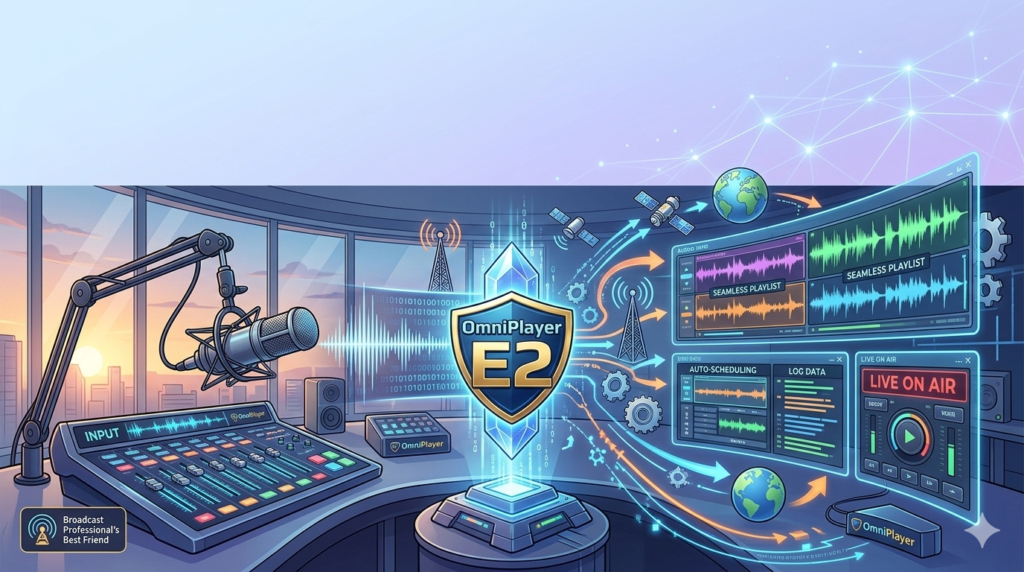
In the fast-paced world of radio broadcasting, reliability and efficiency are non-negotiable. OmniPlayer E2 is a state-of-the-art radio automation software designed to meet the demands of modern radio stations, from small community broadcasters to large, multi-station networks. Developed as a robust and scalable solution, it provides a centralized platform for managing production, scheduling, live broadcasting, and digital distribution.
This software is engineered to integrate seamlessly with third-party systems, including mixing consoles, scheduling software, and social media platforms, making it a versatile hub for any broadcast operation. Known for its high reliability and intuitive design, OmniPlayer E2 has become a preferred choice for radio professionals across Europe, particularly in the Netherlands and France, and is trusted by major industry leaders in Italy. By choosing OmniPlayer E2, broadcasters invest in a powerful management tool that reduces operational costs while significantly increasing workflow efficiency, ensuring a smooth and professional on-air experience.
Key Features
OmniPlayer E2 is packed with advanced features that streamline every aspect of radio broadcasting. Its modular design allows stations to use only the tools they need while providing the flexibility to scale operations over time.
Centralized Database Management
At the core of OmniPlayer E2 is its powerful Database Explorer, a central repository for all your audio assets, metadata, and logs. This system allows multiple users across different workstations to access, edit, and organize content simultaneously without conflicts. The Custom Field Editor further enhances this by allowing stations to create bespoke data fields and forms, tailoring the database structure to specific workflows, whether for managing complex advertising traffic or categorizing niche music genres.
Professional Audio Production Suite
OmniPlayer E2 transforms audio production with a suite of professional tools.
-
Multi-Source Audio Capture: Users can record audio from various sources, including CDs, tapes, live microphones, and remote phone calls, directly into the system.
-
SmartTrack Multitrack Editor: This advanced, non-linear editing tool supports collaborative workflows, allowing multiple editors to work on the same project. It features professional-grade editing capabilities and can even transcribe speech to text using third-party engines like Google Cloud Speech-to-Text or Zoom Media, enabling rapid editing by marking up text segments.
Intelligent Scheduling and Playout
Managing a station’s log is effortless with OmniPlayer E2’s smart scheduling tools. The system allows programmers to build complex playlists for days, weeks, or months in advance using customizable templates. These templates can be saved and reused, eliminating repetitive manual work for tasks like scheduling weekly shows or recurring commercial blocks. The Playout Client then takes over, providing a clear, intuitive interface with real-time clocks and countdowns for live assist mode. For fully automated operations, the Singleplayer feature ensures seamless transmission across FM, DAB+, and online streams.
Multichannel Digital Distribution
Modern broadcasting extends beyond the airwaves. OmniPlayer E2 features a robust multichannel publishing system that uses API integration to automatically push content to social media platforms like Facebook and Twitter, as well as podcast services like MixCloud. The Social Media Workflow Engine automates this process, allowing stations to schedule posts, add metadata, and sync audio with visual elements, ensuring a strong and consistent online presence.
What’s New in OmniPlayer E2
While OmniPlayer E2 is a mature and stable platform, its development focuses on enhancing connectivity and future-proofing broadcast infrastructure. Key strengths that define its current iteration include:
-
Enhanced API Integrations: Deeper and more flexible APIs allow for custom application development and tighter synchronization with external non-linear editors, camera switching systems, and mixing consoles via industry-standard protocols like Ember+, DHD Global Logics, and Livewire+.
-
Improved Remote Workflows: The Remote Studio tool has been optimized for more reliable and higher-quality home voice tracking, allowing talent to record and upload content seamlessly as if they were in the main studio.
-
Expanded Visual Radio Capabilities: The OmniVeo Server provides more robust synchronization of live video, music clips, and news segments with audio playout, enabling stations to create richer, multimedia experiences for their audiences.
System Requirements
To ensure optimal performance and stability, your system should meet the following requirements for running OmniPlayer E2.
Minimum Requirements:
-
Operating System: Windows 10 Professional (64-bit recommended for larger setups, though 32-bit applications are supported)
-
Processor: Intel Core i5 or equivalent
-
RAM: 8 GB
-
Sound Card: Professional multi-channel audio interface (e.g., from RME, M-Audio)
-
Storage: SSD for operating system and software; large-capacity HDD for audio storage
Recommended & Optimized Configuration:
-
Operating System: Windows 11 Professional / Windows Server 2019+
-
Processor: Intel Core i7 / Xeon or equivalent
-
RAM: 16 GB or more
-
Database: Use Network Service for Sybase instead of the Personal Database App to avoid connection limits and errors in multi-user environments.
-
ODBC: Ensure 32-bit ODBC connections are configured, as 64-bit versions are not compatible with all modules.
Installation Guide
Setting up OmniPlayer E2 correctly is crucial for a stable and efficient broadcast environment. Follow these steps for a successful installation.
-
Prepare Your System: Before installing, ensure your Windows user account has administrative privileges. Temporarily disable any antivirus software to prevent it from interfering with the installation process.
-
Install Drivers and Prerequisites: Install the latest drivers for your professional sound card. You will also need to install the Sentinel HASP device driver to manage the software license key and prevent timeout errors.
-
Run the Installer: Execute the OmniPlayer E2 setup file as an administrator. Follow the on-screen prompts to choose your installation directory and select the components you wish to install.
-
Configure the Database: During setup, you will be prompted to configure the database. Select “Network Service for Sybase” for a multi-user setup. Configure the ODBC connection using the provided 32-bit tools.
-
Activate the License: Connect the Sentinel HASP hardware key or activate your software license. Launch the OmniPlayer E2 client and verify that the software recognizes the license.
-
Post-Installation Configuration: Run the AudioLink tool to import your initial audio library. Use DupleXX or Outline to configure the import of playlists from third-party scheduling software like Powergold.
How to Use the Software
Navigating OmniPlayer E2 is intuitive, but understanding its core modules is key to leveraging its full potential.
Managing Your Music Library
Open the Database Explorer to manage your audio assets. You can drag and drop audio files directly into the database. The system automatically scans and stores metadata, making titles instantly searchable. Use the Custom Field Editor to add station-specific information like “energy level” or “musical key” to better organize your catalog for automated scheduling.
Scheduling a Broadcast Day
Navigate to the LogEditor module. Here, you can create a new log for a specific date and channel. Use the Template Explorer to load a pre-defined schedule block (e.g., “Morning Show Template”). You can then populate the log by dragging tracks from the Database Explorer or by importing a list from third-party music scheduling software. Right-click on any item to set voice-track cues or add manual events like liners and commercial breaks.
Going Live or Automated
Launch the Playout Client for your designated channel. In Live Assist mode, the log will load clock-by-clock, giving you control over each element. You can see countdowns to the next event and use hotkeys or a simple button press to trigger audio. To start automated playout, simply load the log and engage the Singleplayer function. The system will seamlessly broadcast the entire schedule without further intervention.
Best Use Cases
OmniPlayer E2’s flexibility makes it suitable for a wide range of broadcasting scenarios.
-
Large Multi-Station Networks: Manage groups of radio stations from a centralized database. Use the Multi Basebrowser to share resources and audio files across different stations and locations, ensuring brand consistency while allowing for localized content.
-
Live-Assisted Broadcasts: For presenters who want control, the intuitive Playout Client offers a clear, fast interface for managing a live show, with instant access to jingles, sweepers, and the scheduled log.
-
Fully Automated Radio Stations: Perfect for internet radio stations or tertiary FM channels, the Singleplayer module provides reliable, 24/7 automated broadcasting, allowing station owners to focus on content creation and monetization.
-
News and Talk Radio: Journalists can use the production tools in the field to record and edit audio. The speech-to-text feature in SmartTrack allows for rapid editing of interviews, significantly speeding up the production-to-air workflow.
-
Hybrid Radio & Visual Broadcasting: Integrate live video with your audio stream for a visual radio experience, or automate the publishing of show segments to popular podcast platforms to reach audiences on-demand.
Advantages and Limitations
Like any professional software, OmniPlayer E2 has its strengths and considerations.
| Advantages | Limitations |
|---|---|
| Highly Scalable: Grows with your station from a single user to a complex multi-site network. | Learning Curve: The sheer depth of features can be overwhelming for new users, requiring initial training. |
| Exceptional Reliability: Built for mission-critical broadcasting with features like Airback for local backup. | Windows-Centric: Primarily designed for the Windows ecosystem, which may not suit all IT environments. |
| Powerful Integration: Open API and support for various industry protocols (Ember+, DHD) ensure it fits into any tech stack. | Initial Setup Complexity: Proper configuration, especially of the database and ODBC connections, requires technical expertise. |
| Comprehensive Feature Set: Combines production, scheduling, playout, and distribution in one unified system, removing the need for multiple disparate tools. | User Interface: While powerful, the interface is feature-rich and may feel dated compared to some modern, minimalist software designs. |
| Proven Industry Track Record: Trusted by major broadcasters like Italy’s Telemedia Group (Radio Deejay, Radio Capital), demonstrating its capability at scale. |
Alternatives to OmniPlayer E2
While OmniPlayer E2 is a top-tier choice, the market offers other robust radio automation software solutions. Here’s how it compares to some key alternatives.
-
RCS Zetta: A direct competitor, Zetta is known for its powerful media management and tight integration with RCS’s scheduling products like GSelector. OmniPlayer E2 often competes on pricing flexibility and its strong integration with a wide variety of hardware protocols.
-
WideOrbit (WO) Radio: A dominant force in the US market, WO Radio is a comprehensive, cloud-ready solution for large enterprise broadcasters. OmniPlayer E2 is a strong alternative for European broadcasters and those seeking a system with a strong on-premise deployment model.
-
StationPlaylist Studio: A popular and more affordable option for smaller stations and internet radio. OmniPlayer E2 provides a more enterprise-grade feature set, including advanced database management, collaborative tools, and sophisticated automation for larger, more complex operations.
-
mAirList: A flexible and cost-effective software popular in Europe. While mAirList is highly customizable, OmniPlayer E2 offers a more out-of-the-box integrated solution with dedicated tools for production, scheduling, and distribution under one umbrella.
Frequently Asked Questions
1. What is OmniPlayer E2 used for?
OmniPlayer E2 is a professional radio automation software used by broadcasters to manage all aspects of a radio station. This includes audio production, music scheduling, live and automated playout, and digital distribution to platforms like DAB+, web streams, and podcasts.
2. Can OmniPlayer E2 integrate with my existing mixing console?
Yes. OmniPlayer E2 is designed for seamless integration. It supports industry-standard protocols like Ember+, DHD Global Logics, and Livewire+, allowing it to communicate directly with a wide range of professional mixing consoles for enhanced control.
3. Is OmniPlayer E2 suitable for a small internet radio station?
Absolutely. While it’s powerful enough for large networks, its modular nature means small stations can start with essential modules like playout and scheduling, benefiting from its professional-grade reliability and audio processing as they grow.
4. How does OmniPlayer E2 handle podcast publishing?
OmniPlayer E2 features a built-in multichannel publishing system. You can select audio from your Database Explorer or LogEditor, choose a destination like a podcast host via API integration, add metadata and artwork, and schedule its release, automating the entire distribution workflow.
5. Does the software support remote voice tracking?
Yes, OmniPlayer E2 includes a dedicated tool called Remote Studio. It enables presenters and journalists to record voice tracks, edit audio, and upload finished content to the main studio database from any remote location with an internet connection.
6. What are the main benefits of using the Network Service for Sybase?
For multi-user environments, using the Network Service for Sybase is recommended over the Personal Database App because it supports more simultaneous connections, handles larger databases more efficiently, and is more stable for critical operations where multiple applications need to access the database at once.
7. How do I ensure my audio is always backed up?
OmniPlayer E2 includes Airback, a standalone local backup tool. It can be configured to automatically back up both your database and all associated audio files to a separate local drive or network location, providing a safety net in case of primary system failure.
Final Thoughts
OmniPlayer E2 stands as a testament to what dedicated, professional-grade software can achieve in the broadcasting industry. It is more than just a playout system; it is a comprehensive operational ecosystem that empowers radio professionals to produce high-quality content, manage complex schedules with ease, and distribute their brand across traditional and digital platforms seamlessly. Its adoption by major networks like Italy’s Telemedia Group underscores its reliability and advanced capabilities.
For broadcasters seeking a solution that offers both powerful performance and the flexibility to grow and adapt, OmniPlayer E2 represents a sound investment. By centralizing workflows and automating critical tasks, it allows stations to focus on what truly matters: creating engaging content and connecting with their audience. Whether you are launching a new station or seeking to upgrade an existing one, OmniPlayer E2 provides the tools, stability, and innovative features needed to thrive in the modern broadcasting landscape.
Premium Software Support Service
If you need professional help with software installation, setup, or technical configuration, our team is available to assist you.
Contact & Support
For quick assistance and latest updates, connect with us using the links below:
🔹 Direct Telegram Support
https://t.me/PlayoutKing
🔹 Official Telegram Updates Group
https://t.me/yourgroup
🔹 WhatsApp Community Group
https://chat.whatsapp.com/yourlink
Service Policy
- Remote testing available through AnyDesk before confirmation.
• Verify the setup and performance before completing the order.
• Support available for single or multiple systems.
• Step-by-step guidance to ensure smooth installation and working environment.
Our goal is to provide reliable technical assistance so your software runs smoothly without interruptions.