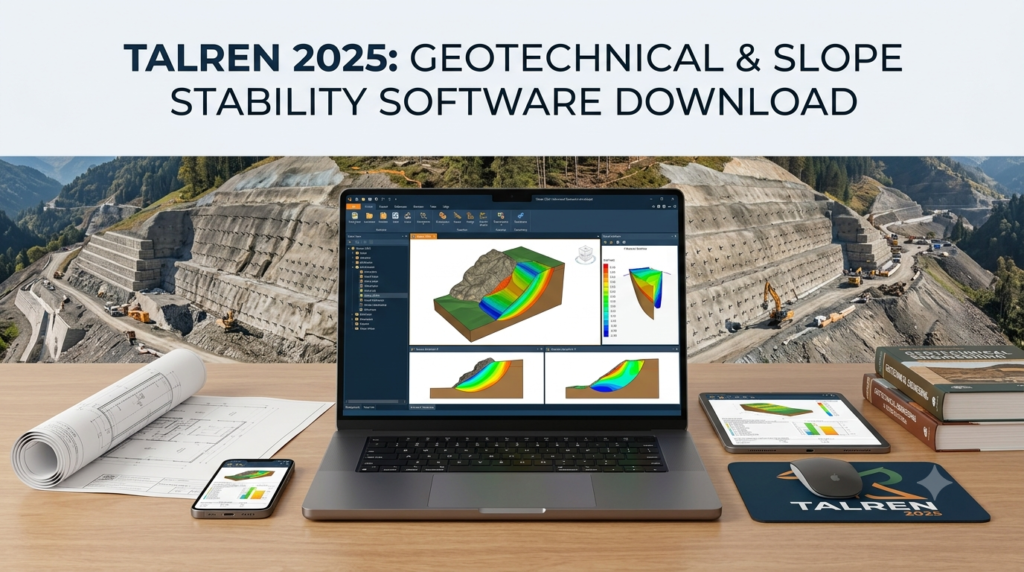

Overview of Talren Geotechnical Software
Table of Contents
Talren is specialized software designed for stability analysis of geotechnical structures, with or without reinforcement systems. The tool supports the assessment of natural slopes, embankments, dams and dikes, gravity walls, reinforced soil structures, nailed walls, and anchored retaining walls. Developed by Terrasol (a Setec group company), Talren has been validated through decades of real-world project applications, ensuring engineering professionals can trust its results for critical infrastructure decisions.
The software’s interface prioritizes user experience with intuitive data entry wizards and graphical result visualization, making complex geotechnical modeling accessible to both experienced engineers and newcomers to slope stability analysis. Engineers can manage construction phases and calculation situations within a single project file, streamlining workflow for multi-stage projects.
Key Features of Talren v6
The software incorporates a comprehensive suite of analysis tools that address the full spectrum of geotechnical stability challenges:
Multiple Calculation Methods
Talren offers several established limit equilibrium methods, including Bishop, Fellenius, and perturbation approaches for circular failure surfaces. These methods provide the foundation for assessing factor of safety against slope failure. The software automatically searches for the minimum safety factor, identifying the most critical failure surface for each analysis scenario.
Kinematic Failure Calculation Method
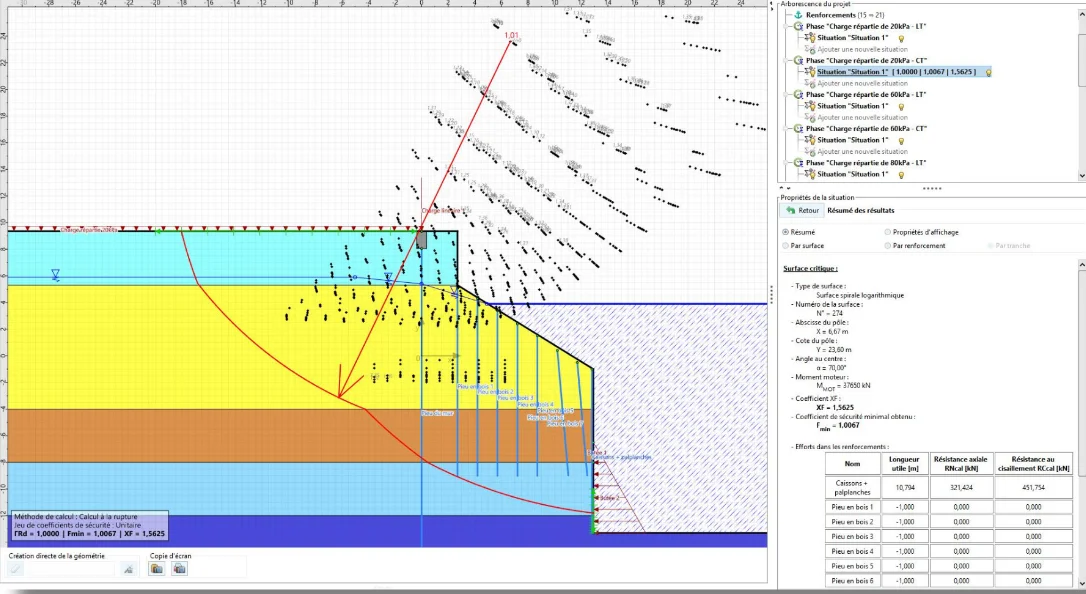
Beyond traditional slice methods, Talren integrates the kinematic approach to failure calculation based on the theory developed by J. Salençon. This method uses logarithmic spiral arcs and extends analysis capabilities beyond the limitations of conventional techniques. It enables advanced applications such as:
-
Determining active and passive earth pressure diagrams for retaining structures
-
Evaluating internal stability of reinforced soil masses
-
Analyzing complex geometries with multiple soil layers
-
Accounting for rigid inclusions and other reinforcement types
Reinforcement System Handling
Talren supports a wide range of reinforcement elements commonly used in geotechnical construction:
-
Soil nails and ground anchors
-
Piles and micropiles
-
Geotextiles and geogrids
-
Steel and polymer strips for mechanically stabilized earth
-
Rigid inclusions and barrettes
Each reinforcement type can be evaluated for its contribution working in tension, compression, shear, and bending, with combination of failure criteria for both the soil and inclusions. The software calculates maximum mobilized forces based on the principle of maximal work.
Standards Compliance
Talren incorporates requirements from current geotechnical design standards:
-
NF P 94 270 (October 2020) for justification of soil-nailed walls
-
NF P 94-281 for retaining wall design
-
Eurocode 7 application standards, with predefined partial safety factor sets
This compliance ensures that designs meet regulatory requirements in jurisdictions following these codes.
Additional Analysis Modules
Talren v6 includes optional paid modules that extend functionality for specialized needs:
Retaining Wall Module: Analyzes external global stability, local external stability, and internal stability of gravity walls, L-shaped walls, T-shaped walls, cellular concrete walls, gabion walls, and masonry structures. Automatic generation of action combinations required by Eurocode 7 is supported.
Earth Pressure Search Module: Determines active and passive pressure diagrams for multi-layer soils subjected to arbitrary loading conditions, including seismic considerations. Results can be exported to K-Réa for flexible retaining wall calculations.
Pile Module: Estimates the resistant contribution along reinforcement elements (nails, piles, inclusions, barrettes) using an elasto-plastic “p-y” model that accounts for multi-layer soil conditions and plastic deformation of the ground. The module identifies limiting factors—whether soil capacity or reinforcement structural capacity controls performance.
Flow Module: Calculates steady-state pore pressure fields for stability analyses using numerical solution of the Laplace equation. The module handles anisotropic and multi-layer soil conditions.
Sensitivity and Reliability Module: Automates sensitivity studies to evaluate parameter influence on stability. Includes reliability analysis capabilities providing safety quantification through reliability indices and failure probabilities using the RSM method.
Seismic Module: Performs automatic search for destabilizing seismic acceleration leading to limit equilibrium. An integrated seismic assistant enables empirical or analytical calculation of post-seismic irreversible displacements using Newmark-type models.
What’s New in the Latest Version
Talren v6 continues to evolve with regular updates that enhance performance and functionality. Recent updates include:
Version 6.2.20 (July 2025)
Various interface corrections, particularly related to wall analysis.
Version 6.2.19 (May 2025)
-
Correction of results display and printing errors when load groups are present
-
Fix for automatic project opening when double-clicking files
-
Calculation engine update
Version 6.2.18 (March 2025)
-
Simplified display of key numerical results for improved readability
-
Optimized printing speed and reduced PDF output file sizes
-
Various interface corrections
-
Wall calculation error fixes
Version 6.2.17 (January 2025)
-
Corrections related to nail shear capacity calculations
-
Improvements in external local stability and internal stability calculations for retaining walls
-
Enhanced phase and situation icons
-
Option to disable project history displayed as thumbnails on the home screen
Version 6.2 Performance Improvements
The calculation engine has been optimized with faster processing for slice methods, reducing analysis time for complex models.
System Requirements for Talren 2025
Talren requires a Windows-based computer meeting these specifications:
Minimum Configuration:
| Component | Requirement |
|---|---|
| Operating System | Windows 10 or 11 (32-bit or 64-bit) |
| Processor | 1.5 GHz or faster, at least 2 cores |
| RAM | 8 GB or more |
| Display Resolution | 1366 x 768 minimum |
| Storage | 1 GB available disk space |
| Port | USB port |
These requirements are modest compared to many modern engineering software packages, making Talren accessible on standard workstations without specialized hardware.
Installation Guide
Steps for Installing Talren
Step 1: Obtain the Software
Acquire Talren from an authorized distributor or directly from Terrasol. The software requires a valid license for operation. Users should contact Terrasol or their regional representative for pricing and licensing information.
Step 2: Verify System Compatibility
Ensure your workstation meets the minimum requirements above. Windows 10 or 11 is required; the software does not support macOS or Linux natively.
Step 3: Run Installer
Execute the installation package provided by Terrasol. Follow the on-screen prompts to complete installation.
Step 4: Activate License
After installation, activate your license using the provided license key or hardware dongle (USB port required).
Step 5: Apply Updates
Check for available updates through the software’s update function or by downloading patches from the Terrasol website. The latest version as of 2025 is v6.2.20.
How to Use Talren for Slope Stability Analysis
Data Input and Model Definition
Geometry Definition: Use the graphical interface to draw profiles with mouse input or import geometries from AutoCAD (DXF format). The interactive workspace supports manipulation of soil layers, the water table, surcharges, and reinforcements.
Soil Parameters: Define soil layer characteristics including unit weight, cohesion, friction angle, and permeability. Talren includes databases and wizards to streamline parameter entry.
Construction Phasing: Manage multiple execution phases and calculation situations within a single project file. This enables verification of stability throughout different construction stages.
Reinforcement Specification: Define reinforcement elements including their location, geometry, and material properties. Each reinforcement type has specific input requirements based on its behavior mode.
Running Analyses
Select Calculation Method: Choose from Bishop, Fellenius, or perturbation methods for circular failure surfaces, or activate the kinematic failure calculation for advanced analyses.
Configure Hydraulic Conditions: Define the water table and pore pressure conditions. The optional Flow module enables integrated pore pressure field calculation.
Apply Seismic Loads: For seismic analyses, use the pseudo-static method or activate the Seismic module for dynamic response assessment.
Interpreting Results
Factor of Safety: Review calculated minimum safety factors for each analysis scenario. Compare against project-specific requirements and code minimums.
Failure Surface Visualization: Examine graphical displays of critical slip circles, including safety maps and isovalue contours.
Reinforcement Forces: Review detailed tables of forces mobilized in reinforcement elements, identifying potential failure mechanisms.
Parametric Sensitivity: Use the Sensitivity module to understand parameter influence on stability results.
Best Use Cases for Talren
Natural Slope Stability: Assess stability of cut slopes, natural terrain, and excavation faces. Talren’s multiple calculation methods allow verification of results across different approaches.
Road and Railway Embankments: Evaluate stability of fill embankments with or without reinforcement. Construction phasing capabilities support staged construction analysis.
Dam and Levee Stability: Analyze earth dams and flood protection dikes under various loading conditions, including rapid drawdown and seismic loading.
Retaining Wall Design: Assess gravity, cantilever, and anchored retaining walls. The retaining wall module provides specific capabilities for wall stability verification including internal, external, and overall stability.
Soil Nailed Slopes: Design and verify soil nail reinforcement for slope stabilization. Talren includes specific functionality aligned with Clouterre recommendations and NF P 94 270 standards.
Reinforced Soil Structures: Analyze mechanically stabilized earth walls and geosynthetic-reinforced slopes with various reinforcement types.
Seismic Stability Assessment: Evaluate slope stability under earthquake loading and estimate permanent displacements.
Advantages and Limitations
Advantages
Validated Calculation Engine: The Talren calculation kernel has been validated through over 25 years of use on real projects, providing confidence in results.
Comprehensive Reinforcement Support: The software handles a complete range of reinforcement types and loading modes, making it suitable for diverse geotechnical applications.
Intuitive User Interface: Interactive graphical interface with wizards for data entry and comprehensive result visualization tools simplifies complex analyses.
Phasing Capabilities: Management of multiple construction phases and calculation situations within a single project file streamlines project workflows.
Standards Compliance: Built-in support for current European and French geotechnical design standards.
Interoperability: Direct links with PLAXIS 2D (geometry, soil characteristics, and pore pressure mesh import), AutoCAD (DXF geometry import), and K-Réa (earth pressure diagram export).
Limitations
Platform Restriction: Windows-only operation limits use in environments standardized on other operating systems.
Limit Equilibrium Focus: While the kinematic approach extends capabilities, Talren is primarily a limit equilibrium tool. Finite element method users may prefer software like PLAXIS 2D for detailed stress-strain analysis. Comparative studies show FEM results can be approximately 2.4% higher than limit equilibrium results, though this difference is often considered negligible in practice.
Specialized Nature: Talren focuses specifically on slope stability and retaining walls, making it less suitable for general geotechnical analysis involving settlement, consolidation, or foundation design.
Licensing Costs: Commercial licensing may be cost-prohibitive for smaller firms or occasional users.
Alternatives to Talren for Geotechnical Analysis
PLAXIS 2D
Overview: PLAXIS 2D is a finite element method (FEM) software for soil-structure interaction analysis. It provides detailed stress-strain behavior modeling and is particularly suited for complex geometries and advanced soil constitutive models.
Key Differences: While Talren uses limit equilibrium and kinematic approaches, PLAXIS employs finite element analysis for comprehensive assessment of stress and strain distributions. FEM can provide more realistic analysis for complex geometry and soil-structure interaction scenarios.
Best Suited For: Projects requiring detailed deformation analysis, advanced constitutive modeling, or when stress-strain behavior is critical.
SLOPE/W (GeoStudio)
Overview: SLOPE/W is a widely used limit equilibrium slope stability software that employs methods including Morgenstern-Price, Bishop, and Janbu for factor of safety calculation.
Comparison: Comparative studies show SLOPE/W and Talren (both based on limit equilibrium theory) produce consistent safety factor results for equivalent analyses. SLOPE/W is considered user-friendly with simpler parameter requirements, making it efficient for initial assessments.
MIDAS GTS
Overview: MIDAS GTS offers both FEM and limit equilibrium capabilities for geotechnical analysis. It supports 2D and 3D modeling for complex geotechnical problems.
Software Selection Guidance
When to choose Talren:
-
Project primarily involves slope stability, retaining walls, or reinforced slopes
-
Limit equilibrium analysis is sufficient
-
Compliance with French or Eurocode standards is required
-
User-friendly interface and established validation are priorities
When to consider FEM alternatives:
-
Complex geometry or loading conditions require detailed stress-strain analysis
-
Advanced soil constitutive models are necessary
-
Deformation analysis is a primary project requirement
Many practitioners adopt a combined approach, using limit equilibrium software like Talren or SLOPE/W for initial assessments and FEM tools for detailed analysis of critical areas.
Frequently Asked Questions
Is Talren suitable for 3D slope stability analysis?
Talren is primarily a 2D analysis tool. While it provides robust capabilities for 2D slope stability and retaining wall analysis, engineers requiring full 3D modeling should consider specialized 3D software options.
What standards does Talren support?
Talren supports NF P 94 270 (October 2020) for soil-nailed wall design, NF P 94-281 for retaining wall design, and Eurocode 7 application standards with predefined partial safety factor sets. Several predefined coefficient sets (Clouterre, Eurocode 7, etc.) are provided.
Can Talren import models from PLAXIS 2D?
Yes, Talren v6 can import geometry, soil characteristics, and pore pressure meshes from PLAXIS 2D, facilitating workflows that combine limit equilibrium and finite element analyses.
How does Talren handle seismic analysis?
Talren provides pseudo-static analysis for seismic loading. The optional Seismic module enables automatic search for destabilizing seismic acceleration and Newmark-type displacement calculations for post-seismic irreversible movements.
What reinforcement types does Talren support?
Talren supports anchors, soil nails, piles, micropiles, geotextiles, geogrids, steel strips, polymer strips, rigid inclusions, and barrettes, with each reinforcement evaluated for tension, compression, shear, and bending contributions.
How do I obtain Talren?
Contact Terrasol (part of the Setec group) directly through their website or authorized distributors. The software is available through commercial licensing with options for additional paid modules including retaining wall analysis, earth pressure search, pile analysis, flow analysis, and sensitivity assessment modules.
What are the system requirements for running Talren?
Talren requires Windows 10 or 11, a 1.5 GHz processor with at least 2 cores, 8 GB RAM, 1366×768 minimum resolution, a USB port, and 1 GB available disk space.
Final Thoughts
Talren 2025 v6 represents a mature, validated solution for geotechnical slope stability analysis. Its foundation in established limit equilibrium methods, enhanced by the kinematic approach to failure calculation, provides engineering professionals with reliable tools for assessing a wide range of geotechnical structures. The software’s intuitive interface, comprehensive reinforcement support, and standards compliance make it a practical choice for both routine slope stability assessments and complex retaining wall designs.
While Talren’s focus on limit equilibrium methods may limit its application for projects requiring detailed stress-strain modeling, the software’s track record and continued development ensure it remains relevant for geotechnical engineering practice. The regular updates through 2025 demonstrate Terrasol’s commitment to maintaining and improving the software.
For engineering firms involved in slope stability, retaining wall design, or reinforced soil structures, Talren offers a balance of usability, comprehensive functionality, and proven reliability that supports confident engineering decisions.