
Overview of Verificare Software
Table of Contents
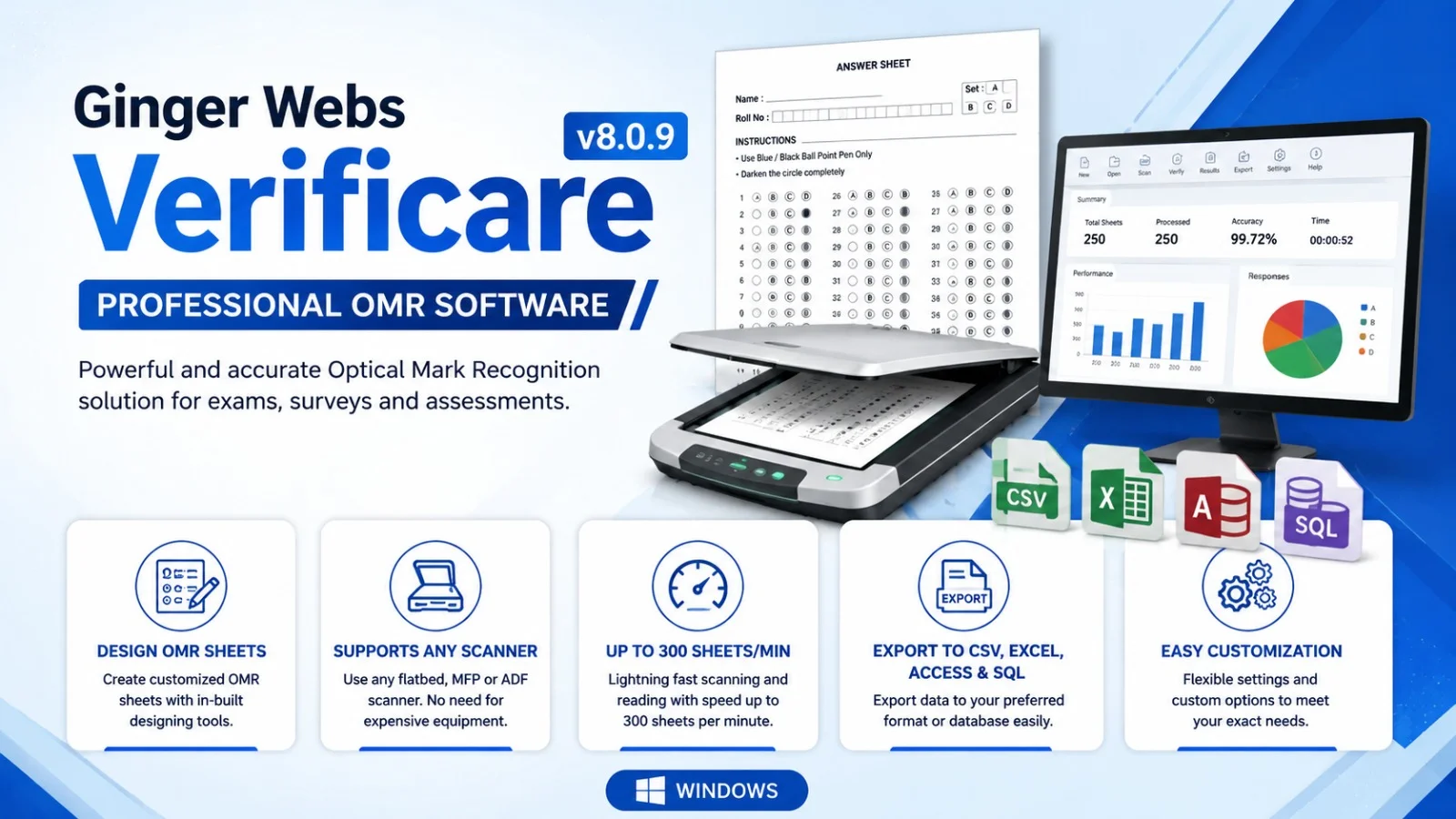
Ginger Webs Verificare 8.0.9 is a sophisticated Optical Mark Recognition (OMR) software solution designed to automate the process of capturing and analyzing data from bubble sheets, surveys, assessments, and examination papers. This OMR software has earned the trust of over 2,000 organizations worldwide, establishing itself as a reliable solution for educational institutions, corporate training departments, and research organizations seeking efficient data processing .
The Verificare OMR software stands out by eliminating dependencies on specialized paper or proprietary scanners. Users can print OMR sheets using standard office printers and regular paper, then scan them with any flatbed, ADF, or MFP scanner . This accessibility makes Verificare a cost-effective solution for institutions looking to modernize their assessment and data collection processes without significant hardware investments.
At its core, Verificare leverages advanced AI technology to ensure 100% accuracy in data reading, while also incorporating anti-cheat detection capabilities that identify irregularities in answer patterns and detect potential impersonation . The software processes thousands of OMR sheets within minutes, dramatically reducing the time and effort traditionally required for manual data entry and verification.
Key Features of Verificare 8.0.9
Custom OMR Sheet Design
Verificare empowers users to create custom OMR sheet designs tailored to specific assessment needs. The intuitive design interface allows users to build examination papers, surveys, admission forms, registration documents, and feedback forms with complete flexibility . Users can incorporate various elements into their OMR sheets, including:
-
Multiple question sets with customizable answer options
-
Entity fields for participant information
-
Barcodes (1D and 2D) for automated identification
-
QR codes for enhanced data tracking
-
Text fields, images, and shapes for comprehensive form design
The software supports any paper size, including A4 and legal formats, and can process double-sided sheets without complications . This design flexibility eliminates the need for specialized pre-printed OMR forms, significantly reducing operational costs.
Scanner Compatibility and Reading Capabilities
One of Verificare’s most significant advantages is its universal scanner compatibility. The software works seamlessly with standard flatbed scanners, ADF (Automatic Document Feeder) scanners, and MFP (Multifunction Printer) devices . This means institutions can leverage their existing scanning infrastructure without purchasing specialized OMR readers.
The reading engine processes all types of OMR sheets, including traditional bubble sheets, plain paper forms, and even photocopies . The software’s advanced algorithms deliver 100% accuracy in data extraction, ensuring reliable results regardless of the source material quality.
Speed Booster Technology
Verificare includes a Speed Booster feature that dramatically accelerates sheet reading to approximately 300 sheets per minute—making the processing ten times faster than conventional methods . This capability is particularly valuable for large-scale examinations and surveys where thousands of forms require rapid processing.
AI-Powered Anti-Cheat and Quality Assurance
The software incorporates multiple anti-cheat mechanisms and quality assurance features:
-
Anti-cheat detection: Identifies potential impersonation and irregular answer patterns
-
Wrong answer key detection: Automatically identifies errors in question paper keys
-
Duplicate form detection: Prevents double-counting or fraudulent submissions
-
Column validation: Performs length checks and generates lists of unmatched data for enhanced accuracy
Data Organization and Export
Verificare provides robust data management capabilities, allowing users to:
-
Sort data in ascending or descending order
-
Apply filters for targeted analysis
-
Export results to XLS, CSV, or custom formats
-
Search for specific information within datasets
-
Crop and save specific areas from OMR forms, such as photographs and signatures
-
Generate comprehensive reports for stakeholders
Barcode and OCR Integration
The software supports seamless integration with barcode and OCR (Optical Character Recognition) modules, enabling automated data capture from printed text and barcodes on OMR forms . This feature extends Verificare’s utility beyond simple bubble sheet processing.
What’s New in Verificare 8.0.9
Version 8.0.9 builds upon Verificare’s established reputation with enhanced performance and expanded capabilities. The latest release includes:
Improved AI algorithms: Enhanced accuracy in data reading and anomaly detection, reducing error rates and improving reliability for large-scale assessments .
Enhanced scanner compatibility: Expanded support for newer scanner models, ensuring seamless integration with modern hardware .
User interface refinements: The Office-like interface has been streamlined for improved usability, making navigation more intuitive for new users while maintaining efficiency for experienced operators .
Faulty file rereading: Enhanced capabilities to identify and accurately reread faulty files, ensuring error-free data extraction even from imperfect source materials .
Mandatory field identification: Improved functionality for highlighting mandatory fields on OMR forms, making it easier for users to ensure complete data collection .
System Requirements
Minimum Hardware Requirements
-
Processor: Intel Pentium or equivalent
-
RAM: 2 GB (4 GB recommended)
-
Hard Disk Space: 500 MB available
-
Scanner: Compatible flatbed, ADF, or MFP scanner
-
Printer: Standard office printer for OMR sheet printing
-
Monitor: 1024 x 768 screen resolution
Supported Operating Systems
-
Windows 7
-
Windows 8
-
Windows 10
-
Windows 11
-
Windows Server editions
Software Prerequisites
-
.NET Framework 4.5 or higher
-
Printer drivers for OMR sheet printing
-
Scanner drivers for scanning functionality
Installation Guide
Step 1: System Preparation
Before installing Verificare 8.0.9, ensure your system meets the minimum requirements and that all operating system updates are applied. Close any unnecessary applications to prevent conflicts during installation.
Step 2: Run the Installer
Download the Verificare 8.0.9 installation package (approximately 132 MB) from the official Ginger Webs distribution channel . Run the installer as an administrator by right-clicking the file and selecting “Run as administrator.”
Step 3: Accept License Agreement
Review and accept the End-User License Agreement (EULA) to proceed with the installation.
Step 4: Select Installation Directory
Choose the installation directory or accept the default location. Ensure sufficient disk space is available for the installation and subsequent data storage.
Step 5: Install Required Components
The installer will automatically detect and install any required components, such as .NET Framework if not already present on the system.
Step 6: Verify Installation
Once installation completes, launch the application and verify that all features are accessible. The application should open without errors, displaying the main interface ready for configuration.
Step 7: Configure Scanner
Connect your scanner and verify that Verificare recognizes the device. The software supports most standard scanners without additional driver configuration.
Step 8: Register the Software
Enter your license key to activate Verificare 8.0.9. The software offers various licensing options, including starter, standard, and professional editions with different feature sets .
How to Use Verificare OMR Software
Designing OMR Sheets
Create a New Template
Launch Verificare and select the option to create a new template. The software provides several pre-designed templates, including:
-
Single-sided 100-question quizzes with four answers
-
200-question assessment sheets
-
300-question examination papers
-
Registration forms
-
Voting templates
-
Survey forms
Customize Your Design
For custom designs, use the template designer to add:
-
Question sets with appropriate answer options (typically A, B, C, D)
-
Entity fields for participant information (name, ID, date, etc.)
-
Barcode or QR code elements for automated tracking
-
Text fields for additional information
-
Images or shapes for visual layout
Print Your OMR Sheets
Once your design is complete, print the OMR sheets using a standard office printer and regular paper. Verificare does not require special paper with cutting marks, significantly reducing printing costs .
Scanning and Reading Sheets
Configure Scanner Settings
Connect your scanner to the computer and configure scanning settings within Verificare. The software automatically detects compatible scanners and optimizes settings for OMR sheet reading.
Read OMR Sheets
Navigate to the “Reading” menu and click the “Read” button. Specify the source location—either a folder on your computer containing pre-scanned images or the physical scanner for direct capture .
Process Multiple Files
Verificare supports batch processing of multiple OMR sheets, automatically reading and extracting data from each file. The Speed Booster feature accelerates processing to approximately 300 sheets per minute .
Data Analysis and Export
Review Extracted Data
After reading, view the extracted data in a tabular format within the Verificare interface. The software identifies any anomalies or duplicate records for review.
Apply Filters and Sort
Use filtering and sorting options to organize data by specific criteria. You can sort by ascending or descending order, search for specific records, or apply filters to isolate particular data subsets .
Export Results
Export processed data to various formats, including:
-
Microsoft Excel (XLS)
-
Comma-separated values (CSV)
-
Custom formats for integration with other systems
Generate Reports
Create comprehensive reports for stakeholders, incorporating charts, summary statistics, and detailed analysis of processed data .
Best Use Cases for Verificare
Educational Examinations
Verificare is ideal for processing educational examinations at all levels. Educational institutions can:
-
Conduct standardized tests with automated scoring
-
Process admission tests quickly and accurately
-
Evaluate student performance through detailed analytics
-
Generate individual and class performance reports
The software’s AI anti-cheat features help maintain assessment integrity by detecting irregular answer patterns and potential impersonation .
Surveys and Research
Research organizations and market research firms benefit from Verificare’s ability to process large-scale surveys efficiently:
-
Read thousands of survey forms within minutes
-
Extract structured data from complex survey designs
-
Export results directly into analysis software
-
Process employee satisfaction surveys and feedback forms
The software’s flexibility in design allows researchers to create surveys with various question types and answer formats .
Corporate Training and Assessments
Corporate training departments use Verificare for:
-
Employee assessments and certifications
-
Training feedback collection
-
Pre-employment testing
-
Skills evaluation and competency mapping
The software’s reporting capabilities enable HR departments to track employee progress and identify training needs effectively.
Registration and Admission Processing
Educational institutions and organizations use Verificare for:
-
Student registration data capture
-
Admission form processing
-
Event registration management
-
Attendance tracking
Barcode and OCR support ensures seamless integration with existing registration workflows .
Advantages and Limitations
Advantages
Cost-Effective Solution
Verificare eliminates the need for specialized OMR paper and proprietary scanners. Users can print OMR sheets on regular paper using standard office printers and scan with existing scanners, significantly reducing operational costs .
High Accuracy
The AI-powered reading engine delivers 100% accuracy in data extraction, ensuring reliable results for critical assessments .
Universal Scanner Compatibility
Unlike specialized OMR hardware, Verificare works with any standard scanner—flatbed, ADF, or MFP—providing flexibility in hardware selection .
Speed and Efficiency
The Speed Booster feature processes up to 300 sheets per minute, making the software suitable for large-scale operations .
Design Flexibility
Users can create custom OMR sheet designs for any application, from simple quizzes to complex surveys and registration forms .
Integrated Anti-Cheat Features
AI-powered detection of irregular patterns and potential impersonation helps maintain assessment integrity .
No Maintenance Costs
Verificare requires no ongoing maintenance costs, providing excellent long-term value .
Limitations
Windows-Only Compatibility
Verificare is available exclusively for Windows operating systems, limiting use in Mac or Linux environments.
Scanner Hardware Dependency
While the software works with standard scanners, scanning speed is dependent on the scanner hardware used.
Physical Sheet Requirement
Verificare processes physical OMR sheets, which may be less efficient than fully digital assessment platforms for some use cases.
Internet Browser Capabilities
While the software supports cloud server integration for data accessibility, its primary functionality remains desktop-based .
Alternatives to Verificare OMR Software
Comparison with Digital Assessment Platforms
While Verificare excels at physical OMR sheet processing, digital assessment platforms like Schoology and Wooclap offer online examination capabilities without physical paper requirements . These alternatives may be more suitable for institutions seeking completely digital assessment workflows, though they lack OMR-specific capabilities.
Additional OMR Software Options
For organizations exploring OMR software alternatives, consider:
-
Remark Office OMR: Another established OMR software option with similar capabilities
-
FormScanner: A more basic OMR solution for smaller operations
-
Open-source OMR tools: Available for organizations with technical resources
Free Trial Option
Verificare offers a free demo download, allowing potential users to evaluate the software before committing to a paid license . This is particularly valuable for institutions testing OMR software for the first time.
Pricing Structure
Verificare offers several licensing options :
| Edition | Price | Features |
|---|---|---|
| Starter | $275/year | 1 user, sheet design tool, read OMR sheets, export to Excel/CSV, crop & save images, 1 year support |
| Standard | $480 lifetime | 1 year validity, all Starter features plus 1-year support |
| Professional | $686 lifetime | Includes Speed Booster and Barcode capabilities |
| Business | $960 lifetime | Full feature set for enterprise applications |
Frequently Asked Questions
What is Verificare OMR software and how does it work?
Verificare is Optical Mark Recognition (OMR) software developed by Ginger Webs that processes bubble sheets, surveys, and assessments by scanning physical forms and automatically extracting data. The software uses AI-powered algorithms to read OMR sheets with 100% accuracy and can process thousands of forms in minutes using standard printers and scanners .
Is Verificare compatible with my existing scanner?
Yes, Verificare works with virtually any standard scanner, including flatbed, ADF, and MFP devices. The software does not require specialized or proprietary hardware, making it a cost-effective OMR solution for most organizations .
Can I create custom OMR sheets with Verificare?
Absolutely. Verificare includes a powerful template designer that allows you to create custom OMR sheets for any application, including examinations, surveys, registration forms, and voting ballots. You can add various elements such as question sets, barcodes, QR codes, and entity fields .
How many sheets can Verificare process at one time?
With the Speed Booster feature enabled, Verificare can process up to 300 sheets per minute, making it suitable for large-scale operations like university entrance examinations or census surveys .
What file formats can Verificare export data to?
Verificare supports export to multiple formats, including Microsoft Excel (XLS), CSV, and custom formats for integration with other systems .
Does Verificare include anti-cheat features?
Yes, Verificare incorporates AI-powered anti-cheat features that detect suspicious answer patterns and potential impersonation. The software can also identify wrong answer keys to ensure assessment integrity .
What are the system requirements for Verificare 8.0.9?
Verificare requires Windows 7 or later, 2 GB RAM, 500 MB available disk space, and a compatible scanner or printer. The software runs on standard Windows computers and does not require specialized hardware .
Is there a free trial available for Verificare OMR software?
Yes, Ginger Webs offers a free demo download of Verificare, allowing organizations to test the software’s capabilities before purchasing a license .
Final Thoughts
Ginger Webs Verificare 8.0.9 represents a robust and reliable OMR software solution for organizations seeking to automate data capture from physical forms. Its combination of universal scanner compatibility, custom template design capabilities, and AI-powered accuracy makes it a compelling choice for educational institutions, corporate training departments, and research organizations.
The software’s ability to work with standard printers and regular paper significantly reduces operational costs compared to specialized OMR solutions. Additionally, its Speed Booster feature and batch processing capabilities ensure efficient handling of large-scale operations.
For organizations evaluating OMR software, Verificare’s free demo provides an opportunity to assess its capabilities firsthand. The various licensing options allow institutions to choose an edition that matches their specific requirements and budget.
Verificare is particularly well-suited for:
-
Educational institutions conducting regular examinations
-
Research organizations processing large surveys
-
Corporate HR departments managing assessments
-
Organizations requiring efficient registration and attendance tracking
While Verificare’s Windows-only availability and physical form processing may not suit every organization, for institutions committed to OMR-based data capture, it offers a proven and cost-effective solution. The software’s established track record with over 2,000 organizations worldwide underscores its reliability and effectiveness in diverse applications .