
Overview of ARES Electrical 2027
Table of Contents
ARES Electrical is a specialized 2D electrical computer-aided design (CAD) software developed by Graebert GmbH. Built on the robust ARES Commander platform, this professional electrical CAD solution integrates industry-specific electrical design tools with native DWG file format support . Engineers, system integrators, and electrical designers leverage ARES Electrical to create detailed schematics, panel layouts, and wiring diagrams efficiently.
The 2027 SP1 release represents the latest evolution of this specialized ECAD (Electrical Computer-Aided Design) software. It combines Graebert’s proven CAD engine with dedicated electrical design features, streamlining the entire workflow from schematic capture to bill of materials (BOM) generation and panel layout. The software operates natively with standard DWG files, facilitating seamless collaboration with mechanical engineers and project stakeholders who use other CAD platforms .
Key Features of ARES Electrical
Comprehensive Electrical Design Toolset
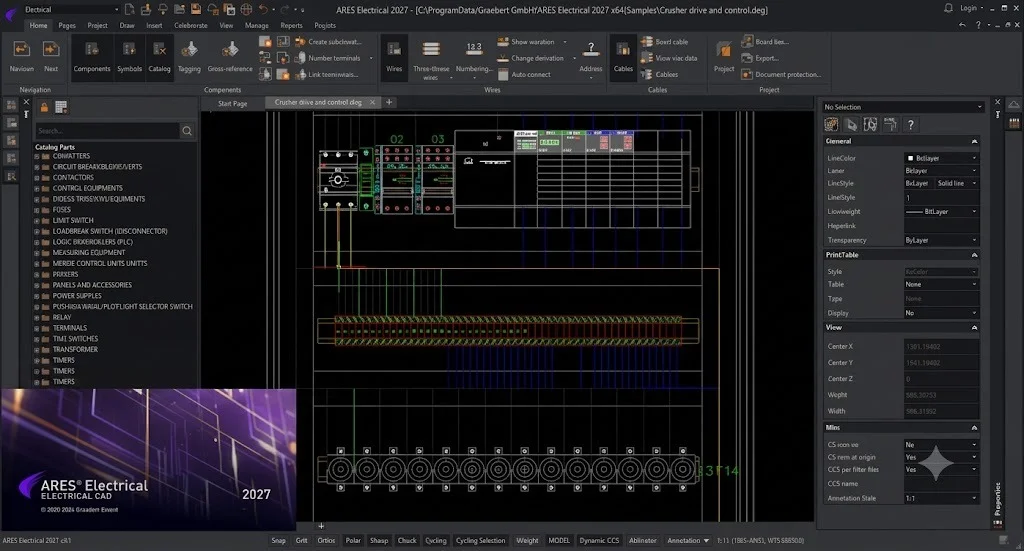
ARES Electrical provides an extensive array of features tailored specifically for electrical engineering projects. The software includes dedicated palettes for managing components, wires, cables, and connectors directly within the drawing interface . These specialized palettes streamline the design process by providing quick access to frequently used electrical symbols and components. The Wires/Cables palette contains a comprehensive library of wire types and cable specifications, while the Components palette organizes hundreds of electrical symbols from various manufacturers.
Automated Wire Numbering and Addressing
The software’s built-in addressing system automatically assigns wire numbers and cross-references throughout the project. Engineers can use the Address tool to add labels to wires, creating consistent identification across multiple pages . The addressing functionality automatically updates when design changes occur, including page order modifications or object repositioning, ensuring accurate documentation throughout the project lifecycle .
Multi-Platform Compatibility
ARES Electrical 2027 supports all major operating systems, making it a versatile choice for design teams with mixed environments:
-
Windows: Windows 10 or 11 (64-bit)
-
macOS: macOS 14 (Sonoma), 15 (Sequoia), and 26 (Tahoe) for both Apple Silicon (ARM) and Intel processors
-
Linux: Ubuntu/Debian (.deb), SUSE/Fedora (.rpm), and generic Linux (.tbz2) distributions
Native DWG File Format Support
As a DWG-native application, ARES Electrical opens, edits, and saves drawings in the standard AutoCAD DWG format without conversion. This ensures seamless compatibility with Autodesk products, other CAD software, and project collaborators. Electrical schematics created in ARES Electrical can be shared directly with mechanical teams using ARES Commander or any other DWG-compatible application.
What’s New in ARES Electrical 2027 SP1
Redesigned User Interface
ARES Electrical 2027 features a completely redesigned Ribbon interface that organizes tools into logical tabs including Home, Pages, Project, Draw, Insert, View, Manage, and Reports . This modern layout improves tool accessibility and reduces the learning curve for new users. The updated workspace structure provides consistent iconography across Components, Symbols, Wires, and Cables palettes .
Mouse Gestures Support
One of the most significant workflow enhancements is the introduction of mouse gestures . Users can now execute commands by drawing simple mouse movements, accelerating frequent operations. The gesture menu can be configured with four or eight commands through the Manage Tab → Customization → Mouse Gestures settings. This feature provides a consistent interaction experience across Graebert products.
Multiphase Wire Capabilities
The Wire Palette now supports multiphase wire insertion with new phase selection options . Engineers can specify the number of phases and their configuration directly from the palette, significantly accelerating three-phase power schematic creation.
Enhanced Collaboration Tools
The new Collaborate tab in the Ribbon makes teamwork capabilities more accessible . This centralized location for collaboration features improves coordination between team members working on shared projects.
Improved Library Performance
Library searches in SQLite databases are now significantly faster, enhancing user efficiency when locating components from extensive catalogs . The component library properties have been enhanced with full custom property display and improved copy-from functionality.
Performance and Stability Enhancements
SP1 delivers numerous bug fixes and performance improvements across all functional areas. These include more robust PDF export functionality, stable batch printing operations, and resolution of issues that previously caused application crashes during specific operations .
System Requirements for ARES Electrical 2027
Recommended Configuration
-
Operating System: Windows 11 64-bit
-
Processor: Intel Core i7 or i9 (8th generation or newer), AMD Ryzen 5, 7, or 9 (2nd generation or newer)
-
Memory: 16 GB RAM or more
-
Storage: 5 GB disk space (installation plus library)
-
Display: 22-inch or larger Full HD (1920×1080) monitor
-
Graphics: Graphics card with 4GB dedicated memory
-
Internet Connection: Required for activation and updates
Minimum Configuration
-
Operating System: Windows 10 64-bit or higher
-
Processor: Intel Core i3 or AMD Ryzen 3
-
Memory: 8 GB RAM
-
Storage: 5 GB disk space (installation plus library)
-
Display: HD monitor
-
Graphics: Graphics card with 2GB dedicated memory
-
Internet Connection: Required for activation
Note: While ARES Electrical may function on other hardware configurations, performance and stability are not guaranteed outside these specifications .
Installation Guide
Traditional Installation
-
Download the installer from the official Graebert website, selecting the appropriate version for your operating system:
-
Windows: 1 GB installer for Windows 10/11 (64-bit)
-
macOS (ARM): 716 MB installer for Apple Silicon
-
macOS (Intel): 752 MB installer for Intel-based Macs
-
Linux (.deb): 2.5 GB for Ubuntu/Debian
-
Linux (.rpm): 2.8 GB for SUSE/Fedora
-
Linux (.tbz2): 3.9 GB for generic Linux distributions
-
-
Run the installer as an administrator (Windows) or with appropriate permissions (macOS/Linux)
-
Follow the installation wizard prompts, selecting your preferred language and installation directory
-
Activate the software using your Graebert license credentials
WinGet Installation (Windows)
For Windows users comfortable with command-line tools, ARES Electrical 2027 can be installed using the WinGet package manager:
winget install -e --id Graebert.AresElectrical.2027
This command automatically downloads and installs the latest version .
How to Use ARES Electrical
Getting Started
-
Launch ARES Electrical and navigate the workspace. The interface consists of:
-
Header: Displays project name and software version
-
ARES Menu: File operations including New, Open, Print
-
Quick Access Toolbar: Customizable access to frequently used commands
-
Ribbon Tabs: Home, Pages, Project, Draw, Insert, View, Manage, Reports
-
Graphics Area: Primary drawing workspace
-
Project Tabs: Navigation between open projects
-
Palettes: Side panels for components, wires, properties, and pages
-
Command Window: Accepts typed CAD commands
-
Status Bar: Sketch settings and coordinate display
-
Creating an Electrical Project
-
Start a new project by navigating to the ARES Menu and selecting New Project
-
Configure project settings through the Manage tab, defining page groups and drawing standards
-
Add pages using the Pages palette, creating separate sheets for schematic sections
Building Electrical Schematics
-
Insert components from the Components palette by dragging symbols into the graphics area
-
Connect components using wires from the Wires palette (note: use wires, not CAD lines, to maintain relationship data)
-
Address wires using the Address tool to assign labels and cross-references
-
Add page groups for mechanical layout, control panels, or other specialized drawings
Generating Reports
-
Access the Reports tab in the Ribbon
-
Select report type:
-
Bill of Materials (BOM): Lists all components used in the project
-
Wire List: Comprehensive wire specification summary
-
Terminal List: Terminal block configuration
-
-
Export reports in your preferred format for procurement or documentation
Best Use Cases
Industrial Control Systems
ARES Electrical excels at designing control panels for manufacturing, automation, and process control. The extensive component library includes PLCs, relays, motor starters, sensors, and industrial communication devices commonly used in factory automation projects.
Building Management Systems
The software is ideal for creating electrical designs for commercial buildings, including lighting control, power distribution, HVAC systems, and security infrastructure. The automatic wire numbering and cross-referencing features ensure comprehensive documentation for building maintenance teams.
Machine Design
When designing complex machinery, electrical engineers often work alongside mechanical designers. ARES Electrical’s DWG compatibility allows seamless integration of electrical schematics with mechanical layouts created in ARES Commander or other CAD platforms.
Product Development
The Mechanical Layout integration enables engineers to verify component placement within physical enclosures. Components can be arranged in a 1:1 scale panel layout, validating dimensions and clearances before manufacturing commences .
Advantages and Limitations
Advantages
| Advantage | Description |
|---|---|
| True Cross-Platform | Native support for Windows, macOS, and Linux on a single license |
| DWG Compatibility | Open, edit, and save native DWG files without conversion |
| Electrical Specialization | Dedicated tools for electrical schematics, not generic CAD functions |
| Integrated Mechanical Layout | Create panel layouts alongside electrical schematics |
| Robust Automation | Automatic wire numbering, addressing, and report generation |
| Comprehensive Library | Extensive manufacturer-specific component databases |
| Regular Updates | Active development with SP releases delivering new features and fixes |
| No License Trap | Transparent pricing without hidden cancellation fees |
Limitations
| Limitation | Description |
|---|---|
| 2D Focus | Primarily designed for 2D electrical schematics; limited 3D modeling capabilities |
| Specialized Tool | May be over-specified for users needing only generic CAD features |
| System Requirements | Demands more resources (especially RAM) than simpler drafting applications |
| Learning Curve | Electrical-specific features require learning beyond basic CAD skills |
Alternatives to ARES Electrical
AutoCAD Electrical (Autodesk)
The industry-standard electrical CAD software, offering extensive component libraries and integration with AutoCAD Mechanical. However, it is Windows-only and requires a more significant investment.
EPLAN Electric P8
A premium solution for large-scale industrial automation projects. EPLAN offers comprehensive reporting and data management but involves significantly higher costs and system requirements.
See Electrical (IGE+XAO)
A dedicated electrical CAD solution with strong database management. It offers specialized tools for harness design and cable planning but requires specific file format management.
QElectroTech
An open-source alternative for basic electrical schematic creation. It is free but lacks the advanced features, DWG compatibility, and support found in commercial solutions.
ARES Commander
Graebert’s base CAD platform offers standard drafting features at a lower cost but lacks the specialized electrical tools included in ARES Electrical .
Frequently Asked Questions
What is the difference between ARES Commander and ARES Electrical?
ARES Commander is Graebert’s general-purpose CAD software for 2D and 3D design. ARES Electrical is a specialized version built on the same CAD engine, adding dedicated electrical tools including component palettes, automatic wire numbering, electrical symbol libraries, and reporting features.
Which operating systems does ARES Electrical 2027 support?
ARES Electrical 2027 supports Windows 10/11 (64-bit), macOS 14, 15, and 26 (both Apple Silicon ARM and Intel), and Linux distributions including Ubuntu/Debian, SUSE/Fedora, and generic Linux.
Can ARES Electrical open AutoCAD DWG files?
Yes, ARES Electrical opens, edits, and saves drawings in native DWG format. This ensures full compatibility with Autodesk AutoCAD and all other DWG-compatible applications.
How do I create a Bill of Materials in ARES Electrical?
Navigate to the Reports tab in the Ribbon and select the Bill of Materials option. The software automatically compiles all components used in your project and presents them in a structured list that can be exported to various formats.
What are the minimum hardware requirements for ARES Electrical?
The minimum requirements are Windows 10 64-bit, Intel Core i3 processor, 8 GB RAM, 5 GB disk space, HD monitor, and a graphics card with 2GB dedicated memory. For optimal performance, a system with Windows 11, Intel Core i7, 16 GB RAM, and a Full HD monitor is recommended.
Can I create panel layouts in ARES Electrical?
Yes, ARES Electrical includes an integrated 2D mechanical layout capability. You can arrange components within panel outlines at 1:1 scale to verify physical fit and drilling positions before manufacturing.
How do I use mouse gestures in ARES Electrical?
Mouse gestures are configurable through Manage Tab → Customization → Mouse Gestures. You can choose between 4 or 8 gesture commands and assign custom actions to each directional movement. This feature accelerates frequent operations in your workflow.
What file formats does ARES Electrical support for import/export?
ARES Electrical supports DWG, DXF, PDF, and its native project package format (.AEPACK) for comprehensive file exchange. Reports can be generated in multiple formats including CSV for integration with external systems.
Final Thoughts
Graebert ARES Electrical 2027 SP1 represents a significant advancement for professionals seeking a robust, cross-platform electrical CAD solution. The software successfully bridges the gap between general-purpose CAD tools and specialized ECAD applications, offering electrical engineers, system integrators, and panel builders a comprehensive environment for electrical design.
The 2027 SP1 release reinforces Graebert’s commitment to improving the professional user experience. The new mouse gestures feature dramatically accelerates routine operations, while the redesigned Ribbon interface improves tool accessibility and reduces time spent navigating menus. The enhanced collaboration capabilities and improved library performance address real-world workflow bottlenecks that previously impacted productivity.
For organizations with mixed operating system environments, ARES Electrical’s native cross-platform compatibility provides a significant advantage over Windows-only competitors. Engineering teams can maintain a single software standard across all workstations regardless of the underlying operating system.
The integration of electrical schematic design with mechanical layout capabilities creates a unified workflow that reduces errors and improves documentation quality. Combined with native DWG compatibility, this ensures seamless collaboration with external partners who may use different CAD platforms.
The software’s competitive pricing and transparent licensing model make it an accessible option for organizations of all sizes. As Graebert continues to develop the platform with regular service pack releases, ARES Electrical positions itself as a compelling alternative to more expensive, platform-limited solutions .
To evaluate ARES Electrical 2027 SP1, visit the official Graebert website to download a trial version and experience the software’s capabilities firsthand.