

Download the PrecioLED VideoMarcador 6.56 (Professional Video Scoreboard Software for Sports) from this link…

Overview of PrecioLED VideoMarcador Software
Table of Contents
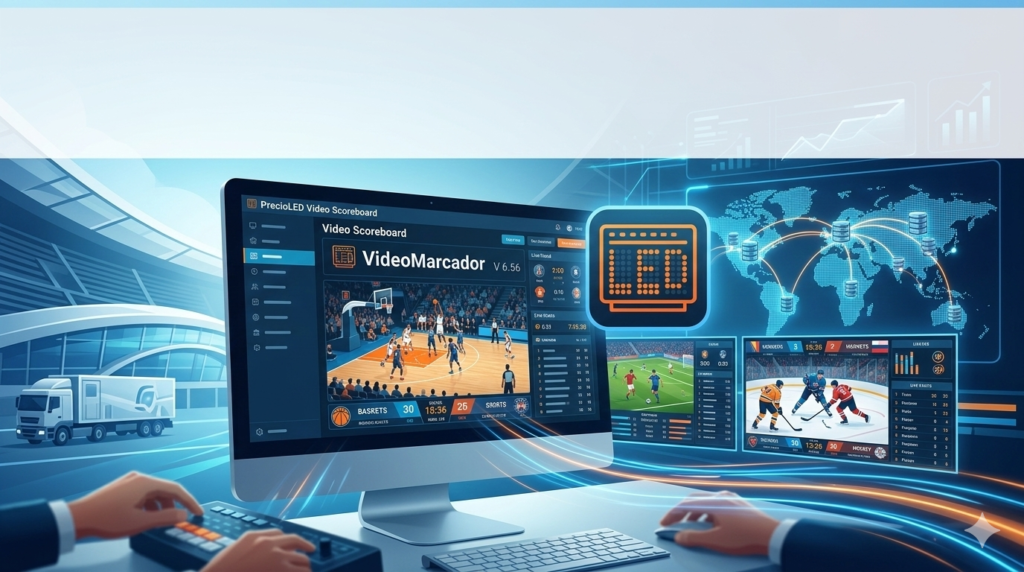
In the modern arena of sports presentation, static displays are a thing of the past. PrecioLED VideoMarcador software is a sophisticated and dynamic solution designed to transform how sports events are managed and experienced. Moving beyond simple number tracking, this video scoreboard software functions as a comprehensive broadcast and information hub. It allows operators to manage live game data, display high-resolution graphics, integrate video feeds, and control sponsor advertising, all from a single, intuitive interface.
Developed by PrecioLED, this application caters to a wide spectrum of athletic events, from local community games to professional league matches. By bridging the gap between traditional scorekeeping and modern digital broadcasting, PrecioLED VideoMarcador empowers venues to deliver a professional, engaging, and memorable experience for players, officials, and spectators alike.
Key Features
PrecioLED VideoMarcador is packed with features that provide complete control over your venue’s visual presentation.
Multi-Sport Configuration
The software is pre-validated for a vast array of sports, eliminating the need for multiple specialized systems. It supports tailored scoring rules and display formats for:
-
Football (Soccer) and Futsal
-
Basketball
-
American Football and Rugby
-
Volleyball, Handball, and Hockey
-
Tennis and Padel
-
Boxing and Wrestling
Real-Time Game Event Management
Beyond just the score and clock, operators can manage granular game events with a single click. This includes logging goals, assists, fouls, penalties (yellow/red cards), substitutions, timeouts, and period/game clocks. This real-time data feed is crucial for broadcast graphics and official records.
Advanced Graphics Engine
Move away from generic displays. The software features a fully customizable graphic engine that allows you to modify backgrounds, team shields, fonts, colors, and the position of every on-screen element. This ensures the scoreboard perfectly matches your team’s branding or the event’s visual identity.
Seamless Camera and Broadcasting Integration
A standout capability is its direct integration with live video sources.
-
Camera Input: Display live feeds from USB or professional cameras directly on the scoreboard screen.
-
Streaming Software Integration: Connect seamlessly with popular streaming tools like vMix and OBS Studio to overlay graphics onto a live broadcast, making it perfect for streaming games online.
Dedicated Remote Control Application
Launched in 2023, the companion mobile app (Precioled Scoreboard Remote) allows operators to control the scoreboard from anywhere in the stadium, court-side, or even a broadcast truck. Available for both Android and iOS, the app manages:
-
Game clock and score
-
Player lineups and substitutions
-
Scene and advertisement switching
Physical Control Hardware Support
For operators who prefer a tactile interface, the software supports customizable physical keyboards. These can be programmed with shortcuts for essential functions like starting/stopping the clock, managing possession, or triggering specific graphics, ensuring rapid response times during fast-paced games.
What’s New in Version 6.56
While specific incremental updates are part of the product’s continuous improvement, version 6.56 builds upon the robust v6.91 framework, focusing on stability and user experience. Key enhancements typical of this version lineage include:
-
Refined Remote Control Protocol: Improved connectivity and reduced latency between the software and the mobile remote app for smoother operation.
-
Expanded Keyboard Customization: New macro options for the physical control keyboard, allowing for more complex command sequences to be triggered with a single key press.
-
Enhanced OBS/vMix Integration: More stable frame rates and graphic layering when used as a source within live streaming software.
-
Additional Language Support: Refinements to the existing multi-language interface (Spanish, English, French, Italian, German, Portuguese) based on user feedback.
System Requirements
To run PrecioLED VideoMarcador efficiently, especially when handling high-resolution graphics and video feeds, your system should meet the following specifications:
-
Operating System: Windows 10 or Windows 11 (64-bit recommended).
-
Processor: Intel Core i5 or equivalent (Intel Core i7 or higher recommended for video-heavy productions).
-
Memory: 8 GB RAM minimum (16 GB or more recommended).
-
Graphics: Dedicated graphics card (e.g., NVIDIA GeForce or GTX series) supporting DirectX 11 or higher. Integrated graphics may struggle with complex animations and video.
-
Storage: 500 MB of available space for the software installation, plus additional space for media assets (images, videos).
-
Additional: Available USB port for physical keyboard or camera connection; network connectivity for remote control features.
Installation Guide
Installing PrecioLED VideoMarcador is a standard process, but proper setup ensures optimal performance.
-
Obtain the Software: Download the official installer from the PrecioLED website or your authorized provider.
-
Run the Installer: Locate the downloaded
.exefile and run it as an Administrator to ensure it has the necessary permissions to install drivers (if required for hardware). -
Follow the Wizard: Accept the license agreement, choose an installation directory (the default is usually fine), and proceed through the setup wizard.
-
Connect Hardware: After installation, connect your control hardware (e.g., the PrecioLED USB keyboard) or camera. Install any required drivers if prompted by the operating system.
-
Configure Output: Open the software and navigate to the display settings to configure your screen output. This typically involves setting up an extended desktop where the software’s control panel is on one screen and the live scoreboard output is on another (projector or LED video display).
How to Use the Software for a Game
-
Initial Setup: Launch the software and select your sport from the main menu. Load your team logos and configure the display template with your preferred colors and layout.
-
Pre-Game Preparation: Enter the starting lineups for both teams. Set the game period (e.g., 1st Half) and the correct game clock time.
-
Live Operation: Use the on-screen control panel, the physical keyboard, or the mobile remote app to manage the game.
-
Click the clock to start/pause time.
-
Use the “+1” buttons to increment the score.
-
For events like a goal or foul, click the corresponding player to log the event and update the scoreboard graphics instantly.
-
-
Between Periods: Use scene management to switch to a different graphic, such as a sponsorship slide, a team roster, or a live camera feed of the crowd, while keeping the control panel ready for the next period.
-
Post-Game: Finalize the score and statistics. You can then switch to a “Game Over” graphic or a closing sponsor reel.
Best Use Cases
PrecioLED VideoMarcador is a versatile tool suitable for various venues and production scales.
-
Professional Sports Clubs: Enhance the in-stadium experience for fans and provide clean graphics for official broadcasts.
-
Educational Institutions (High Schools/Colleges): Modernize athletic facilities, attract student-athletes, and create a professional atmosphere for parents and alumni.
-
Multi-Purpose Venues: Manage scoring and displays for different events in the same facility, from basketball games to wrestling matches and even school assemblies.
-
Live Streaming Producers: For content creators broadcasting amateur or semi-professional sports, the seamless integration with OBS and vMix makes it an essential tool for producing high-quality streams.
-
Independent Leagues: Provide a polished, professional look that can help attract local sponsors and build a stronger fan base.
Advantages and Limitations
Advantages
-
Unmatched Versatility: Its multi-sport capability and deep customization options make it a one-size-fits-all solution for diverse venues.
-
Professional Broadcast Quality: The integration with cameras and streaming software elevates productions far beyond basic scorekeeping.
-
Enhanced Fan Engagement: Dynamic graphics, instant replays (via camera integration), and sponsor messages keep the audience entertained and informed.
-
Operational Flexibility: The combination of on-screen controls, physical keyboards, and a mobile app gives operators the freedom to work from anywhere in the venue.
Limitations
-
Learning Curve: The extensive feature set requires a commitment to learning. Operators should invest time in training and practice before using it in a live game.
-
Hardware Investment: To fully utilize its capabilities, a moderately powerful computer and potentially a dedicated graphics card are required, representing an additional investment beyond the software itself.
-
Mobile App Separate: The remote control app may require a separate subscription or purchase, which is an important factor to consider when budgeting for the entire system.
Alternatives to PrecioLED VideoMarcador
Depending on your specific needs, other software solutions are available in the market:
-
SportsCG: A powerful and widely-used scoreboard graphics software known for its robust template-based system and deep integration with broadcast hardware. It is often preferred by professional TV production crews.
-
Daktronics Show Control: An industry-standard ecosystem, particularly popular in large North American venues. It offers comprehensive control over not just scoreboards but also video displays, sound, and lighting, but is often tied to Daktronics hardware.
-
vMix Itself: While not a dedicated scoreboard creator, vMix has built-in title and scoreboard templates that can be customized. This is a viable option for users already invested in the vMix ecosystem for simpler streaming needs.
-
Open Source Options: There are various community-driven scoreboard projects available. These are typically free but may lack the professional support, regular updates, and polish of a commercial product like PrecioLED.
Frequently Asked Questions
1. Is PrecioLED VideoMarcador difficult to learn for a beginner?
While it is a professional tool with many features, the interface is designed with an intuitive control panel. Beginners can learn the basics of score and clock management quickly. Mastering all the advanced features, like animation triggers and camera integration, will take more practice, but the software is accessible to all skill levels.
2. Can I use the PrecioLED mobile app to control the scoreboard?
Yes. PrecioLED offers a companion app called “Precioled Scoreboard Remote” available for both Android and iOS devices. It allows you to manage the game clock, score, lineups, and events wirelessly from anywhere within range. Please note that this app may require a separate subscription .
3. Does this software work with OBS for live streaming?
Absolutely. One of its key features is direct integration with streaming software. It can send its video output directly to OBS Studio and vMix, making it easy to overlay professional scoreboard graphics onto your live game stream .
4. What sports are officially supported by VideoMarcador?
The software is incredibly versatile and officially supports a wide range including football (soccer), basketball, American football, rugby, volleyball, handball, hockey, futsal, tennis, and padel. Its configurable nature also allows it to be adapted for other sports .
5. Can I display sponsor logos and advertisements on the scoreboard?
Yes. The customizable graphics engine allows you to integrate sponsor logos directly into your display layouts. Furthermore, you can create specific scenes or use the remote control to manually trigger full-screen advertisements, creating a valuable revenue stream for your venue .
6. What are the main benefits of upgrading from a traditional LED scoreboard to this software?
Upgrading to PrecioLED software transforms a simple number display into a dynamic content hub. Key benefits include enhanced fan engagement through graphics and replays, the ability to attract more sponsorship revenue, and the flexibility to use the same system for multiple sports without needing new hardware .
Final Thoughts
PrecioLED VideoMarcador 6.56 stands out as a powerful and flexible solution for anyone serious about modern sports presentation. It effectively merges the accuracy required for official scorekeeping with the visual appeal expected by today’s audiences. Its strength lies in its adaptability—whether you are managing a local youth soccer game, a high school basketball tournament, or a semi-professional league, the software scales to meet your needs.
While it requires an investment in time to master and adequate hardware to run smoothly, the return is a significantly enhanced event experience. By providing tools that improve operational efficiency, boost fan engagement, and open up sponsorship opportunities, PrecioLED VideoMarcador is not just a scoreboard—it’s a complete sports venue management platform.
Premium Software Support Service
If you need professional help with software installation, setup, or technical configuration, our team is available to assist you.
Contact & Support
For quick assistance and latest updates, connect with us using the links below:
🔹 Direct Telegram Support
https://t.me/PlayoutKing
🔹 Official Telegram Updates Group
https://t.me/yourgroup
🔹 WhatsApp Community Group
https://chat.whatsapp.com/yourlink
Service Policy
- Remote testing available through AnyDesk before confirmation.
• Verify the setup and performance before completing the order.
• Support available for single or multiple systems.
• Step-by-step guidance to ensure smooth installation and working environment.
Our goal is to provide reliable technical assistance so your software runs smoothly without interruptions.