
Overview of SalesUp ERP
Table of Contents
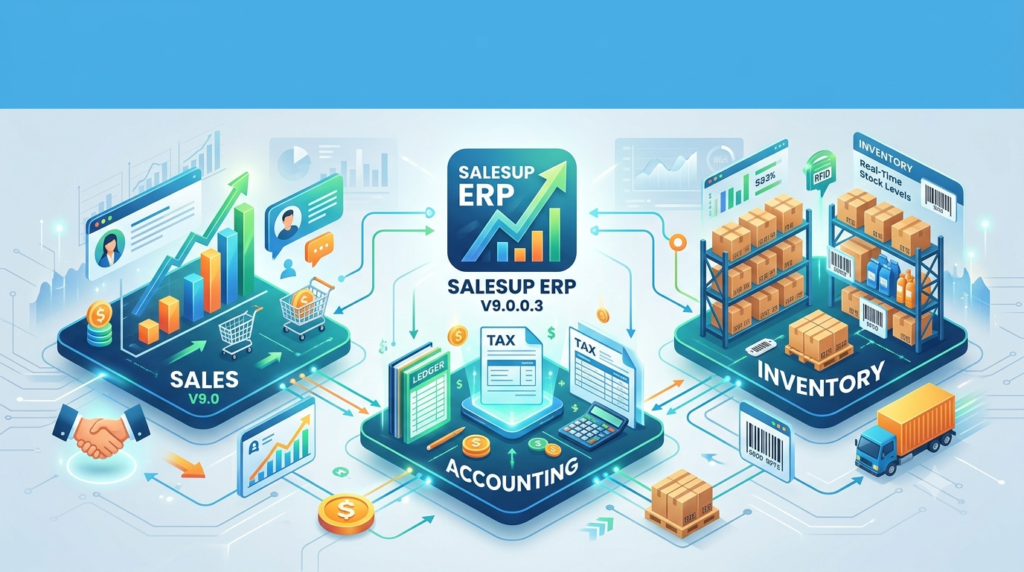
SalesUp ERP V9.0.0.3 is a comprehensive business management solution designed to streamline sales operations, accounting processes, and inventory control for small to medium-sized enterprises. This powerful enterprise resource planning software integrates critical business functions into a unified platform, enabling organizations to manage their entire operational workflow efficiently.
The latest version of SalesUp ERP builds upon its robust foundation with enhanced features and improved performance metrics. As a complete business management system, it addresses the growing complexity of modern commerce while maintaining user-friendly accessibility for businesses transitioning from manual processes to automated digital solutions.
SalesUp ERP stands out in the competitive business software market through its intuitive interface and comprehensive feature set. The software eliminates data silos by connecting sales, inventory, and financial data in real-time, providing business owners with accurate insights for informed decision-making.
Key Features of SalesUp ERP V9.0.0.3
Sales Management Capabilities
The SalesUp ERP sales module provides end-to-end functionality for managing the entire customer acquisition and retention cycle. Users can efficiently process quotations, sales orders, and invoices while maintaining complete visibility into customer interactions and transaction history.
Essential sales features include:
-
Automated quotation generation with customizable templates
-
Sales order processing with real-time inventory verification
-
Customer relationship management (CRM) tools for tracking interactions
-
Multi-currency support for international transactions
-
Discount management and promotional pricing capabilities
Accounting and Financial Management
The financial module transforms complex accounting tasks into streamlined operations. Users can manage general ledger entries, track expenses, and generate financial reports without requiring extensive accounting knowledge.
Key financial management tools include:
-
Double-entry bookkeeping with automated reconciliation
-
Profit and loss statement generation
-
Balance sheet reporting and financial analysis
-
Tax calculation and compliance reporting
-
Accounts receivable and payable management
-
Bank reconciliation and cash flow tracking
Inventory Control System
Inventory management represents one of SalesUp ERP’s most powerful features, providing complete visibility into stock levels, product movements, and warehouse operations.
Advanced inventory capabilities include:
-
Real-time stock level monitoring and alerts
-
Batch tracking and serial number management
-
Purchase order generation based on reorder points
-
Multiple warehouse support and location tracking
-
Barcode scanning integration for efficient stocktaking
-
Product categorization and attribute management
What’s New in SalesUp ERP V9.0.0.3
The latest version introduces significant improvements that enhance user experience and operational efficiency. The development team has focused on performance optimization while adding valuable features requested by the user community.
Enhanced User Interface
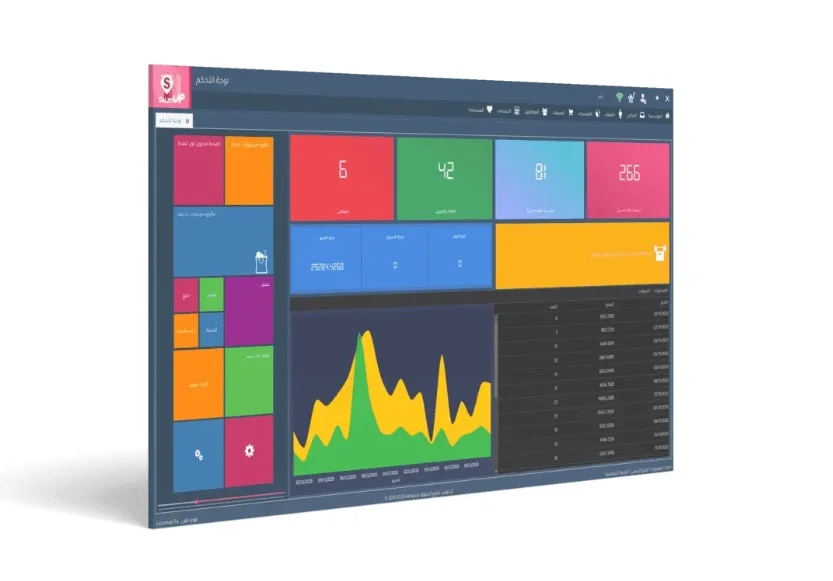
The V9.0.0.3 update features a redesigned dashboard that provides at-a-glance visibility into key business metrics. The modernized interface reduces navigation complexity and makes critical information more accessible. Users can customize their workspace by arranging widgets and modules according to their specific workflow requirements.
Improved Performance and Speed
Performance optimization has resulted in faster data processing and reduced load times for complex operations. Database query optimization ensures that inventory lookups, report generation, and transaction processing occur with minimal latency. Users working with large datasets will notice significant improvements in responsiveness.
Advanced Reporting Capabilities
New reporting templates and enhanced customization options allow users to extract actionable insights from their business data. The updated report builder includes additional filtering options, visualization tools, and export formats. Users can schedule automated report generation for regular distribution to stakeholders.
System Requirements for SalesUp ERP V9.0.0.3
Minimum Hardware Specifications
Before installing SalesUp ERP, verify that your system meets these minimum requirements:
Processor Requirements:
-
Intel Core i3 or equivalent processor
-
2.0 GHz processing speed
Memory and Storage:
-
4 GB RAM minimum (8 GB recommended)
-
2 GB available hard disk space
Operating System Compatibility:
-
Windows 10 Professional or Enterprise
-
Windows 11 Professional or Enterprise
-
Windows Server 2019 or later
Software Prerequisites
The following software components must be installed before running SalesUp ERP:
-
Microsoft .NET Framework 4.8 or higher
-
SQL Server Express 2019 or SQL Server 2019 Standard Edition
-
Internet Explorer 11 or newer browser version
-
Microsoft Office 2016 or later for document integration
Installation Guide for SalesUp ERP
Pre-Installation Preparation
Proper planning ensures a smooth SalesUp ERP installation experience. Begin by verifying system compatibility and backing up any existing data.
Critical pre-installation steps:
-
Confirm system requirements are met
-
Create a system restore point
-
Disable antivirus software temporarily during installation
-
Ensure administrator privileges are available
-
Prepare database server connection details
-
Gather license credentials and activation information
Step-by-Step Installation Process
Follow these instructions to install SalesUp ERP V9.0.0.3 successfully:
-
Download the installation package from the official SalesUp website or authorized distributor portal.
-
Run the installer as administrator by right-clicking the setup file and selecting “Run as Administrator.”
-
Accept the license agreement after reviewing the terms and conditions carefully.
-
Select installation directory or accept the default location.
-
Configure database connection by entering your SQL Server details.
-
Create database schema when prompted during installation.
-
Enter license information provided with your purchase confirmation.
-
Complete the installation and restart your system.
Post-Installation Configuration
After installation completes, configure essential settings to optimize your SalesUp ERP experience:
-
Set up company information and financial year details
-
Configure tax rates applicable to your business operations
-
Create user accounts with appropriate security permissions
-
Import initial master data including products and customers
-
Establish document numbering sequences for invoices and orders
How to Use SalesUp ERP Effectively
Getting Started with Daily Operations
Begin using SalesUp ERP with these fundamental operational tasks:
Sales Processing Workflow:
-
Create quotations for potential customers
-
Convert approved quotations to sales orders
-
Verify inventory availability automatically
-
Generate delivery notes and invoices
-
Process payments and update customer accounts
Inventory Management:
-
Create product records with complete specifications
-
Establish minimum reorder levels for automation
-
Process purchase orders for stock replenishment
-
Perform regular stocktaking and adjustments
-
Track inventory movements and transfers
Financial Operations:
-
Record daily sales and expense transactions
-
Process bank payments and receipt entries
-
Reconcile accounts regularly
-
Generate financial reports for analysis
-
Prepare tax filings and compliance documents
Advanced Features and Customization
Experienced users can leverage advanced SalesUp ERP capabilities:
-
Custom report creation using the integrated report builder
-
Workflow automation for approval processes
-
Data import/export via Excel and CSV formats
-
Multi-branch management with consolidated reporting
-
Integration with payment gateways for online transactions
Best Use Cases for SalesUp ERP
Retail Businesses
Retail operations benefit significantly from SalesUp ERP’s integrated point-of-sale capabilities and inventory management features. The software helps retailers track sales by product category, monitor stock levels automatically, and analyze customer purchasing patterns for targeted marketing efforts.
Wholesale Distributors
Wholesale distributors can manage complex supply chains efficiently with SalesUp ERP. Features include bulk order processing, multi-warehouse management, and advanced pricing structures for different customer tiers. The system automates reorder notifications and maintains optimal inventory levels across distribution networks.
Service-Based Companies
Service organizations utilize SalesUp ERP for project tracking, timesheet management, and client billing. The system handles recurring invoices, service contract management, and integrates seamlessly with accounting functions for complete financial visibility.
Manufacturing Operations
Manufacturing businesses leverage SalesUp ERP for production planning, raw material inventory management, and finished goods tracking. The software integrates with quality control processes and provides visibility into production costs and manufacturing efficiency metrics.
Advantages and Limitations
Advantages of SalesUp ERP V9.0.0.3
User Experience Benefits:
-
Intuitive interface reduces training time for new users
-
Role-based dashboards improve productivity
-
Mobile accessibility enables remote business management
Operational Benefits:
-
Real-time data synchronization eliminates double entry
-
Automated processes reduce manual workload
-
Comprehensive reporting supports strategic decision-making
Financial Benefits:
-
Improved cash flow management through better visibility
-
Reduced inventory carrying costs with optimized stock levels
-
Enhanced customer satisfaction through faster order processing
Limitations to Consider
Technical Considerations:
-
Limited to Windows operating systems only
-
Requires stable internet connection for cloud features
-
Initial setup complexity for businesses new to ERP systems
Scalability Factors:
-
Performance may require optimization for very large databases
-
Third-party integrations may require additional configuration
-
Customization requires technical expertise for complex modifications
Alternatives to SalesUp ERP
TallyPrime
TallyPrime offers comprehensive accounting and business management features with strong focus on financial reporting. The software provides robust compliance capabilities and handles complex taxation requirements effectively. However, inventory features may not be as detailed as SalesUp ERP’s dedicated inventory management module.
Odoo ERP
Odoo provides an open-source alternative with extensive modular architecture supporting business growth. The platform offers superior customization options and mobile accessibility. Small businesses may find the learning curve steeper compared to SalesUp ERP’s more intuitive interface.
SAP Business One
SAP Business One delivers enterprise-grade capabilities suitable for growing organizations with complex operational needs. While offering extensive functionality, the software requires significant implementation resources and ongoing maintenance investment.
QuickBooks Enterprise
QuickBooks Enterprise excels in accounting and financial management with strong integration capabilities for e-commerce. The inventory management features may not match the depth offered by SalesUp ERP for businesses with complex warehousing requirements.
Frequently Asked Questions
What industries does SalesUp ERP support?
SalesUp ERP serves multiple industries including retail, wholesale distribution, manufacturing, services, and e-commerce. The software adapts to various business models through configurable settings and modular functionality.
Is SalesUp ERP compatible with cloud hosting?
Yes, SalesUp ERP supports both on-premises deployment and cloud hosting options. The software can be installed on dedicated servers, virtual machines, or accessed through cloud service providers depending on your business requirements.
Can I migrate data from other accounting software?
SalesUp ERP includes data migration tools for importing information from popular accounting applications. The migration process supports customer records, product catalogs, transaction history, and financial data transfer.
How often does SalesUp release updates?
The development team typically releases quarterly updates with minor patches and annual major version releases. The V9.0.0.3 update represents a significant enhancement with substantial feature additions and performance improvements.
Does SalesUp ERP support multiple currencies?
The software fully supports multi-currency transactions for international business operations. Users can configure exchange rates, process payments in different currencies, and generate consolidated reports for global financial visibility.
What training resources are available for new users?
SalesUp provides comprehensive training resources including video tutorials, documentation, live webinars, and support documentation. The company also offers professional training services for organizations requiring personalized implementation assistance.
How does the inventory system handle batch tracking?
SalesUp ERP includes batch tracking capabilities for products requiring lot number management, expiry date monitoring, and quality control tracking. The system maintains complete traceability for pharmaceuticals, food products, and other regulated items.
Can multiple users access SalesUp ERP simultaneously?
The software supports concurrent user access with configurable user permissions. Organizations can assign role-based access controls to ensure data security and appropriate functionality availability for different team members.
Final Thoughts
SalesUp ERP V9.0.0.3 represents a significant advancement in integrated business management software for small and medium-sized enterprises. The platform delivers powerful functionality across sales, accounting, and inventory management within a unified, accessible interface.
The latest version’s performance improvements, enhanced reporting capabilities, and user interface refinements demonstrate SalesUp’s commitment to continuous improvement based on customer feedback. Organizations seeking to streamline operations, improve financial visibility, and enhance inventory control will find valuable capabilities within this comprehensive ERP solution.
While evaluating business software options, consider your organization’s specific needs alongside the extensive features offered by SalesUp ERP. The platform’s balanced combination of functionality, usability, and affordability positions it as a compelling choice for businesses aiming to modernize their operational processes.
For optimal results, invest time in proper setup and user training to maximize the benefits of SalesUp ERP’s integrated approach to business management. With the right implementation, this powerful software can serve as the foundation for sustainable business growth and operational excellence.
Our Paid Service
“We do not sell or provide any software. We only offer professional support services. If any software on your system is not working properly, or you are facing installation errors, crashes, or any other technical issue — just contact us. We will help you fix the problem quickly and remotely via AnyDesk. No software will be provided from our side — only expert troubleshooting and support.”