

Download the Myriad Playout v6.8.3 from this link…

Overview of Myriad Playout Software
Table of Contents
In the fast-paced world of radio broadcasting, the right technology stack is critical for maintaining a competitive edge. Myriad Playout v6.8.3 is a professional, end-to-end broadcast automation system developed by Broadcast Radio Ltd. Designed for stations of all sizes—from community internet radio to large international networks—this software provides a robust, feature-rich environment for managing your entire broadcast workflow.
With over 25 years of expertise in the industry, the developers have built Myriad Playout from the ground up to balance powerful automation with an intuitive, modern interface. This latest version, v6.8.3, builds on that legacy by introducing enhanced AI tools, workflow refinements, and critical stability updates, ensuring that presenters, producers, and station managers can deliver seamless, high-quality content with greater efficiency than ever before.
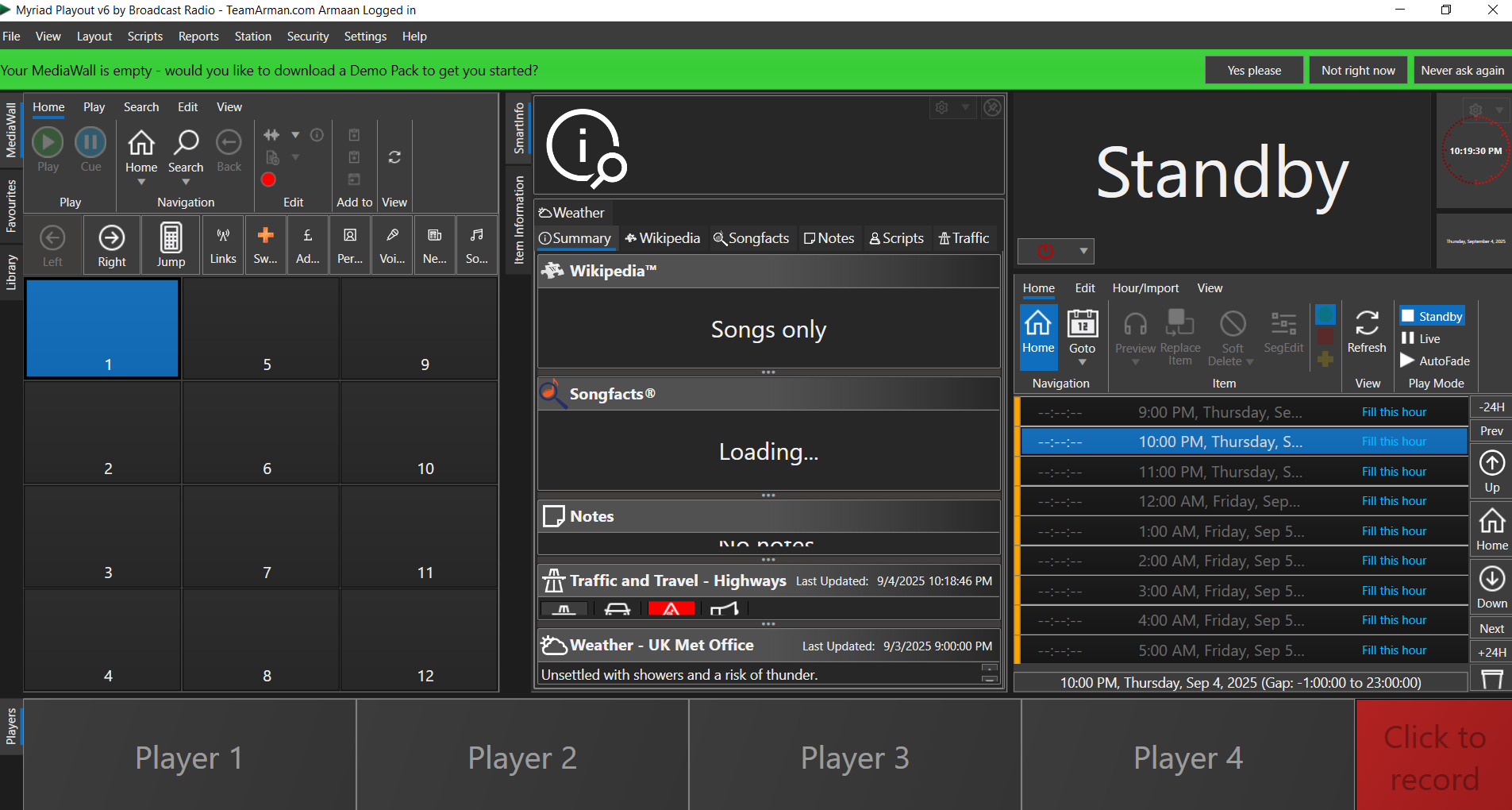
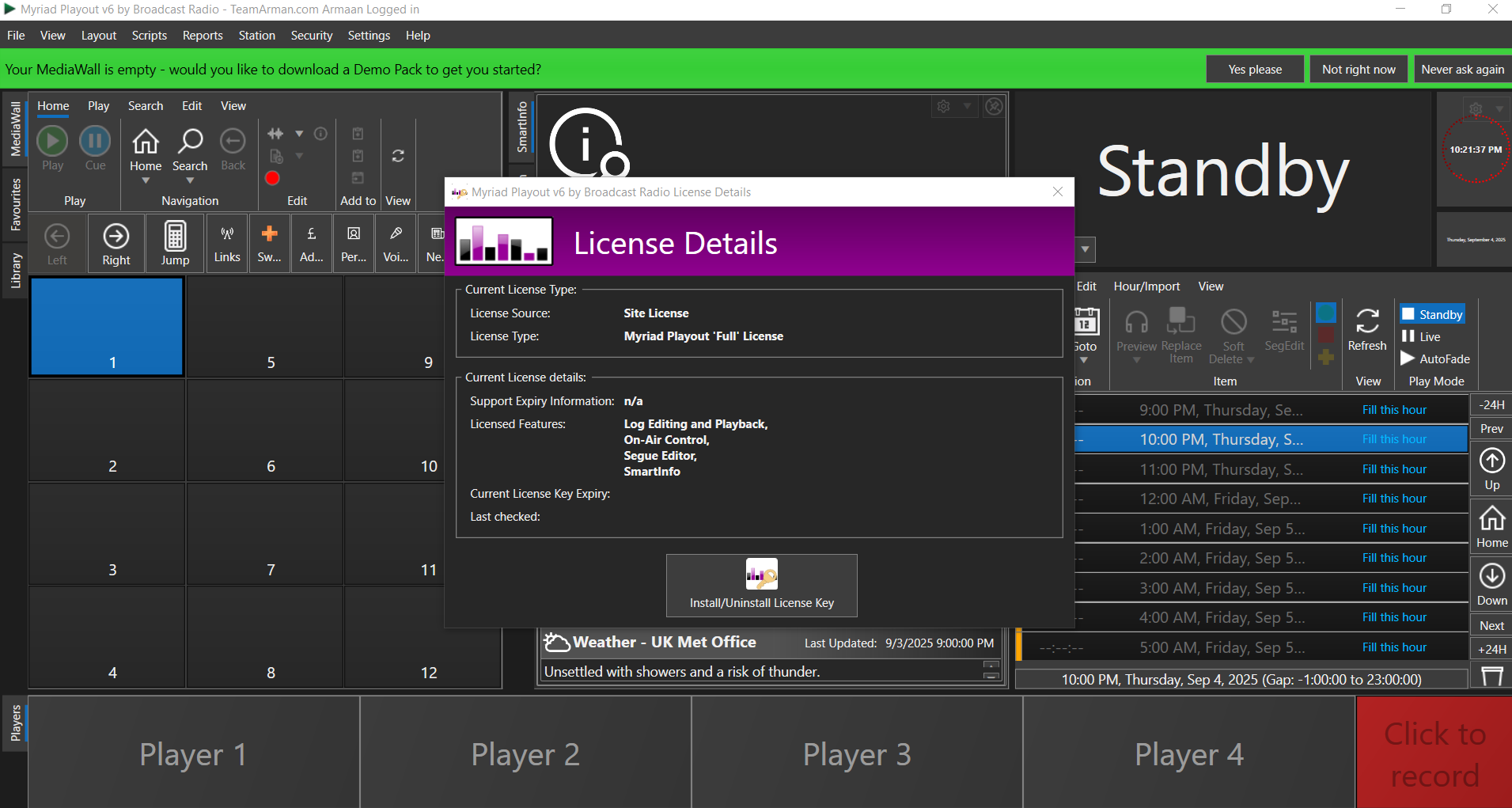
Myriad Playout License Proof

Key Features of Myriad Playout v6.8.3
Myriad Playout is more than just a player; it’s a comprehensive broadcast management system. Here are its core capabilities, designed to streamline operations and enrich listener engagement.
Intelligent Live & Automated Broadcasting
At the heart of Myriad is its flexible approach to scheduling. The Log acts as your dynamic playlist, capable of being built manually or populated automatically via the powerful Myriad Schedule module or third-party scheduling systems. Users with the correct permissions can effortlessly edit content, adjust segues, and insert Voice Links for a polished, personalized show. The system’s intelligent backtiming ensures critical elements like news bulletins or commercials start precisely on time. For automated operations, features like AutoHooks can generate compelling music promos, keeping your station sounding fresh 24/7, even when the studio is unattended.
Real-Time Artist and Song Insights with SmartInfo
Modern audiences crave context. The SmartInfo Panel is a game-changer for listener engagement. As a track plays—whether it’s a new hit or a classic—the system dynamically gathers relevant data from online sources. It displays album art, release year, and even “Studio Notes” with background information about the song or artist. This feature seamlessly integrates with the on-air dashboard to also provide real-time updates like local weather and traffic, transforming a simple broadcast into an informative and interactive experience without requiring manual research from the presenter.
Advanced Voice Tracking for Polished Production
Creating a perfectly produced show has never been easier. With Myriad’s advanced Voice Tracking tools, presenters can pre-record their segments to sound live and spontaneous. Whether in the main studio or using the remote-capable Myriad Anywhere module, you can record, adjust volume levels, fine-tune track placement, and edit segues with surgical precision. The system automatically normalizes audio levels for a consistent listener experience, giving presenters full creative control and the flexibility to produce high-quality shows from virtually anywhere.
Flexible Media, Format, and Backup Support
Professional broadcasting requires professional-grade media support. Myriad Playout handles high-resolution formats including FLAC, 24-bit, and 96kHz audio files, ensuring pristine sound quality. The AutoImporter tool streamlines the process of bringing in new music and ads, while bi-directional synchronization keeps content consistent across multiple stations or sites. Crucially, the integrated Backup feature works with cloud services like Dropbox and OneDrive, ensuring your valuable media library, metadata, and logs are always safe and recoverable.
What’s New in Myriad Playout v6.8.3
This latest update focuses on enhancing creativity, improving system reliability, and refining the user experience. Key updates in version 6.8.3 include:
-
Enhanced AI Voice Generation: Integration with leading text-to-speech platforms like ElevenLabs and Azure AI allows stations to create hyper-realistic voice content for news, commercials, and announcements directly from script, saving significant production time.
-
Improved Script Editor: The script editing interface has been refined for greater control and ease of use, making it simpler to prepare and manage on-air copy.
-
Refined User Permissions: Station managers now have more granular control over user access, ensuring team members have the precise level of access needed for their roles.
-
Audio Device Stability: Addressed and minimized soundcard issues that can arise from Windows updates, providing more reliable performance with audio hardware.
-
Cloud Enhancements: Myriad Cloud users benefit from improved data replication and synchronization for seamless multi-location operations.
System Requirements
To ensure optimal performance of Myriad Playout v6.8.3, your system should meet the following minimum requirements:
-
Operating System: Windows 10 or Windows 11 (64-bit recommended).
-
Processor: Intel Core i5 or equivalent (i7 recommended for heavy multitasking).
-
RAM: 8 GB minimum (16 GB recommended).
-
Storage: SSD with at least 20 GB of free space for the application and additional space for your media library.
-
Sound Card: A professional multi-output sound card is recommended for live on-air use (e.g., ASIO or WDM-compatible).
-
Internet Connection: Required for installation, updates, SmartInfo features, and social media integration.
Installation and Upgrade Guide
Fresh Installation
-
Download the official Myriad Playout v6.8.3 installer from the official Broadcast Radio support portal.
-
Run the installer as an administrator and follow the on-screen prompts.
-
Select the components you wish to install, such as the main Playout application, AutoImporter, and Myriad Cloud tools.
-
Once installed, launch the software and enter your license credentials to activate.
Upgrading from a Previous Version
Broadcast Radio provides a dedicated Upgrade Utility to simplify the transition from older versions like PlayoutONE (P1) v4 or v5.
-
This tool imports your critical metadata, including title, artist, and category information.
-
It intelligently maps your old media types to the new system (e.g., mapping ‘Jingle’ and ‘Ident’ to ‘Links’).
-
For users of PlayoutONE v6, the upgrade path is straightforward, preserving most settings and your media database. It is highly recommended to back up your database before performing any major upgrade.
How to Use Myriad Playout: A Basic Workflow
-
Scheduling: Use the Myriad Schedule module to create your daily or weekly broadcast clocks. These clocks determine the rotation of music, ads, and jingles.
-
Content Management: Import new music and advertisements using the AutoImporter. The system will automatically scan and organize the files, pulling in metadata where available.
-
Building the Log: Generate your playlists (Logs) based on your schedules. You can manually drag and drop items for last-minute changes or special requests.
-
Live Assist (On-Air): For a live show, the Log provides real-time information. Use the SmartInfo Panel to introduce tracks with confidence. Insert Voice Links between songs to record your talk-ups.
-
Automation: When the studio is unattended, simply load the prepared Log and put the system into Auto mode. Myriad will seamlessly play out the entire sequence, including dynamic backtiming for news.
Best Use Cases for Myriad Playout
-
Internet Radio Stations: Perfect for 24/7 automated streaming, using its robust scheduling and social media integration to build an audience.
-
Community & Local FM Stations: Ideal for combining live local content during peak hours with reliable, high-quality automated programming overnight.
-
Multi-Station Networks: The centralized content management and database synchronization make it easy to manage multiple brands or stations from a single production hub.
-
Non-Profits and Educational Broadcasters: The scalable licensing and intuitive interface make it accessible for training students and volunteers.
Advantages and Limitations
Advantages:
-
Scalability: Grows with your station, from a single studio to a complex network.
-
Feature-Rich: Combines scheduling, playout, voice tracking, and music scheduling in one ecosystem.
-
Modern AI Integration: Early adoption of AI for voice generation gives stations a creative edge.
-
Strong Community & Support: Backed by a company with decades of industry experience and an active user community.
-
Data-Driven: The SmartInfo feature adds significant value to the listener experience with minimal effort.
Limitations:
-
Learning Curve: New users may require some time to master the full depth of the scheduling and automation modules.
-
Windows-Only: The software is exclusively for the Windows operating system, which may be a limitation for studios running on macOS or Linux.
-
Hardware Dependency: For professional on-air use, a compatible multi-output sound card is a necessity, adding to the initial setup cost.
Alternatives to Myriad Playout
While Myriad is a powerful choice, the broadcast software market offers other leading solutions:
-
Rivendell: An open-source, enterprise-grade system popular with larger networks, though it requires significant technical expertise to set up and maintain.
-
StationPlaylist Studio: A very popular and user-friendly option, particularly in North America, known for its simplicity and reliability for smaller stations.
-
mAirList: A flexible and cost-effective software widely used in Europe, offering a strong mix of automation and live assist features.
-
ZaraRadio: A simple, free (and paid pro version) radio automation software, ideal for very small stations or beginners due to its straightforward interface.
Frequently Asked Questions (FAQ)
1. Is Myriad Playout v6.8.3 suitable for a completely automated, unattended radio station?
Yes, absolutely. Myriad is designed for both live and automated operation. You can schedule your entire day’s programming using Myriad Schedule, and the system will reliably play out logs, including music, ads, and jingles, without any manual intervention.
2. Can I use Myriad Playout remotely, or do I have to be in the studio?
Yes, you can broadcast remotely using the optional Myriad Anywhere module. It allows you to connect to your studio’s Myriad system over the internet, giving you control over the playout, voice tracking, and live broadcasting from any location with a stable connection.
3. What audio file formats does Myriad support?
Myriad Playout is built for professional quality and supports a wide range of formats, including high-resolution FLAC, MP3, WAV, Ogg Vorbis, and AAC. Its support for 24-bit and 96kHz files ensures your station can deliver pristine audio.
4. How does the AI Voice feature work in the latest version?
The AI Voice feature in v6.8.3 integrates with services like ElevenLabs. You simply type a script (e.g., a commercial or a news bulletin) into the designated area. The software then sends this text to the AI service, which generates a realistic-sounding voice audio file and places it directly into your broadcast log.
5. Is my media library safe if my computer crashes?
Myriad includes built-in backup functionality. You can configure it to automatically back up your entire database, including media, logs, and metadata, to cloud services like Dropbox or OneDrive, ensuring your content is safe and can be restored quickly.
6. What is the difference between Myriad Playout and Myriad Cloud?
Myriad Playout is the on-premises software installed on your studio PC. Myriad Cloud is a managed hosting solution where your Myriad database and media are stored in the cloud, allowing you to access and control your station from any Myriad Playout client, simplifying multi-site management and redundancy.
7. Can I import my data from older versions like PlayoutONE v5?
Yes. Myriad v6.8.3 includes a dedicated Upgrade Utility designed to migrate your data from PlayoutONE v4 and v5. It imports your music library, logs, and metadata, intelligently mapping old categories to the new system to ensure a smooth transition.
Final Thoughts
Myriad Playout v6.8.3 represents a significant step forward in broadcast software. It successfully merges traditional, reliable playout mechanics with the innovative potential of AI and cloud technology. By focusing on workflow efficiency, listener engagement through data, and robust automation, it provides a future-proof solution for broadcasters.
Whether you are looking to launch a new internet station, upgrade an existing FM operation, or streamline a large network, Myriad offers the tools, scalability, and support needed to succeed. Its commitment to innovation, balanced with rock-solid stability, makes it a top-tier choice in the competitive world of radio automation.
Premium Software Support Service
If you need professional help with software installation, setup, or technical configuration, our team is available to assist you.
Contact & Support
For quick assistance and latest updates, connect with us using the links below:
🔹 Direct Telegram Support
https://t.me/PlayoutKing
🔹 Official Telegram Updates Group
https://t.me/yourgroup
🔹 WhatsApp Community Group
https://chat.whatsapp.com/yourlink
Service Policy
- Remote testing available through AnyDesk before confirmation.
• Verify the setup and performance before completing the order.
• Support available for single or multiple systems.
• Step-by-step guidance to ensure smooth installation and working environment.
Our goal is to provide reliable technical assistance so your software runs smoothly without interruptions.